Introduction
This instruction manual provides essential information for the installation and maintenance of the EVTSCAN Full Metal Aluminum Alloy Upgrade Parts Set for the HSP 94122 RC Car. This kit is designed to enhance the performance, stability, and flexibility of your remote-controlled vehicle through the replacement of standard components with durable aluminum alloy parts.
Product Components
The EVTSCAN upgrade kit includes the following aluminum alloy parts:
- 4 x Steering Hubs
- 4 x Servo Link Rods
- 2 x Front Upper Brackets
- 2 x Front Lower Brackets
- 2 x Lower Rear Brackets
- 1 x Steering Wheel Connecting Rod
- 1 Set of Steering Column Kit (3 x Accessories)

Image: A comprehensive view of all blue aluminum alloy upgrade parts included in the kit, laid out against a white background. This includes steering hubs, link rods, and various brackets.
Installation Guide
This upgrade kit is designed for direct replacement of existing parts on the HSP 94122 RC Car. Basic mechanical skills and appropriate tools (e.g., small screwdrivers, wrenches) are required for installation.
- Preparation: Ensure your RC car is powered off and the battery is disconnected. Place the car on a clean, stable surface.
- Identify Parts: Carefully compare the new aluminum alloy parts with the existing plastic components on your HSP 94122 RC Car. Each new part is a direct replacement for a specific original part.
- Component Replacement:
- Steering Hubs: Remove the original steering hubs and install the new aluminum steering hubs. Ensure all bearings and pins are correctly transferred or replaced as needed.
- Servo Link Rods: Detach the old link rods from the servo and steering assembly. Attach the new, adjustable servo link rods, ensuring proper length for optimal steering geometry.
- Front Upper/Lower Brackets: Replace the plastic front upper and lower suspension arm brackets with the aluminum versions. Pay attention to the orientation and secure all screws firmly.
- Lower Rear Brackets: Substitute the original lower rear brackets with the aluminum alloy parts, ensuring correct alignment for the rear suspension arms.
- Steering Wheel Connecting Rod & Steering Column Kit: Replace the existing steering connecting rod and components of the steering column with the new aluminum parts. This typically involves disassembling and reassembling the steering rack mechanism.
- Secure Fasteners: After replacing each component, ensure all screws, nuts, and pins are securely fastened. Avoid over-tightening, which can strip threads or damage parts.
- Functionality Check: Once all parts are installed, manually check the movement of the suspension and steering components to ensure smooth operation and no binding.

Image: A pair of blue aluminum alloy lower rear brackets, showcasing their robust design and precise cutouts for mounting.
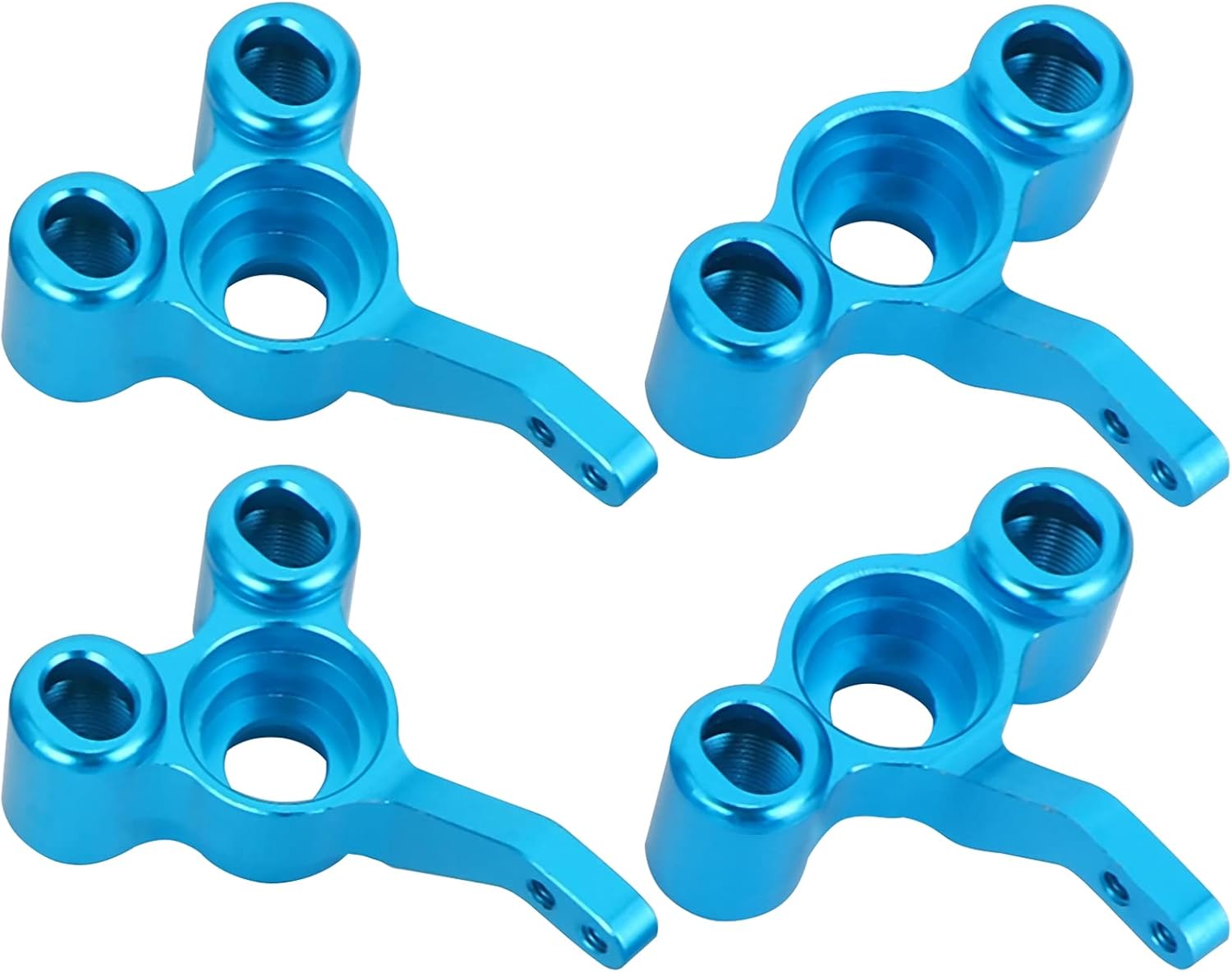
Image: Four blue aluminum alloy steering hubs, designed to house the wheel axles and provide durable pivot points for steering.

Image: Two blue aluminum alloy front upper brackets, which connect the upper suspension arms to the chassis, providing structural integrity.
Operating Considerations
The EVTSCAN aluminum alloy upgrade parts are designed to improve the durability and handling characteristics of your HSP 94122 RC Car. Once installed, the car's operation will be enhanced with increased stability and flexibility, particularly during aggressive driving or over challenging terrain. No specific operating instructions are required for the parts themselves, as they integrate into the existing RC car system.
Maintenance
To ensure the longevity and optimal performance of your aluminum alloy upgrade parts, follow these maintenance guidelines:
- Regular Inspection: Periodically inspect all installed parts for signs of wear, damage, or loose fasteners.
- Cleaning: After use, especially in dusty or dirty conditions, clean the parts to remove debris. A soft brush and compressed air can be effective. Avoid harsh chemicals that may damage the anodized finish.
- Lubrication: While aluminum parts themselves do not require lubrication, ensure that any associated moving parts (e.g., bearings, pivot points) are properly lubricated according to your RC car's original maintenance schedule.
- Tighten Screws: Over time, vibrations can loosen screws. Regularly check and re-tighten all fasteners to prevent parts from detaching or causing play in the suspension/steering.
Troubleshooting
If you encounter issues after installing the upgrade kit, consider the following:
- Parts Not Fitting: Double-check that you have correctly identified the original parts to be replaced and that the new aluminum parts are oriented correctly. Ensure the kit is specifically for the HSP 94122 model. If parts still do not fit, verify the product compatibility with the manufacturer.
- Excessive Play or Binding: Ensure all screws are tightened appropriately. Loose screws can cause play, while over-tightened screws or incorrect assembly can cause binding. Disassemble and reassemble the affected section carefully.
- Damaged Parts: If any part appears damaged upon arrival, contact the seller or manufacturer for assistance.
Specifications
| Feature | Detail |
|---|---|
| Brand | EVTSCAN |
| Material | Aluminum Alloy |
| Compatibility | HSP 94122 RC Car |
| Color | Blue |
| Weight | Approx. 139g / 4.9oz (total kit) |
| Included Components | 4 Steering Hubs, 4 Servo Link Rods, 2 Front Upper Brackets, 2 Front Lower Brackets, 2 Lower Rear Brackets, 1 Steering Wheel Connecting Rod, 1 Steering Column Kit (3 Accessories) |
Warranty and Support
For information regarding product warranty, returns, or technical support, please refer to the purchase documentation or contact the EVTSCAN customer service directly through their official channels or the retailer from whom the product was purchased.


