
AKLOT MI3488
AKLOT Fuzz Guitar Pedal MI3488 Instruction Manual
Model: MI3488
1. Introduction
Thank you for choosing the AKLOT Fuzz Guitar Pedal MI3488. This mini single-type electric effects pedal is designed to deliver a rich, clear fuzz tone, enhancing your guitar's sound with its optimal circuit design and reliable aluminum casing. This manual provides essential information for the safe and effective use of your new pedal.
2. Safety Information
- Power Supply: Use only a DC 9V power adapter (center negative) specifically designed for guitar pedals. Incorrect voltage or polarity can damage the unit.
- Environment: Do not expose the pedal to water, moisture, high temperatures, or extreme cold. Avoid using it in dusty or dirty environments.
- Handling: Handle the pedal with care. Avoid dropping it or subjecting it to strong impacts.
- Servicing: Do not attempt to open or repair the unit yourself. Refer all servicing to qualified personnel.
- Cleaning: Clean only with a dry, soft cloth.
3. Package Contents
Please check that all items are present in your package:
- AKLOT Fuzz Guitar Pedal MI3488
- Instruction Manual (this document)
Note: A DC 9V power adapter is not included and must be purchased separately.
4. Product Overview
The AKLOT Fuzz Guitar Pedal MI3488 features a compact design with intuitive controls for shaping your fuzz tone. Its robust sandblasting oxidation design ensures durability.
Controls:
- FUZZ Knob: Adjusts the intensity of the fuzz effect. Turn clockwise for more aggressive fuzz.
- VOLUME Knob: Controls the overall output volume of the pedal.
- TONE Knob: Adjusts the tonal characteristics of the fuzz, from darker to brighter.
- NORMAL/MID CUT Switch: Toggles between a normal fuzz sound and a fuzz sound with a scooped midrange for a different character.
- Footswitch: Engages or bypasses the fuzz effect.

Image: Three control knobs on the AKLOT Fuzz Pedal: Fuzz, Volume, and Tone, allowing for precise sound shaping.

Image: Numbered diagram of the AKLOT Fuzz Pedal highlighting its input, output, power, and control elements.
5. Setup
Follow these steps to connect your AKLOT Fuzz Guitar Pedal:
- Connect your guitar to the IN jack on the right side of the pedal using a standard 1/4-inch instrument cable.
- Connect the OUT jack on the left side of the pedal to your amplifier or the next pedal in your signal chain using another 1/4-inch instrument cable.
- Connect a DC 9V (center negative) power adapter to the DC 9V input on the top of the pedal.
- Ensure your amplifier is turned off or at a low volume before powering on the pedal to avoid sudden loud noises.
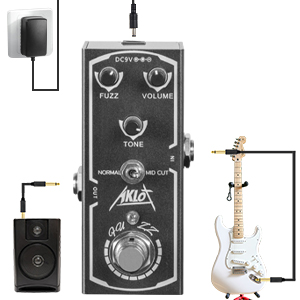
Image: Connection diagram illustrating how to properly connect the fuzz pedal between a guitar and an amplifier, with a power adapter connected.
6. Operating the Pedal
Once connected, you can begin using your AKLOT Fuzz Pedal:
- Press the footswitch to engage the fuzz effect. The LED indicator will illuminate when the effect is active.
- Adjust the FUZZ knob to control the amount of distortion and sustain. Start with a lower setting and increase gradually.
- Use the VOLUME knob to balance the effect's output level with your bypassed signal or other pedals.
- Experiment with the TONE knob to find your desired brightness or darkness for the fuzz sound.
- Toggle the NORMAL/MID CUT switch to explore different tonal characters. 'MID CUT' will provide a more scooped, modern fuzz sound.
- To bypass the effect, press the footswitch again. The LED indicator will turn off.
Video: Demonstration of the AKLOT Fuzz Pedal's sound and control adjustments with an electric guitar.
7. Maintenance
To ensure the longevity and optimal performance of your pedal:
- Cleaning: Wipe the pedal with a soft, dry cloth to remove dust and grime. Do not use liquid cleaners or solvents.
- Storage: When not in use for extended periods, disconnect the power supply and store the pedal in a cool, dry place away from direct sunlight.
- Connections: Periodically check all cable connections for wear and tear. Replace damaged cables to prevent signal loss or noise.
8. Troubleshooting
If you encounter issues with your AKLOT Fuzz Pedal, try the following:
| Problem | Possible Cause | Solution |
|---|---|---|
| No sound when pedal is engaged. | Incorrect power supply; faulty cables; incorrect connection. | Verify DC 9V (center negative) power supply. Check all instrument cables. Ensure guitar is connected to IN and amp to OUT. |
| Weak or distorted sound. | Low battery (if applicable, though this model uses adapter); incorrect knob settings. | Adjust FUZZ, VOLUME, and TONE knobs. Ensure power supply is adequate. |
| Excessive noise or hum. | Poor power supply; ground loop; interference from other electronics. | Use a high-quality, isolated power supply. Try different power outlets. Move pedal away from other electronic devices. |
| LED not lighting up. | No power; faulty footswitch. | Check power connection. If power is confirmed, contact support. |
9. Specifications
- Model: MI3488
- Effect Type: Fuzz
- Power Supply: DC 9V (center negative, not included)
- Current Draw: (Information not provided, typically low for mini pedals)
- Input: 1/4-inch mono audio jack
- Output: 1/4-inch mono audio jack
- Material: Aluminum alloy casing
- Dimensions: Approximately 3.94 x 2.2 x 2.13 inches (10 x 5.6 x 5.4 cm)
- Weight: Approximately 4.6 ounces (130 grams)
10. Warranty & Support
AKLOT products are designed for reliability and performance. For warranty information, please refer to the warranty card included with your purchase or visit the official AKLOT website. If you require technical support or have any questions regarding your AKLOT Fuzz Guitar Pedal MI3488, please contact AKLOT customer service through the retailer where you purchased the product or via the contact information provided on the official AKLOT website.
Ask a question about this manual
Ask about setup, troubleshooting, compatibility, parts, safety, or missing instructions. Manuals+ will review the question and use this page’s manual context to help answer it.