
1. Introduction
This manual provides essential instructions for the proper setup, operation, and maintenance of your SGPRO SG-14 Dual Handheld Wireless Microphone Set. Please read this manual thoroughly before using the product to ensure optimal performance and longevity. Keep this manual for future reference.

Image 1.1: The SGPRO SG-14 Dual Handheld Wireless Microphone Set, featuring two handheld microphones and a compact receiver.
2. Package Contents
Verify that all items listed below are present in your package:
- 2 x Handheld Microphones (Transmitters)
- 1 x Compact Wireless Receiver
- 1 x USB Charging Cable
- 2 x Anti-roll Rings
- 2 x Mic Foam Covers
- 1 x 6.35mm to 3.5mm Connector
- 1 x User Manual (this document)
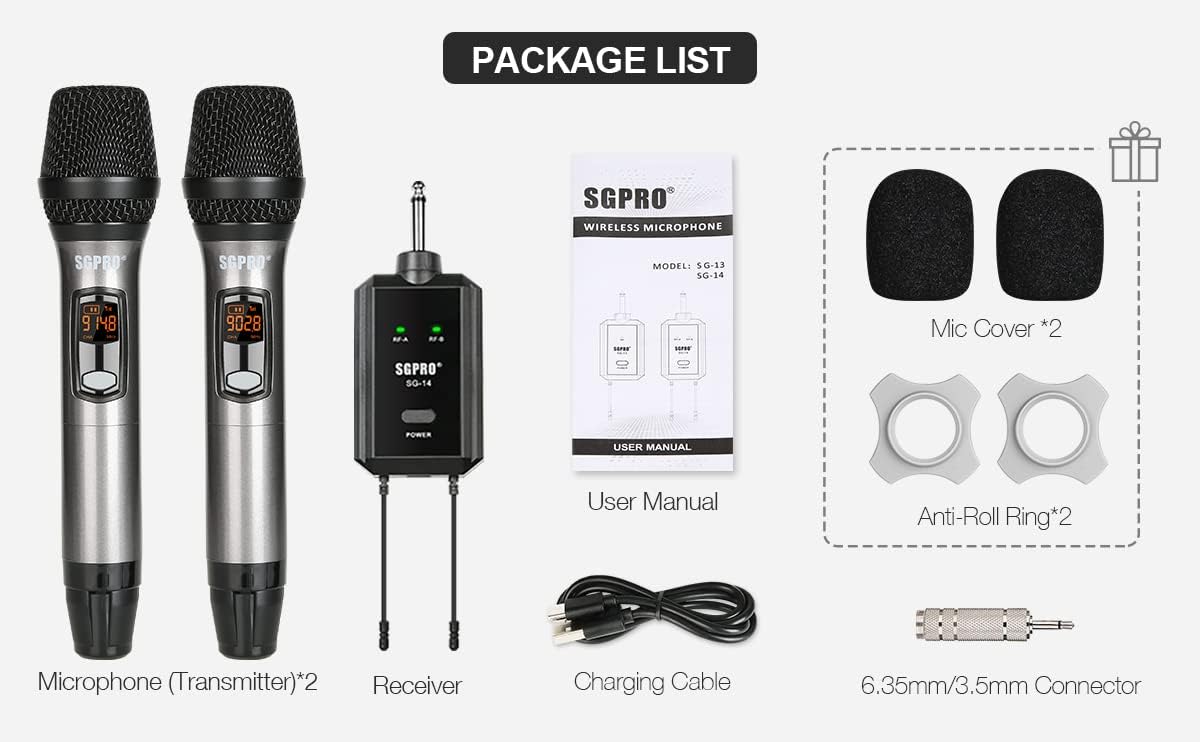
Image 2.1: Visual representation of all items included in the SGPRO SG-14 package.
3. Product Overview
3.1 Handheld Microphone (Transmitter)
- Durable Capsule Cover: Protects the microphone capsule.
- LCD Indicator: Displays battery level, channel, and frequency.
- Power/Mute Button: Turns the microphone on/off and mutes/unmutes the audio.
- Set Button: Used for channel selection and pairing.
- CH+/CH- Buttons: Adjusts the channel frequency.
- AA Batteries Compartment: Houses two AA batteries for power.
3.2 Compact Wireless Receiver
- 6.35mm Jack: Connects to audio input devices (e.g., amplifier, mixer).
- RF-A/RF-B Indicators: Lights up when a microphone signal is received for channel A or B.
- Power Button: Turns the receiver on/off and initiates pairing.
- Antennas: Ensures stable signal transmission.
- Type-C USB Port: For charging the receiver's internal battery.

Image 3.1: Detailed diagram illustrating the various parts and controls of the handheld microphone and the compact receiver.
4. Setup
- Charge the Receiver: Connect the receiver to a USB power source using the provided Type-C charging cable. The power indicator will show charging status. Ensure it is fully charged before first use.
- Install Batteries in Microphones: Unscrew the bottom part of each handheld microphone to access the battery compartment. Insert two AA batteries into each microphone, observing the correct polarity (+/-).
- Connect the Receiver: Plug the 6.35mm jack of the receiver directly into the microphone input of your audio device (e.g., amplifier, mixer, powered speaker). If your device has a 3.5mm input, use the included 6.35mm to 3.5mm adapter.
- Power On: Press and hold the Power button on the receiver to turn it on. Press and hold the Power/Mute button on each microphone to turn them on.


Image 4.1: The receiver connected to a power source for charging and a diagram showing compatible audio devices.
5. Operation
5.1 Power On/Off
- Microphone: Press and hold the Power/Mute button for approximately 3 seconds.
- Receiver: Press and hold the Power button for approximately 3 seconds.
5.2 Mute Function
While the microphone is on, a short press of the Power/Mute button will mute or unmute the microphone. The LCD display will indicate the mute status.

Image 5.1: A hand pressing the Power/Mute button on the microphone.
5.3 Channel Selection
The SGPRO SG-14 system operates on UHF frequencies with 32 available channels to minimize interference. To change the channel on a microphone:
- Turn on the microphone.
- Use the CH+ or CH- buttons to cycle through the available channels.
- Ensure the selected channel on the microphone matches the receiver's paired channel (A or B).

Image 5.2: Microphone LCD displays showing channel frequency changes and channel indicators.
6. Pairing (Sync Operation)
If a microphone loses connection or you need to pair a new microphone, follow these steps:
- Turn on the microphone. Unscrew the mid & tail covers. Long-press the 'SET' button for 10 seconds. The microphone screen should then indicate a running '----'.
- Turn off the receiver. Long-press the 'POWER' button on the receiver for 10 seconds until the LED light flashes red and green.
- Wait until the receiver's LED light changes to steady green. This indicates the microphone is synchronized (SYNC) with the receiver.
- Click the receiver's 'POWER' button to exit pairing mode. The microphone's 'SET' button can also be pressed to complete the pairing process.
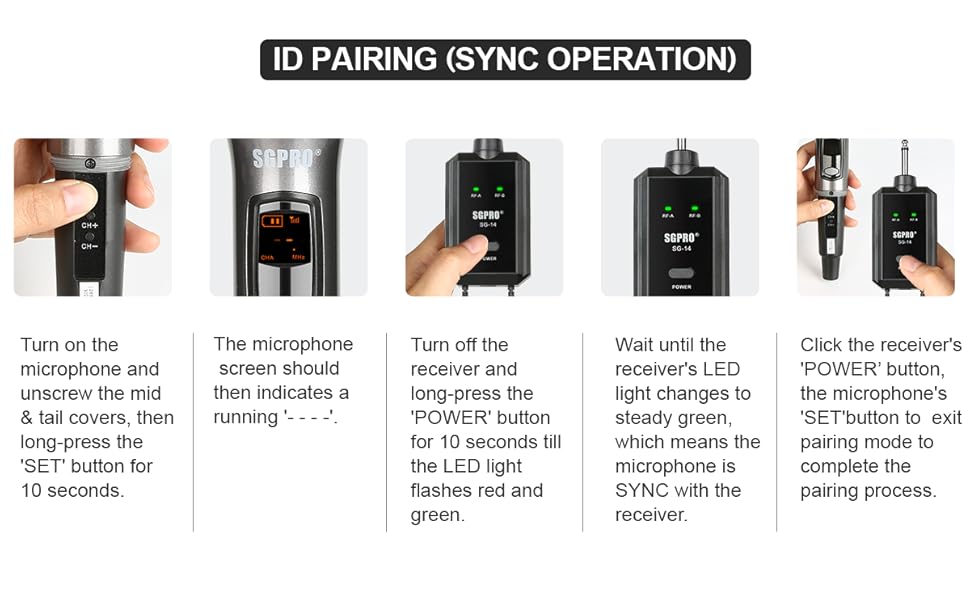
Image 6.1: Visual guide for the ID pairing process between the microphone and receiver.
7. Applications
The SGPRO SG-14 Dual Handheld Wireless Microphone Set is suitable for a variety of uses:
- Singing and Karaoke
- DJ Performances
- Public Speaking and Presentations
- Classroom Instruction
- Church Services
- Home Entertainment

Image 7.1: Individuals using the handheld microphones in a social setting.
8. Maintenance
- Cleaning: Use a soft, dry cloth to clean the microphones and receiver. Do not use liquid cleaners or solvents.
- Battery Care: Remove AA batteries from the microphones if they will not be used for an extended period to prevent leakage. Recharge the receiver regularly to maintain battery health.
- Storage: Store the set in a cool, dry place away from direct sunlight and extreme temperatures.
- Protection: Use the provided anti-roll rings and foam covers to protect the microphones from damage and reduce plosive sounds.
9. Troubleshooting
| Problem | Possible Cause | Solution |
|---|---|---|
| No sound from microphone | Microphone or receiver not powered on; Low batteries; Microphone muted; Incorrect pairing; Receiver not connected to audio input. | Ensure both devices are on; Replace AA batteries in mic, charge receiver; Unmute microphone; Re-pair devices (Section 6); Verify receiver is plugged into correct audio input. |
| Interference or static noise | Other wireless devices operating on similar frequencies; Obstructions between mic and receiver; Distance too great. | Change microphone channel (Section 5.3); Ensure clear line of sight; Reduce distance between mic and receiver (max 196 ft / 60 meters). |
| Microphone not pairing | Incorrect pairing procedure; Receiver already paired with another device. | Follow pairing instructions carefully (Section 6); Ensure only one receiver is in pairing mode at a time. |
| Short battery life | Old or low-quality AA batteries; Receiver not fully charged. | Use fresh, high-quality AA batteries; Fully charge receiver before use. |
10. Specifications
| Feature | Detail |
|---|---|
| Model Number | SG-HM (Microphone), SG-14 (Set) |
| Microphone Form Factor | Handheld |
| Connectivity Technology | UHF (Ultra High Frequency) |
| Number of Channels | 32 |
| Polar Pattern | Unidirectional (Cardioid) |
| Signal-to-Noise Ratio | 120 dB |
| Audio Sensitivity | 95 Decibels |
| Microphone Power Source | 2 x AA Batteries (not included) |
| Receiver Power Source | Rechargeable Lithium Polymer Battery |
| Connector Type | 6.35 mm Jack |
| Compatible Devices | Amplifiers, Mixers, Powered Speakers |
| Special Feature | Noise Reduction, Mute Function, Battery Indicator |
| Material | Acrylonitrile Butadiene Styrene, Alloy Steel |
| Item Dimensions (L x W x H) | 0.94 x 0.2 x 0.2 inches (Microphone) |
| Item Weight | 0.635 ounces / 18 Grams (Microphone) |
| Effective Range | Up to 196 feet (60 meters) in optimal conditions |


Image 10.1: Illustrations of the high-quality dynamic mic capsule with cardioid polar pattern and the effective wireless range.
11. Safety Information
- Do not expose the product to water or excessive moisture.
- Avoid dropping or subjecting the product to strong impacts.
- Do not attempt to disassemble or modify the product. This will void the warranty and may cause damage.
- Keep out of reach of children.
- Dispose of batteries according to local regulations.
12. Warranty and Support
For warranty information or technical support, please refer to the contact details provided with your purchase or visit the official SGPRO website. Please retain your proof of purchase for warranty claims.

