
warmiplanet WICF03-1
warmiplanet 52-inch Ceiling Fan with Lights and Remote Control Instruction Manual
Brand: warmiplanet | Model: WICF03-1
Product Overview
The warmiplanet 52-inch Ceiling Fan is designed to provide optimal air circulation and lighting for your indoor spaces. Featuring a quiet, reversible DC motor, it offers 6-speed settings for customized airflow throughout the year. The integrated 24-watt LED light is dimmable and allows you to switch between cool white (6000K), natural (4000K), and warm white (3000K) color temperatures. All functions are easily controlled via the included multi-function remote, which also includes a convenient timer function and memory for light and speed settings.
Key Features:
- LED Light: 24-watt replaceable and dimmable LED with 3 color temperatures (3000K, 4000K, 6000K).
- Quiet DC Motor: Reversible motor for summer cooling and winter warmth, operating quietly for undisturbed comfort. CFM up to 3300.
- Multi-function Remote: Controls 6 speeds, light color temperature, dimming, and timer functions (1H, 3H, 6H). Includes a wall bracket.
- Memory Function: Retains last used light color and fan speed settings.
- Double-sided Fan Blades: Offers aesthetic versatility.
Setup and Installation
Proper installation is crucial for the safe and efficient operation of your ceiling fan. Please follow these steps carefully. If you are unsure about any part of the installation process, consult a qualified electrician.
Bill of Materials:
Ensure all components are present before beginning installation.

Image: Overview of all components included in the package, such as motor, canopies, downrod, blades, blade holders, hanging bracket, light plate, hardware, and remote control.
Determine Your Ceiling Type:
The installation method for the hanging bracket varies based on your ceiling material.

Image: Diagrams illustrating how to install the hanging bracket for concrete ceilings (using machine screws) and wooden ceilings (using wood screws).
Step-by-Step Installation:
- Step 1: Install the Hanging Bracket. Install the hanging bracket to the octagon box with 2 machine screws and iron washers. Loosen the two opposite screws.
- Step 2: Prepare the Downrod. Loosen the two screws on the coupler. Pull out the R-pin from the rod. Install the up canopy, canopy cover, and down canopy to the downrod.
- Step 3: Attach Downrod to Motor. Feed the wires through the downrod. Insert the cross-pin and fix it with the R-pin. Tighten the two screws on the coupler.
- Step 4: Hang and Wire the Fan. Hang the fan to the hanging bracket and make the bulge on the hanging bracket align with the notch on the hemisphere. Connect the wires from the motor to the receiver. Connect the wires on the other side of the receiver to the home circuit.
- Step 5: Secure the Canopy. Rotate the up canopy. Tighten the two screws.
- Step 6: Install the Blades. Install the blade to the blade holder. Remove the screws which are used to install Blades. Install the blades, tighten the screws.
- Step 7: Install the Light Plate and Cover. Remove the three screws used to install the light plate. Install the light plate. Connect light power cord. Rotate the light cover until it is fixed.

Image: A person wearing gloves is shown securing the hanging bracket to the ceiling electrical box using a screwdriver.

Image: Hands are shown loosening screws on the coupler and assembling the canopies onto the downrod.

Image: Wires are fed through the downrod, and the downrod is secured to the motor with a cross-pin and tightened screws.

Image: The fan is hung from the bracket, and electrical connections are made between the motor, receiver, and home circuit.

Image: The upper canopy is rotated into place and secured with screws, covering the wiring connections.

Image: A fan blade is attached to its holder, and then the holder is screwed onto the fan motor housing.

Image: The LED light plate is screwed into the fan, its power cord is connected, and the light cover is twisted into place.
Installation Video:
Video: A detailed step-by-step guide demonstrating the installation process of the warmiplanet 52-inch ceiling fan.
Operating Instructions
Your warmiplanet ceiling fan comes with a multi-functional remote control for convenient operation of all features.
Remote Control Functions:

Image: The remote control unit showing buttons for fan speed, light control, and timer settings.
- Fan Speed Control: Select from 6 available speeds (buttons 1-6) to adjust airflow intensity.
- Light Control: Turn the LED light ON/OFF.
- Color Temperature Adjustment: Cycle through cool white (WW), natural (NW), and warm white (DW) light settings.
- Brightness Dimming: Use the '+' and '-' buttons to increase or decrease the light brightness (10-100% dimmable).
- Timer Function: Set the fan and light to automatically turn off after 1 hour (1H), 3 hours (3H), or 6 hours (6H).
- Reversible Motor: The remote controls the reversible DC motor. In summer, the fan blades rotate counter-clockwise to create a downdraft, providing a cooling effect. In winter, the blades rotate clockwise to create an updraft, circulating warm air trapped near the ceiling.
Product Demonstration Video:
Video: A demonstration showcasing the various features and operational aspects of the warmiplanet ceiling fan, including light and speed adjustments.
Airflow and Lighting Performance
The warmiplanet ceiling fan is engineered for powerful and quiet performance, ensuring comfort in any season.
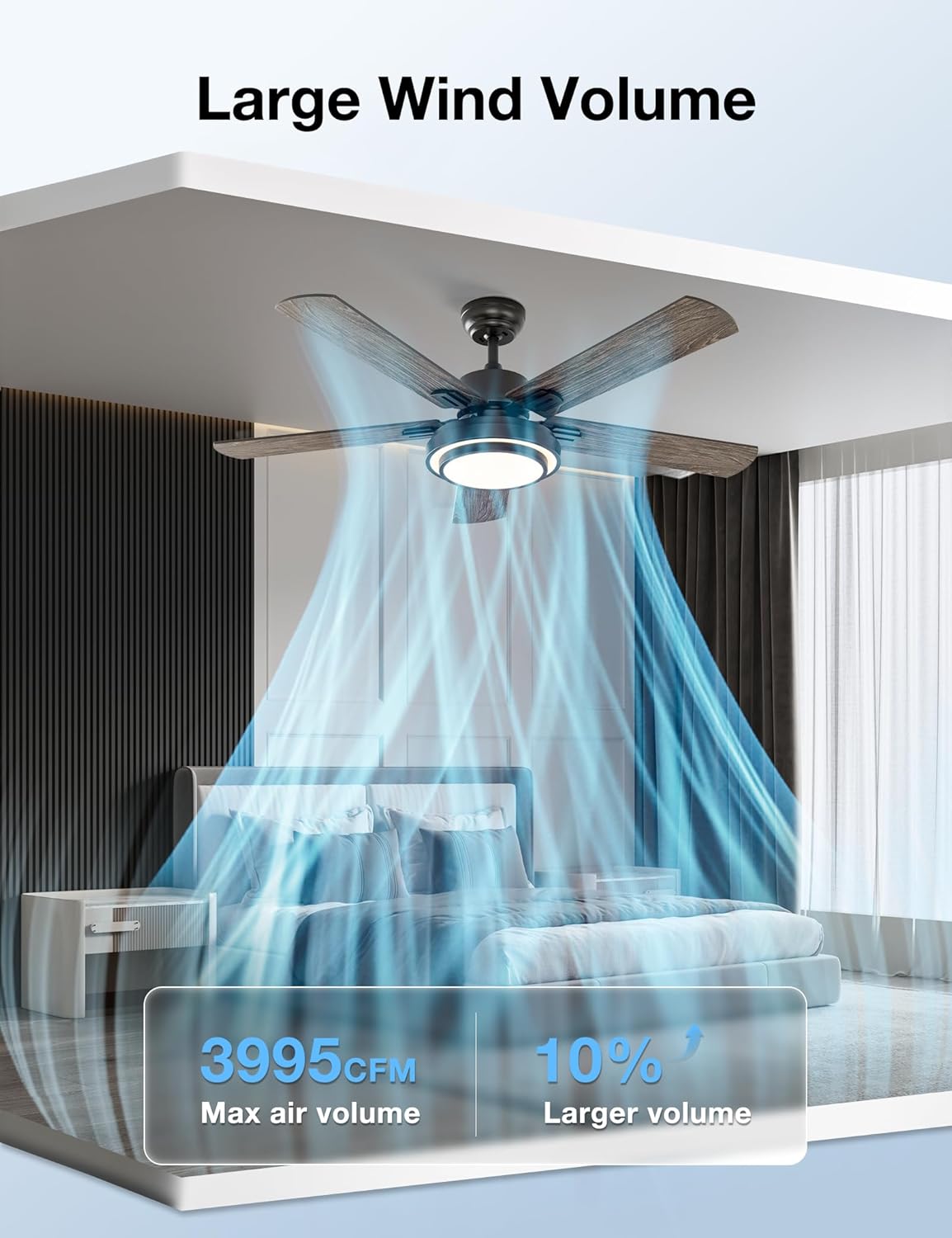
Image: A visual representation of the fan's large wind volume, indicating a maximum air volume of 3995 CFM.

Image: An illustration highlighting the fan's quiet operation, with noise levels as low as 30dB, comparable to the sound of breathing.
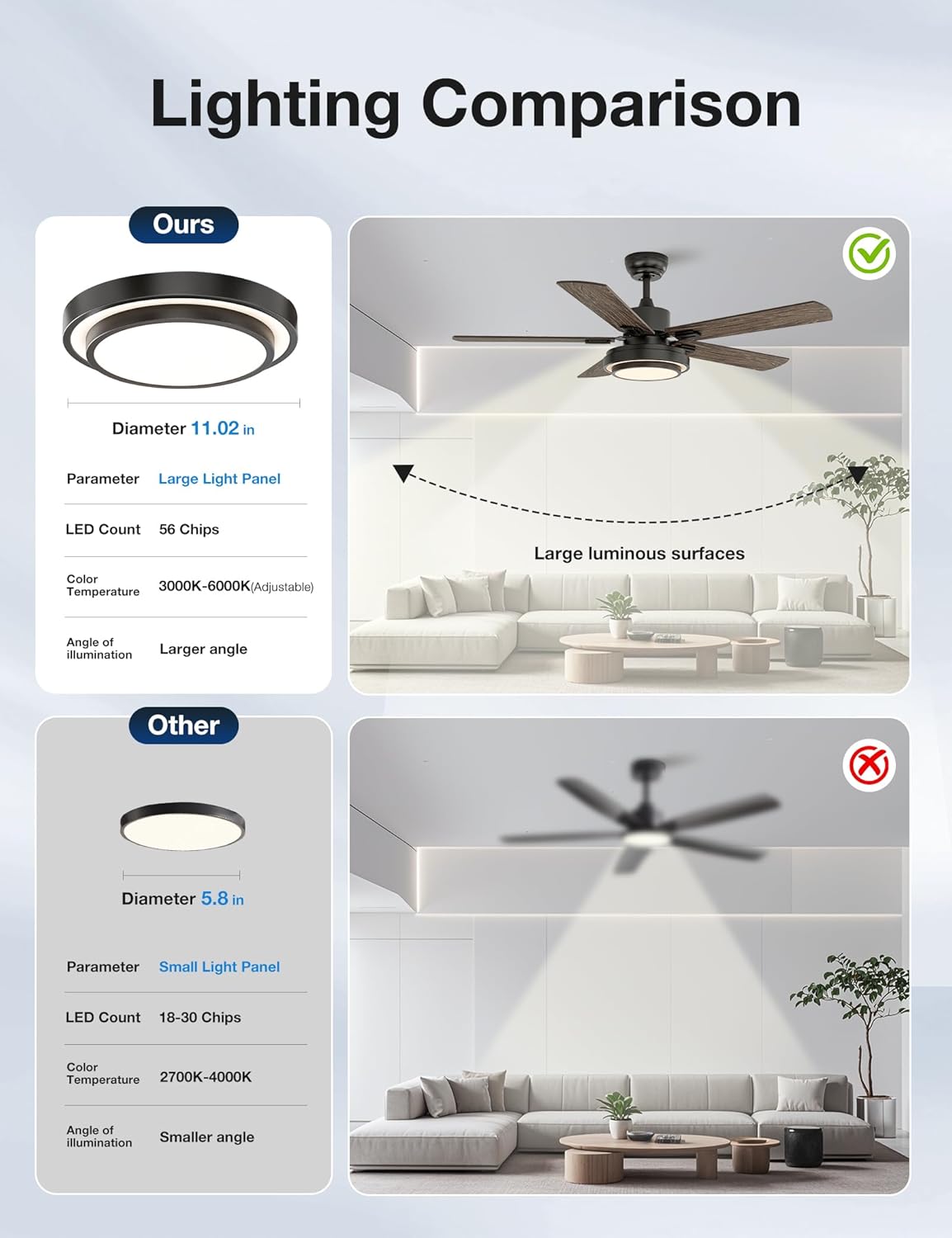
Image: A comparison showing the larger light panel (11.02 inches diameter) and larger luminous surfaces of the warmiplanet fan compared to smaller alternatives.

Image: Visualizing the fan's reversible function, with counter-clockwise updraft for summer cooling and clockwise downdraft for winter warmth.
Maintenance
Regular maintenance will ensure the longevity and optimal performance of your warmiplanet ceiling fan.
- Cleaning: To clean the fan, wipe the blades and motor housing with a soft, damp cloth. Do not use abrasive cleaners or solvents, as they may damage the finish.
- Blade Balance: If the fan wobbles, check that all blade screws are tightened securely. Ensure blades are not bent or damaged.
- Light Source: The LED light is designed for long-term use. If replacement is ever needed, contact customer support for compatible parts.
Troubleshooting
If you encounter any issues with your ceiling fan, refer to the following common troubleshooting tips:
- Fan Does Not Operate: Check that the power supply is connected and the circuit breaker is on. Ensure the remote control batteries are not depleted.
- Light Does Not Work: Verify the light power cord connection. Check if the light function is turned on via the remote.
- Excessive Noise: Ensure all screws on the motor housing and blade attachments are tight. Check that the fan is properly balanced and securely mounted to the hanging bracket.
- Remote Control Not Responding: Replace the batteries in the remote control. Ensure there are no obstructions between the remote and the fan's receiver.
For further assistance, please contact warmiplanet customer support.
Specifications
| Attribute | Value |
|---|---|
| Brand | warmiplanet |
| Model Name | WICF03-1 |
| Color | Black |
| Electric Fan Design | Ceiling Fan |
| Power Source | DC |
| Style | Modern |
| Product Dimensions | 52"D x 52"W x 14.9"H |
| Room Type | Indoor |
| Special Feature | Remote Control |
| Recommended Uses | Air Circulation |
| Wattage | 32.00 Watts |
| Number of Blades | 5 |
| Air Flow Capacity | 3995 Cubic Feet Per Minute |
| Blade Length | 20.5 Inches |
| Voltage | 120 Volts |
| Switch Type | Remote |
| Item Weight | 17.1 Pounds |
| Included Components | Remote |
| Blade Material | Wood |
| Light Type | LED |
Warranty and Support
warmiplanet stands behind the quality of its products. This ceiling fan comes with the following warranty:
- Motor Warranty: 10 years
- Whole Fan Warranty: 2 years
For any questions, installation problems, or support needs, warmiplanet offers 24-hour customer support. Please feel free to contact us, and we will reply within 24 hours to assist you.
Related documentsWICF03-1


Ask a question about this manual
Ask about setup, troubleshooting, compatibility, parts, safety, or missing instructions. Manuals+ will review the question and use this page’s manual context to help answer it.