
1. Introduction
Thank you for choosing the NCOUUOCN Car Interior LED Ambient Door Light Stripes. This product is designed to enhance your vehicle's interior aesthetics with adjustable ambient lighting. This manual provides detailed instructions for installation, operation, and maintenance to ensure optimal performance and longevity of your ambient light kit. Please read this manual thoroughly before installation and use.
2. Product Features
- Two adjustable colors: Ice Blue and Ice Orange.
- LED brightness is adjustable via the vehicle's central control screen.
- Equipped with 441 high-quality LED light beads for consistent illumination.
- Constructed from durable ABS material with a multilayer electroplating process for enhanced texture and longevity.
- Designed for non-destructive installation, integrating seamlessly with your vehicle's interior.
3. Package Contents
The package includes all necessary components for a complete installation:
- Door handle covers (color variant specific, e.g., Beige, Black, Gray, Oyster Color, Carbon Fiber).
- LED atmosphere light strips.
- Vehicle-specific wiring harness.

Figure 3.1: Overview of package contents, including various door handle cover colors and LED light strips.

Figure 3.2: Detailed view of the ambient light kit components.
4. Compatibility
This LED ambient door light kit is specifically designed for:
- BMW 5 Series F10 (2010-2017)
- BMW 5 Series F11 (2010-2017)
- BMW 5 Series F18 (2010-2017)
Please ensure your vehicle model and year match the compatibility list before proceeding with installation.
5. Safety Information
Always prioritize safety during installation and operation. Failure to follow these guidelines may result in damage to the product, vehicle, or personal injury.
- Ensure the vehicle's ignition is off and the battery is disconnected before beginning any electrical work.
- If you are unsure about any step of the installation process, consult a professional automotive technician.
- Do not modify the product or its components. Unauthorized modifications may void the warranty and pose safety risks.
- Keep all tools and small parts away from children.
6. Setup and Installation
Installation of the ambient door light stripes requires careful handling of vehicle interior panels and electrical connections. It is recommended to watch the provided installation video for a visual guide.
6.1. Pre-Installation Steps
- Park your vehicle on a level surface and engage the parking brake.
- Turn off the ignition and remove the key.
- Disconnect the negative terminal of the vehicle's battery to prevent electrical shorts.
- Gather all necessary tools, which typically include trim removal tools, screwdrivers, and wire cutters/strippers.
6.2. Installation Procedure
The installation process generally involves removing the door panels, integrating the LED strips and new door handle covers, and connecting the wiring harness. The design allows for non-destructive installation, meaning no permanent modifications to the vehicle's original structure are required.
Video 6.1: Detailed installation guide for the NCOUUOCN ambient light kit in a BMW 5 Series F10/F18.
- Carefully remove the interior door panels using appropriate trim removal tools to avoid damage.
- Disconnect any existing wiring from the original door handle components.
- Install the new door handle covers with integrated LED light strips. Ensure they are securely fitted.
- Route the wiring harness through the door panel, connecting it to the vehicle's existing electrical system as shown in the installation video.
- Reconnect the vehicle battery and test the lights before reassembling the door panels.
- Reattach the door panels, ensuring all clips and screws are properly secured.

Figure 6.2: Illustration of the non-destructive installation method.
7. Operating Instructions
The NCOUUOCN LED Ambient Door Light Stripes offer two color options and adjustable brightness, controlled directly through your vehicle's central control screen.
7.1. Color Selection
The ambient lights can display either Ice Blue or Ice Orange. The selection is typically made through the vehicle's iDrive system or similar central control interface. Navigate to the interior lighting settings to switch between the available colors.

Figure 7.1: Interior ambient lighting set to Ice Blue.
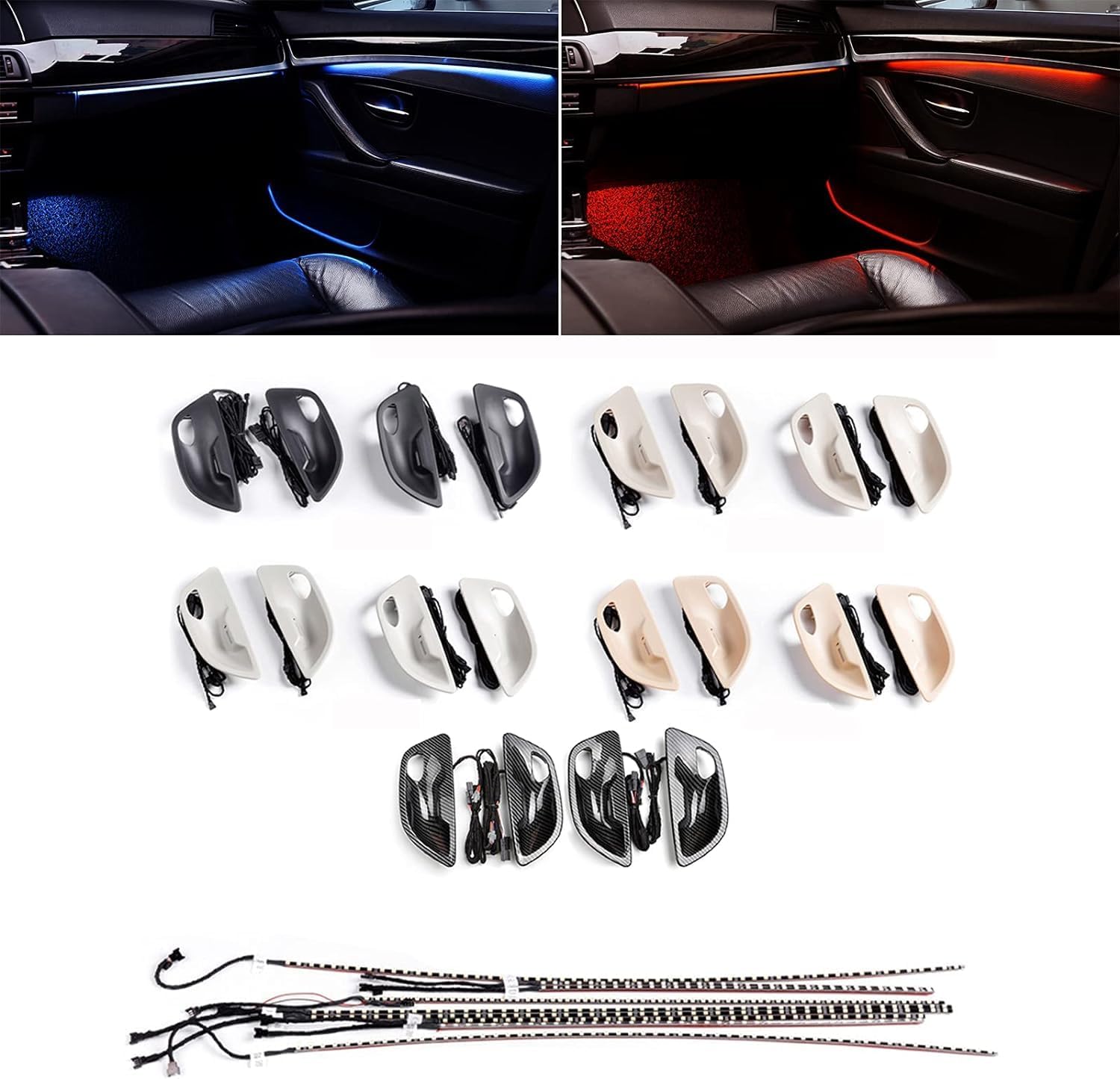
Figure 7.2: Interior ambient lighting set to Ice Orange.
7.2. Brightness Adjustment
The brightness of the LED ambient lights can be adjusted using the vehicle's central control screen. Locate the brightness settings within the interior lighting menu and use the controls to increase or decrease the light intensity to your preference.

Figure 7.3: Central control screen displaying brightness adjustment options.

Figure 7.4: Close-up of the brightness adjustment interface.
Video 7.5: Demonstration of color and brightness adjustment for the ambient lights.
8. Maintenance
The NCOUUOCN LED Ambient Door Light Stripes are designed for durability and require minimal maintenance.
- Cleaning: Use a soft, dry cloth to wipe the surface of the door handle covers and light strips. Avoid abrasive cleaners or solvents that could damage the finish or LED components.
- Inspection: Periodically check the wiring connections to ensure they remain secure.
- LED Lifespan: The high-quality LEDs have a long lifespan and typically do not require replacement under normal operating conditions.
9. Troubleshooting
If you encounter any issues with your ambient light kit, refer to the following troubleshooting tips:
| Problem | Possible Cause | Solution |
|---|---|---|
| Lights do not turn on. | Loose wiring connection, incorrect installation, vehicle fuse blown. | Check all wiring connections. Review installation steps. Inspect vehicle fuses related to interior lighting. |
| Only one color displays. | Incorrect setting in vehicle's central control, wiring issue. | Verify color settings in your vehicle's central control screen. Check wiring for the color selection circuit. |
| Brightness cannot be adjusted. | Incorrect setting in vehicle's central control, wiring issue. | Ensure brightness adjustment is enabled and correctly configured in your vehicle's central control screen. Inspect relevant wiring. |
| Flickering lights. | Unstable power supply, loose connection. | Check power connections for stability. Ensure all wiring is securely fastened. |
If the problem persists after attempting these solutions, please contact NCOUUOCN customer support for further assistance.
10. Specifications
- Model Number: KYLED-F10
- Brand: NCOUUOCN
- Voltage: 12 volts
- Light Source Type: LED
- Form Factor: Strip
- Material: ABS
- Item Dimensions (L x W x H): 23.62 x 3.94 x 1.18 inches
- Number of Pieces: 1 (kit)
- Water Resistance Level: Not Water Resistant
- Compatible Vehicle Type: Passenger Car (BMW 5 Series F10/F11/F18 2010-2017)
11. Warranty and Support
For warranty information or technical support, please refer to the product packaging or contact NCOUUOCN customer service through the retailer where the product was purchased. Keep your purchase receipt as proof of purchase for any warranty claims.