
1. Introduction
The LINKMICRO LM203 is a portable 4-inch handheld digital microscope designed for detailed observation and recording. It features up to 200X magnification, 1080P photo and video capabilities, and includes a 32G Micro SD card for storage. Its lightweight and ergonomic design allows for one-hand operation and comfortable use for various applications, from educational purposes to professional inspections.

Image: The LM203 microscope shown alongside travel essentials, highlighting its portability.
2. What's in the Box
Upon opening your LINKMICRO LM203 package, you will find the following components:
- 1x LINKMICRO LM203 Handheld Digital Microscope
- 1x 32G Micro SD Card
- 1x USB Cable
- 1x Portable Wrist Strap
- 1x Portable Bag
- 1x User Manual

Image: All included items neatly arranged, showing the microscope, SD card, USB cable, wrist strap, and user manual.
3. Setup
3.1 Initial Charging
Before first use, ensure the microscope is fully charged using the provided USB cable. Connect the micro USB end to the microscope's charging port and the USB-A end to a compatible power adapter or computer USB port.
3.2 Inserting the Micro SD Card
Locate the Micro SD card slot on the side of the microscope. Gently insert the provided 32G Micro SD card until it clicks into place. This card is essential for saving photos and videos.
3.3 Connecting to a Computer (PC View)
The LM203 can be connected to a computer for a larger viewing experience or to transfer files:
- Download the "Amcap" software for Windows 10, or use the "Photo Booth" application for iMac/MacBook.
- Connect the microscope to your computer using the USB cable.
- On the microscope screen, select "PC Camera" mode.
- Open the software on your computer, and the microscope's live view will be displayed. You can then use the software's functions to capture images or record videos.

Image: The LM203 microscope connected via USB to a laptop, showing the magnified view on the computer screen.
4. Operating Instructions
4.1 Power On/Off
Press and hold the Power On/Off button (usually marked with a power symbol) to turn the microscope on or off.
4.2 Adjusting Focus and Magnification
Use the focus wheel located on the microscope's barrel to adjust the image clarity. The LM203 offers up to 200X magnification. For digital zoom, use the Up/Zoom In and Down/Zoom Out buttons on the control panel.
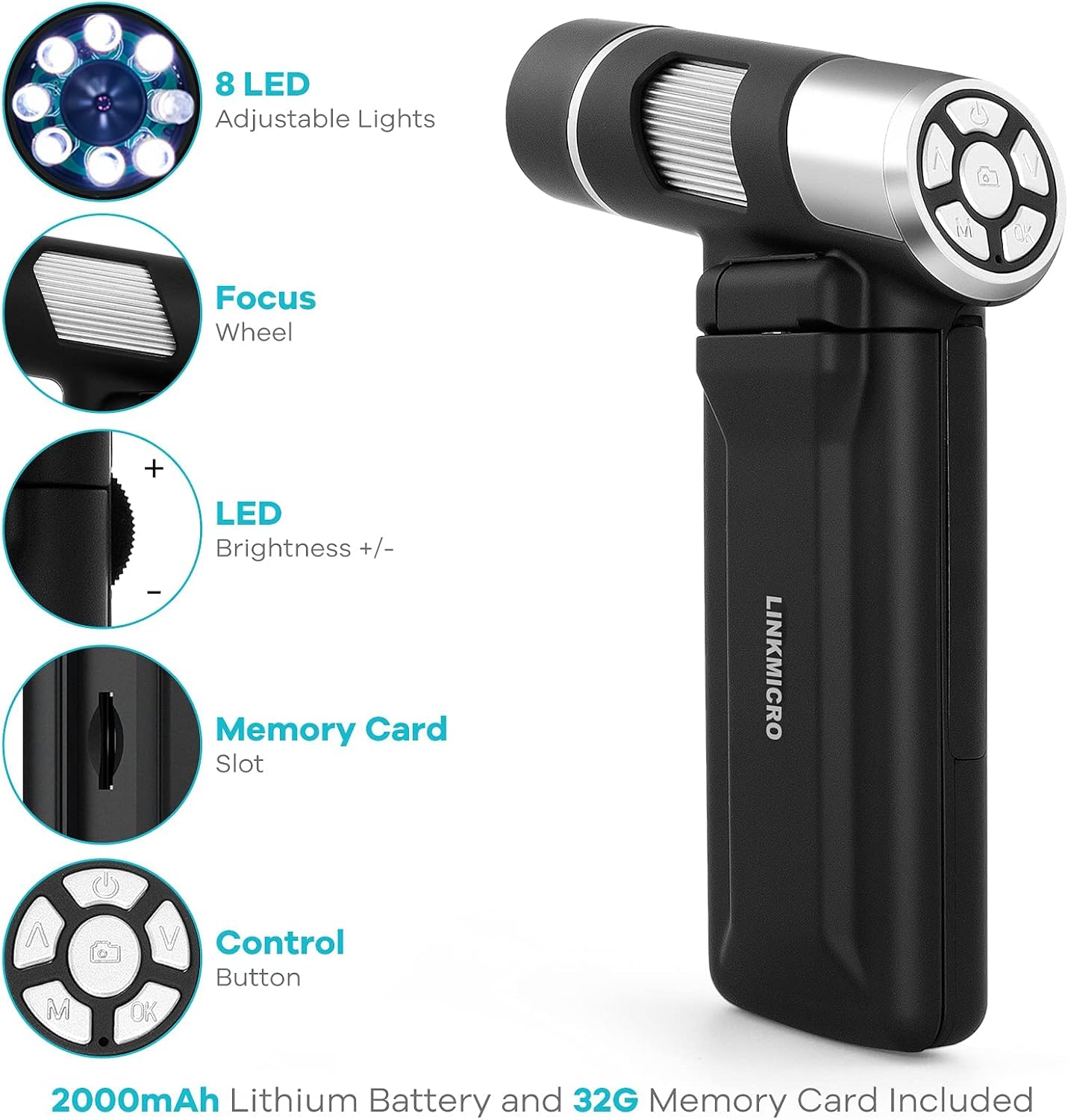
Image: Detailed view of the LM203's control panel, highlighting the focus wheel, LED lights, and navigation buttons.
4.3 Capturing Photos and Recording Videos
The LM203 allows you to capture 1080P photos and videos directly to the Micro SD card:
- Press the 'M' (Mode) button to switch between photo and video modes.
- In photo mode, press the Camera/OK button to take a picture.
- In video mode, press the Camera/OK button to start recording. Press it again to stop recording.
Video: Demonstration of using the LM203 handheld microscope to observe and capture details of a coin.
Video: Observing a circuit board with the LM203 handheld microscope, showcasing its utility for electronic inspection.
4.4 Adjusting LED Brightness
The LM203 features 8 adjustable LED lights. Use the LED Brightness +/- switch on the side of the microscope to increase or decrease the illumination for optimal viewing.
4.5 Screen Adjustment
The 4-inch screen can be tilted up to 350 degrees, providing flexible viewing angles for comfortable observation.

Image: The LM203 microscope being used by an adult and child to explore nature, demonstrating its portability and ease of use.
Video: A close-up video recorded by the LM203 microscope showing the intricate details of a mosquito.
Video: A demonstration of the LM203 handheld microscope capturing the texture of short sleeves, highlighting its ability to show fabric details.
Video: A detailed view of a stone's texture captured by the LM203 handheld microscope, illustrating its use for geological observation.
5. Maintenance
To ensure the longevity and optimal performance of your LINKMICRO LM203 Digital Microscope, follow these maintenance guidelines:
- Cleaning: Use a soft, dry cloth to clean the microscope body. For the lens and screen, use a specialized lens cleaning cloth and solution to avoid scratches.
- Storage: Store the microscope in the provided portable bag in a cool, dry place away from direct sunlight and extreme temperatures.
- Battery Care: Avoid fully discharging the battery frequently. Charge the device regularly, even if not in use for extended periods, to maintain battery health.
- Handling: Handle the microscope with care to prevent drops or impacts, which can damage internal components or the screen.
6. Troubleshooting
If you encounter any issues with your LM203 microscope, refer to the following common troubleshooting tips:
- Device not turning on: Ensure the battery is fully charged. Connect the microscope to a power source and try again. If the issue persists, perform a reset using the reset hole (refer to the diagram in the physical manual for location).
- Blurred image: Adjust the focus wheel until the image on the screen is clear. Ensure the object is within the microscope's focal range.
- Cannot save photos/videos: Check if the Micro SD card is correctly inserted and has sufficient free space. The card might need to be formatted (refer to the physical manual for instructions on formatting).
- No image on PC: Ensure the microscope is in "PC Camera" mode and the correct software (Amcap for Windows, Photo Booth for Mac) is running and selected. Check the USB cable connection.
7. Specifications
| Feature | Detail |
|---|---|
| Model Name | LM203 |
| Brand | LINKMICRO |
| Magnification Maximum | 200X |
| Screen Size | 4 inches (Flip-up, 350-degree tilt) |
| Photo/Video Resolution | 1080P |
| Storage | 32G Micro SD Card (included) |
| Light Source Type | 8 LED Adjustable Lights |
| Power Source | Built-in 2000mAh Battery (approx. 3 hours use) |
| Connectivity | USB (PC compatible) |
| Item Weight | 7.52 ounces (approx. 215g) |
| Material | Plastic |
8. Warranty and Support
The LINKMICRO LM203 Handheld Digital Microscope comes with a 1-year warranty. For any questions, technical assistance, or support needs, please contact LINKMICRO customer service. Our dedicated support team is available 7 days a week, 24 hours a day to assist you.
You can find contact information on the official LINKMICRO website or through your purchase platform.