
1. Introduction
This manual provides essential instructions for the safe and efficient operation, installation, and maintenance of your Swimline HYDROTOOLS 16-Inch Sand Filter Pump System, Model 71610HCK. This system is designed for above-ground and soft-sided pools up to 15,600 gallons, offering efficient water filtration and consistent performance. Please read this manual thoroughly before installation and use to ensure proper function and longevity of your equipment.

Image 1.1: Complete HYDROTOOLS 16-Inch Sand Filter Pump System. This image displays the assembled sand filter tank, pump, multi-port valve, and connecting hose, along with the included hose connection kit.
2. Safety Information
Always adhere to the following safety guidelines to prevent injury and equipment damage:
- Ensure the power supply matches the pump's requirements (110V/60Hz).
- Always disconnect power before performing any service or maintenance.
- Do not operate the pump if the electrical cord is damaged.
- Keep children away from the filter system during operation.
- Install the filter system on a level, stable surface.
- Do not bury the electrical cord.
- Consult a qualified electrician for any electrical installations or repairs.
3. Product Components
The HYDROTOOLS 16-Inch Sand Filter Pump System includes the following main components:
- 16-Inch Filter Tank: Double-reinforced molded tank designed to hold up to 100 pounds of filter sand.
- 1.0 HP Pump (0.54 THP): Efficient pump with a flow rate of 3,720 GPH, optimized for low noise levels.
- 6-Way Multi-Port Valve: For various operational modes (Filter, Backwash, Rinse, Waste, Recirculate, Closed, Winter).
- Filter Base: Provides stable support for the filter tank and pump.
- Pressure Gauge: Monitors system pressure.
- Sight Glass: Allows visual inspection of backwash water clarity.
- Drain Valve: For easy draining of the filter tank.
- 40mm to 1.5'' Filter Hose Connection Kit: Adapters for compatibility with soft-sided pools (e.g., Intex, Bestway).
- Connecting Hoses and Hardware: All necessary items for assembly.

Image 3.1: Detailed view of the complete system components, including the 7-way valve, pressure gauge, sight glass, and drain valve.

Image 3.2: Overview of included accessories, such as the filter hose connection kit, strainer basket, pressure gauge, and base.
4. Setup and Installation
Follow these steps for proper assembly and installation:
- Positioning: Place the filter system on a firm, level surface, preferably below the pool's water level, and at least 10 feet from the pool. Ensure adequate drainage.
- Fill with Sand: Remove the multi-port valve and carefully pour the recommended amount of filter sand (up to 100 lbs) into the tank. Ensure the standpipe is centered during this process. Do not overfill.
- Install Multi-Port Valve: Carefully place the multi-port valve onto the tank, ensuring it seats properly on the standpipe. Secure it with the provided clamp or bolts.
- Connect Pump: Attach the pump to the filter tank using the provided plumbing. Ensure all connections are tight to prevent leaks.
- Pool Connections: Connect the filter system to your pool's skimmer and return lines. For soft-sided pools, use the included 40mm to 1.5'' filter hose connection kit for proper fitment.
- Electrical Connection: Plug the pump into a grounded electrical outlet. Ensure the circuit is protected by a Ground Fault Circuit Interrupter (GFCI).
- Prime the Pump: Before starting, ensure the pump basket is filled with water. Open all necessary valves to allow water to flow from the pool to the pump.
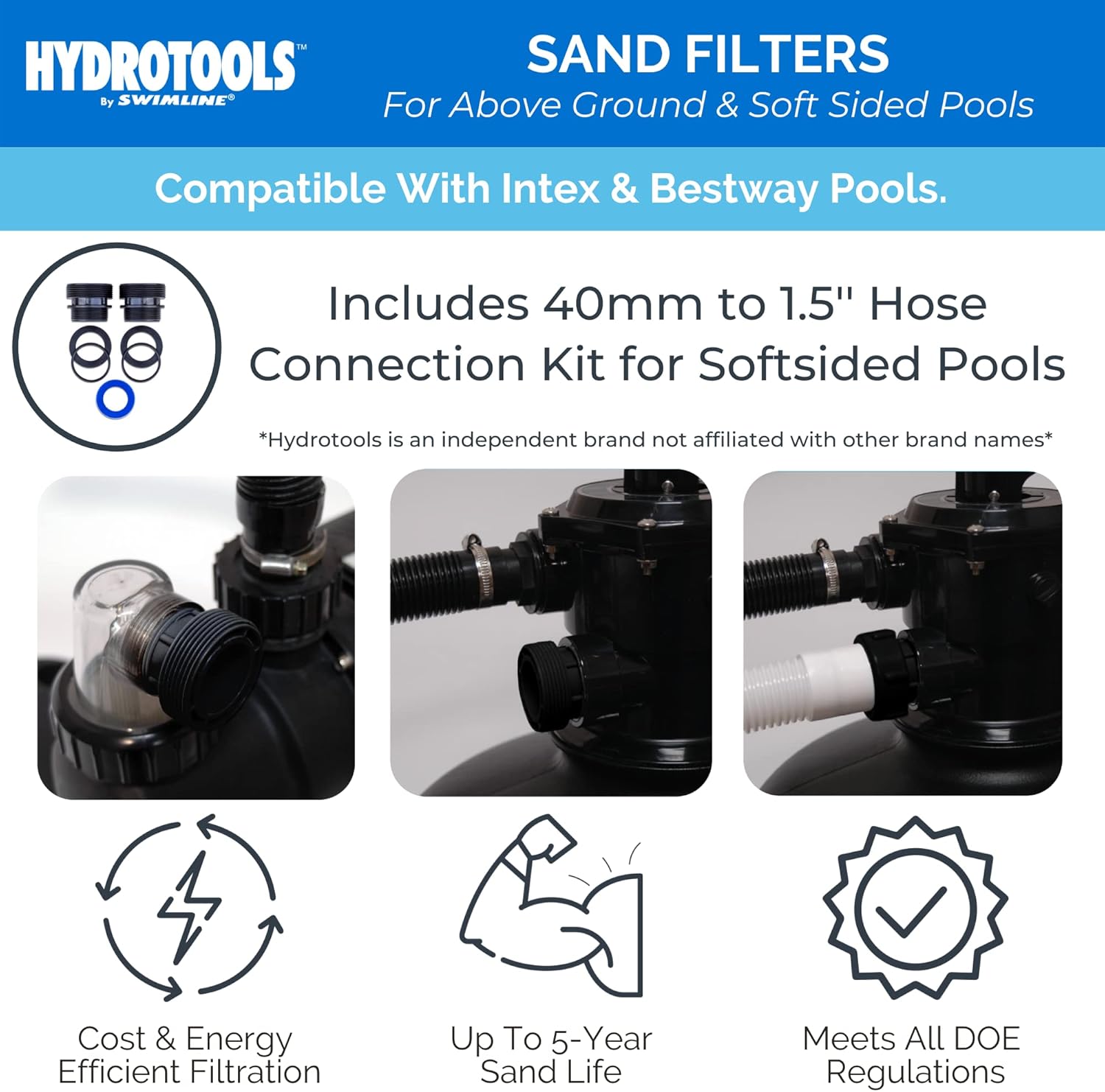
Image 4.1: Illustration of the 40mm to 1.5-inch hose connection kit, highlighting compatibility with soft-sided pools like Intex and Bestway.
5. Operating the Filter System
The multi-port valve controls the flow of water through the filter system. Always turn off the pump before changing the valve position.

Image 5.1: Diagram illustrating the various settings and functions of the multi-port valve.
Multi-Port Valve Settings:
- FILTER: Normal filtering mode. Water flows through the sand, is cleaned, and returned to the pool.
- BACKWASH: Cleans the filter sand by reversing water flow. Water is discharged through the waste port. Perform when pressure gauge reads 8-10 PSI above starting pressure.
- RINSE: Used after backwashing to flush dirty water from the valve and settle the sand. Water is discharged through the waste port.
- WASTE: Bypasses the filter, sending water directly out the waste port. Useful for vacuuming heavy debris directly to waste or lowering pool water level.
- RECIRCULATE: Bypasses the filter, circulating water directly back to the pool. Useful for chemical distribution without filtering.
- CLOSED: Shuts off all flow to the filter and pump. Do not operate the pump in this position.
- WINTER: Position for winterizing the filter system.
Initial Startup Procedure:
- Ensure the pump is primed and all connections are secure.
- Set the multi-port valve to the BACKWASH position.
- Turn on the pump and backwash for 2-3 minutes, or until water in the sight glass runs clear.
- Turn off the pump.
- Set the multi-port valve to the RINSE position.
- Turn on the pump and rinse for 30-60 seconds.
- Turn off the pump.
- Set the multi-port valve to the FILTER position.
- Turn on the pump. The system is now operating in normal filter mode. Note the initial pressure gauge reading.
6. Maintenance
Regular Backwashing:
Backwash the filter when the pressure gauge reads 8-10 PSI above the clean filter's starting pressure, or when water clarity diminishes. Follow the backwash and rinse procedure outlined in Section 5.
Sand Replacement:
Filter sand typically lasts approximately 5 years, depending on water chemistry and backwashing frequency. Replace sand when filtration efficiency decreases despite regular backwashing.
Pump Strainer Basket Cleaning:
Periodically inspect and clean the pump's strainer basket to ensure optimal water flow and prevent debris buildup. Turn off the pump, close necessary valves, remove the lid, empty the basket, and replace.
Winterization:
Before freezing temperatures, drain all water from the filter tank and pump. Disconnect hoses and store components in a dry, protected area. Set the multi-port valve to the WINTER position.
7. Troubleshooting
Refer to the following common issues and solutions:
| Problem | Possible Cause | Solution |
|---|---|---|
| Low water flow / Low pressure | Clogged strainer basket, dirty filter sand, air leak in suction line, closed valve. | Clean strainer basket, backwash/rinse filter, check for air leaks, ensure all valves are open. |
| Cloudy pool water | Insufficient filtration time, dirty filter sand, improper water chemistry, undersized filter. | Increase filtration time, backwash/rinse filter, test and adjust pool chemistry, replace old sand. |
| Pump not priming | Low water level, air leak, clogged suction line, pump basket not filled. | Ensure adequate pool water level, check for air leaks, clear suction line, fill pump basket with water. |
| Water leaking from system | Loose connections, worn O-rings/gaskets, cracked housing. | Tighten connections, inspect and replace O-rings/gaskets, contact support for cracked components. |
8. Specifications
| Feature | Detail |
|---|---|
| Model Name | 16 In Sand Filter Combo |
| Part Number | 71610HCK |
| Filter Size | 16 inches |
| Recommended Max. Pool Size | Up to 15,600 Gallons |
| Pump Horsepower | 1.0 HP (0.54 THP) |
| Gallons Per Hour (GPH) | 3,720 GPH |
| Sand Capacity | 100 lbs |
| Power | 110V/60Hz |
| Material | Plastic |
| Item Weight | 50 Pounds |
| Item Dimensions (LxWxH) | 29.75 x 32.75 x 17.25 inches |
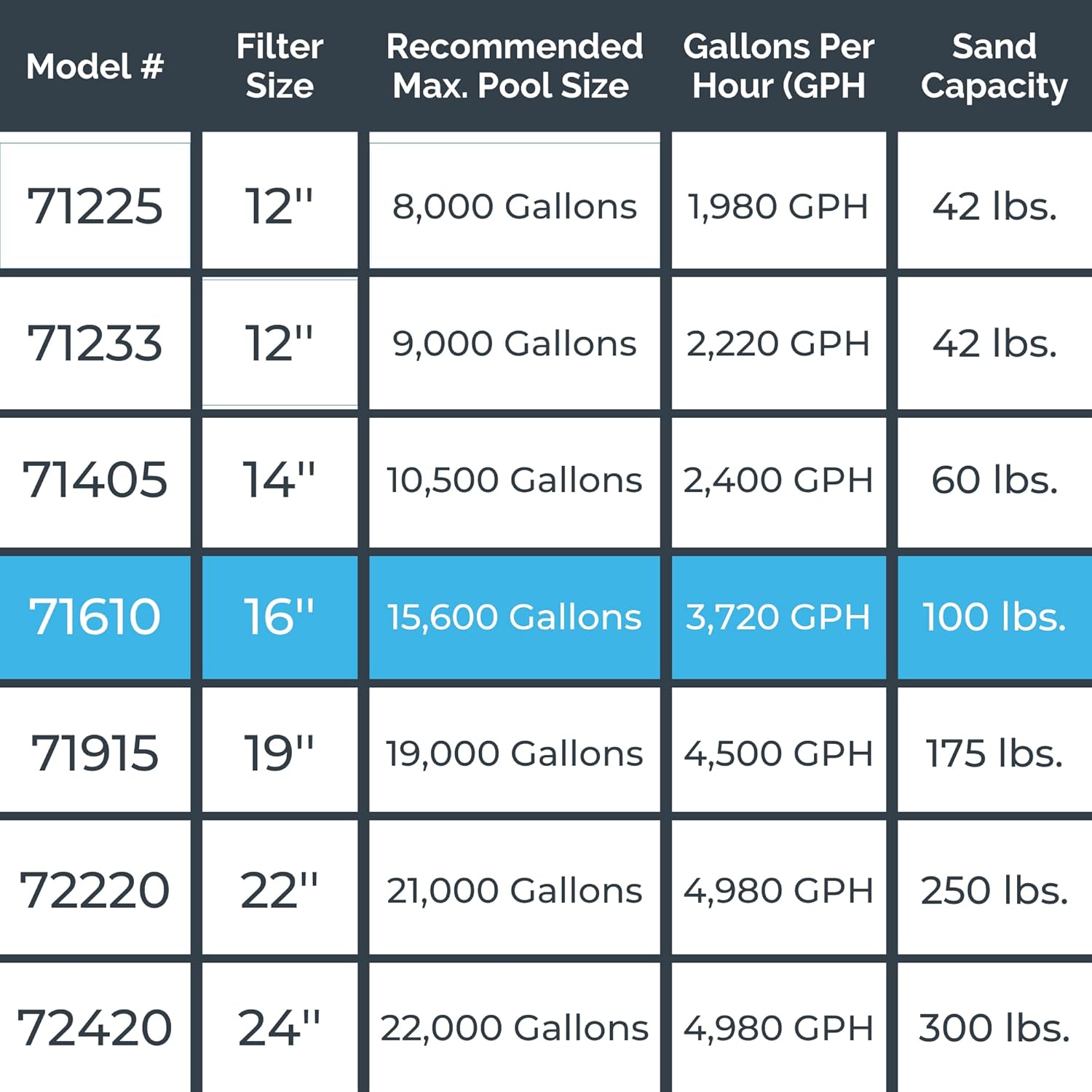
Image 8.1: Table comparing various HYDROTOOLS filter models, highlighting the 16-inch model's specifications for filter size, recommended pool size, GPH, and sand capacity.
9. Warranty Information
This product comes with a 1 Year Warranty Against Manufacturer's Defects. This warranty applies only to new goods sold by approved sellers. Please retain your proof of purchase for warranty claims. For further details or to initiate a warranty claim, contact Swimline customer support.
10. Customer Support
For technical assistance, replacement parts, or any questions regarding your HYDROTOOLS filter system, please visit the official Swimline website or contact their customer service department. Refer to your purchase documentation for specific contact details.


