
Hot Wheels HDX77
Hot Wheels Track Builder Unlimited Split Loop Pack Instruction Manual
Model: HDX77
Introduction
The Hot Wheels Track Builder Unlimited Split Loop Pack is designed to enhance your Hot Wheels track system, allowing for dynamic and varied racing experiences. This playset features a unique split loop mechanism, enabling vehicles to choose different exit routes after completing the loop. It encourages creativity and problem-solving as users can integrate it with other Hot Wheels track pieces to build extensive and exciting layouts.
Product Overview
The Split Loop Pack introduces an innovative element to the Hot Wheels Track Builder series. It includes a dual-path loop and a launcher, providing an engaging play experience. The diverter mechanism allows for interactive decision-making during races, adding an extra layer of excitement. This set is compatible with existing Hot Wheels track components, offering endless possibilities for customization and expansion.

Figure 1: Hot Wheels Track Builder Unlimited Split Loop Pack in its retail packaging.
What's in the Box
Carefully unpack all components and ensure all parts are present before beginning assembly.
- 2 Loop Track Pieces
- 1 Hot Wheels Logo (decorative piece)
- 1 Y-Track (diverter mechanism)
- 1 Launcher
- 1 12" High Wall E-Track
- 1 Base Connector
- 2 Molded Loop Tracks
- 2 Loop Bases
- 1 Hot Wheels Car (1:64 Scale Vehicle)

Figure 2: All components included in the Hot Wheels Track Builder Unlimited Split Loop Pack.
Setup
Follow these steps to assemble your Hot Wheels Track Builder Unlimited Split Loop Pack:
- Connect Track Pieces: Begin by connecting the straight track pieces to form the approach to the launcher. Ensure the blue connectors are securely slotted into the track ends.
- Assemble the Launcher: Attach the launcher unit to the end of the initial straight track. The launcher features a slider mechanism to propel the car.
- Construct the Loop: Assemble the two molded loop tracks and attach them to the loop bases. Connect the assembled loop to the track extending from the launcher.
- Integrate the Y-Track (Diverter): Position the Y-Track (diverter) at the exit of the loop. This piece allows for the selection of different exit paths. Ensure it is firmly connected to the loop and any subsequent track pieces.
- Extend and Customize: Use additional track pieces (sold separately) to extend your track layout from the diverter's exit points, creating more complex and exciting courses.

Figure 3: The Hot Wheels Track Builder Unlimited Split Loop Pack fully assembled.
Operating Instructions
Operating the Split Loop Pack is straightforward:
- Place the Car: Position a Hot Wheels vehicle onto the launcher's starting point.
- Launch the Car: Pull back the yellow slider on the launcher until it locks into place. Then, press the blue launch button to propel the car forward into the loop.

Figure 4: Activating the launcher to send the car through the track.
- Utilize the Diverter: As the car exits the loop, you can manually adjust the yellow diverter lever located beneath the loop to direct the car to one of two different exit routes. This allows for varied play and strategic racing.

Figure 5: Adjusting the diverter to change the car's path.
- Expand Your Track: The set is designed to connect with other Hot Wheels Track Builder sets, allowing for larger and more complex track designs.
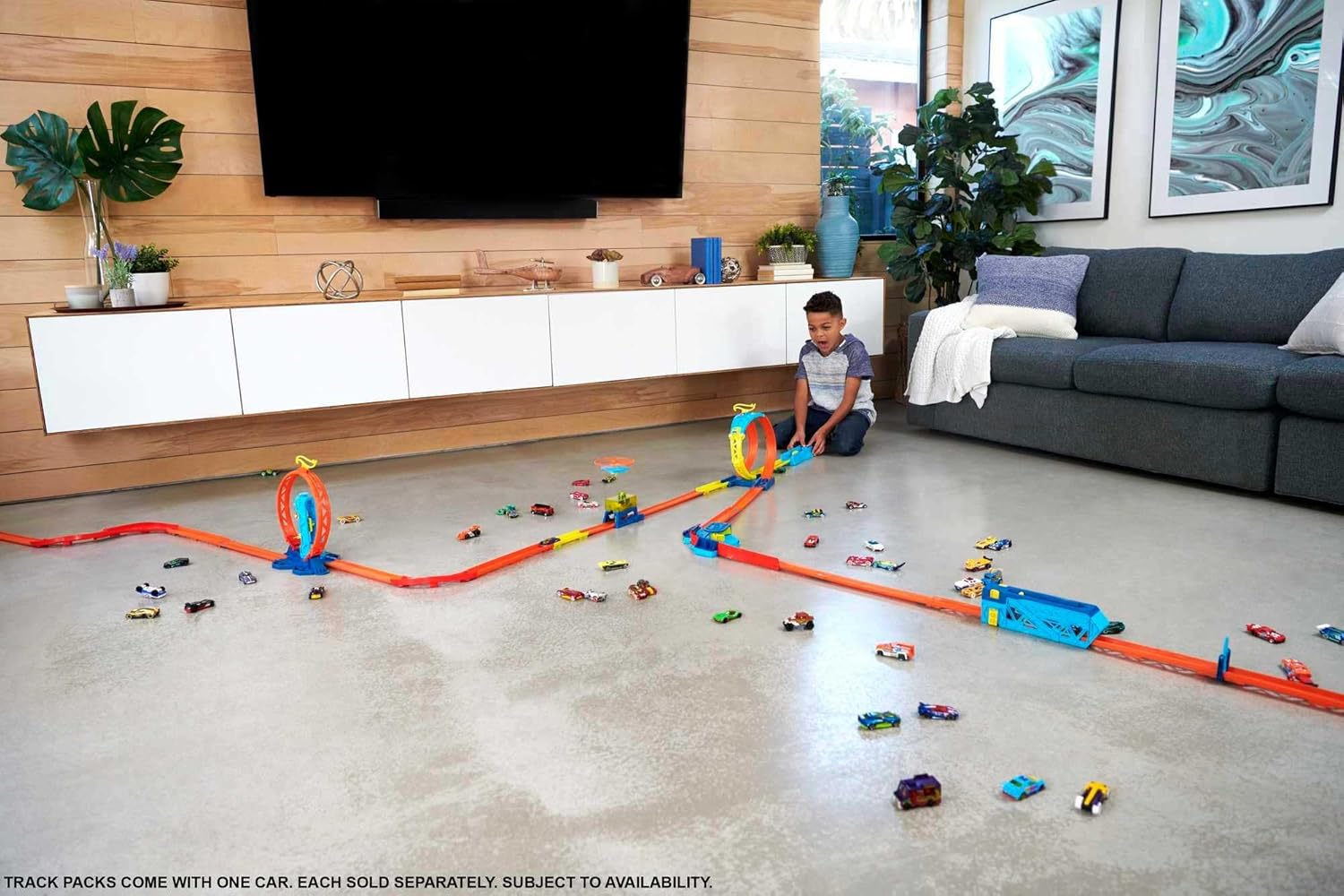
Figure 6: An example of an extended track setup incorporating the Split Loop Pack.
Maintenance
To ensure the longevity and optimal performance of your Hot Wheels Track Builder Unlimited Split Loop Pack, follow these simple maintenance guidelines:
- Cleaning: Wipe down track pieces and components with a soft, damp cloth. Avoid using harsh chemicals or abrasive cleaners, as these may damage the plastic.
- Storage: When not in use, store the playset in a cool, dry place away from direct sunlight to prevent warping or fading of the plastic.
- Inspection: Periodically inspect all track connectors and moving parts (launcher, diverter) for any signs of wear or damage. Replace any broken or worn parts to maintain safe operation.
Troubleshooting
If you encounter any issues with your Hot Wheels Track Builder Unlimited Split Loop Pack, refer to the following common problems and solutions:
| Problem | Possible Cause | Solution |
|---|---|---|
| Car does not complete the loop. | Insufficient launch force; track not properly connected; car wheels are dirty. | Ensure the launcher is fully pulled back before release. Check all track connections for secure fit. Clean car wheels and track surface. |
| Diverter not switching paths smoothly. | Debris in the mechanism; misaligned track. | Inspect the diverter for any obstructions and remove them. Verify that the track pieces leading into and out of the diverter are correctly aligned. |
| Track pieces disconnect during play. | Loose connections; excessive force applied. | Ensure all blue connectors are fully engaged. Avoid lifting or moving the assembled track by individual sections during play. |
Specifications
- Product Dimensions: 7.95 x 26.91 x 11.48 inches
- Item Weight: 15.1 ounces
- Model Number: HDX77
- ASIN: B09BW4495Q
- Manufacturer Recommended Age: 4 years and up
- Release Date: January 22, 2022
- Manufacturer: Mattel
Warranty and Support
This Hot Wheels product is manufactured by Mattel and is subject to their standard warranty policies. For specific warranty details, product support, or to inquire about replacement parts, please visit the official Mattel website or contact their customer service department. Keep your proof of purchase for warranty claims.
For additional information and to explore more Hot Wheels products, visit the Hot Wheels Store on Amazon.
Ask a question about this manual
Ask about setup, troubleshooting, compatibility, parts, safety, or missing instructions. Manuals+ will review the question and use this page’s manual context to help answer it.