
1. Introduction
Thank you for purchasing the Muse MT-112 W Micro System. This versatile audio system combines a classic turntable with modern features such as a CD player, FM radio, Bluetooth connectivity, and USB/SD card playback and encoding. This manual provides essential information for the safe and efficient operation of your device. Please read it thoroughly before use and retain it for future reference.
2. Safety Instructions
- Power Source: Ensure the power supply voltage matches the rating label on the unit.
- Ventilation: Do not block ventilation openings. Allow adequate space around the unit for proper airflow.
- Water and Moisture: Do not expose the unit to rain, moisture, or dripping/splashing liquids. Do not place objects filled with liquids on the unit.
- Heat: Keep the unit away from heat sources such as radiators, heat registers, stoves, or other apparatus that produce heat.
- Cleaning: Unplug the unit from the wall outlet before cleaning. Use a soft, dry cloth. Do not use liquid cleaners or aerosol cleaners.
- Servicing: Do not attempt to service this product yourself. Refer all servicing to qualified service personnel.
- Placement: Place the unit on a stable, flat surface to prevent it from falling.
3. Package Contents
Please check that the following items are included in your package:
- Muse MT-112 W Micro System Unit
- 45 RPM Adapter
- AC Power Cable
- User Manual
If any items are missing or damaged, please contact your retailer.
4. Product Overview
Familiarize yourself with the various parts and controls of your Muse MT-112 W Micro System.

Figure 1: Front view of the Muse MT-112 W Micro System with the transparent dust cover open, revealing the turntable and a vinyl record. The front panel features controls and a display.
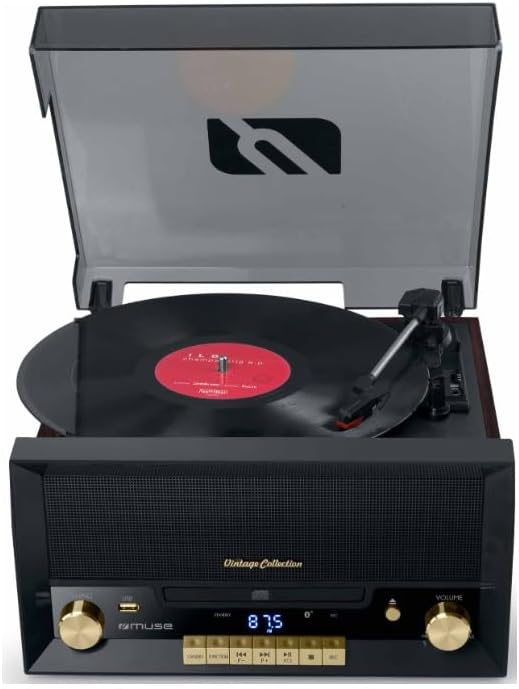
Figure 2: Detailed front view of the micro system with the turntable lid closed. The central display shows '87.5', indicating FM radio frequency. Controls for tuning, volume, and playback are visible.

Figure 3: Close-up of the front control panel, highlighting the CD tray in its closed position, the digital display, and various function buttons (e.g., USB, SD, Play/Pause, Skip, Stop) and the volume knob.
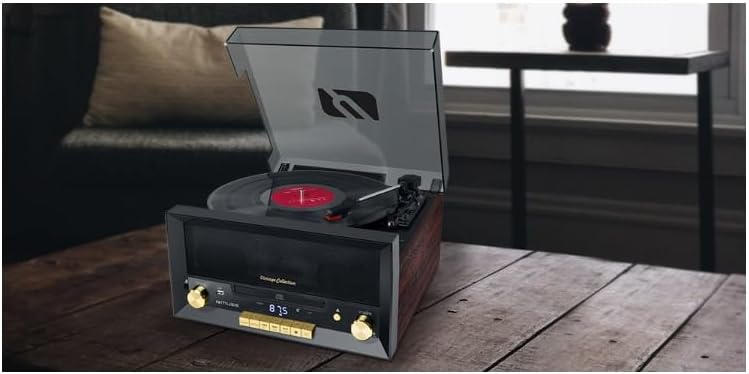
Figure 4: Rear view of the micro system, displaying the power input socket, RCA audio output jacks (red and white), and potentially an FM antenna connection.
Front Panel Controls:
- Power/Function Knob: Turns the unit on/off and selects input source (Phono, CD, FM, Bluetooth, USB, SD, AUX).
- Tuning Knob: Adjusts FM radio frequency.
- Volume Knob: Adjusts the overall sound volume.
- CD Tray: For inserting audio CDs.
- Display: Shows current function, track number, or radio frequency.
- USB Port: For USB flash drives (playback and encoding).
- SD Card Slot: For SD memory cards (playback and encoding).
- Playback Control Buttons: Play/Pause, Stop, Skip Forward/Backward.
- Open/Close Button: Opens and closes the CD tray.
Rear Panel Connections:
- AC Power Input: Connects to the main power supply.
- RCA Output (L/R): Connects to external amplifiers or powered speakers.
- FM Antenna: For improved FM radio reception.
Top Panel (Turntable):
- Turntable Platter: Where vinyl records are placed.
- Tonearm: Holds the stylus (needle).
- Speed Selector: Switches between 33, 45, and 78 RPM.
- Auto Stop Switch: Enables/disables automatic stopping of the platter at the end of a record.
- 45 RPM Adapter: Used for records with a large center hole.
5. Setup
5.1 Unpacking and Placement
- Carefully remove the unit from its packaging.
- Place the unit on a flat, stable surface, ensuring adequate ventilation around it.
- Remove any protective materials from the turntable platter and tonearm.
5.2 Power Connection
Connect the supplied AC power cable to the AC power input on the rear of the unit, then plug the other end into a standard wall outlet.
5.3 Antenna Connection
For optimal FM radio reception, extend the built-in FM wire antenna or connect an external FM antenna to the designated port on the rear of the unit, if available.
5.4 External Audio Output (Optional)
If you wish to connect the micro system to an external amplifier or powered speakers, use RCA cables (not included) to connect the RCA L/R output jacks on the rear of the unit to the corresponding input jacks on your external audio equipment.
6. Operating Instructions
6.1 General Operation
- Power On/Off: Rotate the Power/Function knob clockwise to turn the unit on. Rotate counter-clockwise until it clicks to turn off.
- Function Selection: Rotate the Power/Function knob to select your desired source: PHONO (Turntable), CD, FM, BT (Bluetooth), USB, SD, or AUX.
- Volume Adjustment: Rotate the Volume knob to increase or decrease the sound level.
6.2 Turntable Operation (PHONO)
- Lift the dust cover.
- Place a vinyl record on the turntable platter. If playing a 45 RPM single, place the 45 RPM adapter on the center spindle first.
- Set the Speed Selector to 33, 45, or 78 RPM, matching your record.
- Set the Auto Stop Switch to ON if you want the platter to stop automatically at the end of the record, or OFF for continuous rotation.
- Gently lift the tonearm using the cueing lever and position the stylus over the desired track on the record.
- Lower the tonearm slowly onto the record using the cueing lever. Playback will begin.
- To stop playback, lift the tonearm, return it to its rest, and lower the cueing lever.
6.3 CD Player Operation (CD)
- Select the CD function using the Power/Function knob.
- Press the OPEN/CLOSE button to open the CD tray.
- Place a CD (CD, CD-R, or CD-RW) with the label side facing up into the tray.
- Press the OPEN/CLOSE button again to close the tray. The unit will read the disc.
- Press the PLAY/PAUSE button to start playback.
- Use the SKIP FORWARD/BACKWARD buttons to navigate between tracks.
- Press the STOP button to end playback.
6.4 FM Radio Operation (FM)
- Select the FM function using the Power/Function knob.
- Rotate the Tuning Knob to manually scan for radio stations. The frequency will be shown on the display.
- Preset Stations: The unit supports 20 FM presets. Refer to the full manual for detailed instructions on how to store and recall presets.
6.5 Bluetooth Operation (BT)
- Select the BT function using the Power/Function knob. The display will show 'BT' and flash, indicating it's in pairing mode.
- Enable Bluetooth on your mobile device (smartphone, tablet, etc.) and search for available devices.
- Select 'MT-112 W' (or similar name) from the list of devices.
- Once paired, the 'BT' indicator on the display will stop flashing. You can now play audio from your device through the micro system.
6.6 USB/SD Card Playback and Encoding
- Playback: Insert a USB flash drive into the USB port or an SD card into the SD card slot. Select USB or SD function. The unit will automatically detect and play compatible audio files. Use playback control buttons to navigate.
- Encoding (Recording): The unit supports recording audio from the turntable, CD, or FM radio directly to a USB drive or SD card. Refer to the full manual for specific steps on how to initiate and manage recording.
6.7 Auxiliary Input (AUX)
- Connect an external audio device (e.g., MP3 player, smartphone) to the 3.5mm AUX IN jack on the front panel using a 3.5mm audio cable (not included).
- Select the AUX function using the Power/Function knob.
- Play audio from your connected device. The sound will be output through the micro system's speakers.
6.8 Headphone Output
Connect headphones to the 3.5mm headphone jack on the front panel for private listening. When headphones are connected, the main speakers will be muted.
7. Maintenance
7.1 Cleaning the Unit
- Always unplug the unit before cleaning.
- Use a soft, dry cloth to wipe the exterior surfaces. Do not use abrasive cleaners, waxes, or solvents.
- For the dust cover, use a soft cloth to avoid scratches.
7.2 Stylus Care
- The stylus is a delicate component. Handle it with care.
- Clean the stylus periodically using a soft brush, brushing gently from back to front.
- Replace the stylus when you notice a degradation in sound quality or visible wear.
8. Troubleshooting
If you encounter any issues, please refer to the following common problems and solutions:
- No Power: Ensure the power cable is securely connected to both the unit and the wall outlet. Check if the outlet is functioning.
- No Sound: Check the volume level. Ensure the correct function (source) is selected. If using external speakers, check their power and connections. If using headphones, ensure they are fully plugged in.
- Turntable Not Spinning/Skipping: Ensure the speed selector matches the record. Check if the auto-stop switch is set correctly. Ensure the tonearm is properly lowered. Clean the stylus.
- CD Not Playing: Ensure the CD is inserted correctly (label side up) and is clean and free of scratches. Try a different CD.
- Bluetooth Pairing Issues: Ensure the unit is in Bluetooth mode and flashing. Make sure Bluetooth is enabled on your device and it's within range. Disconnect from other Bluetooth devices.
- Poor Radio Reception: Adjust the position of the FM antenna. Try relocating the unit to a different area.
If the problem persists, please contact customer support.
9. Specifications
| Brand | MUSE |
| Model | MT-112 W |
| Power Output | 20 W |
| Turntable Speeds | 33 / 45 / 78 RPM |
| CD Compatibility | CD, CD-R/RW |
| Connectivity | Bluetooth, USB, SD Card, 3.5mm Aux-in, RCA Output, Headphone Output |
| Tuner | FM (20 Presets) |
| Dimensions (H x W x D) | 171 x 343 x 324 mm |
| Weight | 3.83 kg |
| Material | Wood, Plastic |
| Power Source | AC Cable |
10. Warranty and Support
This product is covered by a manufacturer's warranty. Please refer to the warranty card included in your package for detailed terms and conditions. For technical support, service, or warranty claims, please contact your retailer or the official Muse customer service department. Keep your proof of purchase for warranty validation.


