
1. Product Overview
This manual provides essential information for the safe and efficient operation of your GYMAX Foldable Treadmill. Please read this manual thoroughly before initial use and retain it for future reference.

Image 1.1: The GYMAX Foldable Treadmill, showcasing its compact design and control panel.
2. Safety Information
- Always consult with a healthcare professional before starting any new exercise program.
- Ensure the treadmill is placed on a flat, stable surface with adequate clearance around it.
- Keep children and pets away from the treadmill during operation.
- Always attach the safety key to your clothing before beginning a workout. The treadmill will stop if the safety key is disengaged.
- Do not operate the treadmill if it is damaged or malfunctioning.
- Wear appropriate athletic footwear during use.
- The maximum user weight for this treadmill is 220 lbs. Do not exceed this limit.
3. Package Contents
Verify that all components are present before assembly:
- GYMAX Foldable Treadmill Unit
- Power Cord
- Safety Key
- User Manual (this document)
- Assembly Tools (e.g., 6MM Allen key, M8*16 hexagon socket pan head screws, M8 washers)
4. Setup and Assembly
The GYMAX Foldable Treadmill requires minimal assembly. Follow these steps to set up your treadmill:
- Unfold the Treadmill: Carefully lift the riser of the treadmill into the upright position.
- Secure the Riser: Use the provided 6MM Allen key to loosen the screws on both sides counterclockwise. Once the riser is in position, tighten the screws on both sides clockwise to secure it.
- Install the Computer Display: Put the computer display down. Ensure the communication line is not pressed or damaged during this step.
- Lock the Display: Use the M8*16 hexagon socket pan head screws and M8 washers to lock the computer display onto the left and right risers.
- Attach Covers: Clip the covers into the risers on both sides.
For a visual guide, please refer to the assembly video below:
Video 4.1: Official GYMAX treadmill assembly instructions.

Image 4.1: Key features of the treadmill, including transportation wheels for easy relocation and adjustable footpads for stability.
5. Operating Instructions
5.1 Control Panel and Display
The treadmill features an LED monitor that displays real-time exercise data. The control panel allows you to manage your workout settings.

Image 5.1: The LED monitor and control panel, highlighting data display and heart rate sensors.
- LED Monitor: Displays Time, Speed, Distance, Calories Burned, and Heart Rate.
- Heart Rate Sensor: Located on the two handles, these sensors track your pulse during exercise.
- Quick Speed Adjustment: Buttons on the console allow for rapid changes in speed.
- Safety Key: A red safety key is provided. Attach it to your clothing and insert it into the designated slot on the console. The treadmill will not operate without the safety key in place.
5.2 Preset Programs
The treadmill includes 12 preset programs (P1-P12) designed to offer varied workout routines. Select a program to automatically adjust speed and intensity throughout your session.

Image 5.2: The 12 preset programs available on the treadmill's control panel.
5.3 APP Control (Bluetooth Connectivity)
Enhance your workout experience by connecting your device to the treadmill via the Gymax App. This feature allows for:
- Access to training courses.
- Tracking historical fitness data.
- Sharing exercise data with a community.
- Switching speed units between miles and kilometers.

Image 5.3: The Gymax App interface demonstrating smart control and data tracking.
5.4 Motor Performance
The treadmill is equipped with a 2.25HP motor, providing a smooth running experience with a speed range of 0.6 to 7.5 mph. The motor operates with low noise, ensuring a quiet exercise environment.

Image 5.4: Illustration of the treadmill's 2.25HP motor and its quiet operation.
6. Maintenance
Regular maintenance ensures the longevity and optimal performance of your treadmill.
6.1 Running Belt
The treadmill features a 5-layer shock-absorbing running belt measuring 16.5" x 43.5". This design helps prevent slips and protects your joints. Periodically inspect the belt for wear and tear. Ensure the belt is properly aligned and tensioned. Refer to the troubleshooting section if the belt requires adjustment.
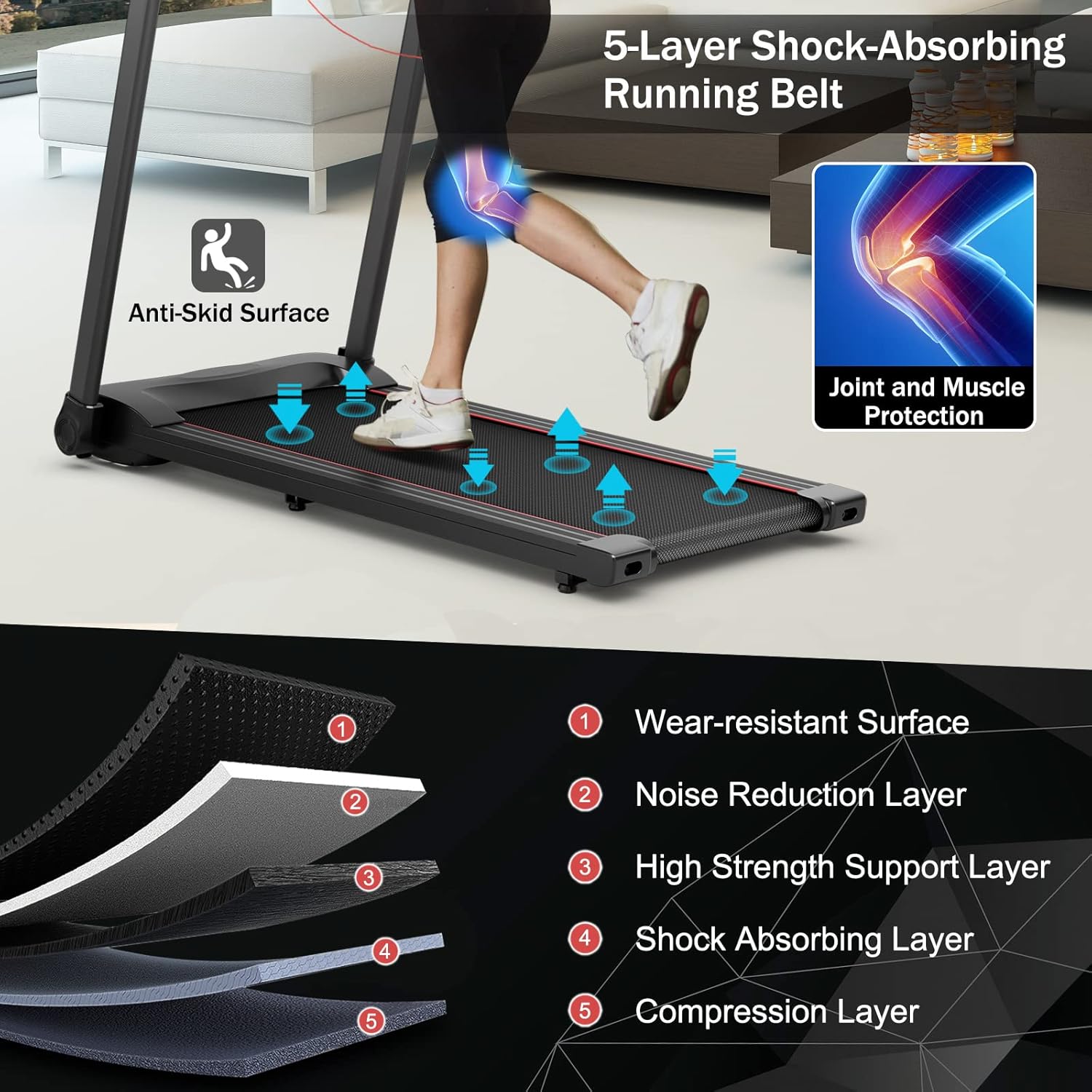
Image 6.1: The 5-layer shock-absorbing running belt construction.
6.2 Cleaning
Wipe down the treadmill surfaces with a damp cloth after each use to remove sweat and dust. Do not use abrasive cleaners or solvents.
6.3 Lubrication
Regular lubrication of the running deck is crucial for smooth operation and to prevent premature wear. Consult the specific instructions for lubrication frequency and type of lubricant recommended for your model. (Note: If you encounter an E53 error, it may indicate a need for lubrication.)
7. Troubleshooting
- Treadmill not starting: Ensure the power cord is securely plugged in and the safety key is correctly inserted into the console.
- Belt slipping or uneven: The running belt may require adjustment or tensioning. Refer to the maintenance section or contact customer support for guidance.
- Unusual noises: Check for loose parts or foreign objects under the belt. If the noise persists, discontinue use and contact customer support.
- Error Code E53: This error code often indicates a lubrication issue. Apply appropriate treadmill lubricant to the running deck as per maintenance guidelines. If the error persists, contact customer support.
- App connectivity issues: Ensure Bluetooth is enabled on your device and the Gymax App is updated. Try restarting both the treadmill and your device.
8. Specifications
| Feature | Specification |
|---|---|
| Brand | GYMAX |
| Model Name | Folding Treadmill for Home |
| Motor Horsepower | 2.25 HP |
| Speed Range | 0.6 - 7.5 Miles per Hour |
| Product Dimensions (L x W x H) | 51.5"D x 26.5"W x 41"H |
| Folded Size (L x W x H) | 51.5" x 26.5" x 8" |
| Running Area (L x W) | 43.5" x 16.5" |
| Item Weight | 67 Pounds |
| Maximum Weight Recommendation | 220 Pounds |
| Material | Iron, Acrylonitrile Butadiene Styrene (ABS) |
| Display Type | LED |
| Special Features | Built-In Speaker, Pulse Sensor, APP Control |
| Preset Programs | 12 |
| Power Source | Electric (110V, 60HZ) |
| Connectivity Technology | Bluetooth |

Image 8.1: Visual representation of treadmill dimensions and key specifications.
9. Warranty and Support
The GYMAX Foldable Treadmill comes with a 90-day warranty.
If you encounter any installation issues, operational problems, or require assistance with folding, please contact GYMAX customer support. They can provide installation videos and help resolve any concerns.
For further assistance, please refer to the contact information provided with your purchase or visit the official GYMAX website.

