
MEDION MD10495
MEDION 2-in-1 Microwave with Grill User Manual
Model: MD10495
Introduction
Thank you for choosing the MEDION MD10495 2-in-1 Microwave with Grill. This appliance combines the convenience of a microwave with the versatility of a grill, offering 5 power levels and 3 combination settings for various cooking needs. With a 20-liter capacity and 700 watts of microwave power (800 watts grill power), it is designed for efficient and easy food preparation. This manual provides essential information for safe operation, maintenance, and troubleshooting.
Important Safety Instructions
Always follow basic safety precautions when using electrical appliances to reduce the risk of burns, electric shock, fire, injury to persons, or exposure to excessive microwave energy.
- Read all instructions before using the appliance.
- Do not attempt to operate this oven with the door open as this can result in harmful exposure to microwave energy.
- Do not place any object between the oven front face and the door or allow soil or cleaner residue to accumulate on sealing surfaces.
- Do not operate the oven if it is damaged. It is particularly important that the oven door closes properly and that there is no damage to the: (1) door (bent), (2) hinges and latches (broken or loosened), (3) door seals and sealing surfaces.
- The oven should not be adjusted or repaired by anyone except properly qualified service personnel.
- Ensure the appliance is placed on a stable, level surface.
- Do not immerse the cord, plug, or appliance in water or other liquid.
- Close supervision is necessary when the appliance is used by or near children.
Product Overview and Components
Familiarize yourself with the main parts of your MEDION microwave oven.

Figure 1: Front view of the MEDION MD10495 microwave oven, showing the door, handle, and control knobs on the right side.
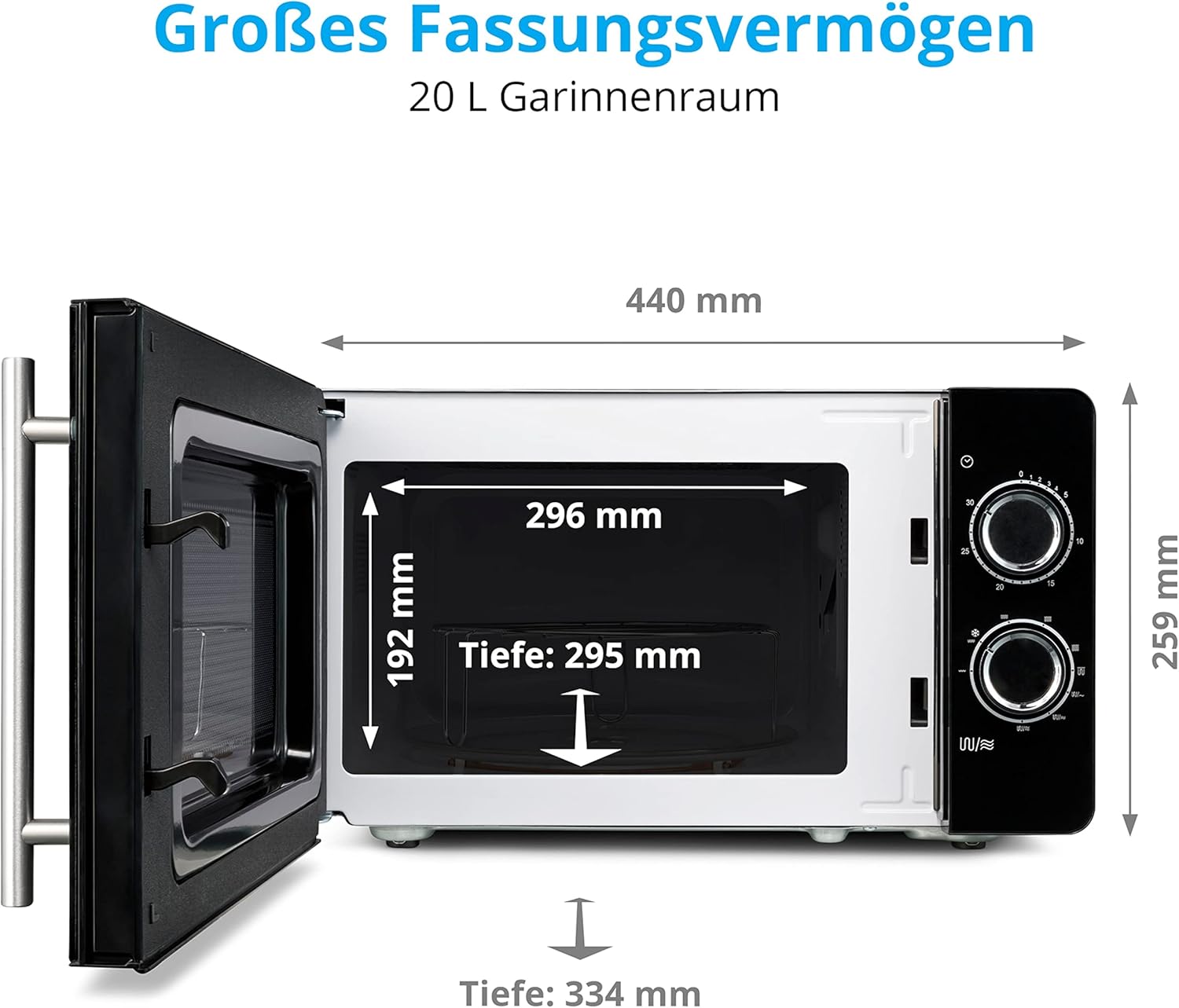
Figure 2: Internal dimensions of the microwave oven, indicating a depth of 295mm, width of 296mm, and height of 192mm for the cooking cavity. The overall external dimensions are 440mm width and 259mm height.
Included Components:
- MEDION MD10495 Microwave Oven
- Glass Turntable
- Grill Rack
Setup
- Unpacking: Carefully remove the microwave oven and all packing materials from the carton.
- Placement: Place the oven on a flat, stable surface that can withstand the weight of the oven and the heaviest food likely to be cooked in it. Ensure there is adequate ventilation space around the oven (at least 10 cm on the back and sides, 20 cm above).
- Power Connection: Plug the power cord into a grounded electrical outlet. Ensure the voltage matches the rating label on the oven.
- Turntable Assembly: Place the turntable ring inside the oven cavity. Then, place the glass turntable plate on top of the ring, ensuring it sits securely in the center hub.
- Initial Cleaning: Before first use, wipe the interior and exterior of the oven with a damp cloth.
Operating Instructions
Your MEDION microwave offers various functions for cooking and heating.
Control Panel Overview:
- Upper Knob: Timer control (up to 30 minutes).
- Lower Knob: Power/Function selector.
Microwave Cooking:
This appliance features 5 microwave power levels.
- Place food in a microwave-safe container on the glass turntable.
- Close the oven door securely.
- Turn the lower knob to select the desired microwave power level (e.g., 700W for full power).
- Turn the upper knob to set the cooking time. The oven will start automatically.
- The oven will stop and chime when the set time expires.
Grill Function:
The 800-watt grill function is ideal for browning and crisping food.
- Place food on the grill rack provided, then place the rack on the glass turntable.
- Close the oven door.
- Turn the lower knob to select the "Grill" setting.
- Turn the upper knob to set the grilling time.
- Monitor food closely to prevent burning.

Figure 3: Example of food suitable for the grill function, such as sausages.
Combination Cooking (Microwave + Grill):
The oven offers 3 combination settings, allowing you to cook and brown food simultaneously.
- Combi 1: Microwave (low) + Grill (high) - Suitable for poultry, pork, and fish.
- Combi 2: Microwave (medium) + Grill (medium) - Suitable for larger cuts of meat.
- Combi 3: Microwave (high) + Grill (low) - Suitable for vegetables and casseroles.
- Place food in a microwave-safe and oven-safe container on the grill rack.
- Close the oven door.
- Turn the lower knob to select the desired combination setting (Combi 1, 2, or 3).
- Turn the upper knob to set the cooking time.

Figure 4: The microwave and grill functions can be used separately or in combination for diverse dishes like pasta or pizza.
Defrost Function:
The defrost function allows for quick and gentle thawing of frozen foods.
- Place frozen food directly on the glass turntable or in a microwave-safe container.
- Close the oven door.
- Turn the lower knob to the "Defrost" setting (often indicated by a snowflake icon).
- Turn the upper knob to set the defrosting time based on the food's weight and type.
- Periodically check the food and turn it over if necessary to ensure even defrosting.

Figure 5: Frozen vegetables, an ideal candidate for the defrost function.
Maintenance and Cleaning
Regular cleaning helps maintain the performance and longevity of your microwave oven.
- Interior Cleaning: After each use, wipe the interior with a damp cloth to remove food splatters. For stubborn stains, use a mild detergent or a microwave-safe cleaner. The lacquered interior and front part are designed for easy cleaning.
- Exterior Cleaning: Clean the exterior surfaces with a soft, damp cloth. Do not use abrasive cleaners or solvents.
- Turntable and Grill Rack: The glass turntable and grill rack can be removed and washed in warm, soapy water or in a dishwasher.
- Door Seals: Regularly clean the door seals and adjacent parts with a damp cloth to ensure proper sealing.
- Odour Removal: To remove odors, combine a cup of water with the juice of one lemon in a microwave-safe bowl. Microwave on high for 5-7 minutes. Let it cool, then wipe the interior.
Troubleshooting
If you encounter issues with your microwave, refer to the following common problems and solutions:
| Problem | Possible Cause | Solution |
|---|---|---|
| Oven does not start. | Power cord not plugged in; Fuse blown or circuit breaker tripped; Door not closed properly. | Plug into outlet; Replace fuse or reset circuit breaker; Close door securely. |
| Food not heating. | Incorrect power level selected; Cooking time too short. | Select higher power level; Increase cooking time. |
| Turntable not rotating. | Turntable not properly placed; Debris under turntable. | Ensure turntable is correctly seated on the hub; Clean under the turntable. |
| Excessive noise during operation. | Food container touching oven walls; Turntable not centered. | Adjust food container; Re-center turntable. |
If the problem persists after trying these solutions, please contact customer support.
Specifications
| Feature | Detail |
|---|---|
| Brand | MEDION |
| Model Number | MD10495 |
| Capacity | 20 Liters |
| Microwave Power | 700 Watts |
| Grill Power | 800 Watts |
| Power Levels | 5 Microwave Power Levels |
| Combination Settings | 3 (Microwave + Grill) |
| Special Features | Grill function, Defrost function, Reheating function |
| Installation Type | Freestanding |
| Color | Silver/Black |
| Material | Glass (for turntable) |
| Product Dimensions (L x W x H) | 33.6 x 44.1 x 25.7 cm |
| Weight | 10 Kilograms |
Warranty and Support
MEDION is committed to providing high-quality products and excellent customer service.
Warranty Information:
Specific warranty details may vary by region. Please refer to the warranty card included with your product or visit the official MEDION website for detailed warranty terms and conditions.
Customer Support:
For technical assistance, troubleshooting beyond this manual, or spare parts inquiries, please contact MEDION customer support. Our competent customer service team is available to assist you.
You can find contact information on the official MEDION website or through the retailer where you purchased the product.
Related documentsMD10495


Ask a question about this manual
Ask about setup, troubleshooting, compatibility, parts, safety, or missing instructions. Manuals+ will review the question and use this page’s manual context to help answer it.