
CUBOT KingKong 5 pro
CUBOT Kingkong 5 Pro Rugged Smartphone User Manual
Model: KingKong 5 pro
1. Introduction
This manual provides essential information for the safe and efficient use of your CUBOT Kingkong 5 Pro Rugged Smartphone. Please read it thoroughly before operating the device.
The CUBOT Kingkong 5 Pro is designed for durability and performance, featuring an 8000mAh battery, Android 11, IP68/IP69K waterproof and dustproof rating, and a 48MP camera.
2. Package Contents
Verify that all items are present in your product package:
- Kingkong 5 pro Rugged Smartphone
- USB Cable
- Charger
- Cue Card
- Earphone
- Ejector tool
- User Manual (this document)
3. Device Overview
Familiarize yourself with the physical components of your CUBOT Kingkong 5 Pro.

Image: Front, back, and side view of the CUBOT Kingkong 5 Pro Rugged Smartphone, showcasing its rugged exterior and the Android 11 operating system on the display.

Image: Detailed diagram illustrating the dimensions (Height: 165.75mm, Width: 81.40mm, Thickness: 18.75mm, Weight: 308.8g) and component locations such as the 48MP Sony main camera, 5MP macro lens, 0.3MP photosensitive lens, dual flash, fingerprint sensor, power key, TF/SIM card slot, and volume buttons.
Key Components:
- Display: 6.1-inch HD+ screen (720*1560 resolution).
- Cameras: 48MP main lens, 25MP front lens, 5MP macro lens.
- Buttons: Power Key, Volume Up/Down, Fingerprint Sensor (side-mounted).
- Ports: Type-C USB port.
- SIM/TF Card Slot: Supports Dual Nano SIM and 1 TF card (expandable up to 256GB).
- Speakers: Dual Loud Stereo Speakers.
4. Setup
4.1. SIM Card and TF Card Installation
To install your SIM card(s) and/or TF card:
- Locate the SIM/TF card tray on the side of the phone.
- Insert the ejector tool into the small hole next to the tray to open it.
- Carefully pull out the tray.
- Place your Nano SIM card(s) and/or TF card into the designated slots on the tray, ensuring correct orientation.
- Gently push the tray back into the phone until it is flush with the device body.

Image: The CUBOT Kingkong 5 Pro submerged in water, illustrating its IP68 and IP69K waterproof rating. This phone is designed to withstand immersion up to 1.5 meters for 30 minutes.
Important Note on SIM Compatibility:
Before ordering, please confirm your SIM card's compatibility. The CUBOT Kingkong 5 Pro is compatible with AT&T, T-Mobile, Metro PCS, and other GSM carriers. It is NOT compatible with new AT&T/Cricket Wireless/Verizon/Sprint/Boost Mobile/US Cellular and other CDMA networks.
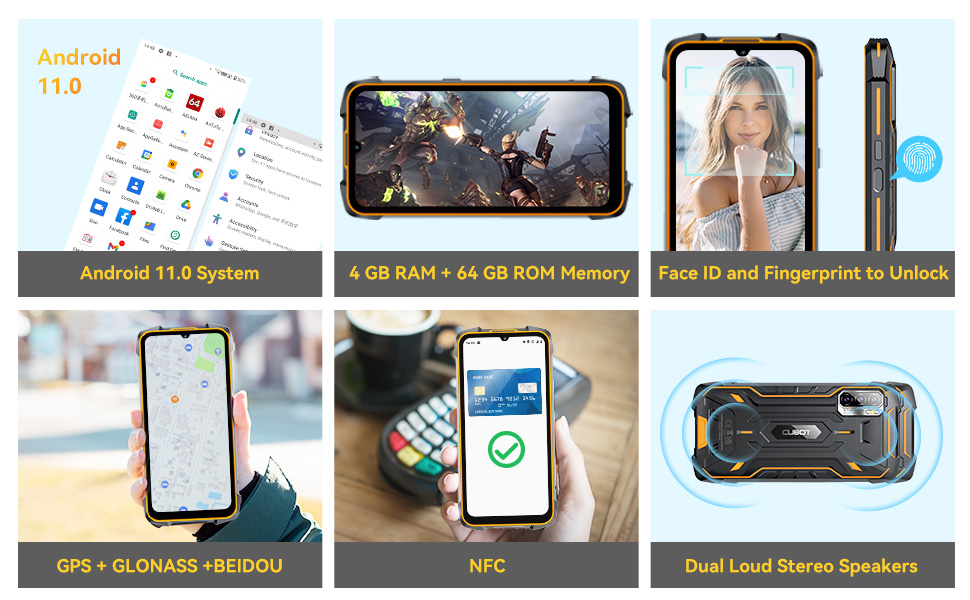
Image: A visual guide to SIM card compatibility for the CUBOT Kingkong 5 Pro, indicating that T-Mobile, AT&T (older networks), and Metro PCS are compatible, while new AT&T, Cricket, Verizon, Sprint, Boost Mobile, and US Cellular are not.
4.2. Initial Charging
Before first use, fully charge your device using the provided USB cable and charger. The phone supports 5V/3A fast charging.
- Connect the USB cable to the phone's Type-C port.
- Connect the other end of the USB cable to the charger.
- Plug the charger into a power outlet.
- The charging indicator will appear on the screen.

Image: A graphic emphasizing the 8000mAh battery of the Kingkong 5 Pro, highlighting its long standby time (800 H) and phone call duration (400 H), suggesting it can function like a power bank.
4.3. Powering On/Off
- To Power On: Press and hold the Power Key until the CUBOT logo appears.
- To Power Off: Press and hold the Power Key until the power options menu appears, then select "Power off".
5. Operating Instructions
5.1. Android 11 Operating System
Your CUBOT Kingkong 5 Pro runs on Android 11, offering an intuitive and customizable user experience. Navigate using touch gestures and on-screen controls.
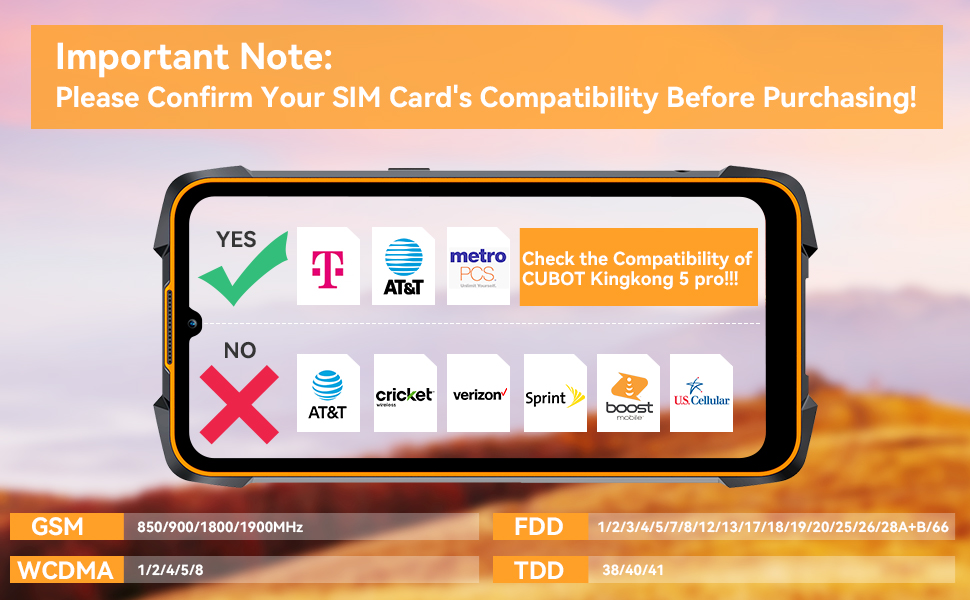
Image: A visual representation of the Android 11 operating system interface on the CUBOT Kingkong 5 Pro, displaying various app icons and system menus.
5.2. Security Features (Fingerprint/Face ID)
Enhance your phone's security and convenience with biometric unlocking.
- Fingerprint ID: The side-mounted fingerprint scanner allows for quick and secure unlocking. Register your fingerprints in the Security settings.
- Facial ID: Use the front camera for facial recognition unlocking. Set up Face ID in the Security settings.


Image: Two images demonstrating the phone's unlocking methods: one showing the use of the side-mounted fingerprint sensor and another showing facial recognition for unlocking.
5.3. Camera Operation
Capture high-quality photos and videos with the versatile camera system.
- Main Camera: The 48MP main lens provides ultra-clarity for detailed shots.
- Front Camera: The 25MP front camera is ideal for selfies and video calls.
- Macro Lens: The 5MP macro lens allows for close-up photography.

Image: The CUBOT Kingkong 5 Pro displaying its camera interface, focusing on a skier, to illustrate the capabilities of its 48MP ultra-clarity main camera, 5MP macro lens, 0.3MP photosensitive lens, and 25MP front camera.
5.4. Connectivity
- 4G Network: Supports 4G network for fast mobile data.
- Bluetooth 5.0: For connecting wireless accessories.
- NFC: Supports Near Field Communication for mobile payments and quick pairing.
- GPS: Integrated GPS + GLONASS + Beidou + Galileo for accurate navigation.


Image: Two images illustrating connectivity features: one showing an NFC payment transaction and another displaying GPS navigation on the phone screen.
6. Maintenance and Care
To ensure the longevity and optimal performance of your CUBOT Kingkong 5 Pro, follow these maintenance guidelines:
- Cleaning: Use a soft, lint-free cloth to clean the screen and body. Avoid abrasive cleaners or solvents.
- Water and Dust Resistance: While IP68/IP69K rated, ensure all port covers are securely closed before exposing the phone to water or dust. Avoid prolonged submersion or exposure to high-pressure water.
- Temperature: Operate the phone within recommended temperature ranges. Avoid extreme heat or cold.
- Impact Protection: Despite its rugged design, avoid unnecessary drops or impacts to prevent potential damage.

Image: A composite image showcasing the CUBOT Kingkong 5 Pro's robust features: 360° waterproof (submerged in water), 360° dustproof (buried in sand), and 1.5M drop resistance (phone falling).
7. Troubleshooting
This section addresses common issues you might encounter with your CUBOT Kingkong 5 Pro.
| Problem | Possible Cause | Solution |
|---|---|---|
| Phone does not power on. | Low battery; System crash. | Charge the phone for at least 30 minutes. Press and hold the Power Key for 10-15 seconds to force restart. |
| Poor call quality / Earpiece issues. | Weak signal; Oxidized earpiece antenna. | Move to an area with better signal. If earpiece sound is poor, gently tap the bottom of the phone's back against a hard surface (e.g., table) to clear potential oxidation on the earpiece antenna. |
| Cannot connect to network. | Incorrect SIM installation; Incompatible carrier; Network settings issue. | Re-insert SIM card. Verify carrier compatibility (refer to Section 4.1). Check APN settings in network settings. |
| Apps freezing or crashing. | Insufficient RAM; App conflict; Software bug. | Close background apps. Clear app cache. Restart the phone. Update apps or system software. |
| Battery drains quickly. | High screen brightness; Many background apps; GPS/Bluetooth always on. | Adjust screen brightness. Close unused apps. Turn off GPS/Bluetooth when not in use. Check battery usage in settings. |
8. Specifications
| Feature | Detail |
|---|---|
| Model | KingKong 5 pro |
| Operating System | Android 11.0 |
| Processor | MT6762D Octa-Core |
| RAM | 4 GB |
| Internal Storage (ROM) | 64 GB |
| Expandable Storage | Up to 256 GB (TF card) |
| Display | 6.1 Inches HD+ (720 x 1560 resolution) |
| Main Camera | 48 MP |
| Front Camera | 25 MP |
| Macro Lens | 5 MP |
| Battery Capacity | 8000 mAh |
| Charging | 5V/3A Fast Charging, Type-C Port |
| Waterproof/Dustproof | IP68 & IP69K |
| Drop Resistance | Up to 1.5 meters |
| Connectivity | 4G, Bluetooth 5.0, NFC, Wi-Fi |
| Navigation | GPS+GLONASS+Beidou+Galileo |
| Security | Fingerprint ID, Face ID |
| Dimensions | 6.53 x 3.2 x 0.73 inches (165.75 x 81.40 x 18.75 mm) |
| Weight | 1.28 pounds (308.8 g) |
9. Warranty and Support
For warranty information and technical support, please refer to the official CUBOT website or contact their customer service directly. Details regarding warranty periods and service procedures are typically provided with your purchase documentation or on the manufacturer's official support channels.
If you encounter product-related issues, such as connectivity problems, please contact CUBOT customer support for assistance.
Visit the official CUBOT store for more information: CUBOT Store on Amazon
Related documentsKingKong 5 pro


Ask a question about this manual
Ask about setup, troubleshooting, compatibility, parts, safety, or missing instructions. Manuals+ will review the question and use this page’s manual context to help answer it.