
Introduction
This manual provides essential instructions for the safe and effective use of your PROTEAR Bluetooth Hearing Protection Earmuffs, Model N1. Please read this manual thoroughly before operating the device and retain it for future reference. These earmuffs are designed to provide hearing protection in noisy environments while allowing for wireless audio playback and communication.
Product Overview
The PROTEAR N1 earmuffs feature a comfortable design with integrated Bluetooth technology for wireless connectivity. Key components include the wide headband, adjustable design, soft ear pads, control buttons, LED indicator, and a Type-C charging port.

Setup
1. Adjusting the Fit
Proper fit is crucial for effective hearing protection and comfort. Adjust the headband to ensure the ear cups fully cover your ears and create a snug seal. The metal frame allows for easy length adjustment.
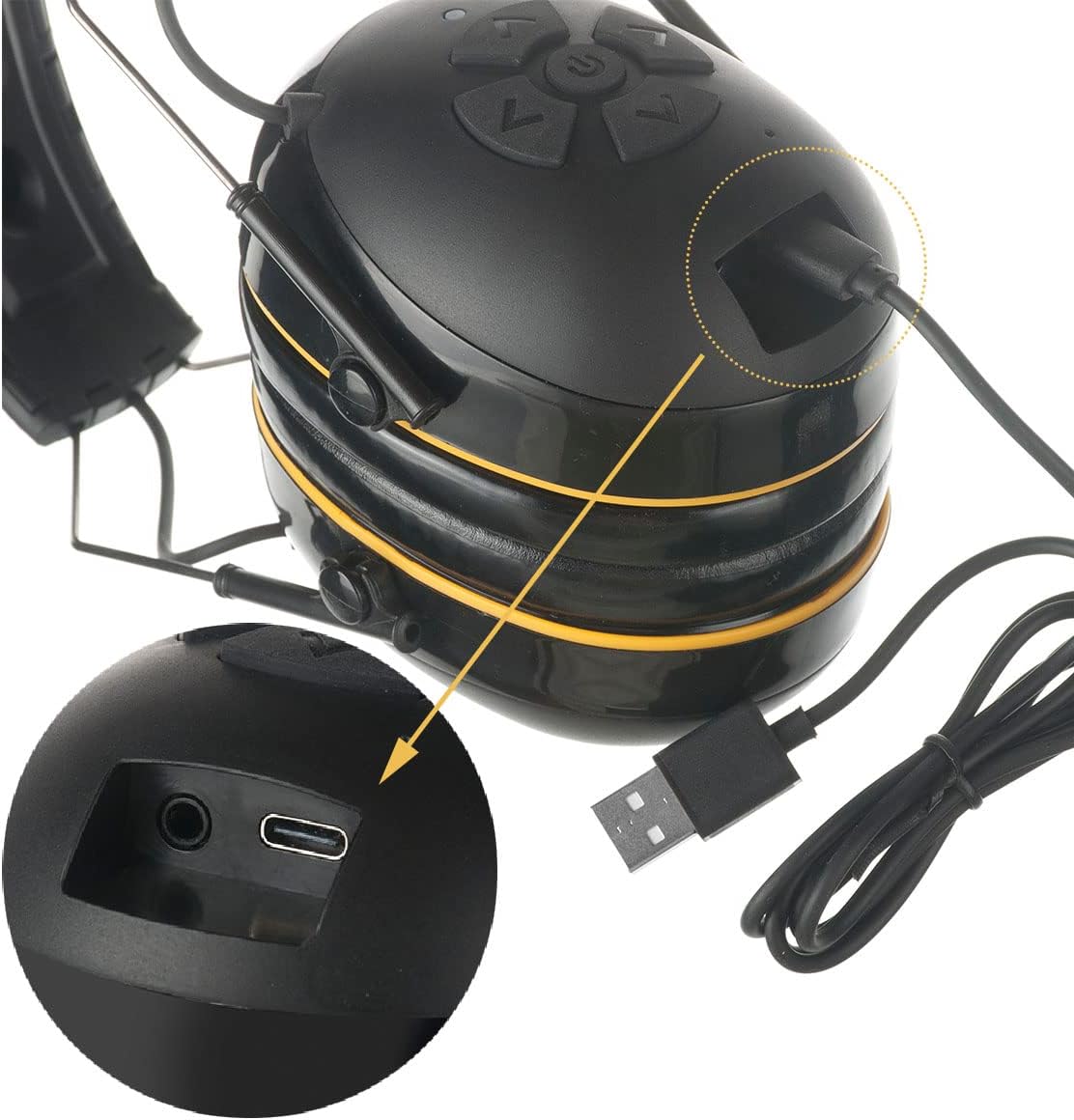
2. Initial Charging
Before first use, fully charge the earmuffs. Connect the provided USB Type-C cable to the charging port on the earmuffs and the other end to a compatible USB power source. The LED indicator will show charging status.

3. Power On/Off
To power on, press and hold the power button (usually the center button) until the LED indicator lights up. To power off, press and hold the power button again until the LED indicator turns off.
4. Bluetooth Pairing
- Ensure the earmuffs are powered off.
- Press and hold the power button for approximately 5-7 seconds until the LED indicator flashes blue and red, indicating pairing mode.
- On your mobile device, enable Bluetooth and search for available devices.
- Select "PROTEAR N1" (or similar name) from the list to connect.
- Once connected, the LED indicator will typically show a solid blue light or flash blue slowly.
Operating Instructions
The PROTEAR N1 earmuffs feature intuitive controls for audio playback and call management.

1. Audio Playback
- Play/Pause: Press the center power button once.
- Volume Up: Press the 'Up' arrow button.
- Volume Down: Press the 'Down' arrow button.
- Next Track: Press the 'Right' arrow button.
- Previous Track: Press the 'Left' arrow button.
2. Call Management
- Answer Call: Press the center power button once when a call comes in.
- End Call: Press the center power button once during a call.
- Reject Call: Press and hold the center power button for 2 seconds when a call comes in.
Charging
The earmuffs are equipped with a 1200mAh rechargeable lithium battery, providing extended playtime. The USB Type-C charging interface allows for convenient and fast charging.
- Connect the earmuffs to a USB power source using the provided Type-C cable.
- The LED indicator will illuminate during charging and change color or turn off when fully charged.
- A full charge typically provides over 40 hours of playtime.
- The earmuffs feature a low battery warning and an auto-shutoff function to conserve battery life.
Maintenance
- Cleaning: Wipe the earmuffs with a soft, damp cloth. Do not use abrasive cleaners or immerse the device in water.
- Storage: Store the earmuffs in a cool, dry place away from direct sunlight and extreme temperatures.
- Ear Pads: Periodically inspect ear pads for wear and tear. Replace if damaged to maintain optimal noise reduction and comfort.
Troubleshooting
| Problem | Possible Cause | Solution |
|---|---|---|
| Earmuffs do not power on. | Battery is depleted. | Charge the earmuffs fully. |
| Cannot pair with Bluetooth device. | Earmuffs not in pairing mode or device Bluetooth is off. | Ensure earmuffs are in pairing mode (flashing blue/red LED). Check device Bluetooth settings. Move closer to the device. |
| No sound or low volume. | Volume too low on earmuffs or connected device. | Increase volume on both the earmuffs and the connected device. Ensure earmuffs are properly connected. |
| Poor sound quality. | Weak Bluetooth connection or interference. | Move closer to the connected device. Avoid sources of strong electromagnetic interference. |
Specifications
- Brand: PROTEAR
- Model: N1
- Noise Reduction Rating (NRR): 25 dB
- Single Number Rating (SNR): 30 dB
- Bluetooth Version: 5.4
- Battery: 1200mAh Rechargeable Lithium Battery
- Playtime: 40+ hours
- Charging Port: USB Type-C
- Noise Control: Sound Isolation
- Material: ABS, PU
- Item Dimensions: 7.6 x 5.1 x 10.2 Centimetres
- Adjustability: Adjustable Headband
Safety Information
- Always ensure the earmuffs are properly fitted to achieve the stated noise reduction rating.
- Do not modify the earmuffs, as this may reduce their effectiveness and void any warranty.
- Avoid exposing the earmuffs to extreme temperatures, moisture, or corrosive substances.
- Keep out of reach of children.
- Dispose of the battery and device according to local regulations.
Warranty and Support
Specific warranty details and direct support contact information are not provided in the available product data. Please refer to the retailer or manufacturer's official website for warranty claims and customer support inquiries.