
BLACK+DECKER 800 GPH
BLACK+DECKER Swimming Pool Cover Pump User Manual
Model: 800 GPH
Introduction
This manual provides essential information for the safe and efficient operation, maintenance, and troubleshooting of your BLACK+DECKER 800 GPH Swimming Pool Cover Pump. This submersible pump is designed to quickly remove standing water from pool covers, spas, boats, and other areas. Please read this manual thoroughly before initial use to ensure proper function and longevity of the product.
Safety Information
Always observe basic safety precautions when using electrical appliances to reduce the risk of fire, electric shock, and personal injury.
- Electrical Safety: This pump operates on 110 volts AC. Ensure the power outlet is properly grounded and protected by a Ground Fault Circuit Interrupter (GFCI). Do not operate the pump with a damaged cord or plug.
- Submersion: The pump is designed for submersible use only. Do not operate it dry.
- Water Temperature: Do not use the pump with water temperatures exceeding 95°F (35°C).
- Debris: Ensure the pump's inlet is clear of large debris that could clog or damage the impeller.
- Children and Pets: Keep children and pets away from the pump and the area of operation during use.
- Disconnect Power: Always disconnect the pump from the power source before performing any maintenance, cleaning, or when not in use.
Product Overview
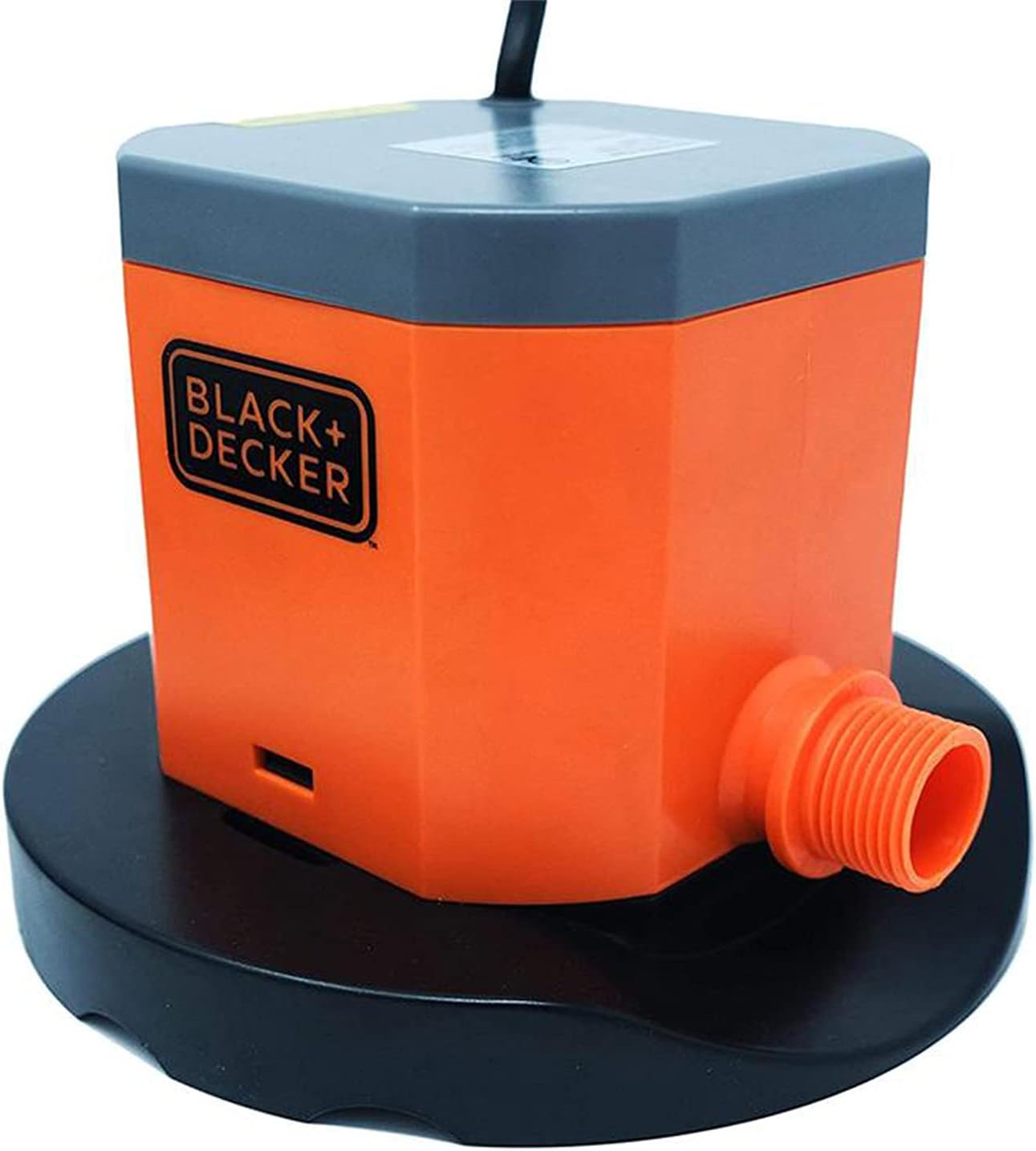
The BLACK+DECKER 800 GPH Pool Cover Pump is a compact and efficient solution for water removal. Key features include:
- High Capacity: Pumps up to 800 gallons per hour (GPH).
- Low Water Removal: Capable of removing water down to 0.125 inches deep.
- Integrated Filter: Features a reusable foam inlet filter to prevent clogging.
- Long Power Cord: Equipped with a 25-foot power cord for extended reach.
- Stabilizing Base: Designed with a wide base for stability during operation.
- Standard Hose Connection: Connects directly to a standard garden hose without additional adapters.


Setup
- Unpack: Carefully remove the pump and all components from the packaging. Inspect for any signs of damage.
- Hose Connection: Attach a standard garden hose to the pump's threaded outlet. Ensure the connection is secure to prevent leaks.
- Placement: Position the pump on the lowest point of the pool cover or the area where water needs to be removed. The stabilizing base platform should sit flat.
- Power Connection: Extend the 25-foot power cord to a suitable 110V AC grounded outlet. Ensure the outlet is protected by a GFCI. Do not plug in the pump until it is fully submerged in water.
Operating Instructions
- Submerge Pump: Place the pump into the water on the pool cover or desired area. Ensure the pump is fully submerged before plugging it in.
- Initiate Pumping: Plug the pump's power cord into the GFCI-protected 110V AC outlet. The pump will begin to operate immediately, removing water at a rate of up to 800 GPH.
- Monitor Operation: Allow the pump to operate until the water level is reduced to approximately 0.125 inches.
- Manual Shut-off: As this is a manual pump, it will not automatically shut off when the water is removed. Once the desired water level is reached, unplug the pump from the power outlet to stop operation.
- Remove Pump: Carefully remove the pump from the water.
Note: The pump is designed to remove water down to a very low level, but some residual water may remain due to the manual operation requirement.
Maintenance
Regular maintenance ensures optimal performance and extends the life of your pump.
- Filter Cleaning: The reusable foam inlet filter should be regularly inspected and cleaned. Disconnect power, remove the filter, rinse it thoroughly with clean water, and reattach. This prevents debris from clogging the pump chamber.
- Debris Removal: Periodically check the pump's intake area for any accumulated leaves, twigs, or other debris and remove them.
- Storage: When not in use, especially during off-season, clean the pump thoroughly, ensure it is dry, and store it in a cool, dry place away from direct sunlight and freezing temperatures.
Troubleshooting
| Problem | Possible Cause | Solution |
|---|---|---|
| Pump does not turn on. | No power; GFCI tripped; Damaged power cord/plug. | Check power outlet; Reset GFCI; Inspect cord for damage (do not use if damaged, contact support). |
| Pump runs but no water is discharged. | Pump not fully submerged; Inlet filter clogged; Hose kinked or blocked. | Ensure pump is fully submerged; Clean inlet filter; Straighten hose or clear blockage. |
| Reduced flow rate. | Inlet filter partially clogged; Debris in pump chamber. | Clean inlet filter; Disconnect power and carefully check for debris around the impeller. |
| Pump makes unusual noise. | Debris caught in impeller; Pump running dry. | Disconnect power and check for debris; Ensure pump is fully submerged. |
Specifications
| Attribute | Detail |
|---|---|
| Brand | BLACK+DECKER |
| Model | 800 GPH Pool Cover Pump |
| Power Source | Corded Electric |
| Voltage | 110V AC |
| Maximum Flow Rate | 800 Gallons Per Hour (GPH) / 5.83 Gallons Per Minute (GPM) |
| Minimum Water Removal Depth | 0.125 inches |
| Item Weight | 5.86 Pounds |
| Material | Plastic |
| Cord Length | 25 feet |
Warranty Information
This BLACK+DECKER Swimming Pool Cover Pump comes with a 1-year limited warranty from the date of purchase. This warranty covers defects in material and workmanship under normal use. It does not cover damage resulting from misuse, abuse, accidents, unauthorized repairs, or lack of proper maintenance. Please retain your proof of purchase for warranty claims.
Support
For technical assistance, troubleshooting beyond this manual, or warranty inquiries, please contact BLACK+DECKER customer support. Refer to the product packaging or the official BLACK+DECKER website for the most current contact information.
For more information, visit the official BLACK+DECKER Store on Amazon.
Ask a question about this manual
Ask about setup, troubleshooting, compatibility, parts, safety, or missing instructions. Manuals+ will review the question and use this page’s manual context to help answer it.