
Creative MF8385
Creative Stage 360 2.1 Bluetooth Sound Bar Speaker User Manual
Model: MF8385
1. Introduction
The Creative Stage 360 is a 2.1 Bluetooth Sound Bar Speaker system designed to enhance your home entertainment experience with cinematic audio. It features Dolby Atmos integration, upgraded system drivers, and multiple connectivity options for versatile use with various devices.
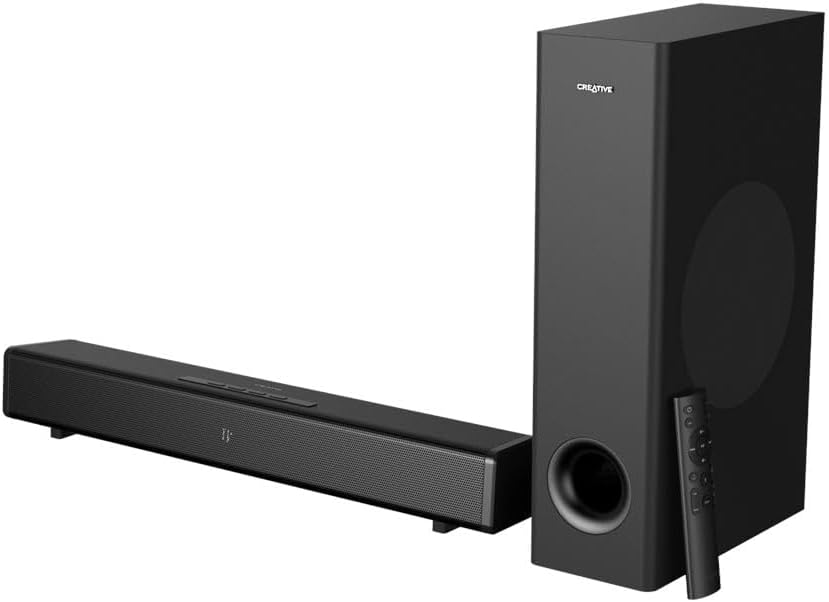
Image: The Creative Stage 360 soundbar and its accompanying subwoofer, both in black, with the remote control placed next to the subwoofer.
2. What's in the Box
Upon unboxing your Creative Stage 360, please ensure all the following components are present:
- Creative Stage 360 Sound Bar
- Wired Subwoofer
- Remote Control
- Power Cord
- HDMI Cable
- Optical Cable
- User Manual and Documentation

Image: An overhead view of all components included in the Creative Stage 360 package, neatly laid out on a white surface.
3. Setup
3.1. Placement
Place the soundbar directly in front of your television or monitor. The subwoofer can be placed on the floor near the soundbar, ideally in a corner for enhanced bass response.
3.2. Connecting the Soundbar
Follow these steps to connect your Creative Stage 360:
- Power Connection: Connect the power cord to the soundbar and then to a wall outlet.
- Subwoofer Connection: Connect the wired subwoofer to the dedicated subwoofer output port on the soundbar.
- Audio Source Connection: Choose one of the following methods to connect your audio source:
- HDMI ARC: For optimal audio quality and control, connect an HDMI cable from the HDMI ARC port on the soundbar to the HDMI ARC port on your TV. This allows your TV remote to control the soundbar's volume.
- HDMI 2.0: Use the HDMI 2.0 input ports for connecting devices like gaming consoles (PS5, Xbox Series X/S, Nintendo Switch), PCs, Blu-ray, or DVD players.
- Optical: Connect an optical cable from the soundbar's Optical In port to your TV or other audio source's optical output.
- Bluetooth 5.0: For wireless audio streaming from mobile phones, tablets, computers, or MP3 players.

Image: A close-up view of the rear panel of the Creative Stage 360 soundbar, showing the various input and output ports including HDMI ARC, HDMI 2.0, Optical, and power input.
4. Operating Instructions
4.1. Power On/Off
Press the Power button on the soundbar or the remote control to turn the unit on or off.
4.2. Adjusting Volume
Use the Volume Up (+) and Volume Down (-) buttons on the soundbar or the remote control to adjust the audio level. If connected via HDMI ARC, your TV remote may also control the volume.
4.3. Using the Remote Control
The included remote control provides full command over your soundbar's features:
- Source Selection: Use the Source button to cycle through input modes (HDMI ARC, HDMI 2.0, Optical, Bluetooth).
- Sound Modes: Press the 'Mode' button to switch between optimized sound profiles:
- Music Mode: Balanced audio for music listening.
- Movie Mode: Enhanced soundstage for cinematic experiences.
- Night Mode: Reduces dynamic range for late-night viewing without disturbing others.
- Wide Mode: Expands the soundstage for a broader audio experience.
- Bass Adjustment: Use the 'Bass +' and 'Bass -' buttons to increase or decrease the subwoofer's output.
- Far/Near Listening: Adjusts the audio for optimal listening depending on your distance from the soundbar.

Image: A detailed view of the Creative Stage 360 remote control, highlighting its various buttons for power, volume, source, sound modes, and bass control.
4.4. Bluetooth Pairing
To pair your mobile device with the soundbar via Bluetooth:
- Press the Bluetooth button on the remote control or the Source button on the soundbar until 'BT' appears on the display. The Bluetooth indicator will flash, indicating pairing mode.
- On your mobile device, enable Bluetooth and search for 'Creative Stage 360' in the list of available devices.
- Select 'Creative Stage 360' to connect. Once connected, the Bluetooth indicator on the soundbar will turn solid blue.
5. Maintenance
To ensure the longevity and optimal performance of your Creative Stage 360, follow these maintenance guidelines:
- Cleaning: Use a soft, dry cloth to wipe down the surfaces of the soundbar and subwoofer. Avoid using liquid cleaners or abrasive materials, as they may damage the finish.
- Ventilation: Ensure proper ventilation around the soundbar and subwoofer. Do not block any ventilation openings.
- Environment: Keep the unit away from direct sunlight, heat sources, excessive dust, moisture, and strong magnetic fields.
- Handling: Handle the unit with care. Avoid dropping or subjecting it to strong impacts.
6. Troubleshooting
If you encounter issues with your Creative Stage 360, refer to the following common problems and solutions:
- No Sound:
- Ensure the soundbar is powered on and the correct input source is selected.
- Check all cable connections (HDMI, Optical, Power) are secure.
- Verify the volume on both the soundbar and your connected device (TV, phone) is not muted or set too low.
- If using HDMI ARC, ensure your TV's HDMI ARC function is enabled in its settings.
- Subwoofer Not Working / Distorted Bass:
- Check the wired connection between the soundbar and the subwoofer.
- Adjust the bass level using the remote control.
- Ensure the subwoofer is receiving power.
- Remote Control Not Responding:
- Check and replace the batteries in the remote control.
- Ensure there are no obstructions between the remote and the soundbar's IR receiver.
- Bluetooth Pairing Issues:
- Ensure the soundbar is in Bluetooth pairing mode (flashing 'BT' on display).
- Disable and re-enable Bluetooth on your mobile device.
- Forget 'Creative Stage 360' from your device's Bluetooth list and attempt to pair again.
- Sound Distortion / Intermittent Audio:
- Check for loose cable connections.
- Try a different audio source or input method.
- Ensure the soundbar is not placed too close to other electronic devices that might cause interference.
7. Specifications
| Feature | Detail |
|---|---|
| Model Name | 51MF8385AA001 24110985 |
| Speaker Type | Soundbar |
| Special Feature | Bass Boost, Dolby Enabled, Subwoofer |
| Recommended Uses For Product | For Computers, For Music Players, For Smartphones or Tablets, For Televisions |
| Compatible Devices | Personal Computer, Television |
| Unit Count | 1 Count |
| Controller Type | Remote Control |
| Surround Sound Channel Configuration | 2.1 |
| Color | Multicolor |
| Included Components | Speakers |
| Product Dimensions | 3.4"D x 22.2"W x 2.9"H |
| Item Weight | 13.6 Pounds |
| Is Waterproof | FALSE |
| Warranty Type | Limited |
| Number of Items | 1 |
| Control Method | Remote |
| Wireless Communication Technology | Bluetooth |
| Speaker Size | 56.39 Centimeters |
| Power Source | Corded Electric |
| Woofer Diameter | 12 Centimeters |
| Water Resistance Level | Not Water Resistant |
| Customer Package Type | FFP |
| Audio Driver Type | Dynamic Driver |
| Bluetooth Range | 10 Meters |
| Subwoofer Connectivity Technology | Wired |
| Connectivity Protocol | Bluetooth |
| Includes MP3 player? | No |
| Number Of Circuits | 1 |
| Number of Power Levels | 1 |
| UPC | 054651194625 |
| Manufacturer | Creative Labs |
| Item model number | MF8385 |
| Date First Available | August 3, 2021 |
| Brand | Creative |
| Speaker Maximum Output Power | 240 Watts |
| Connectivity Technology | Bluetooth |
| Audio Output Mode | Surround |
| Mounting Type | Bar Mount |
8. Warranty and Support
The Creative Stage 360 comes with a Limited Warranty. For specific terms and conditions, please refer to the warranty documentation included in your product packaging.
For further assistance, technical support, or to explore other Creative products, please visit the official Creative Store:
Related documentsMF8385


Ask a question about this manual
Ask about setup, troubleshooting, compatibility, parts, safety, or missing instructions. Manuals+ will review the question and use this page’s manual context to help answer it.