
1. Safety Information
Always prioritize safety when operating welding equipment. Failure to follow safety guidelines can result in serious injury or death.
- Personal Protective Equipment (PPE): Always wear a welding helmet with appropriate shade, flame-resistant clothing, welding gloves, and safety shoes.
- Ventilation: Ensure adequate ventilation to avoid inhaling welding fumes, which can be hazardous.
- Fire Hazards: Keep flammable materials away from the welding area. Have a fire extinguisher readily available.
- Electrical Safety: Ensure the welder is properly grounded. Do not operate in wet conditions. Inspect cables for damage before use.
- Arc Rays: Welding arc rays can cause eye and skin burns. Protect yourself and bystanders.
- Hot Parts: Welded materials and equipment parts remain hot after welding. Handle with care.
- Overload Protection: The DEKO 135A-MIG welder includes over-current, over-voltage, overheating, and overload protection. If these activate, allow the machine to cool down before resuming operation.
2. Product Overview & Components
The DEKO 135A-MIG is a versatile 3-in-1 inverter arc welder designed for various welding tasks, suitable for both beginners and experienced users. It features IGBT inverter technology for efficient and stable welding.
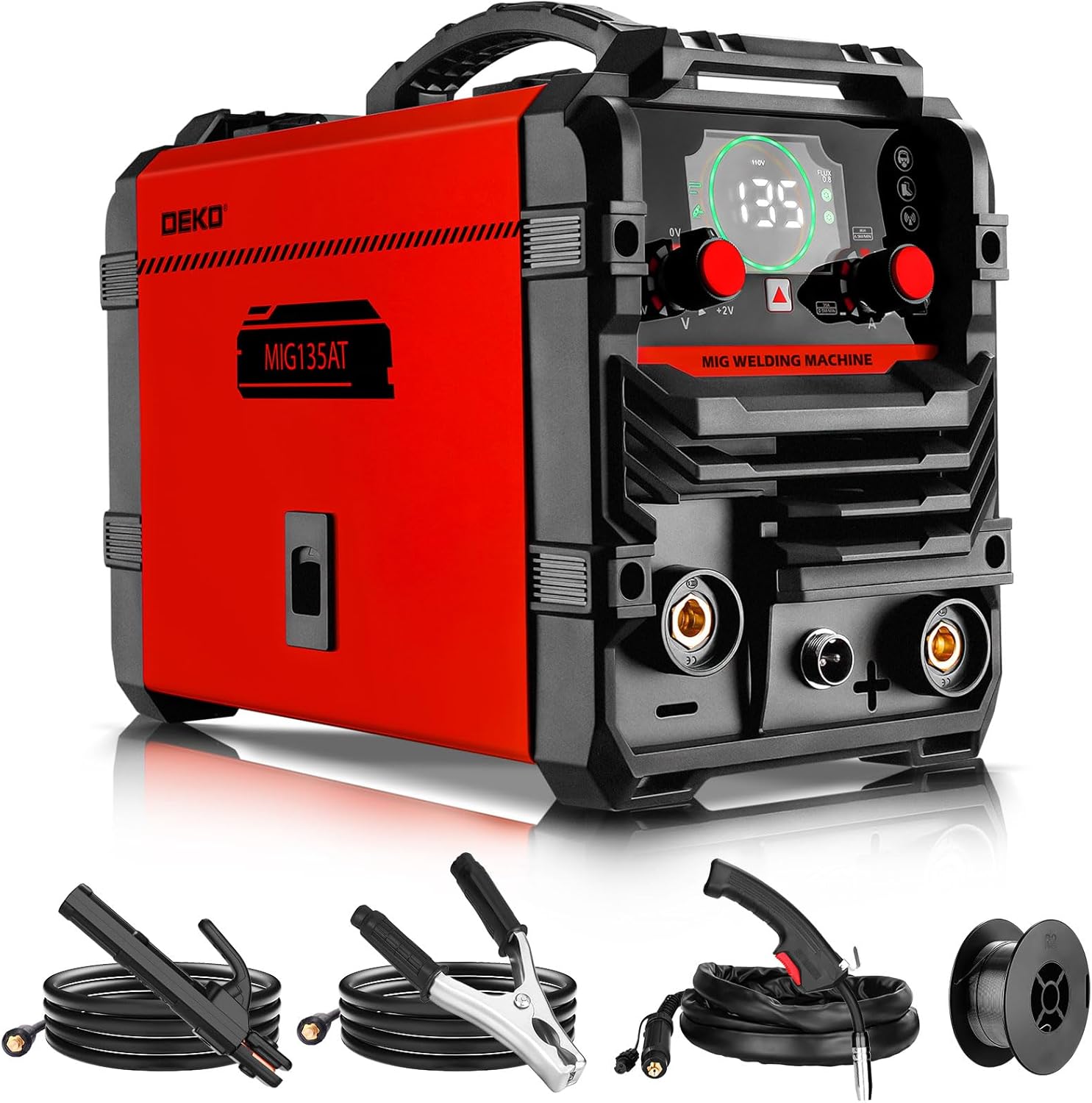
Figure 2.1: Overall view of the DEKO 135A-MIG Welder and included accessories.
2.1 Key Features
- 3-in-1 Welding Modes: Supports MIG (Metal Inert Gas) with flux-cored wire, MMA (Manual Metal Arc) / Stick welding, and Lift TIG welding (TIG torch sold separately).
- IGBT Inverter Technology: Reduces energy loss and improves welding efficiency, providing a stable arc.
- Digital Display: Advanced digital display for clear visual feedback and easy adjustment of welding parameters.
- Portability: Weighing only 5.8 kg (12.8 lbs) with a convenient handle for easy transport.
- Safety Protections: Automatic voltage compensation, over-current, overheating, and overload protection ensure safe operation.

Figure 2.2: DEKO 135A-MIG Welder highlighting Flux Core MIG, IGBT Inverter Technology, Lift TIG, and Stick Welding capabilities.
2.2 Control Panel Functions
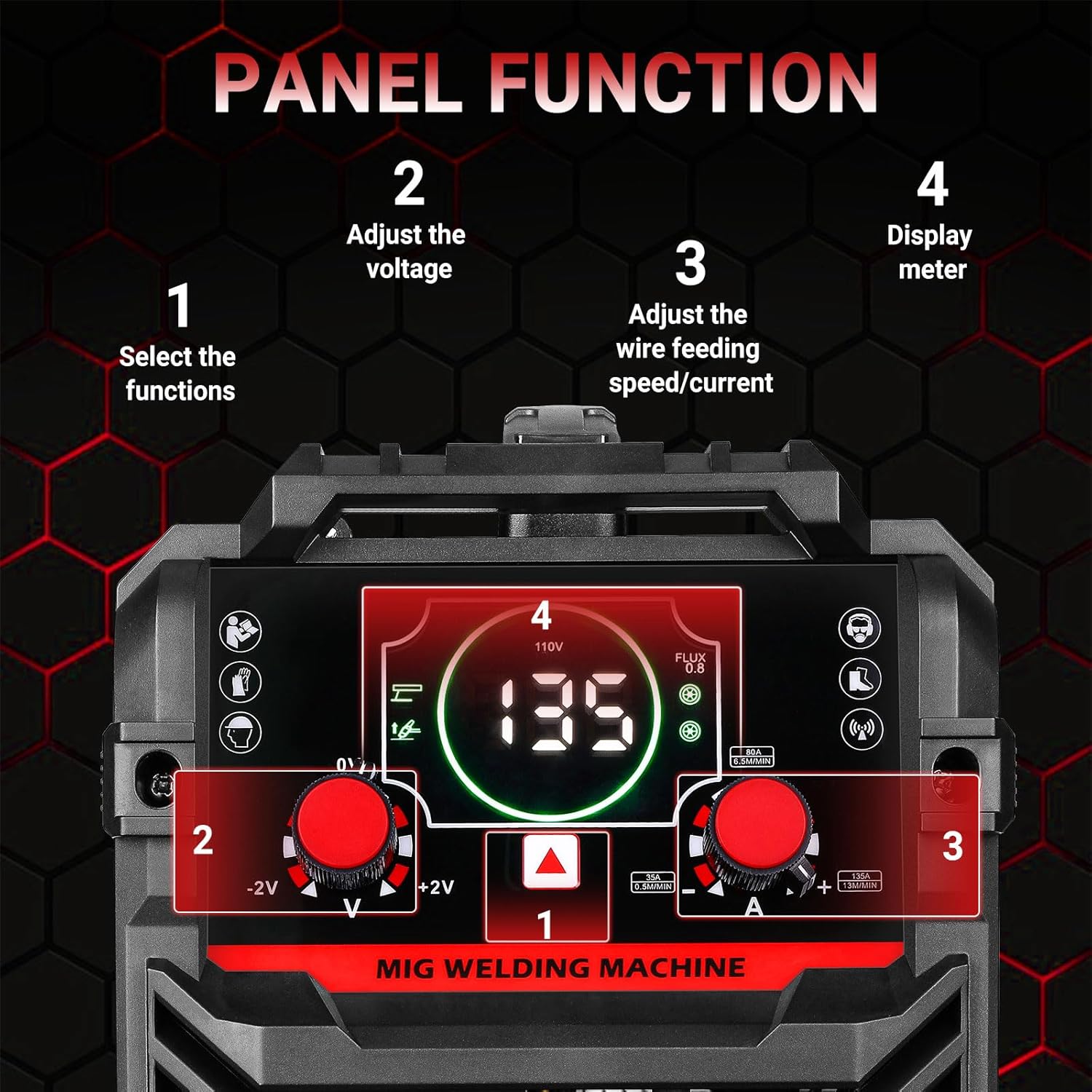
Figure 2.3: Detailed view of the control panel with numbered functions.
- Function Selection: Button to select between MIG, MMA, and Lift TIG welding modes.
- Voltage Adjustment: Knob to adjust the welding voltage.
- Wire Feeding Speed/Current Adjustment: Knob to adjust wire feeding speed (for MIG) or welding current (for MMA/Lift TIG).
- Display Meter: Digital screen showing selected parameters (e.g., amperage, voltage).
3. Kit Contents
Your DEKO 135A-MIG welder package includes the following items:
- 1 x DEKO 135A-MIG Welder
- 1 x MIG Welding Torch (2 meters)
- 1 x Earth Clamp (2.1 meters)
- 1 x Flux-Cored Wire Spool
- 1 x Electrode Holder (2.1 meters)
- 1 x Nozzle
- 1 x 1.0/0.39 inch Nozzle
- 1 x Instruction Manual
4. Setup
4.1 Connecting Cables (MMA/Stick Welding)
- Connect the electrode holder cable to the positive (+) terminal on the welder. Insert the connector and twist to secure.
- Connect the earth clamp cable to the negative (-) terminal on the welder. Insert the connector and twist to secure.
- Attach the earth clamp securely to the workpiece or welding table to ensure a good electrical connection.
- Insert the welding electrode into the electrode holder.
Video 4.1: Illustrative video demonstrating the unboxing and initial setup of a similar 135A welding machine, including cable connections.
4.2 Loading Flux-Cored Wire (MIG Welding)
- Open the side panel of the welder to access the wire feed mechanism.
- Place the flux-cored wire spool onto the spool holder. Ensure it rotates freely.
- Thread the wire through the wire guide and into the drive roller mechanism.
- Adjust the tension on the drive roller to prevent slipping or crushing the wire.
- Close the side panel.
Video 4.2: Illustrative video showing the wire feeding process for a similar MIG welder.
Video 4.3: Illustrative video demonstrating MIG gun operation and wire feeding for a similar welder.
5. Operation
The DEKO 135A-MIG welder offers three primary welding modes: MIG (Flux-Cored), MMA (Stick), and Lift TIG.

Figure 5.1: The DEKO 135A-MIG supports MIG, Stick, and Lift TIG welding modes.
5.1 Selecting Welding Mode
Use the function selection button on the control panel (refer to Figure 2.3, item 1) to cycle through the available welding modes: MIG, MMA, or Lift TIG.
5.2 Adjusting Parameters
Once the mode is selected, use the adjustment knobs (refer to Figure 2.3, items 2 and 3) to set the appropriate voltage, current, or wire feed speed according to your material and welding requirements. The digital display (Figure 2.3, item 4) will show the selected values.
5.3 Welding Process
Ensure proper PPE is worn and the workpiece is securely clamped and grounded. Initiate the arc according to the chosen welding process. Maintain a steady hand and consistent travel speed for optimal weld quality.
Video 5.1: Illustrative video demonstrating MIG, MMA, and Lift TIG welding modes on a similar 3-in-1 machine.
Video 5.2: Illustrative video demonstrating MMA (Stick) welding with a similar inverter welder.
5.4 Supported Materials
The DEKO 135A-MIG welder is capable of welding a wide range of metals, including:

Figure 5.2: Examples of metals that can be welded with the DEKO 135A-MIG: Cast Iron, Mild Steel, Sheet Metal, Stainless Steel, Square Pipe, and Metal Cage.
6. Maintenance
Regular maintenance ensures the longevity and optimal performance of your DEKO 135A-MIG welder.
- Cleaning: Remove dust from the machine twice a month using compressed air. Ensure the machine is unplugged before cleaning.
- Cable Inspection: Periodically check all cables (electrode holder, earth clamp, power cord) for cuts, fraying, or damage. Replace damaged cables immediately.
- Nozzle and Contact Tip: For MIG welding, regularly clean or replace the nozzle and contact tip to ensure proper wire feed and gas flow.
- Storage: Store the welder in a dry, clean environment when not in use.
7. Troubleshooting
If you encounter issues with your DEKO 135A-MIG welder, consider the following common troubleshooting steps:
- No Power: Check the power connection, ensure the main switch is ON, and verify the power outlet is functional.
- No Arc: Ensure the earth clamp has a good connection to the workpiece. Check the electrode holder connection and that the electrode is properly inserted. For MIG, check wire feed and contact tip.
- Poor Weld Quality: Adjust welding parameters (current, voltage, wire speed) according to the material thickness and type. Ensure the workpiece is clean and free of rust or paint.
- Overload/Overheat Indicator: If the overload or overheat indicator lights up, stop welding and allow the machine to cool down. Ensure proper ventilation around the welder.
- Wire Feeding Issues (MIG): Check for tangled wire, proper tension on the drive rollers, and a clean contact tip/nozzle.
If problems persist, contact DEKO customer support for assistance.
8. Specifications
| Feature | Specification |
|---|---|
| Model | 135A-MIG |
| Manufacturer | DEKO |
| Voltage | 220 Volts |
| Power Source | Electric (corded) |
| Dimensions (Package) | 38.5 x 30.8 x 22.4 cm (15.16 x 12.13 x 8.82 inches) |
| Product Weight | 6.84 kg (15.08 lbs) |
| Welding Modes | MIG (Flux-Cored), MMA (Stick), Lift TIG |
| Color | Red |
9. Warranty & Support
For warranty information, technical support, or service inquiries regarding your DEKO 135A-MIG welder, please refer to the contact details provided with your purchase documentation or visit the official DEKO website. Keep your proof of purchase for warranty claims.
