
dyplay 1702C
Dyplay 20-Inch Bluetooth Soundbar User Manual
Brand: dyplay | Model: 1702C
This manual provides comprehensive instructions for setting up, operating, and maintaining your Dyplay 20-Inch Bluetooth Soundbar. Enhance your audio experience with powerful sound and versatile connectivity.
Product Overview
The Dyplay 20-Inch Bluetooth Soundbar (Model 1702C) is designed to upgrade your home theater audio with its 100-watt peak power output. It delivers clear treble, heavy bass, and a wide stereo effect, making it ideal for TVs, smartphones, PCs, and gaming setups. Its compact design allows for flexible placement, either on a desktop or wall-mounted.

Image: The Dyplay 20-Inch Bluetooth Soundbar in black, accompanied by its remote control, showcasing its sleek design.
Setup Guide
What's in the Box?
Before you begin, ensure all components are present:
- 1 x Dyplay Soundbar
- 1 x Power Adapter
- 1 x Remote Controller
- 1 x HDMI Cable
- 1 x Optical Cable
- 1 x Audio Cable (3.5mm)
- 1 x RCA-3.5mm Cable
- 1 x User Manual (this document)

Image: A visual representation of all items included in the soundbar package, such as the soundbar, remote, cables, and power adapter.
Placement Options
The soundbar can be placed on a desktop or mounted on a wall:
- Desktop Placement: Place the soundbar directly in front of your TV or monitor on a flat, stable surface.
- Wall Mount: The soundbar is designed to be wall-mountable. (Mounting brackets are not included).

Image: Demonstrates the soundbar's versatility with illustrations for both wall-mounted and desktop setups.
Connecting Your Soundbar
The Dyplay soundbar offers multiple connection options:
- HDMI (ARC): For optimal audio quality and synchronized volume control with your TV remote. Connect an HDMI cable from the soundbar's HDMI ARC port to your TV's HDMI ARC port. Ensure your TV's audio output is set to HDMI (ARC) and PCM format.
- Optical: For high-quality digital audio. Connect an optical cable from the soundbar's OPTICAL port to your TV's Optical Output port. Remember to remove the protective caps from the optical cable ends. Ensure your TV's audio output is set to Optical and PCM format.
- AUX (3.5mm): For connecting devices with a 3.5mm audio jack. Use the provided 3.5mm audio cable.
- USB: For playing audio from a USB drive.
- TF Card: For playing audio from a TF (MicroSD) card.
- Bluetooth 5.0: For wireless connection to smartphones, tablets, and other Bluetooth-enabled devices.

Image: A close-up view of the soundbar's rear panel, highlighting the various input ports including USB, AUX, Optical, TF card slot, and HDMI ARC.
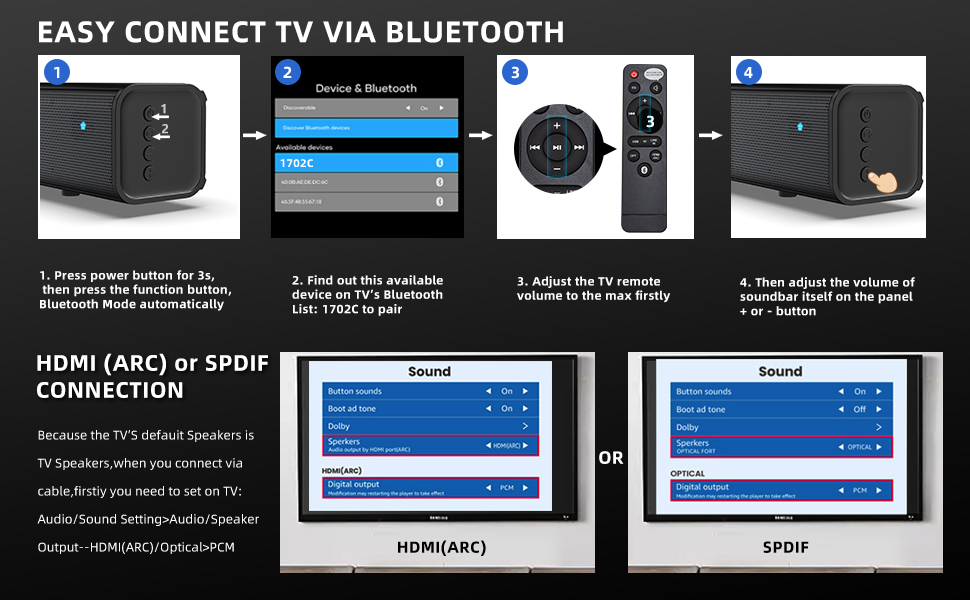
Image: A step-by-step diagram illustrating how to connect the soundbar via Bluetooth and how to configure TV settings for HDMI (ARC) or SPDIF connections, including setting audio output to PCM.
Operating Instructions
Power On/Off
Press the power button on the soundbar or the remote control to turn the unit on or off.
Mode Selection
The soundbar features 4 equalizer modes to optimize your listening experience:
- Music Mode: Enhanced for musical playback.
- Movie Mode: Optimized for cinematic sound effects.
- News Mode: Clearer dialogue for news and talk shows.
- Gaming Mode: Immersive sound for gaming.
Switch between modes using the dedicated buttons on the remote control or the soundbar's control panel.

Image: Illustrates the four distinct equalizer modes (Music, Movie, News, Gaming) available on the soundbar, each with a corresponding visual scene.
Volume Control
Adjust the volume using the volume up/down buttons on the remote control or the soundbar's control panel. If connected via HDMI ARC, your TV remote may also control the soundbar's volume.
Bluetooth Pairing
- Ensure the soundbar is powered on and in Bluetooth mode (indicated by a specific LED color or voice prompt).
- On your device (smartphone, tablet, etc.), enable Bluetooth and search for available devices.
- Select "1702C" from the list of devices to pair.
- Once paired, the soundbar will indicate a successful connection, and you can stream audio wirelessly.
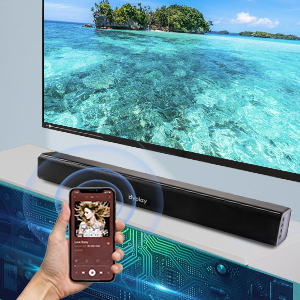
Image: A graphic illustrating a smartphone wirelessly connected to the soundbar via Bluetooth, with sound waves emanating from the soundbar.
Care and Maintenance
To ensure the longevity and optimal performance of your Dyplay soundbar, follow these guidelines:
- Cleaning: Use a soft, dry cloth to wipe the surface of the soundbar. Do not use liquid cleaners or abrasive materials, as they may damage the finish.
- Placement: Avoid placing the soundbar in direct sunlight, near heat sources, or in areas with high humidity or dust.
- Ventilation: Ensure adequate airflow around the soundbar to prevent overheating.
- Handling: Handle the soundbar with care. Avoid dropping it or subjecting it to strong impacts.
Troubleshooting
If you encounter issues with your soundbar, refer to the following common problems and solutions:
| Problem | Possible Cause / Solution |
|---|---|
| No Sound from Soundbar |
|
| Sound is Not Loud Enough |
|
| Bluetooth Pairing Issues |
|
| Remote Control Not Working |
|
Note: The soundbar does not support Dolby Audio due to copyright issues.
Technical Specifications
| Feature | Specification |
|---|---|
| Model Name | 1702C |
| Speaker Type | Soundbar |
| Mounting Type | Wall Mount, Desktop |
| Speaker Maximum Output Power | 100 Watts (Peak) |
| Surround Sound Channel Configuration | 2.0 |
| Connectivity Technology | Bluetooth 5.0, HDMI (ARC), Optical, AUX (3.5mm), USB, TF Card |
| Wireless Communication Technology | Bluetooth |
| Bluetooth Range | 15 Meters |
| Product Dimensions (D x W x H) | 2.4"D x 20"W x 2.4"H |
| Item Weight | 2.89 pounds |
| Color | Black |
| Controller Type | Button, Remote Control |
| Power Source | Corded Electric |
| Audio Driver Type | Dynamic Driver |
| Special Features | Wireless, Bluetooth, Wall Mount, 2 Powerful Full-Range Speakers, 4 Equalizer Modes, Remote Control |
Warranty and Support
Every Dyplay soundbar undergoes a strict quality test process. We stand by the quality of our product with a 12-month worry-free after-sales support.
For any problems or inquiries, please contact us via Amazon. Our customer service team is ready to assist you.
Contact Information:
- Through your Amazon order page for the product.
- Visit the official Dyplay Store on Amazon: dyplay Store
Ask a question about this manual
Ask about setup, troubleshooting, compatibility, parts, safety, or missing instructions. Manuals+ will review the question and use this page’s manual context to help answer it.