
1. Introduction
Thank you for choosing the Pro Breeze 1000ml Electric Dehumidifier. This manual provides important information regarding the safe operation, installation, maintenance, and troubleshooting of your new appliance. Please read these instructions thoroughly before use and retain them for future reference.
This compact and portable dehumidifier is designed to efficiently remove excess moisture from the air in small to medium-sized rooms, helping to prevent mold, mildew, and dampness. It features ultra-quiet Peltier technology, a 4-hour timer, automatic shut-off, and customizable LED lighting.
2. Safety Information
- Always ensure the voltage indicated on the rating label matches your mains supply voltage.
- Do not operate the appliance with a damaged cord or plug. If the supply cord is damaged, it must be replaced by the manufacturer, its service agent, or similarly qualified persons to avoid a hazard.
- This appliance is for indoor use only. Do not use it outdoors.
- Do not immerse the appliance, power cord, or plug in water or other liquids.
- Always unplug the appliance when not in use, before cleaning, or before moving it.
- Keep the appliance out of reach of children and pets.
- Ensure the air inlet and outlet are not blocked to allow for proper airflow.
- Operate the dehumidifier on a stable, flat surface to prevent tipping.
- Do not use the appliance in areas where flammable liquids or gases are stored.
3. Product Overview
The Pro Breeze 1000ml Electric Dehumidifier is designed for ease of use and effective moisture control. Key features include:
- Efficient Moisture Extraction: Removes up to 450ml of moisture per day using advanced Peltier thermoelectric technology.
- Large Water Tank: Features a 1000ml (1L) capacity water tank, reducing the frequency of emptying.
- Ultra-Quiet Operation: Operates at a low noise level (below 37 dB), suitable for bedrooms and offices.
- 4-Hour Timer: Built-in timer for automatic shut-off after 4 hours of operation.
- Automatic Shut-Off: The unit automatically turns off when the water tank is full, indicated by a red light.
- 6 LED Light Colors: Choose from 6 vibrant LED colors to create ambient lighting, or turn the light off for undisturbed sleep.
- Compact and Portable: Lightweight design for easy placement and movement between rooms.

Image 3.1: Overview of the Pro Breeze 1000ml Electric Dehumidifier, highlighting its compact size (H 24cm, W 15cm, L 15cm) and key features like 450ml/day extraction, 1L water tank, 4-hour timer, full tank indicator, LED lights, and power cord.

Image 3.2: Visual summary of the dehumidifier's features: ultra-silent, energy-saving, lightweight, portable, 1L water tank, 6 LED colors, 4-hour timer, and automatic shut-off.
4. Setup
- Unpack: Carefully remove the dehumidifier from its packaging. Retain all packaging materials for future storage or transport.
- Placement: Place the dehumidifier on a flat, stable surface in the desired room. Ensure there is at least 10cm (4 inches) of space around the air inlet and outlet for optimal airflow. Avoid placing it directly against walls or furniture.
- Power Connection: Plug the power adapter into a suitable electrical outlet.
5. Operating Instructions
5.1 Power On/Off
- To turn on the dehumidifier, press the Power button (⑁) located on the top panel. The power indicator light will illuminate.
- To turn off the dehumidifier, press the Power button (⑁) again. The power indicator light will turn off.
5.2 Setting the 4-Hour Timer
- While the dehumidifier is running, press the Timer/Light button (⌚/☀) once to activate the 4-hour timer. The timer indicator light will illuminate.
- The dehumidifier will operate for 4 hours and then automatically shut off.
- To deactivate the timer, press the Timer/Light button (⌚/☀) again. The timer indicator light will turn off.

Image 5.1: The dehumidifier operating with its 4-hour timer function, ideal for use during sleep or when leaving the room.
5.3 LED Light Control
- The dehumidifier features 6 bright LED colors that illuminate the water tank.
- To cycle through the colors or turn the light off, press the Timer/Light button (⌚/☀) repeatedly until the desired color or 'off' state is reached.
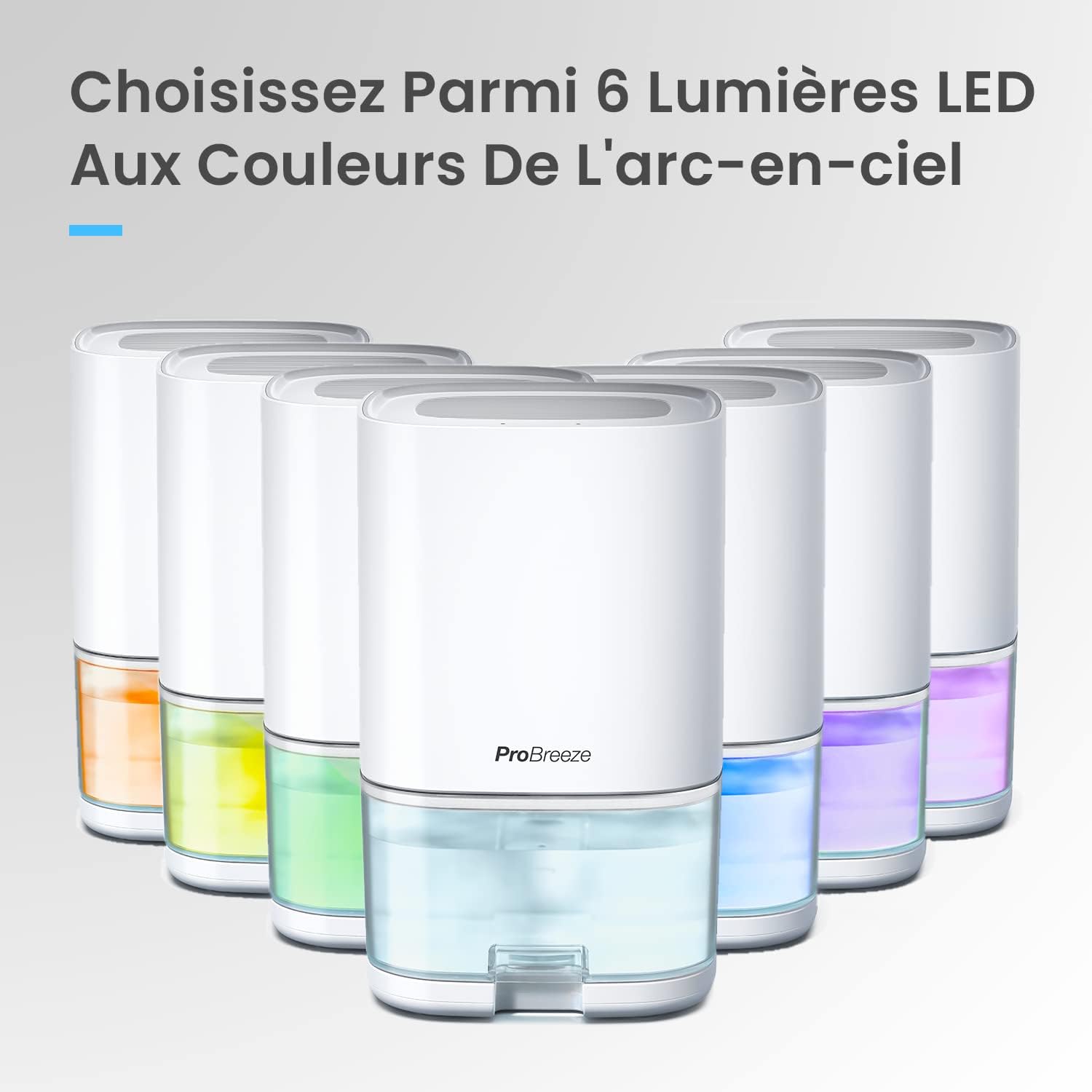
Image 5.2: Multiple Pro Breeze dehumidifiers displaying the range of 6 selectable LED light colors.
5.4 Automatic Shut-Off and Water Tank Full Indicator
- When the 1000ml water tank is full, the dehumidifier will automatically shut off to prevent overflow.
- The water tank will illuminate red to indicate that it needs to be emptied.

Image 5.3: The dehumidifier's water tank glowing red, signaling that it is full and requires emptying.
5.5 Optimal Operating Conditions
For best performance, the dehumidifier operates optimally between 20-30℃ (68-86°F) with a relative humidity of 60-80%.
6. Maintenance
6.1 Emptying the Water Tank
- When the water tank is full and the red indicator light is on, turn off the dehumidifier and unplug it from the power outlet.
- Carefully slide out the water tank from the front of the unit.
- Pour out the collected water.
- Slide the empty water tank back into the dehumidifier until it clicks into place. Ensure it is securely seated.
- Plug in the dehumidifier and turn it on to resume operation.

Image 6.1: The 1000ml water tank being removed from the dehumidifier for emptying or cleaning.
6.2 Cleaning the Dehumidifier
- Always unplug the appliance before cleaning.
- Wipe the exterior of the unit with a soft, damp cloth. Do not use abrasive cleaners or solvents.
- Clean the air inlet and outlet grilles regularly with a soft brush or vacuum cleaner to prevent dust buildup.
- The water tank can be rinsed with clean water. For thorough cleaning, use a mild detergent and rinse well. Ensure the tank is completely dry before reinserting.
7. Troubleshooting
| Problem | Possible Cause | Solution |
|---|---|---|
| Dehumidifier does not turn on. | No power supply. | Check if the power cord is securely plugged into the outlet and the unit. Ensure the outlet is functioning. |
| Dehumidifier is running but not collecting water. | Room humidity is too low. | The dehumidifier will only extract water if the relative humidity is above 40%. If humidity is low, less water will be collected. |
| Temperature is too low. | Peltier dehumidifiers are less effective in very cold environments (below 10°C). Ensure the room temperature is within the optimal range (20-30℃). | |
| Air inlets/outlets are blocked. | Ensure there is sufficient space around the unit and that the grilles are clean and unobstructed. | |
| Dehumidifier automatically shuts off and red light is on. | Water tank is full. | Empty the water tank and reinsert it correctly. |
| Unit is noisy. | Unit is not on a flat surface. | Place the dehumidifier on a stable, flat surface. |
8. Specifications
| Feature | Detail |
|---|---|
| Model Number | PB-F17W |
| Dimensions (L x W x H) | 15.1 x 15.1 x 28 cm |
| Weight | 1.2 kg |
| Water Tank Capacity | 1000 ml |
| Moisture Extraction | Up to 450 ml/day |
| Power | 36 Watts |
| Airflow | 42 m³/hour |
| Operating Temperature Range | Optimal 20-30℃ (68-86°F) |
| Special Features | Quiet operation, 4-hour timer, Portable, Automatic shut-off, 6 LED light colors |
9. Product Video Overview
Video 9.1: An official product video demonstrating the key features and benefits of the Pro Breeze 1000ml Electric Dehumidifier, including its moisture extraction capabilities, quiet operation, timer function, LED lighting, and automatic shut-off when the water tank is full.
10. Warranty and Support
For warranty information and customer support, please refer to the warranty card included with your product or visit the official Pro Breeze website. Do not attempt to repair the appliance yourself, as this may void the warranty and pose a safety risk.

