
1. Introduction
This manual provides essential instructions for the safe and efficient operation, installation, and maintenance of your Hydra-Kool KGL-RM-60-S Grab-N-Go Open Over-Under Self-Contained Refrigerated Merchandiser. Please read this manual thoroughly before installation and use, and retain it for future reference.
1.1 Safety Information
- Always disconnect power before cleaning, servicing, or performing maintenance.
- Ensure proper ventilation around the unit to prevent overheating and maintain cooling efficiency.
- Do not store explosive substances such as aerosol cans with a flammable propellant in this appliance.
- This appliance is intended for commercial use only.
- Keep all ventilation openings clear of obstruction.
- Do not damage the refrigerant circuit.
2. Setup
2.1 Unpacking
Carefully remove all packaging materials, including any protective films or tapes. Inspect the merchandiser for any shipping damage. Report any damage to the carrier immediately.
2.2 Placement
- Place the unit on a strong, level surface capable of supporting its weight (approximately 750 lbs). Use the leveling feet to ensure stability.
- Ensure adequate clearance around the unit for proper air circulation, especially at the rear and sides where the condenser is located. Avoid placing the unit near heat sources or in direct sunlight.
- Maintain an ambient temperature between 60°F (15°C) and 75°F (24°C) for optimal performance.

Figure 1: Front view of the Hydra-Kool KGL-RM-60-S Refrigerated Merchandiser. This image shows the overall design with the open front, adjustable shelves, and LED lighting in the canopy.
2.3 Electrical Connection
- Verify that the power supply voltage matches the requirements specified on the unit's data plate.
- Connect the merchandiser to a dedicated, properly grounded electrical outlet. Do not use extension cords or adapter plugs.
- Allow the unit to stand for at least 2 hours after moving before plugging it in to allow refrigerants to settle.
2.4 Initial Cleaning
Before first use, clean the interior and exterior surfaces with a mild soap and water solution. Rinse thoroughly and dry completely.
3. Operating Instructions
3.1 Power On and Initial Cooling
After connecting to power, the unit will begin to cool. Allow several hours for the merchandiser to reach its set temperature before loading products.
3.2 Digital Temperature Control
The merchandiser is equipped with a digital temperature control system. Refer to the specific controller's manual (if provided separately) for detailed programming instructions. Generally, the display shows the current internal temperature. Buttons allow for adjusting the set point, initiating manual defrost cycles, and viewing system status.
3.3 Loading Products
- Load products evenly on the adjustable shelves. Do not overload shelves beyond their weight capacity.
- Ensure that products do not block the air circulation vents inside the merchandiser. Proper airflow is crucial for maintaining consistent temperatures.
- The unit features (2) locking rear loading doors for convenient stocking and a key locking manual front shutter for security when closed.
3.4 LED Lighting
The merchandiser includes LED lighting in the canopy and under all shelves to illuminate products. These lights are typically controlled by a switch, often located near the digital controller or on the unit's exterior.
4. Maintenance
4.1 Daily Cleaning
- Wipe down interior and exterior surfaces with a damp cloth and mild, non-abrasive cleaner.
- Clean the tempered side glass regularly to maintain visibility.
4.2 Condenser Coil Cleaning (Monthly/Quarterly)
The condenser coil, located at the bottom rear of the unit, should be cleaned regularly to ensure efficient operation. Always disconnect power before cleaning the condenser. Use a stiff brush or vacuum cleaner to remove dust and debris from the fins. A dirty condenser coil can significantly reduce cooling efficiency and increase energy consumption.
4.3 Defrosting
This self-contained unit typically features an automatic defrost cycle. If excessive ice buildup is observed, consult the digital controller manual for instructions on initiating a manual defrost or contact a qualified service technician.
4.4 Gasket Inspection
Regularly inspect the gaskets around the rear loading doors for cracks or damage. Damaged gaskets can lead to air leaks and reduced cooling efficiency. Replace worn gaskets promptly.
5. Troubleshooting
Before contacting service, review the following common issues and their potential solutions:
| Problem | Possible Cause | Solution |
|---|---|---|
| Unit not cooling |
|
|
| Excessive noise |
|
|
| Water on floor |
|
|
If the problem persists after attempting these solutions, contact a qualified service technician.
6. Specifications
Detailed technical specifications for the Hydra-Kool KGL-RM-60-S Refrigerated Merchandiser:
| Feature | Detail |
|---|---|
| Model Number | KGL-RM-60-S |
| Dimensions (W x D x H) | 60-5/8" x 36" x 65" (60.63"W x 36"D x 65"H) |
| Weight | 750 Pounds |
| Refrigeration Type | Self-Contained |
| Compressor Horsepower | 3/4 HP |
| Shelves | (2) Adjustable shelves |
| Doors | (2) Locking rear loading doors |
| Lighting | LED lighting in canopy & under all shelves |
| Exterior Finish | Gray PVC coated steel |
| Interior Finish | Gray PVC coated steel |
| Side Panels | Tempered side glass, black foamed polystyrene end panels |
| Certifications | ETL-Sanitation, cETLus |
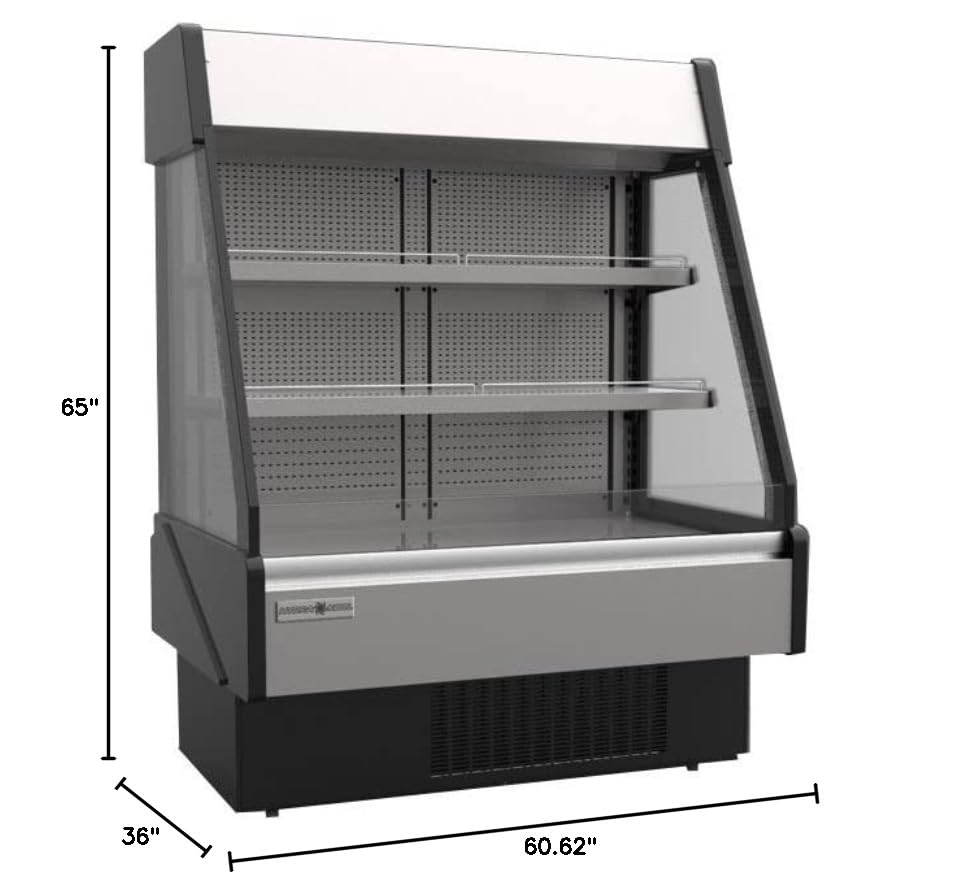
Figure 2: Dimensional view of the Hydra-Kool KGL-RM-60-S, illustrating its width (60.62"), depth (36"), and height (65").
7. Warranty and Support
For warranty information and technical support, please refer to the documentation provided at the time of purchase or contact your authorized Hydra-Kool dealer. Ensure you have your model number (KGL-RM-60-S) and serial number ready when contacting support.
Manufacturer: MVP Group


