
BELLISSIMA 11847A
Bellissima Imetec Air Wonder Hot Air Brush - Model 11847A User Manual
Brand: BELLISSIMA
Introduction
The Bellissima Imetec Air Wonder is an 8-in-1 hot air brush designed to dry, volumize, and create various hairstyles with ease. Featuring ionic technology and ceramic & keratin coated brushes, this versatile tool allows for effortless styling while protecting your hair and minimizing frizz. This manual provides detailed instructions for safe and effective use of your Air Wonder.

Image: The Bellissima Imetec Air Wonder hot air brush, showcasing its main unit and the complete set of 8 interchangeable styling accessories.
Safety Guidelines
- Do not use the device near water.
- Ensure the device is switched off and cooled down after use to prevent burns.
- Always read the label, warnings, and instructions provided with the product before use.
- Keep out of reach of children.
- Do not operate if the cord or plug is damaged.
- Unplug the appliance during cleaning and when not in use.
What's Included
Your Bellissima Imetec Air Wonder package includes:
- Hot Air Brush Main Unit
- 1 x Concentrator (2x6 cm)
- 1 x Detangling Brush
- 1 x Oval Volumizing Brush
- 1 x Round Brush (50 mm)
- 1 x Round Brush (32 mm)
- 1 x Curling Iron (19 mm)
- 1 x Diffuser for Curly Hair
- 1 x Beauty Bag
- User Manual

Image: A visual representation of the 8 distinct styling accessories included with the Bellissima Air Wonder.
Initial Setup
- Ensure the main unit is unplugged before attaching or detaching any accessories.
- To attach an accessory, align the accessory with the main unit and twist until it clicks securely into place.
- To detach an accessory, press the release button (if present) or twist in the opposite direction until it unlocks, then pull it off.
- Plug the device into a suitable power outlet.
Operating Your Air Wonder
General Operation
- The Air Wonder features 2 air and temperature combinations for personalized drying and styling.
- Use the power/temperature switch to select your desired setting.
- Activate the Cool Fix cold air setting to set your hairstyle in place after styling.

Image: Detail of the Air Wonder's control panel, showing the power, temperature, and cool shot settings for precise styling control.
Using the Accessories
1. Concentrator (Dry)
Use the concentrator to remove excess water from towel-dried hair before styling. It directs airflow for efficient initial drying.

Image: A user demonstrating the use of the concentrator attachment to pre-dry hair, preparing it for styling.
2. Detangling Brush (Smooth & Delicate)
Gently untangle damp hair with the detangling brush before proceeding with your desired styling. This helps prepare the hair without causing damage.

Image: A user gently detangling her hair with the Smooth & Delicate brush attachment.
3. Oval Volumizing Brush (Volume & Straight)
Achieve soft, voluminous straight hair by using the oval volumizing brush. Brush from roots to ends, lifting at the roots for added volume.

Image: A user styling her hair with the oval volumizing brush to create a voluminous and straight look.
4. Round Brush (50 mm) (Straight & Wavy)
Create soft straight or wavy styles with the 50mm round brush. Wrap sections of hair around the brush and glide down for smooth results or twist for waves.

Image: A user styling her hair with the 50mm round brush to achieve a soft straight or wavy finish.
5. Round Brush (32 mm) (Extra Wavy)
For more defined waves and shaped ends, use the 32mm round brush. This smaller barrel allows for tighter curls and more sculpted styles.

Image: A user styling her hair with the 32mm round brush to create extra wavy styles with defined ends.
6. Curling Iron (19 mm) (Curly)
Create tight and defined curls with the 19mm curling iron. Wrap small sections of hair around the barrel, hold for a few seconds, then release.

Image: A user styling her hair with the 19mm curling iron to achieve tight and defined curls.
7. Diffuser for Curly Hair (Natural Curls)
Enhance and define natural curls while drying with the diffuser. Gently cup sections of hair in the diffuser and lift towards the scalp.
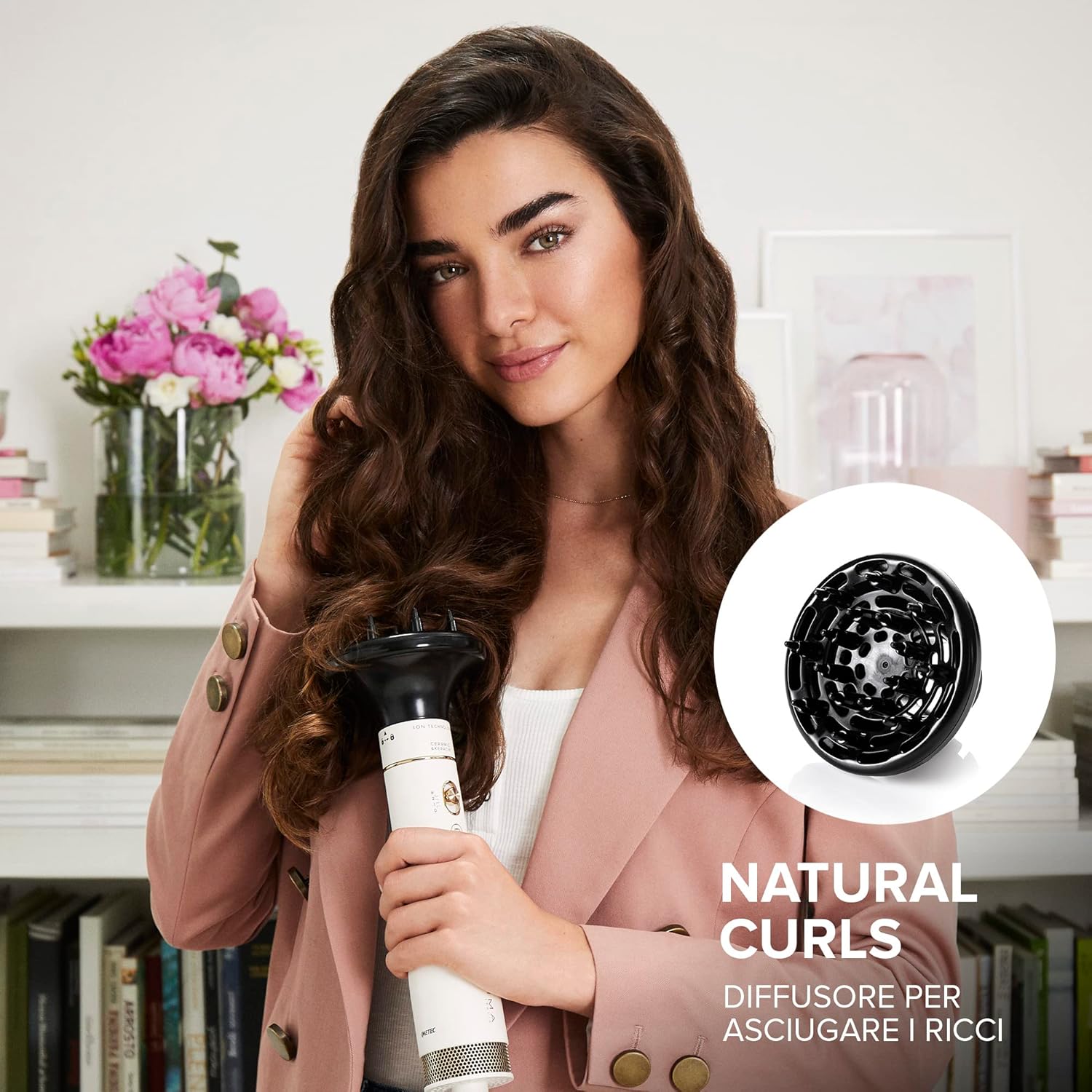
Image: A user utilizing the diffuser attachment to dry and enhance her natural curly hair.
Hair Protection Features
- Ionic Technology: Helps maintain hair hydration, reducing frizz and leaving hair smoother.
- Ceramic & Keratin Coating: Protects hair from heat damage, providing immediate vitality for shinier and silkier results.

Image: A close-up view of the brush head, highlighting the ceramic and keratin coating and the 'ION TECHNOLOGY' label.
Care and Maintenance
- Always unplug the device and allow it to cool completely before cleaning.
- Wipe the main unit and accessories with a soft, damp cloth. Do not use abrasive cleaners or solvents.
- Regularly remove any hair tangled in the brushes to maintain optimal performance.
- Store the Air Wonder and its accessories in the provided beauty bag in a dry place.
Troubleshooting
If you encounter issues with your Bellissima Imetec Air Wonder, please refer to the following common solutions:
- Device not turning on: Ensure the power cord is securely plugged into a working electrical outlet. Check the power switch on the device.
- Low airflow or heat: Check if the air intake filter at the back of the main unit is clean and free from dust or hair. Clean if necessary.
- Accessories not staying attached: Ensure the accessory is correctly aligned and twisted until it clicks firmly into place.
- Hair getting tangled: Ensure hair is detangled before styling. Work with smaller sections of hair.
If problems persist, please contact customer support.
Technical Specifications
| Model Number | 11847A |
| Brand | BELLISSIMA |
| Wattage | 1000 W |
| Power Source | Corded Electric |
| Dimensions | 25 x 5.3 x 5.3 cm |
| Weight | 720 grams |
| Color | Satin White with Gold Details |
| Material | Ceramic |
| Country of Origin | China |
Warranty and Customer Support
Your Bellissima Imetec Air Wonder is covered by a manufacturer's warranty. Please refer to the warranty card included in your package for specific terms and conditions.
For technical assistance, troubleshooting not covered in this manual, or warranty claims, please contact Bellissima customer support through their official website or the contact information provided in your product packaging.
You can visit the official Bellissima store for more information: Bellissima Store
Related documents11847A

Ask a question about this manual
Ask about setup, troubleshooting, compatibility, parts, safety, or missing instructions. Manuals+ will review the question and use this page’s manual context to help answer it.