
TEKTRO TR180-52
TEKTRO TR-52 Series Bicycle Disc Brake Rotor 180mm Instruction Manual
Model: TR180-52
1. Introduction
This manual provides essential information for the proper installation, operation, and maintenance of your TEKTRO TR-52 Series 180mm Bicycle Disc Brake Rotor. Please read this manual thoroughly before installation and use to ensure safe and optimal performance.
Product Features:
- Precision-Engineered for Optimal Braking: The TR-52 Disc Rotor delivers consistent, reliable braking performance, ensuring maximum control in various riding conditions.
- High-Quality Stainless Steel Construction: Built from durable stainless steel, this rotor resists warping and corrosion, providing long-lasting performance and durability.
- 6-Bolt Mounting for Universal Compatibility: Features a standard 6-bolt design, making it compatible with a wide range of hubs and easy to install on most bikes.
- Vented Design for Superior Heat Dissipation: Strategically placed cutouts enhance airflow, reducing heat buildup during intense braking for improved performance and longevity.
- Anti-Vibration Design: Minimizes vibrations for smoother, quieter braking and enhanced control.

The TEKTRO TR-52 Series 180mm disc brake rotor, shown with its six mounting bolts. This rotor features a precision-engineered design for optimal braking performance.
2. Safety Information
Always prioritize safety when working with bicycle components. Improper installation or maintenance can lead to serious injury or product failure.
- Always wear appropriate safety gear, including eye protection, when installing or maintaining bicycle components.
- Ensure your bicycle is stable and securely supported before beginning any work.
- Use only compatible tools and parts. Refer to your bicycle manufacturer's specifications for compatibility.
- After installation, always perform a thorough safety check of your brakes before riding.
- If you are unsure about any installation or maintenance procedure, consult a qualified bicycle mechanic.
- Disc rotors can become very hot during use. Avoid touching the rotor immediately after riding to prevent burns.
3. Installation Guide
This section outlines the general steps for installing the TEKTRO TR-52 180mm disc brake rotor. Specific procedures may vary based on your bicycle's hub and brake caliper system. Always refer to your bicycle and brake caliper manufacturer's instructions in conjunction with this guide.
Tools Required:
- T25 Torx wrench (for 6-bolt rotor bolts)
- Torque wrench
- Clean cloth
- Isopropyl alcohol (optional, for cleaning)
Installation Steps:
- Prepare the Wheel: Remove the wheel from your bicycle. If replacing an old rotor, carefully remove the old rotor and clean the hub's mounting surface. Ensure no grease or oil is present on the hub or rotor.
- Position the Rotor: Align the new TEKTRO TR-52 rotor with the 6-bolt mounting holes on your wheel hub. Ensure the rotation direction arrow on the rotor (if present) points in the direction of forward wheel rotation.
- Install Bolts: Insert the six provided T25 Torx bolts into the rotor and hub. Start all bolts by hand to prevent cross-threading.
- Tighten Bolts: Using a T25 Torx wrench, tighten the bolts in a star pattern (opposite bolts) to ensure even pressure. Gradually increase torque until all bolts are tightened to the manufacturer's specified torque (typically 4-6 Nm). Use a torque wrench for accuracy.
- Clean the Rotor: After installation, clean the rotor surface with a clean cloth and isopropyl alcohol to remove any fingerprints or contaminants that could affect braking performance.
- Reinstall Wheel and Adjust Caliper: Reinstall the wheel onto your bicycle. Adjust your brake caliper to ensure proper alignment with the new rotor, allowing for even pad contact and preventing rubbing. Refer to your brake caliper's instruction manual for specific adjustment procedures.
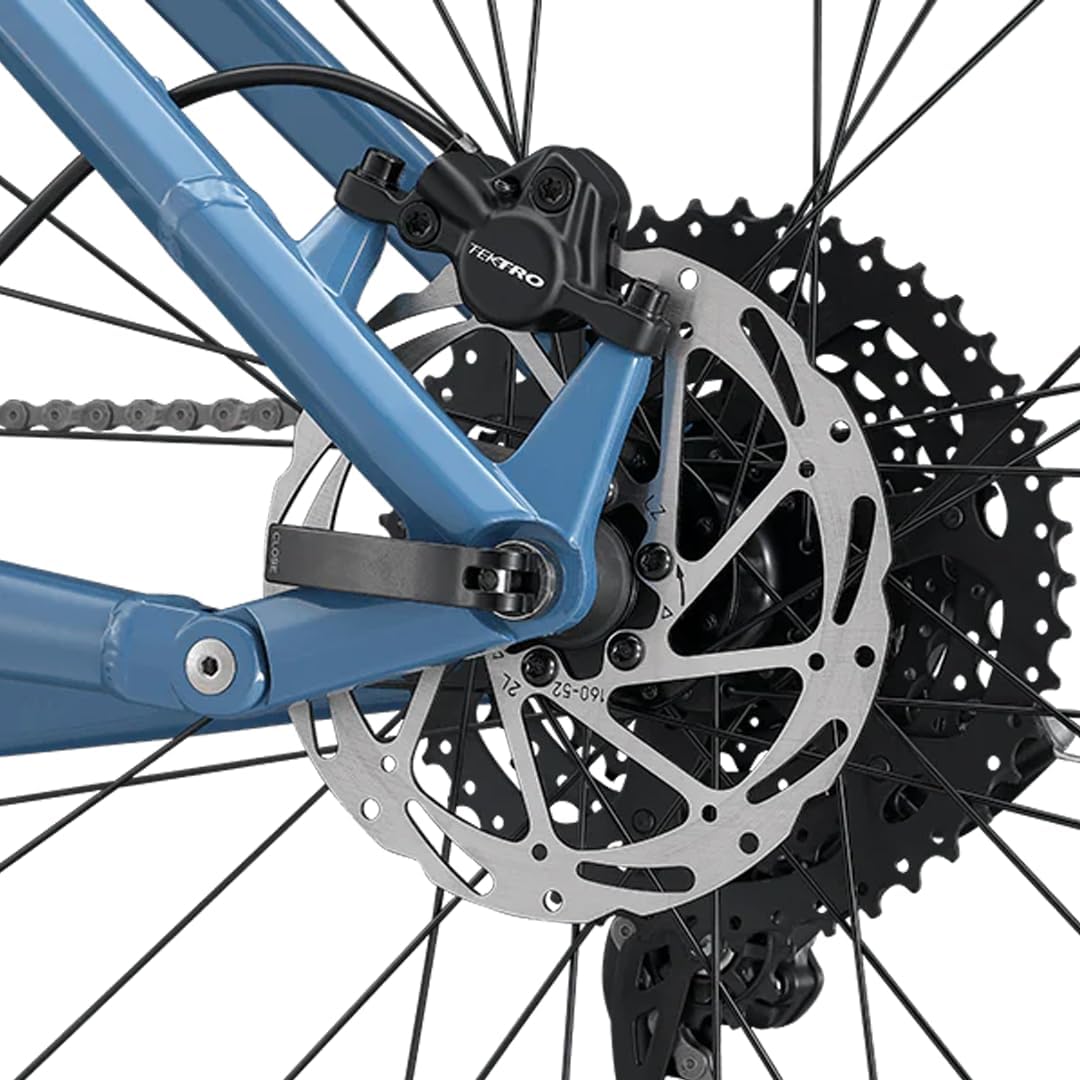
An example of the TEKTRO disc brake rotor correctly installed on the rear wheel of a bicycle, demonstrating its placement relative to the caliper and wheel hub.
4. Operating Your Disc Brakes
After installation, it is crucial to properly 'bed-in' your new disc brake rotor and pads to achieve optimal braking performance and longevity. This process helps transfer a thin layer of pad material onto the rotor surface, improving friction and reducing noise.
Brake Bed-In Procedure:
- Find a safe, open area with no traffic.
- Accelerate to a moderate speed (e.g., 10-15 mph or 16-24 km/h).
- Apply the brakes firmly but gradually, slowing down to a walking pace without coming to a complete stop. Repeat this 10-20 times.
- Next, accelerate to a higher speed (e.g., 20 mph or 32 km/h).
- Apply the brakes very firmly, almost to a stop, but avoid locking the wheels. Repeat this 5-10 times.
- Allow the brakes to cool down completely before riding normally.
During the bed-in process, you may notice a decrease in braking power and some noise. This is normal. Braking performance will improve as the pads and rotor bed-in. Avoid hard, prolonged braking during the initial rides after bed-in.
5. Maintenance
Regular maintenance ensures the longevity and safe operation of your TEKTRO disc brake rotor.
Routine Checks:
- Rotor Cleanliness: Keep the rotor clean and free from oil, grease, or dirt. Contaminants can severely reduce braking performance and cause noise. Use a clean cloth and disc brake cleaner or isopropyl alcohol.
- Rotor Wear: Inspect the rotor for wear. The minimum thickness for the TR-52 180mm rotor is 1.5mm. Replace the rotor if it falls below this thickness or shows signs of excessive wear, deep grooves, or cracks.
- Rotor Straightness: Periodically check the rotor for trueness (straightness). A warped rotor can cause pulsing brakes and reduced performance. Minor warps can sometimes be corrected with a rotor truing fork, but severely warped rotors should be replaced.
- Bolt Tightness: Regularly check that the 6-bolt mounting bolts are tightened to the specified torque (4-6 Nm). Loose bolts can lead to rotor wobble and unsafe conditions.
- Brake Pads: Always ensure your brake pads are in good condition and compatible with your disc brake system. Worn pads can damage the rotor.

This image highlights key design elements of the TEKTRO TR-52 disc rotor, including its anti-vibration arm design, standard ISO 6-bolt mounting, precision hole pattern for efficient heat dissipation, and robust cutout pattern for enhanced rotor stability during braking.
6. Troubleshooting
This section addresses common issues you might encounter with your disc brake rotor.
| Problem | Possible Cause | Solution |
|---|---|---|
| Squealing or Grinding Noise | Contaminated rotor/pads, worn pads, misaligned caliper, loose bolts, new pads/rotor not bedded-in. | Clean rotor with disc brake cleaner. Inspect and replace worn pads. Realign caliper. Check bolt tightness. Perform brake bed-in procedure. |
| Reduced Braking Power | Contaminated rotor/pads, worn pads, air in hydraulic system (if applicable), rotor wear beyond limit, improper bed-in. | Clean rotor/pads. Replace worn pads. Bleed hydraulic brakes (if applicable, consult mechanic). Replace rotor if worn. Re-perform bed-in. |
| Brake Pulsation or Vibration | Warped rotor, uneven pad wear, loose caliper or hub. | Check rotor for trueness; replace if severely warped. Inspect and replace pads. Ensure caliper and hub are securely mounted. |
| Rotor Rubbing Caliper/Pads | Misaligned caliper, warped rotor, wheel not seated correctly. | Realign brake caliper. Check rotor for trueness. Ensure wheel is properly seated in dropouts/fork. |
7. Specifications
| Feature | Detail |
|---|---|
| Brand | TEKTRO |
| Model | TR180-52 |
| Rotor Diameter | 180mm |
| Mounting Pattern | 6-Bolt ISO Standard |
| Thickness | 1.8mm |
| Minimum Thickness | 1.5mm |
| Material | High-Quality Stainless Steel |
| Weight (approx.) | 170g (for 180mm rotor) |
| Vehicle Service Type | Bicycle |
| Exterior Finish | Zinc |

A visual comparison illustrating the different available diameters for TEKTRO disc rotors: 160mm (126g), 180mm (170g), and 203mm (226g). This manual focuses on the 180mm model.

A technical diagram detailing the dimensions of a TEKTRO disc brake rotor. Key measurements include a thickness of 1.8mm, a minimum thickness of 1.5mm, and an ISO 6-bolt pattern for mounting. Note: The outer diameter shown in this specific diagram is 160mm, but the product covered by this manual is 180mm.
8. Warranty and Support
For warranty information, technical support, or replacement parts, please contact TEKTRO customer service or visit the official TEKTRO website. Keep your proof of purchase for warranty claims.
TEKTRO Official Website: Visit the TEKTRO Store on Amazon
Related documentsTR180-52


Ask a question about this manual
Ask about setup, troubleshooting, compatibility, parts, safety, or missing instructions. Manuals+ will review the question and use this page’s manual context to help answer it.