
Voltas 4502968-SAC 185V ADQ Maha Super UVC
Voltas 1.5 Ton Inverter 5 Star Maha Super Adjustable UVC Split AC User Manual
Model: 4502968-SAC 185V ADQ Maha Super UVC
1. Introduction
This user manual provides essential information for the safe and efficient operation, installation, and maintenance of your Voltas 1.5 Ton Inverter 5 Star Maha Super Adjustable UVC Split AC. Please read this manual thoroughly before using the appliance and retain it for future reference.
2. Safety Information
Always adhere to the following safety precautions to prevent injury or damage to the unit.
- Ensure the unit is installed by a qualified technician.
- Do not insert fingers or objects into the air inlet/outlet.
- Do not operate the unit with wet hands.
- Disconnect power before cleaning or maintenance.
- Keep children away from the unit.
- Do not block the air flow to the indoor or outdoor unit.
3. Package Contents
Verify that all components are present in the package:
- Indoor Unit
- Outdoor Unit
- Installation Kit (Pipes, Wires)
- Remote Control with Batteries
- User Manual

Figure 3.1: Included Installation Kit components, including copper pipes and electrical wiring.
4. Setup and Installation
Installation of this split air conditioner requires professional expertise. It is strongly recommended to contact an authorized Voltas service center or a certified technician for installation to ensure proper functioning and safety.
4.1. Indoor Unit Placement
The indoor unit should be mounted on a wall, ensuring sufficient space around it for proper airflow and maintenance. Avoid direct sunlight and heat sources.
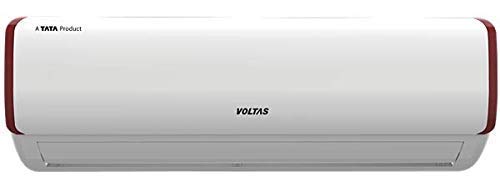
Figure 4.1: Front view of the Voltas AC indoor unit, showing its sleek white design with red accents.
4.2. Outdoor Unit Placement
The outdoor unit should be placed in a well-ventilated area, away from obstructions that could impede airflow. Ensure it is on a stable, level surface.
4.3. Electrical Connection
Ensure the electrical supply matches the unit's requirements (230 Volts, 5200 Watts). A dedicated circuit breaker is recommended. All electrical work must comply with local codes and regulations.
5. Operating Instructions
Your Voltas AC is equipped with a remote control for convenient operation. Familiarize yourself with its functions.

Figure 5.1: The remote control for the Voltas AC, featuring glow buttons and a clear display for various functions.
5.1. Remote Control Functions
- Power Button: Turns the unit on or off.
- Mode Button: Cycles through operating modes: Cool, Fan, Dry (Dehumidifier), Auto.
- Temp +/- Buttons: Adjusts the desired temperature.
- Fan Button: Adjusts fan speed.
- V. Swing / H. Swing: Controls vertical and horizontal louver movement.
- Sleep Mode: Optimizes temperature for comfortable sleep and energy saving.
- Turbo Mode: Provides rapid cooling.
- Timer On/Off: Sets a timer for automatic power on/off.
- Saver Mode: Activates energy-saving operation.
- Lamp Button: Controls the display light on the indoor unit.
5.2. Special Features
- UVC LED: Helps to kill 99.9% germs & pathogens in the air.
- Titanium Oxide Filter: Removes harmful gases and VOCs.
- Adjustable Tonnage: Intelligent switching of 5 step Tonnage options based on ambient heat and number of people, optimizing cooling capacity and energy consumption.
- Self Diagnosis: The unit can detect and display certain operational issues.
- Dual Temperature Display: Provides clear temperature readings.
6. Maintenance
Regular maintenance ensures optimal performance and extends the lifespan of your AC unit. Always disconnect power before performing any maintenance.
6.1. Air Filter Cleaning
Clean the air filters every two weeks or more frequently if the unit is used heavily or in dusty environments. Dirty filters reduce cooling efficiency and airflow.
- Open the front panel of the indoor unit.
- Remove the air filters.
- Clean the filters with a vacuum cleaner or wash them with lukewarm water and mild detergent.
- Allow filters to dry completely before reinserting.
- Close the front panel.
6.2. Outdoor Unit Cleaning
Periodically clean the outdoor unit's coil and fins to remove dust, leaves, and debris. This should ideally be done by a professional technician.
6.3. Seasonal Maintenance
Before the cooling season, it is recommended to have a professional technician inspect the refrigerant levels, electrical connections, and overall system performance.
7. Troubleshooting
Before contacting service, check the following common issues:
| Problem | Possible Cause | Solution |
|---|---|---|
| Unit does not start | No power supply; Remote control batteries dead; Timer set to OFF. | Check power connection and circuit breaker; Replace remote batteries; Cancel timer setting. |
| Insufficient cooling | Dirty air filters; Blocked outdoor unit; Doors/windows open; Temperature setting too high. | Clean air filters; Clear obstructions from outdoor unit; Close doors/windows; Lower temperature setting. |
| Unusual noise | Loose parts; Unit not level; Foreign object inside. | Contact service if noise persists after checking for obvious obstructions. |
| Water leakage from indoor unit | Clogged drain pipe; Improper installation. | Clear drain pipe; Contact service for re-installation check. |
If the problem persists after attempting these solutions, please contact an authorized service technician.
8. Product Specifications
| Feature | Detail |
|---|---|
| Brand | Voltas |
| Model | 4502968-SAC 185V ADQ Maha Super UVC |
| Capacity | 1.5 Tons |
| Energy Efficiency | 5 Star (4.51 EER) |
| Annual Energy Consumption | 891.86 Kilowatt Hours Per Year |
| Noise Level | 45 dB |
| Installation Type | Split System |
| Special Features | UVC LED, Titanium Oxide Filter, Dust Filter, Air Purification Filter, Dehumidifier, Anti-bacterial Filter, Adjustable Tonnage |
| Colour | White |
| Control Console | Remote Control |
| Voltage | 230 Volts |
| Wattage | 5200 Watts |
| Material | Copper |
| Product Dimensions | 179.5D x 53W x 55.5H Centimeters |
| Item Weight | 49 kg 300 g |
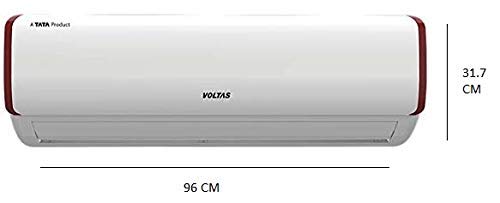
Figure 8.1: Dimensions of the Voltas AC indoor unit, showing approximate length of 96 cm and height of 31.7 cm.
9. Warranty and Support
Your Voltas AC comes with a 1-year warranty. For warranty claims, technical support, or service requests, please contact Voltas customer service.
Visit the official Voltas website for the latest contact information and service center details: www.voltas.com
You can also visit the Voltas Store on Amazon for product information: Voltas Store
Ask a question about this manual
Ask about setup, troubleshooting, compatibility, parts, safety, or missing instructions. Manuals+ will review the question and use this page’s manual context to help answer it.