
1. Introduction
Thank you for choosing the Bosch TDA3024010 Steam Iron. This manual provides essential information for the safe and efficient use, maintenance, and troubleshooting of your appliance. Please read these instructions carefully before first use and keep them for future reference.

Image 1: Bosch TDA3024010 Steam Iron, showcasing its design and steam function.
2. Safety Instructions
Always observe the following safety precautions to prevent electric shock, fire, or injury:
- Ensure the voltage indicated on the iron corresponds to your mains voltage before connecting.
- Do not leave the iron unattended while it is switched on or connected to the mains.
- Keep the iron and its cord out of reach of children and pets when it is switched on or cooling down.
- Never immerse the iron in water or any other liquid.
- Do not operate the iron if the cord or plug is damaged, or if the iron has been dropped or is visibly damaged. Contact authorized service personnel.
- Always place the iron on a stable, heat-resistant surface when not in use.
- Unplug the iron from the mains socket before filling with water, emptying, or cleaning.
- Use the iron only for its intended household purpose.
3. Product Overview
Familiarize yourself with the main components of your Bosch steam iron:
- Ceramic Soleplate: Provides smooth gliding and even heat distribution.
- Water Tank (320 ml): Transparent tank for easy monitoring of water level.
- Water Inlet: For filling the water tank.
- Spray Nozzle: For moistening stubborn creases.
- Steam Control Dial: Adjusts steam output.
- Temperature Control Dial: Selects the appropriate temperature for different fabrics.
- Indicator Light: Illuminates when the iron is heating up and turns off when the set temperature is reached.
- Power Cord: Connects the iron to the electrical outlet.
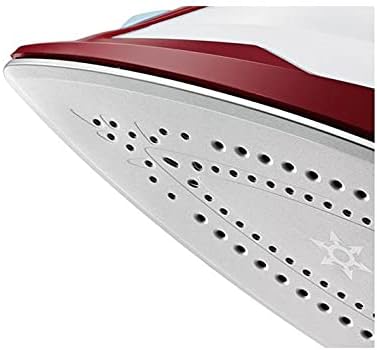
Image 2: Detail of the ceramic soleplate with steam vents.
4. Setup
4.1 Unpacking
- Remove all packaging materials and any labels or stickers from the iron.
- Check the appliance for any damage. Do not use if damaged.
4.2 First Use
- Before first use, iron an old piece of damp cloth to remove any manufacturing residues from the soleplate.
- Some vapor and odor may be emitted during the first use; this is normal and will disappear.
4.3 Filling the Water Tank
- Ensure the iron is unplugged from the power outlet.
- Open the water inlet cover.
- Using the provided measuring cup, carefully pour tap water into the water tank up to the 'MAX' mark. Do not overfill.
- Close the water inlet cover securely.

Image 3: Demonstrating how to fill the water tank of the iron.
5. Operating Instructions
5.1 Temperature Setting
- Plug the iron into a suitable power outlet.
- Turn the temperature control dial to the desired setting according to the fabric type. Refer to the fabric care labels on your garments.
- The indicator light will illuminate, indicating the iron is heating. It will turn off when the set temperature is reached.
5.2 Steam Ironing
- Ensure the water tank is filled.
- Set the temperature control dial to the steam ironing range (usually marked with steam symbols).
- Once the indicator light turns off, adjust the steam control dial to the desired steam output.
- Begin ironing.
5.3 Dry Ironing
- Ensure the water tank is empty or the steam control dial is set to the 'no steam' position.
- Set the temperature control dial to the desired setting for dry ironing.
- Wait for the indicator light to turn off before ironing.
5.4 Water Spray Function
- Press the spray button to release a fine mist of water onto the fabric, helping to smooth out stubborn wrinkles.
- Ensure the water tank contains water for this function.
6. Maintenance
6.1 Cleaning the Soleplate
- Always unplug the iron and allow it to cool completely before cleaning.
- Wipe the soleplate with a damp cloth and a non-abrasive cleaner if necessary.
- Do not use abrasive scourers or chemical cleaners as these can damage the soleplate.
6.2 Descaling
To maintain optimal steam performance, descale your iron regularly, especially in hard water areas. Refer to the specific descaling instructions provided with your iron or consult the Bosch service center.
6.3 Storage
- After use, unplug the iron and empty any remaining water from the tank.
- Allow the iron to cool down completely.
- Store the iron upright in a safe, dry place.
7. Troubleshooting
| Problem | Possible Cause | Solution |
|---|---|---|
| Iron does not heat up. | Not plugged in; power outlet faulty; temperature dial set to minimum. | Check power connection; try another outlet; set temperature dial to desired heat. |
| No steam or insufficient steam. | Water tank empty; temperature too low for steam; steam control set to 'no steam'; calcification. | Fill water tank; set temperature to steam range; adjust steam control; descale the iron. |
| Water leakage from soleplate. | Temperature too low for steam; water tank overfilled; iron left horizontal too long with steam on. | Increase temperature; do not overfill; place iron upright when not actively ironing. |
If you encounter problems not listed here, or if the solutions do not resolve the issue, please contact the Bosch service center.
8. Specifications
- Brand: Bosch
- Model Number: TDA3024010
- Type: Steam Iron
- Power Input: 2400 Watt
- Soleplate Type: Ceramic
- Water Tank Capacity: 320 ml
- Special Features: Water Spray Function
- Color: Multi-color
- EAN-13: 4242002814681
- Manufactured In: Spain
- Recommended Use: General textile ironing, suitable for most fabrics
9. Warranty and Support
Your Bosch TDA3024010 Steam Iron comes with a two-year warranty provided by Bosch agent Egypt - MTi.
For any service inquiries, technical support, or warranty claims, please contact the official service center:
- Service Center Hotline: 19460
Please retain your proof of purchase for warranty validation.