
1. Introduction
The Resideo SkyBell Trim 2 Wi-Fi Video Doorbell (model DBCAM-TRIMBR2) provides enhanced security and convenience for your home. This device features two-way audio, motion sensor technology, and night vision capabilities, allowing you to monitor your entryway and communicate with visitors from your smartphone or tablet. The doorbell integrates with the Total Connect Services 2.0 app, offering remote access and control over its functions, including a silent mode for notifications.
2. Product Overview
The SkyBell Trim 2 is designed for a sleek and compact installation. It features a camera lens, a doorbell button with an LED indicator, and a motion sensor. The device is finished in an Oil Rubbed Bronze color.
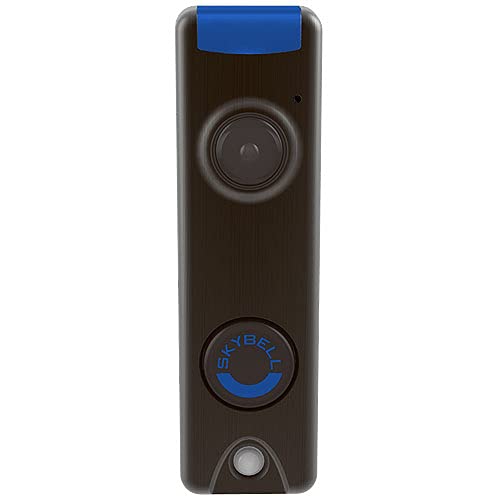
Image 1: Front view of the Resideo SkyBell Trim 2 Wi-Fi Video Doorbell, showing the camera, doorbell button, and motion sensor.
Key Components:
- Camera Lens: Captures video of your entryway.
- Doorbell Button: Activates the doorbell and features an LED light that can change colors.
- Motion Sensor: Detects movement in front of your door.
- LED Light: Located at the top, provides illumination and status indication.
3. Setup
The Resideo SkyBell Trim 2 requires a wired connection for power and operation. Ensure you have existing doorbell wiring (110V/220V AC) at your installation location.
Installation Steps:
- Power Off: Before beginning installation, turn off power to your existing doorbell at the circuit breaker.
- Remove Old Doorbell: Carefully remove your existing doorbell button.
- Wire Connection: Connect the existing doorbell wires to the terminals on the back of the SkyBell Trim 2. Refer to the detailed wiring diagram provided in the packaging for specific instructions.
- Mounting: Securely mount the SkyBell Trim 2 to your doorframe or wall using the provided screws and mounting plate.
- Power On: Restore power at the circuit breaker. The doorbell's LED light should illuminate, indicating it is receiving power.
- App Download & Pairing: Download the Total Connect Services 2.0 app from your device's app store. Follow the in-app instructions to create an account and pair your SkyBell Trim 2 doorbell with your Wi-Fi network and account.
For detailed wiring diagrams and specific installation requirements, please consult the full installation guide included with your product.
4. Operating Instructions
4.1 Two-Way Audio
When a visitor presses the doorbell or motion is detected, you will receive a notification on your smartphone or tablet via the Total Connect Services 2.0 app. Open the app to view a live feed and engage in two-way communication with the visitor using the built-in speaker and microphone.
4.2 Motion Detection
The integrated PIR motion sensor detects movement up to 10 feet from the doorbell. Upon detection, the device will send an alert to your connected iOS device. You can adjust motion sensitivity settings within the app to minimize false alerts.
4.3 Night Vision
The SkyBell Trim 2 features full-color night vision, utilizing an ultra-low light imager (0.05 LUX) with a range of up to 15 feet. This ensures clear visibility of your entryway even in low-light conditions.
4.4 Silent Mode
To prevent audible chimes inside your home, activate Silent Mode through the Total Connect Services 2.0 app. While in Silent Mode, you will still receive notifications on your iOS devices when the doorbell is pressed or motion is detected.
4.5 Remote Video Viewing
Access live video feeds and recorded events anytime, anywhere, through the Total Connect Services 2.0 app on your smartphone or tablet.
5. Maintenance
The SkyBell Trim 2 is designed to be rugged and weatherproof with an IP54 rating, protecting it from dust and splashing water. Regular maintenance is minimal.
Cleaning:
- Gently wipe the camera lens and the device's exterior with a soft, damp cloth to remove dust or smudges.
- Avoid using harsh chemicals or abrasive cleaners, as these can damage the finish or electronic components.
6. Troubleshooting
If you encounter issues with your SkyBell Trim 2, consider the following troubleshooting steps:
- No Power/Offline: Ensure the circuit breaker supplying power to the doorbell is on. Verify that the wiring connections are secure. If the device frequently goes offline, check your Wi-Fi signal strength at the doorbell's location.
- App Connectivity Issues: Confirm your smartphone or tablet has a stable internet connection. Try restarting the Total Connect Services 2.0 app or reinstalling it if problems persist. Ensure the app is updated to the latest version.
- Delayed Notifications/Live View: A slow or unstable internet connection (both at the doorbell and on your mobile device) can cause delays. Check your home's Wi-Fi speed and signal strength.
- Motion Detection Sensitivity: If you are receiving too many or too few motion alerts, adjust the motion detection sensitivity settings within the Total Connect Services 2.0 app.
- Night Vision Clarity: Ensure the camera lens is clean and free from obstructions.
If these steps do not resolve the issue, please contact Resideo customer support for further assistance.
7. Specifications
| Model Number | DBCAM-TRIMBR2 |
| Brand | RESIDEO |
| Color | Oil Rubbed Bronze |
| Dimensions (H x L x W) | 4.8 x 1.44 x 1.13 inches |
| Item Weight | 7.5 Ounces |
| Power Source | Corded Electric (110V/220V AC) |
| Connectivity Technology | Wireless (Wi-Fi) |
| Motion Detection | PIR detection @ 10 ft |
| Night Vision | Full color, Ultra low light imager (0.05 LUX), 15 ft |
| Audio | Two-way Audio, Built-in Speaker |
| Waterproof Rating | IP54 |
| Compatible Devices | Smartphone, Tablet (iOS devices for Silent Mode) |
| Video Capture Format | MPEG-4 |
| Video Capture Resolution | 720p |
| UPC | 194160007594 |
8. Warranty and Support
For information regarding product warranty, technical support, or service, please refer to the warranty card included with your product or visit the official Resideo website. Contact details for customer support can typically be found on the manufacturer's website or in the product packaging.

