1. Introduction
The LaCie 2big Dock is a high-capacity desktop RAID storage solution designed for professional workflows. This device offers substantial storage and high-speed data transfer capabilities, making it suitable for various computing environments including PC, iPad with USB-C, and Mac systems. It features compatibility with Thunderbolt 4, Thunderbolt 3, USB4, USB 3.2, and USB 3.0 interfaces, and includes dual Thunderbolt ports for daisy-chaining multiple devices. The 2big Dock is equipped with hot-swappable IronWolf Pro enterprise-class drives, ensuring reliability and sustained performance.

Image 1.1: Front view of the LaCie 2big Dock, showcasing its design and central blue indicator light.
2. Package Contents
Verify that all items are present in the product packaging:
- LaCie 2big Dock Thunderbolt 3 36TB unit
- Thunderbolt 3 cable
- USB 3.1 (USB-C to USB-A) cable
- External power supply
- Quick start guide

Image 2.1: The LaCie 2big Dock packaging, indicating the included components.
3. Product Overview
The LaCie 2big Dock is designed with multiple connectivity options and features to streamline creative workflows.
3.1 Front Panel Features
- Status LED: Indicates power status and drive activity.
- Drive Bays: Two hot-swappable bays for IronWolf Pro enterprise-class drives.
- Front-facing Ports: Includes a USB 3.2 Type-A hub port, CFexpress Type B, CFast 2.0, and SD card slots for convenient access.

Image 3.1: The LaCie 2big Dock integrated into a desktop setup, highlighting its front-facing ports and connectivity.
3.2 Rear Panel Features
- Dual Thunderbolt Ports: Two Thunderbolt 3 ports (USB-C compatible) for host connection and daisy-chaining up to five additional Thunderbolt devices.
- DisplayPort 1.8: For connecting a display.
- Power Input: Connection for the external power supply.
- Kensington Lock Slot: For physical security.
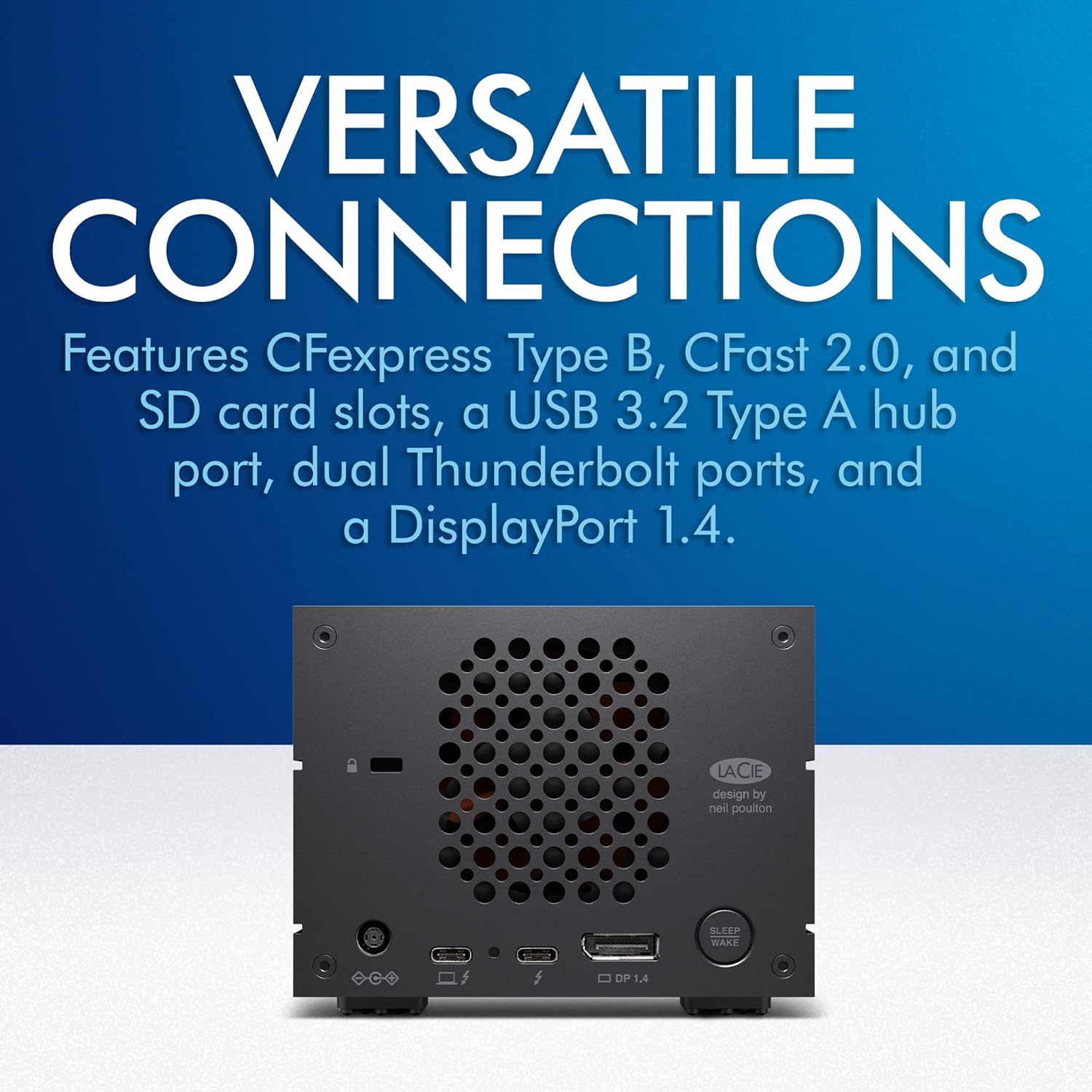
Image 3.2: Rear panel of the LaCie 2big Dock, detailing the Thunderbolt ports, DisplayPort, and other connections.
4. Setup
4.1 Physical Connection
- Connect the power supply to the LaCie 2big Dock and then to a power outlet.
- Connect the Thunderbolt 3 cable from your computer to one of the Thunderbolt ports on the LaCie 2big Dock. Alternatively, use the USB 3.1 cable for USB-A connections.
- The device will power on automatically. The front LED will illuminate.
4.2 Software Installation and RAID Configuration
Upon initial connection, your operating system may prompt you to install necessary drivers or software. It is recommended to install the LaCie Toolkit software to manage the device, including RAID configuration.
- RAID 0 (Striping): Optimizes for maximum speed and capacity. Data is spread across both drives, offering faster read/write performance. If one drive fails, all data is lost.
- RAID 1 (Mirroring): Optimizes for data redundancy. Data is duplicated on both drives. If one drive fails, data remains accessible on the other. Capacity is halved.
Use the LaCie Toolkit's step-by-step wizard to configure your preferred RAID level. This process will erase all data on the drives, so ensure no critical data is present before proceeding.
5. Operating the LaCie 2big Dock
5.1 Data Transfer
Once connected and configured, the LaCie 2big Dock will appear as an external drive on your computer. You can drag and drop files, or use your preferred software for data transfer. The device supports speeds up to 550MB/s, ideal for large file transfers and demanding applications.

Image 5.1: The LaCie 2big Dock, emphasizing its high-speed data transfer capabilities.
5.2 Daisy Chaining
The dual Thunderbolt ports allow you to daisy chain up to five additional Thunderbolt devices, such as monitors, other storage devices, or peripherals. Connect the first device to your computer, and then connect subsequent devices to the available Thunderbolt ports on the previous device in the chain.
5.3 Hot-Swapping Drives
The LaCie 2big Dock supports hot-swapping of its IronWolf Pro enterprise-class drives. This means you can replace a faulty drive (especially in a RAID 1 configuration) without powering down the unit. Refer to the LaCie Toolkit for proper hot-swap procedures to ensure data integrity.

Image 5.2: The LaCie 2big Dock with its IronWolf Pro enterprise-class drives, highlighting their hot-swappable nature.
6. Maintenance
6.1 Drive Health Monitoring
Regularly monitor the health of your IronWolf Pro drives using the LaCie Toolkit software. This software provides diagnostic tools and alerts for potential drive issues, allowing for proactive maintenance.
6.2 Cooling Fan
The LaCie 2big Dock features a temperature-controlled cooling fan. The fan will activate as needed to maintain optimal operating temperatures. Ensure the rear ventilation area is not obstructed to allow for proper airflow.
6.3 Firmware Updates
Periodically check the LaCie support website or the LaCie Toolkit for available firmware updates. Keeping your device's firmware up-to-date ensures optimal performance, compatibility, and security.
7. Troubleshooting
- Device Not Detected: Ensure all cables are securely connected and the power adapter is plugged in. Try connecting to a different port on your computer or using a different cable. Restart your computer.
- Slow Performance: Verify that you are using a Thunderbolt or USB 3.2/USB4 compatible port on your computer. Check the RAID configuration; RAID 1 offers redundancy but lower speed than RAID 0. Ensure no background processes are heavily utilizing the drive.
- Drive Disconnects Randomly: Check power connections. Ensure the device is placed in a well-ventilated area to prevent overheating. Update drivers and firmware.
- LED Indicator Behavior: Refer to the LaCie Toolkit or online support for specific LED patterns and their meanings.
For further assistance, consult the LaCie support website or contact customer service.
8. Specifications
| Feature | Detail |
|---|---|
| Model Number | STLG36000400 |
| Digital Storage Capacity | 36 TB |
| Hard Drive Type | Mechanical Hard Disk (Seagate IronWolf Pro) |
| Hard Drive Interface | eSATA |
| Rotational Speed | 7200 RPM |
| Connectivity Technology | Thunderbolt 4, Thunderbolt 3, USB4, USB 3.2, USB 3.0 |
| Compatible Devices | Desktop, Laptop (PC, iPad USB-C, Mac) |
| Product Dimensions (LxWxH) | 8.54 x 4.65 x 3.67 inches |
| Item Weight | 8.36 pounds |
| Color | Black |
9. Warranty and Support
The LaCie 2big Dock includes a limited warranty protection plan. Additionally, it comes with Rescue Data Recovery Services for a specified period, providing peace of mind in case of unexpected data loss.

Image 9.1: LaCie Rescue Data Recovery Services logo, indicating included data recovery support.
For detailed warranty information, to register your product, or to access support resources, please visit the official LaCie support website.
Online Support: www.lacie.com/support


