
1. Introduction
Welcome to the world of SmartGames Dragon Inferno! This 2-player strategy game challenges you to build the biggest kingdom while strategically summoning dragons to burn your opponent's territories. Designed for ages 7 and up, it's a game of planning, problem-solving, and spatial insight.

Image: SmartGames Dragon Inferno game box and all game components laid out, providing an overview of the product.
2. Game Components
The SmartGames Dragon Inferno set includes the following:
- 1 Game board
- 2 sets of 7 kingdom tiles (one dark green, one light green)
- 5 Dragon tiles in different shapes
- 8 Dragon eggs
- Game rules (this manual)
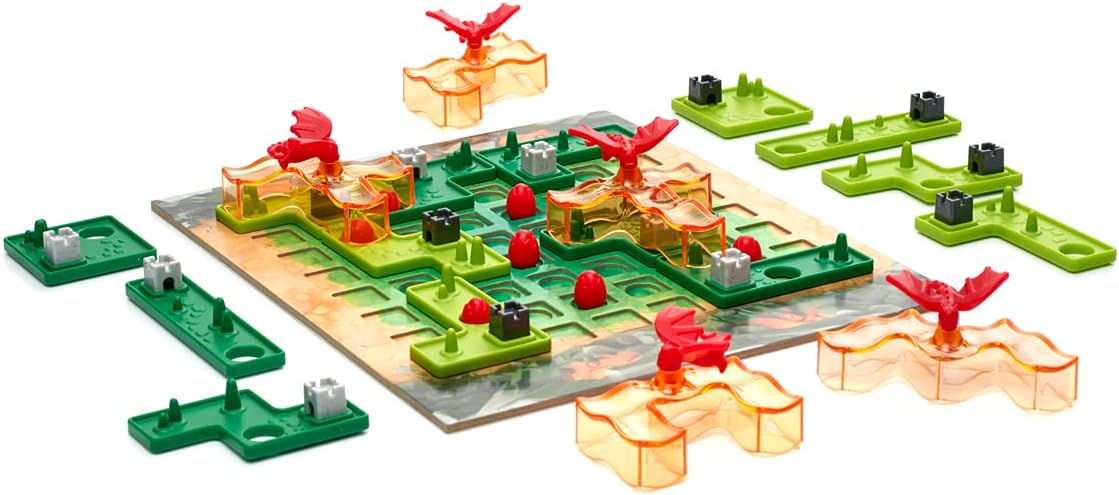
Image: A close-up view of the various game components, including the green kingdom tiles, orange dragon tiles, and red dragon eggs, ready for play.
3. Setup
Follow these steps to set up your game:
- Place the game board on a flat surface, such as a table. The board features a 6x6 grid in the center and 5 numbered dragon caves around the perimeter.
- Each player chooses a set of 7 kingdom tiles (one player takes dark green, the other takes light green).
- Randomly place the 5 dragon tiles in front of each of the 5 numbered dragon caves. The numbers indicate the order in which dragons will enter the game.
- The youngest player places 4 dragon eggs on any empty squares within the 6x6 center grid of the game board.
- The other player then places the remaining 4 dragon eggs on any other empty squares within the 6x6 center grid.

Image: A four-panel collage illustrating the game setup, the process of placing kingdom tiles, how dragons are summoned, and the appearance of a completed game board.
4. Operating (How to Play)
The objective is to expand your territories and strategically summon dragons to burn your opponent's kingdom tiles. Players take turns placing kingdom tiles on the game board.
- Players start by placing their first kingdom tile on one of the 4 corner squares of the 6x6 grid.
- Each new kingdom tile must cover an empty square or touch at least one other piece of the same color (horizontally or vertically).
- When a kingdom tile is placed around a dragon egg (meaning all 4 sides of the egg's square are covered by kingdom tiles), you must bring the first available dragon (based on the numbered caves) into play. This dragon is used to burn your opponent's kingdom tiles.
- Dragon tiles must always cover 5 segments of previously placed kingdom tiles. These 5 segments are removed from the game.
- If a player places a kingdom tile on top of a dragon egg, that egg is broken and removed from the game board.
- The next dragon must be placed on the game board when its corresponding egg is surrounded, even if it covers your own kingdom tiles.
- If it's not possible to place a dragon correctly (i.e., it cannot cover 5 segments), it is removed from the game.
- The game ends when both players cannot place any more kingdom tiles.
Video: Official video tutorial demonstrating the setup, gameplay, and scoring for SmartGames Dragon Inferno. This video provides a visual guide to understanding the game mechanics.

Image: Two players are shown actively engaged in a game of SmartGames Dragon Inferno, carefully placing their game pieces on the board.
5. Scoring
After the game ends, players count their scores:
- Kingdom tiles covered by a dragon tile do not count towards the score.
- Each segment of a kingdom tile that is not covered by a dragon tile is worth +1 point.
- Each castle on your kingdom tiles is an additional +1 point.
- Each broken dragon egg (removed from the board) is -1 point.
The player with the highest total score wins and rules the kingdom!
6. Cognitive Skills Developed
Playing SmartGames Dragon Inferno helps stimulate and develop the following cognitive skills:
- Logic: Applying reasoning to solve problems and make decisions.
- Visual Perception: Interpreting and understanding visual information.
- Planning: Strategizing and organizing steps to achieve a goal.
- Problem Solving: Identifying and resolving challenges during gameplay.
- Concentration: Maintaining focus and attention throughout the game.
7. Specifications
| Feature | Detail |
|---|---|
| Package Dimensions | 11.42 x 9.61 x 2.44 inches |
| Item Weight | 1.43 pounds |
| ASIN | B09BBTFVB9 |
| Item Model Number | SGM 505US |
| Manufacturer Recommended Age | 7 years and up |
| Manufacturer | Smart Toys and Games |
8. Warranty and Support
For any questions, concerns, or support regarding your SmartGames Dragon Inferno game, please contact the manufacturer, Smart Toys and Games. While specific warranty details are not provided in this manual, SmartGames is committed to providing quality products and customer satisfaction.
You can often find contact information for Smart Toys and Games on their official website or through the retailer where you purchased the game.