
Introduction
The Cygolite Hotrod 120 is a powerful, USB rechargeable bicycle tail light designed to enhance your visibility during both night and day rides. Featuring an array of COB LEDs, it generates a wide and far-reaching beam, crucial for safety on busy roads. This manual provides essential information for the proper setup, operation, and maintenance of your Hotrod 120 tail light.
What's Included
Your Cygolite Hotrod 120 package includes the following components:
- Hotrod Taillight
- Flexible Seatpost Mount
- Micro USB Charging Cable (2 feet length)

Image: The Hotrod 120 tail light, flexible seatpost mount, and Micro USB charging cable.
Setup
Mounting the Tail Light
The Hotrod 120 features a sturdy, flexible mount designed for easy and secure attachment to most seatposts and seatstays, including aero styles. Ensure the light is firmly attached to prevent movement during rides.
- Wrap the flexible silicone strap around your bicycle's seatpost or seatstay.
- Hook the strap securely onto the designated tab on the light's body.
- Adjust the light's angle to ensure maximum visibility to traffic behind you.

Image: The flexible mount securing the Hotrod 120 to a bicycle.
Operating Instructions
Power On/Off and Mode Selection
The Hotrod 120 is equipped with a single button for all operations.
- To Turn On: Press and hold the power button for approximately 1 second.
- To Change Modes: Briefly press the power button to cycle through the available lighting modes.
- To Turn Off: Press and hold the power button for approximately 1 second.
Low Battery Indicator
The light features a low battery indicator to alert you when charging is needed. Refer to the charging section for details.
Video: Official demonstration of the Cygolite Hotrod 120 Lumen Bicycle Taillight's features and operation.
Charging
The Hotrod 120 is USB rechargeable. Use the provided Micro USB cable to charge the device.
- Locate the Micro USB charging port on the light. It is typically covered by a rubber flap for water resistance.
- Gently open the rubber flap.
- Connect the Micro USB cable to the light and the other end to a USB power source (e.g., computer, wall adapter).
- The light will indicate charging status (e.g., a specific LED color or pattern).
- Once fully charged, disconnect the cable and securely close the rubber flap to maintain water resistance.
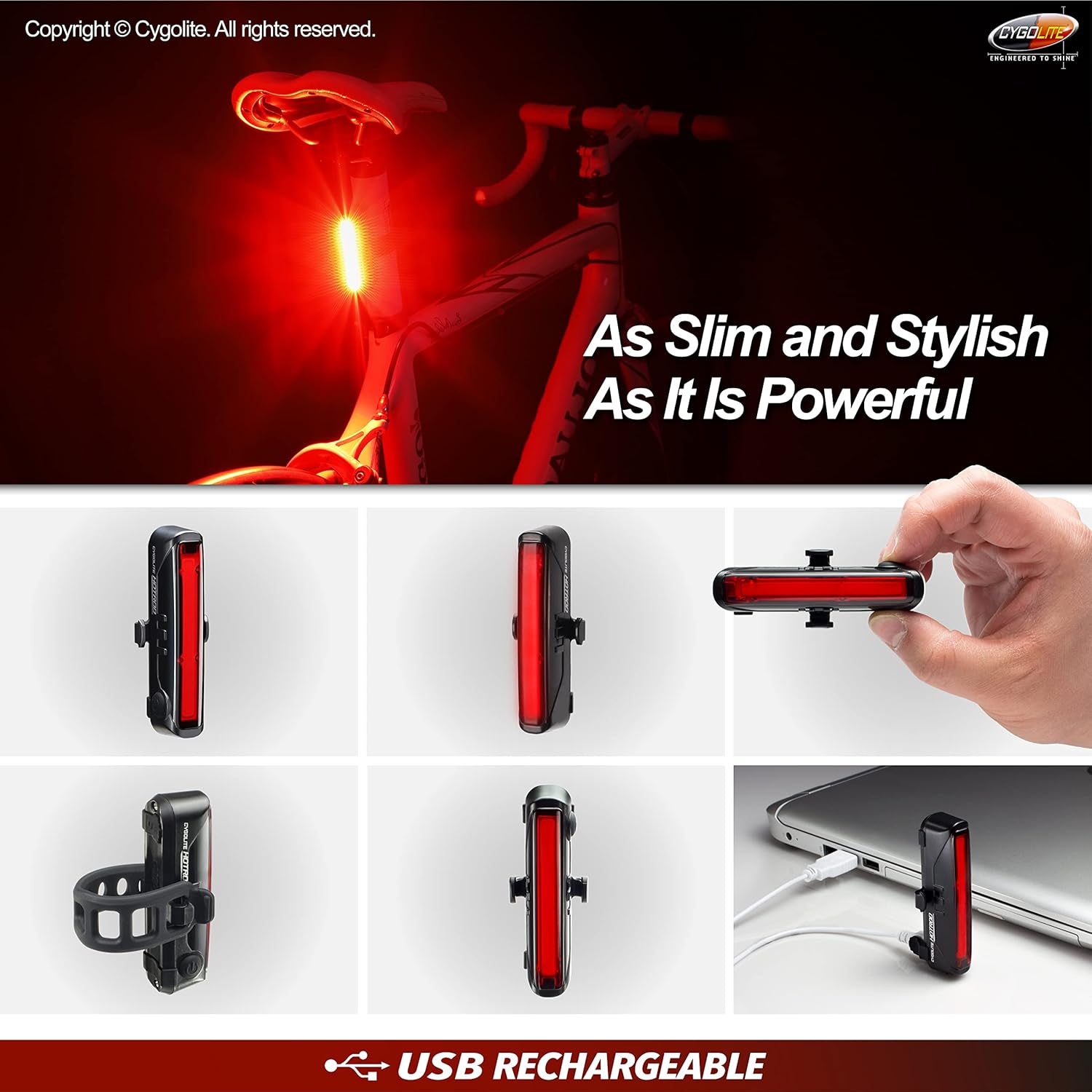
Image: The Hotrod 120 connected to a USB charging cable.
Light Modes and Run Times
The Hotrod 120 offers 7 distinct lighting modes for various riding conditions, optimizing visibility for both night and daytime use.
| Mode | Description | Approximate Run Time |
|---|---|---|
| High Steady | Constant, high-intensity beam for consistent visibility. | 1 hour 15 minutes |
| Group (Low Steady) | Lower intensity steady beam, suitable for group rides. | 70 hours |
| Zoom | Dynamic flash pattern. | 5 hours |
| SteadyPulse | Combines a steady beam with intermittent flashes for enhanced awareness. | 5 hours 30 minutes |
| Bzzz Flash | Fast, buzz-like flashes designed to grab attention. | 8 hours |
| Low Flash | Low intensity flash mode. | 30 hours |
| DayLightning High Flash | High-intensity, lightning-like flashes optimized for broad daylight visibility. | 3 hours |

Image: Visual representation of light modes and run times.
Maintenance
To ensure the longevity and optimal performance of your Cygolite Hotrod 120, follow these maintenance guidelines:
- Cleaning: Wipe the light's body and lens with a soft, damp cloth. Avoid abrasive cleaners or solvents that could damage the plastic.
- Charging Port: Keep the USB charging port clean and free of debris. Always ensure the rubber flap is securely closed when not charging to maintain water resistance.
- Battery Care: For best battery life, avoid fully discharging the light frequently. Charge the light regularly, especially if it will be stored for an extended period. Store in a cool, dry place.
- Mount Inspection: Periodically check the flexible mount for any signs of wear or damage. Replace if necessary to ensure secure attachment.
Troubleshooting
If you encounter issues with your Hotrod 120, refer to the following common problems and solutions:
| Problem | Possible Cause | Solution |
|---|---|---|
| Light does not turn on. | Battery is depleted. | Charge the light using the provided USB cable. |
| Light does not turn on. | Power button not pressed correctly. | Press and hold the power button for 1 second to turn on. |
| Light does not charge. | USB cable or power source issue. | Try a different USB cable or power adapter. Ensure the cable is fully inserted. |
| Light modes do not change. | Button not pressed correctly. | Briefly press the power button to cycle through modes. |
| Light is dim or run time is short. | Battery not fully charged or aging battery. | Ensure the light is fully charged. Battery capacity may decrease over time. |
Specifications
Key technical specifications for the Cygolite Hotrod 120:
| Feature | Detail |
|---|---|
| Model Number | HR-120-USB |
| Lumen Output | 120 Lumens |
| Power Source | Battery Powered (USB Rechargeable) |
| Water Resistance Rating | IP64 |
| Material | Plastic |
| Item Weight | 0.17 Pounds (approx. 77 grams) |
| Product Dimensions (L x W x H) | 9" x 5.5" x 1" (approx. 22.86cm x 13.97cm x 2.54cm) |
| Number of Settings | 7 |
| Mounting Type | Seat Mount |
| UPC | 745025016024 |
Warranty
The Cygolite Hotrod 120 comes with a One Year Limited Warranty from the manufacturer. This warranty covers defects in materials and workmanship under normal use. Please retain your proof of purchase for warranty claims. For specific terms and conditions, refer to the warranty information provided with your product or contact Cygolite customer support.
Support
For further assistance, technical support, or warranty inquiries regarding your Cygolite Hotrod 120, please visit the official Cygolite website or contact their customer service department. Contact information can typically be found on the product packaging or the manufacturer's website.