
Bytech BYAUEB141BK
User Manual
Bytech BYAUEB141BK Stereo Earbuds W/MIC
Model: BYAUEB141BK
Introduction
Thank you for choosing the Bytech BYAUEB141BK Stereo Earbuds with Microphone. These earbuds are designed to provide clear audio for music, calls, and other audio content. This manual will guide you through the setup, operation, and maintenance of your new earbuds.
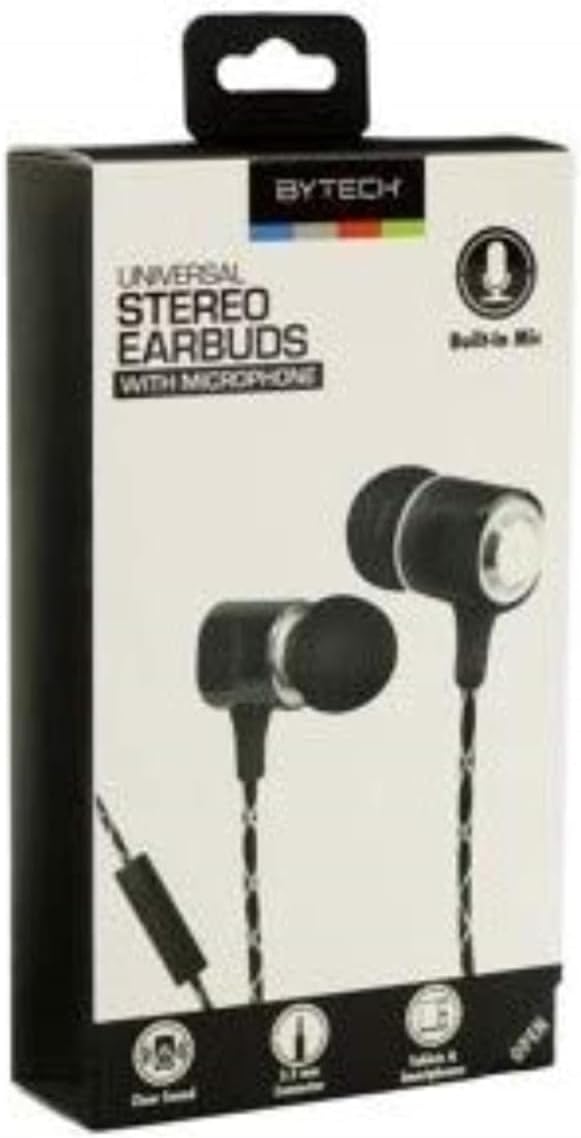
Figure 1: Bytech BYAUEB141BK Stereo Earbuds in their retail packaging, showing the black earbuds with a braided cable and a 3.5mm jack.
What's in the Box
- One (1) Bytech BYAUEB141BK Stereo Earbuds W/MIC
Setup
The Bytech BYAUEB141BK earbuds are designed for simple plug-and-play operation.
- Identify the Audio Jack: Locate the 3.5mm audio jack on your smartphone, tablet, laptop, or other compatible audio device.
- Insert the Earbuds: Gently insert the 3.5mm plug of the earbuds into the audio jack of your device until it clicks into place.
- Position Earbuds: Place the earbuds comfortably into your ears. The "L" marking indicates the left earbud, and "R" indicates the right earbud.
- Adjust Volume: Adjust the volume directly on your connected device to a comfortable listening level.
Operating Instructions
These earbuds are primarily controlled by the connected device, but feature an integrated microphone for communication.
Listening to Audio
- Once connected, audio from your device will automatically play through the earbuds.
- Use your device's media controls (play, pause, skip, volume) to manage playback.
Using the Microphone
- The built-in microphone allows for hands-free calling and voice commands.
- When a call comes in, answer it directly from your connected device. Your voice will be picked up by the earbud's microphone.
- For voice control features (if supported by your device), activate the voice assistant on your device, and speak into the microphone.
Retractable Cable Feature (if applicable)
Some models of Bytech earbuds may feature a retractable cable for easy storage and tangle prevention. If your earbuds have this feature, gently pull both ends of the cable simultaneously to extend it. To retract, pull slightly again and release to allow the mechanism to wind the cable back in.
Maintenance and Care
Proper care will extend the life of your earbuds.
- Cleaning: Use a soft, dry cloth to wipe the earbuds and cable. Do not use harsh chemicals or abrasive materials. For ear tips, gently remove them and clean with a damp cloth, ensuring they are completely dry before reattaching.
- Storage: Store your earbuds in a clean, dry place away from extreme temperatures. Avoid tangling the cable by coiling it neatly.
- Avoid Moisture: Do not expose the earbuds to water or excessive moisture. They are not waterproof.
- Handle Gently: Avoid pulling on the cable directly when disconnecting from a device. Always grasp the plug.
Troubleshooting
If you encounter issues with your earbuds, try the following solutions:
| Problem | Possible Solution |
|---|---|
| No sound from earbuds. |
|
| Sound is distorted or intermittent. |
|
| Microphone is not working. |
|
Specifications
| Feature | Detail |
|---|---|
| Model Number | BYAUEB141BK |
| Brand | Bytech |
| Connectivity Technology | Wired (3.5mm Jack) |
| Ear Placement | In Ear |
| Form Factor | In Ear |
| Microphone | Built-in |
| Noise Control | Sound Isolation |
| Control Type | Voice Control (via connected device) |
| Material | Acrylonitrile Butadiene Styrene (ABS) |
| Color | Black |
| Item Weight | 1.65 ounces (approx. 0.05 kg) |
| Recommended Uses | Calling, Music, Travel, Exercising |
| UPC | 805112039418 |
Warranty and Support
For warranty information or technical support, please refer to the documentation included with your purchase or visit the official Bytech website. Keep your proof of purchase for any warranty claims.
Ask a question about this manual
Ask about setup, troubleshooting, compatibility, parts, safety, or missing instructions. Manuals+ will review the question and use this page’s manual context to help answer it.