
Sytas TJ-SBGY001BP
Sytas Ergonomic Desk Chair User Manual
Model: TJ-SBGY001BP | Brand: Sytas
Introduction
Thank you for choosing the Sytas Ergonomic Desk Chair. This manual provides essential information for the assembly, operation, maintenance, and troubleshooting of your new chair. Designed with your comfort and health in mind, this chair features an S-shaped ergonomic backrest, supportive lumbar support, breathable mesh, and convenient adjustable functions to enhance your daily work or study experience.

Figure 1: Sytas Ergonomic Desk Chair (Black)
Safety Information
- Ensure all components are present and undamaged before assembly.
- Follow assembly instructions carefully. Do not overtighten screws.
- Do not stand on the chair. Use only for seating one person.
- Do not exceed the maximum weight capacity of 300 lbs (136 kg).
- Keep hands and fingers clear of moving parts during adjustment.
- Regularly inspect all bolts and connections to ensure they are secure.
- Keep away from open flames or excessive heat.
- Use on a flat, stable surface.
Package Contents
Before beginning assembly, verify that all parts listed below are included in your package:
- Chair Backrest (Mesh)
- Seat Cushion (Padded)
- Armrests (Flip-up, Padded) - 2 pieces
- Chair Base (5-star)
- Casters (Wheels) - 5 pieces
- Gas Lift Cylinder
- Mechanism Plate (for seat adjustment)
- Hardware Kit (screws, washers, Allen key, decoration caps)
- User Manual (this document)
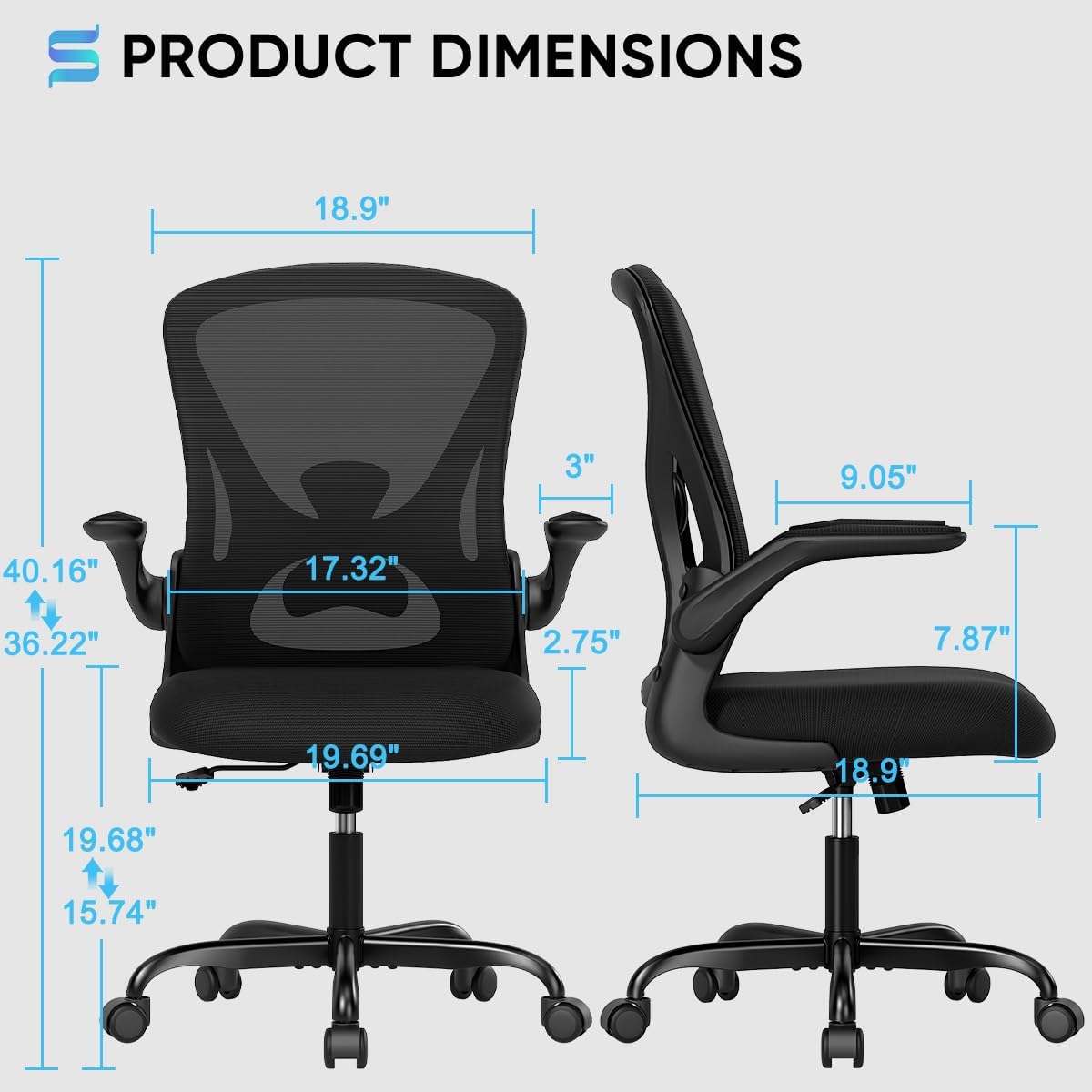
Figure 2: Product Dimensions and Components Overview
Setup and Assembly
Assembly typically takes 15-20 minutes. All necessary tools are included. For a visual guide, please refer to the official assembly video below.
Video 1: Official Sytas Office Chair Assembly Guide. This video demonstrates the step-by-step process of assembling the chair, including attaching the base, casters, gas lift, and connecting the seat and backrest with armrests.
Step-by-Step Assembly:
- Assemble the Base: Insert the five casters into the holes at the end of each leg of the 5-star base. Push firmly until they click into place.
- Install the Gas Lift: Place the gas lift cylinder into the central hole of the assembled 5-star base.
- Attach the Mechanism Plate: Secure the mechanism plate to the underside of the seat cushion using the provided screws. Ensure the front of the mechanism faces the front of the seat.
- Connect Armrests to Backrest: Attach the armrests to the backrest using the designated screws.
- Attach Backrest/Armrest Assembly to Seat: Align the backrest and armrest assembly with the pre-drilled holes on the seat cushion and secure with screws.
- Combine Seat and Base: Carefully place the assembled seat onto the gas lift cylinder, ensuring it is firmly seated. Apply gentle downward pressure to secure the connection.
- Add Decoration Caps: Cover any visible screw heads with the provided decoration caps for a clean finish.
Operating Instructions
Height Adjustment:
To adjust the chair's height, locate the lever on the right side, beneath the seat. While seated, pull the lever up to lower the chair. To raise the chair, stand up and pull the lever up. Release the lever at your desired height to lock it in place.
Tilt Function (Rocking Style):
The chair features a 90°-120° tilt tension for comfortable reclining. To activate the tilt, pull out the adjustment lever located on the left side, beneath the seat. To lock the chair in an upright position, push the lever back in. The tilt tension knob, located at the front of the mechanism, can be rotated to adjust the resistance of the recline.
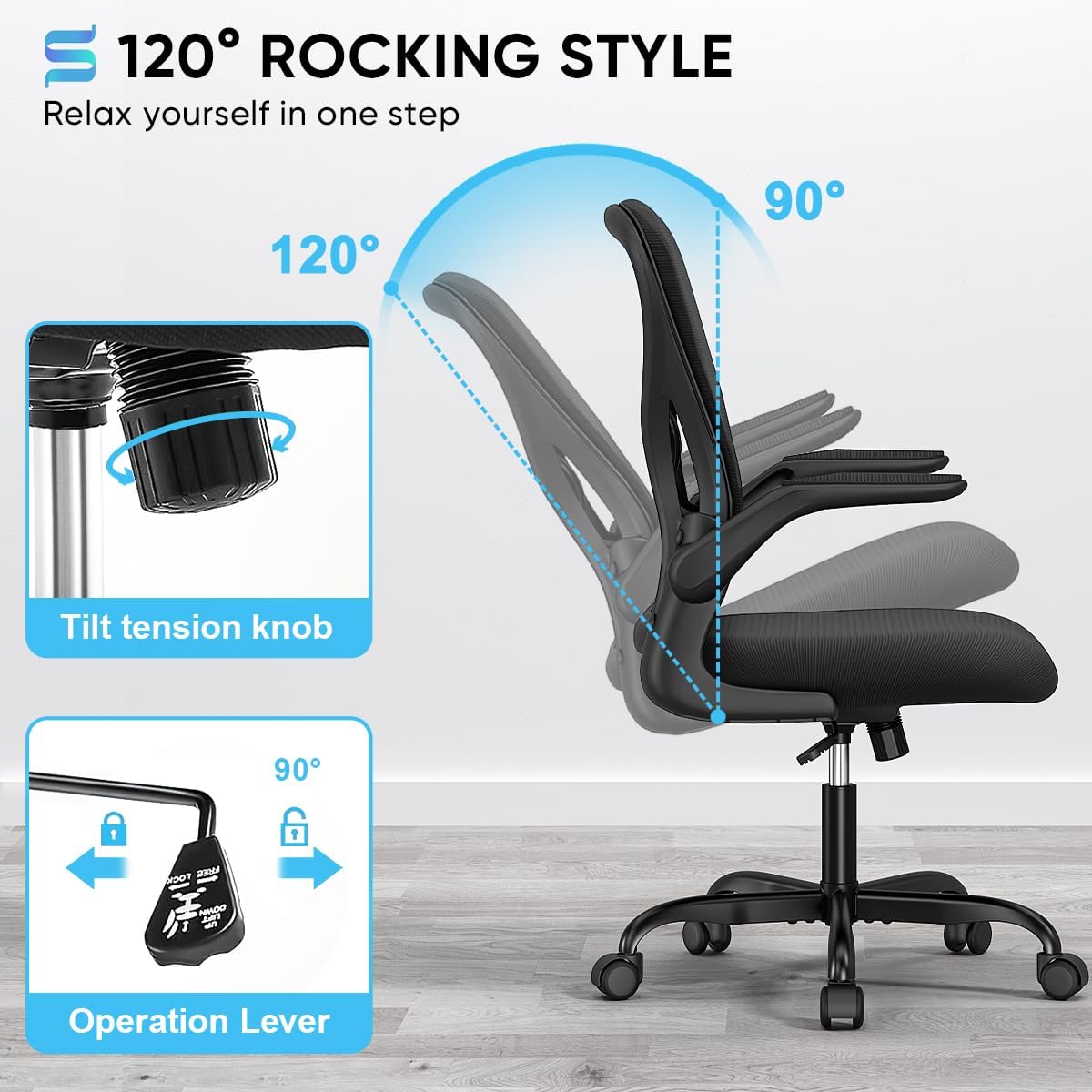
Figure 3: Tilt Function Controls
Flip-Up Armrests:
The padded armrests can be flipped up 90° to save space or allow the chair to be pushed closer to a desk. Simply lift the armrests upwards until they lock into the vertical position. To return them to the horizontal position, gently pull them down.

Figure 4: Flip-Up Armrests in action
Ergonomic Support:
The S-shaped backrest is designed to align with the natural curve of your spine, providing supportive lumbar support and reducing muscle fatigue. The high-density double-layer mesh back is breathable, ensuring comfort during long periods of use.
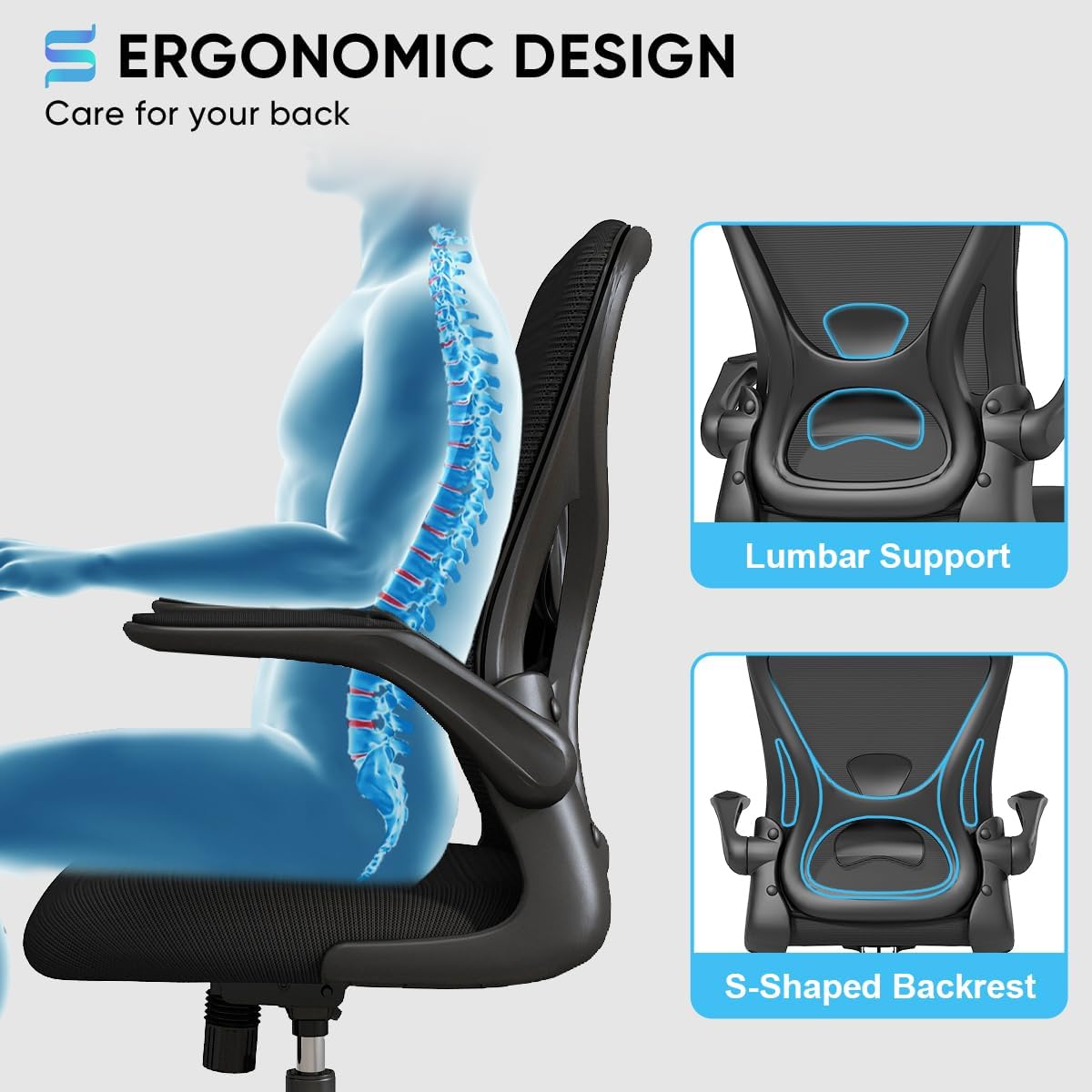
Figure 5: Ergonomic Design for Spinal Support
Maintenance
- Cleaning: Wipe clean with a damp cloth. For mesh and fabric areas, use a mild soap solution if necessary, and blot dry. Avoid harsh chemicals or abrasive cleaners.
- Inspection: Periodically check all screws and bolts to ensure they are tight. Retighten as needed to maintain stability and safety.
- Casters: Keep casters free of debris (hair, dust, etc.) to ensure smooth rolling. Clean regularly.
- Gas Lift: Do not attempt to disassemble the gas lift cylinder. If it malfunctions, contact customer support.
Troubleshooting
| Problem | Possible Cause | Solution |
|---|---|---|
| Chair wobbles or is unstable. | Loose screws or uneven assembly. | Check and tighten all assembly screws. Ensure the chair is on a flat surface. |
| Chair does not adjust height. | Gas lift malfunction or lever not engaged. | Ensure the height adjustment lever is fully engaged. If the issue persists, the gas lift may need replacement. Contact support. |
| Casters do not roll smoothly. | Debris caught in casters. | Turn the chair over and remove any hair, dust, or debris from the caster wheels. |
| Backrest does not tilt or lock. | Tilt mechanism locked or tension too high. | Pull out the tilt adjustment lever to enable tilt. Adjust the tilt tension knob to reduce resistance. |
Specifications
| Brand: | Sytas |
| Model Name: | TJ-SBGY001BP |
| Color: | Black |
| Product Dimensions: | 18.9"D x 19.69"W x 36.22"H |
| Item Weight: | 27.7 pounds (12.56 kg) |
| Maximum Weight Recommendation: | 300 Pounds (136 kg) |
| Material: | Mesh, Foam (fill) |
| Special Features: | Ergonomic Backrest, Lumbar Support, Flip-up Arms, Breathable Mesh, Height Adjustable, Swivel |
| UPC: | 717765843819 |
| Date First Available: | October 24, 2021 |
Warranty and Support
Sytas offers a 1-year warranty for this product. For any questions, issues, or warranty claims, please contact Sytas customer service. We are committed to providing effective assistance and ensuring your satisfaction.
For more information or to contact support, please visit the official Sytas Store: Sytas Store on Amazon
Related documentsTJ-SBGY001BP


Ask a question about this manual
Ask about setup, troubleshooting, compatibility, parts, safety, or missing instructions. Manuals+ will review the question and use this page’s manual context to help answer it.