1. Product Overview
The ZdalaMit BN59-01330C is a replacement remote control designed for various Samsung Smart TV models. It features voice control functionality, allowing for convenient operation of your television.
This remote requires 2 x AA size alkaline batteries (not included) for operation.
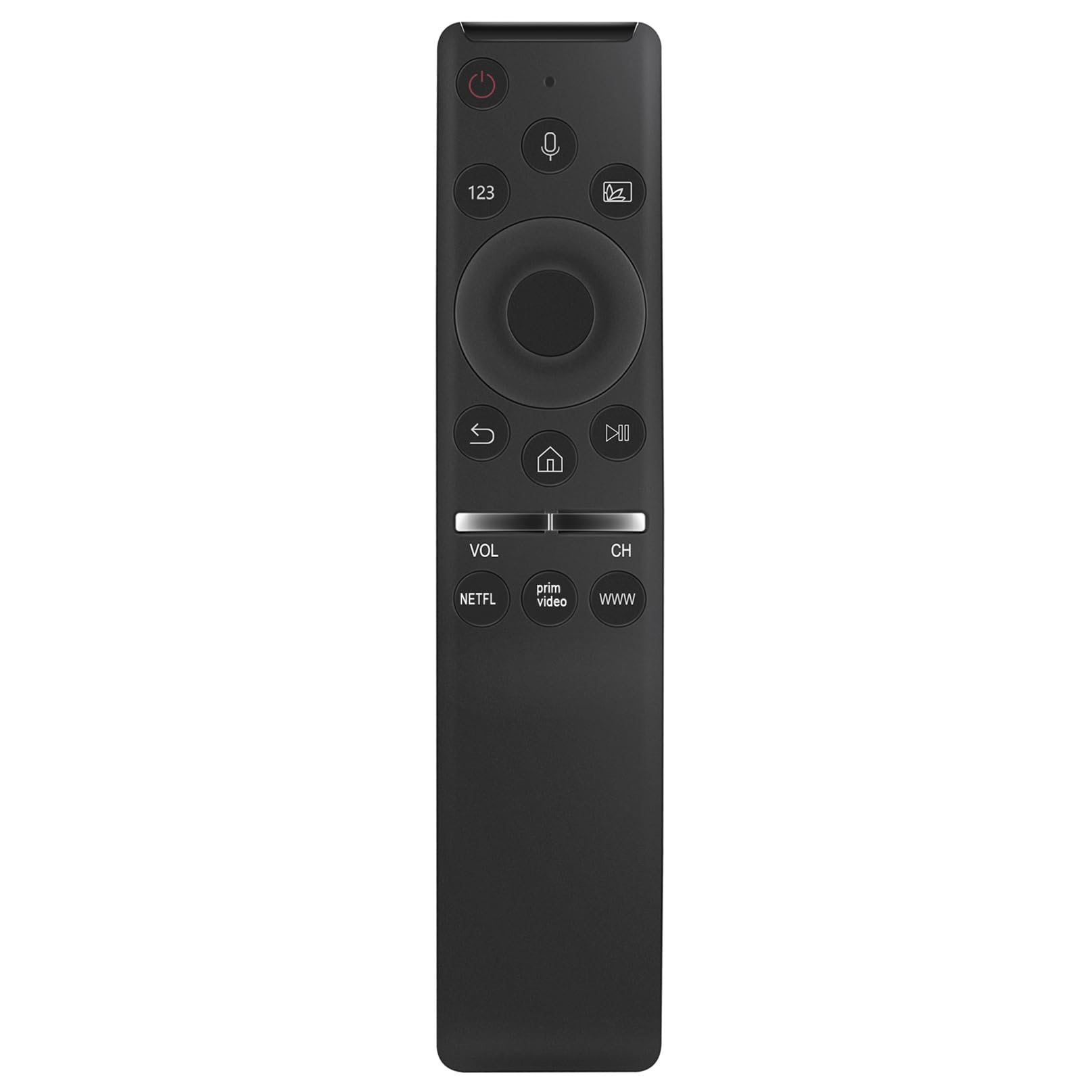
Image 1.1: Front view of the ZdalaMit BN59-01330C remote control.
Compatible Samsung TV Models:
- QA50Q65T, QA43Q60T, QA49Q80T, QA43Q65T, QA75Q70T, QA50Q60T, QA55Q80T, QA55Q60T, QA55Q65T, QA85Q80T, QA65Q65T, QA58Q60T, QA65Q60T, QA75Q60T, QA55Q70T, QA65Q70T, QA65Q80T, QA75Q80T, QA85Q60T, QA85Q70T
2. Setup
2.1 Battery Installation
The remote control requires two AA size alkaline batteries. Ensure correct polarity when inserting the batteries.
- Locate the battery compartment cover on the back of the remote control.
- Slide the cover downwards or press the latch (if present) to open the compartment.
- Insert two AA alkaline batteries, matching the (+) and (-) terminals as indicated inside the compartment.
- Replace the battery compartment cover, ensuring it clicks securely into place.
2.2 Pairing the Remote Control
Before using the voice control and some other functions, the remote must be paired with your Samsung TV. Follow these steps:
- Ensure your Samsung TV is powered on.
- Point the remote control towards your TV.
- Simultaneously press and hold the Return button (usually an arrow pointing left) and the Play/Pause button for approximately 3 seconds.
- A pairing message should appear on your TV screen, indicating successful pairing.
If pairing is unsuccessful, ensure the batteries are correctly installed and try again. Move closer to the TV if necessary.
3. Operating Instructions
This section details the primary functions and button layout of your ZdalaMit BN59-01330C remote control.

Image 3.1: Front view highlighting the voice control feature.
3.1 Button Functions
- Power Button (⏻): Turns the TV on or off.
- Voice Control Button (🎤): Activates the voice command feature. Press and hold to speak your command.
- 123 Button: Accesses the virtual numeric keypad.
- Multi-View/Source Button: Changes input source or activates multi-view mode.
- Directional Pad (Up, Down, Left, Right): Navigates menus and selections.
- Select/Enter Button: Confirms a selection.
- Return Button (↶): Returns to the previous screen or menu.
- Home Button (⌂): Accesses the Smart Hub or home screen.
- Play/Pause Button (⏯): Controls media playback (play, pause).
- Volume Up/Down (VOL): Adjusts the TV volume.
- Channel Up/Down (CH): Changes TV channels.
- NETFLIX Button: Direct access to the Netflix application.
- Prime Video Button: Direct access to the Prime Video application.
- WWW Button: Direct access to the web browser.
3.2 Using Voice Control
The voice control feature allows you to issue commands to your TV using your voice. Ensure the remote is paired with your TV before using this feature.
- Press and hold the Voice Control Button (microphone icon).
- Speak clearly into the microphone located on the remote control.
- Release the button when you have finished speaking your command.
Examples of voice commands include "Open Netflix," "Change to Channel 5," "Volume up," or "Search for [movie title]."
4. Maintenance
4.1 Cleaning the Remote Control
To maintain the remote control's appearance and functionality, clean it regularly.
- Use a soft, dry cloth to wipe the surface of the remote control.
- Do not use liquid cleaners, sprays, or abrasive materials, as these can damage the remote.
4.2 Battery Replacement
Replace the batteries when the remote control's performance degrades or if it stops responding. Refer to Section 2.1 Battery Installation for detailed steps.
- Always replace both batteries at the same time.
- Use new AA alkaline batteries.
- Dispose of used batteries according to local regulations.
5. Troubleshooting
If you encounter issues with your remote control, refer to the following common solutions.
5.1 Remote Not Responding
- Check Batteries: Ensure batteries are correctly inserted with the correct polarity. Replace old or depleted batteries with new AA alkaline batteries.
- Re-pair Remote: If the remote was previously working but stopped, try re-pairing it with your TV. Refer to Section 2.2 Pairing the Remote Control.
- Obstructions: Ensure there are no objects blocking the line of sight between the remote and the TV's infrared receiver (though this remote uses Bluetooth for voice, some functions might still rely on IR).
5.2 Voice Control Not Working
- Pairing Status: Voice control requires the remote to be paired via Bluetooth. Confirm the remote is successfully paired with your TV (Section 2.2).
- Microphone Button: Ensure you are pressing and holding the Voice Control Button while speaking.
- Speak Clearly: Speak clearly and directly into the remote's microphone.
- TV Settings: Check your TV's sound or voice control settings to ensure the feature is enabled.
6. Specifications
| Feature | Detail |
|---|---|
| Model Number | BN59-01330C |
| Brand | ZdalaMit |
| Product Dimensions | 5 x 1.2 x 0.6 inches |
| Item Weight | 1.41 ounces |
| Batteries Required | 2 x AA alkaline batteries |
| Special Feature | Voice Search |
| Color | Black |
| Compatible Devices | Samsung Televisions (specific models listed in Section 1) |

Image 6.1: Dimensions of the ZdalaMit BN59-01330C remote control.
7. Warranty Information
Specific warranty details for the ZdalaMit BN59-01330C remote control are typically provided by the seller or manufacturer at the time of purchase. Please refer to your purchase documentation or contact the seller directly for information regarding warranty coverage, terms, and conditions.
8. Customer Support
If you have any questions, require further assistance, or encounter issues not covered in this manual, please do not hesitate to contact the seller or manufacturer directly. Contact information can usually be found on your purchase receipt or the product packaging.
For general inquiries, you may also visit the ZdalaMit brand page or the retailer's support section where the product was purchased.


