
Introduction
This manual provides detailed instructions for the setup, operation, maintenance, and troubleshooting of your AMIR HA67F-AU Key Lock Box. Please read this guide thoroughly before using the product to ensure proper function and security.
Product Overview and Features
The AMIR HA67F-AU Key Lock Box is designed for secure key storage, offering convenience and protection for your keys in various indoor and outdoor environments. Its robust construction and user-friendly design make it suitable for homes, offices, vacation rentals, and more.
- Removable Shackle: The lock box features a detachable shackle, allowing it to be easily hung on doorknobs, car handles, railings, fences, or pipes without the need for tools.
- Large Capacity: Capable of storing up to 5 standard house keys or 3 larger keys. The internal dimensions are approximately 2.17 x 1.38 x 1.14 inches.
- Sturdy Material: Constructed from high-strength zinc alloy and hardened-steel shackles, providing resistance against cutting and sawing. It is rust-resistant and designed for durability.
- High Security: Equipped with a 4-digit combination lock, offering 10,000 possible combinations for enhanced security. The combination can be reset as needed.
- Weatherproof Design: Suitable for both indoor and outdoor use, protecting keys from environmental elements.
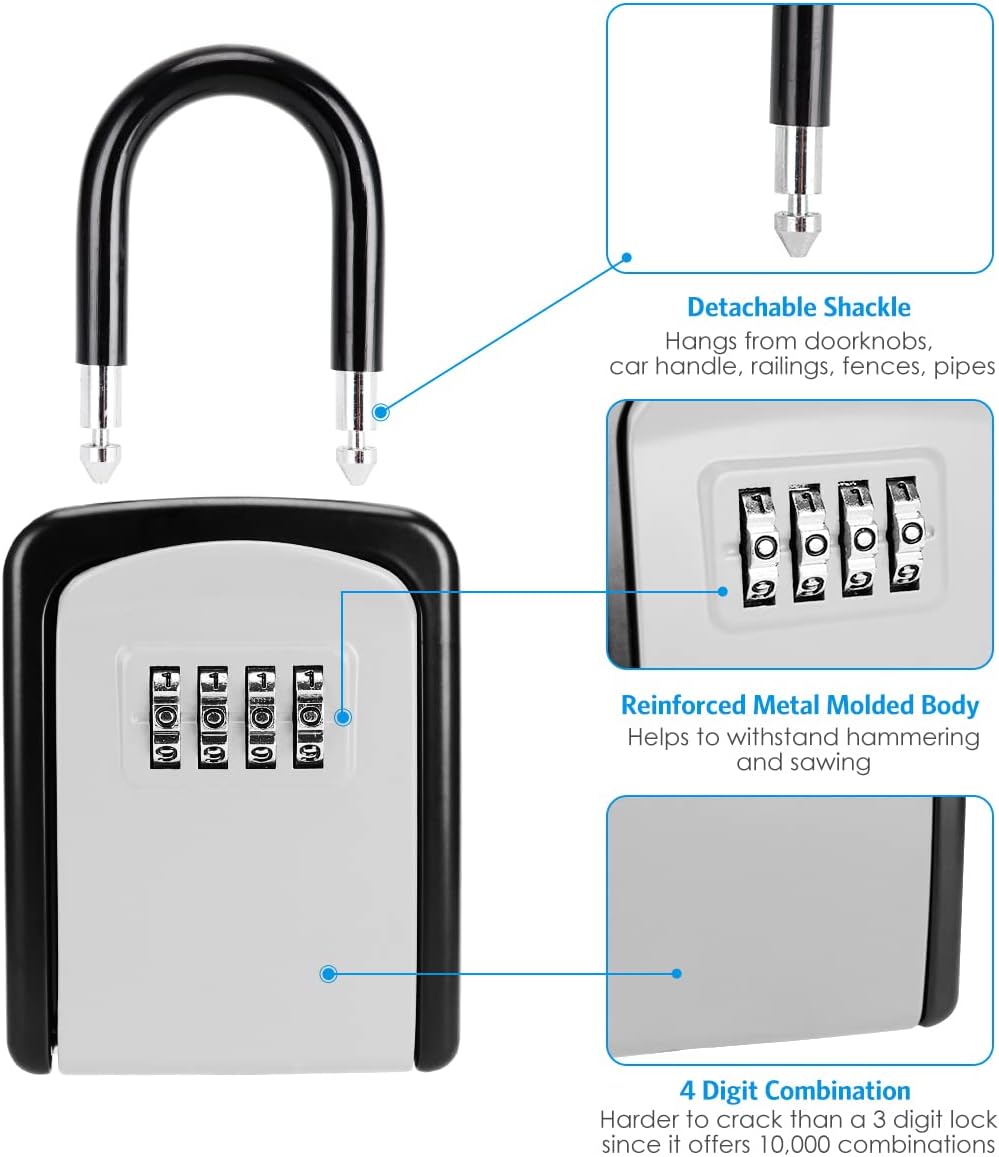
Image: Key features of the AMIR HA67F-AU Key Lock Box, highlighting the detachable shackle, reinforced metal body, and the 4-digit combination dial.

Image: Detailed dimensions of the AMIR HA67F-AU Key Lock Box, illustrating both its external size and the internal storage capacity.
Setup Instructions
1. Setting Your Combination
The lock box comes with a default combination of 0-0-0-0. Follow these steps to set your personalized 4-digit combination:
- Step 1: Dial the default code (0-0-0-0) to align with the indicator marks on the front of the lock box.
- Step 2: Open the lock box. Inside, locate the RESET lever on the back of the front cover. Push this lever from position A to position B.
- Step 3: With the lever in position B, scroll the number dials to set your desired 4-digit combination. Ensure the numbers are clearly aligned with the indicator marks.
- Step 4: Push the RESET lever back from position B to position A. Your new combination is now set.
Important: Please record your new combination immediately and store it in a safe place. Without the correct combination, the lock box cannot be opened, and there is no master key or override.

Image: Step-by-step guide for setting the combination, showing the dials, reset lever, and final combination setting.
2. Attaching the Lock Box
The AMIR HA67F-AU Key Lock Box features a removable shackle for flexible placement.
- Step 1: Open the lock box using your set combination.
- Step 2: Locate the button inside the top part of the lock box. Push this button up to release one end of the shackle.
- Step 3: Pull up the shackle completely.
- Step 4: Position the lock box where desired (e.g., around a doorknob, railing, or fence). Insert the shackle ends back into the lock box and ensure they click securely into place.
- Step 5: Close the lock box and scramble the dials to secure it.

Image: Instructions for hanging the lock box, demonstrating how to remove and reattach the shackle to a doorknob.
Operating Instructions
To access your keys:
- Align the 4-digit combination dials to your set code.
- Pull down the front cover of the lock box to open it.
- Retrieve or place keys inside.
- Close the front cover firmly.
- Scramble the combination dials to lock the box and prevent unauthorized access.

Image: The AMIR Key Lock Box in an open state, revealing the interior compartment for key storage and the combination dials.
Maintenance
To ensure the longevity and optimal performance of your AMIR Key Lock Box:
- Cleaning: Wipe the exterior with a soft, damp cloth. Avoid abrasive cleaners or solvents that could damage the finish or internal mechanisms.
- Lubrication: Periodically apply a small amount of silicone-based lubricant to the shackle mechanism and combination dials to ensure smooth operation, especially in harsh weather conditions.
- Inspection: Regularly check the lock box for any signs of wear, damage, or corrosion. Ensure the shackle is securely attached and the combination dials turn freely.
- Weather Protection: While weatherproof, prolonged exposure to extreme conditions may affect performance. Consider placing it in a sheltered location if possible.
Troubleshooting
If you encounter issues with your AMIR Key Lock Box, refer to the following common solutions:
- Lock Box Will Not Open:
- Ensure the combination dials are precisely aligned with your set code. Even a slight misalignment can prevent opening.
- Verify you are using the correct combination. If you forgot your code and did not record it, the lock box cannot be opened without destructive methods.
- Check for any debris or obstruction preventing the cover from opening.
- Dials Are Stiff or Hard to Turn:
- Apply a silicone-based lubricant to the dials.
- Clean any dirt or grime from around the dials.
- Shackle Does Not Detach/Attach Smoothly:
- Ensure the lock box is open and the internal release button is fully pressed.
- Check for any obstructions or damage to the shackle mechanism.
- Apply a silicone-based lubricant to the shackle pins.
If these steps do not resolve the issue, please contact customer support.
Specifications
| Feature | Detail |
|---|---|
| Brand | AMIR |
| Model Number | HA67F-AU |
| External Dimensions (Approx.) | 3.66"H x 2.87"W (from product image) |
| Internal Dimensions (Approx.) | 2.17"H x 1.38"W x 1.14"D |
| Lock Type | 4-Digit Combination |
| Color | Silver (for this variant) |
| Key Capacity | Up to 5 house keys or 3 large keys |
| Material | Alloy Steel, Metal, Zinc |
| Special Features | Anti-Theft, Combination Lock, Portable, Removable Shackle, Waterproof |
| Mounting Type | Handle (Removable Shackle) |
| Item Weight | 0.33 Kilograms / 11.7 ounces |
| Water Resistance Level | Waterproof |
Warranty Information
AMIR provides a 24-month warranty for the HA67F-AU Key Lock Box, covering manufacturing defects and material flaws under normal use. Additionally, customers receive lifetime support for their product. Please retain your proof of purchase for warranty claims.
Customer Support
For any questions, concerns, or assistance with your AMIR HA67F-AU Key Lock Box, please contact AMIR customer support. You can typically find contact information on the official AMIR website or through your purchase platform.
We are committed to providing high-quality products and support to our customers.