
Introduction
This manual provides comprehensive instructions for the setup, operation, and maintenance of your Marea B61002/1 Smartwatch. Please read this manual carefully before using your device to ensure proper functionality and to maximize its features. Keep this manual for future reference.
Product Overview
The Marea B61002/1 is a stylish and functional smartwatch designed for men, featuring a silver stainless steel case and strap. It combines the classic aesthetic of an analog watch with the advanced capabilities of a modern smartwatch.
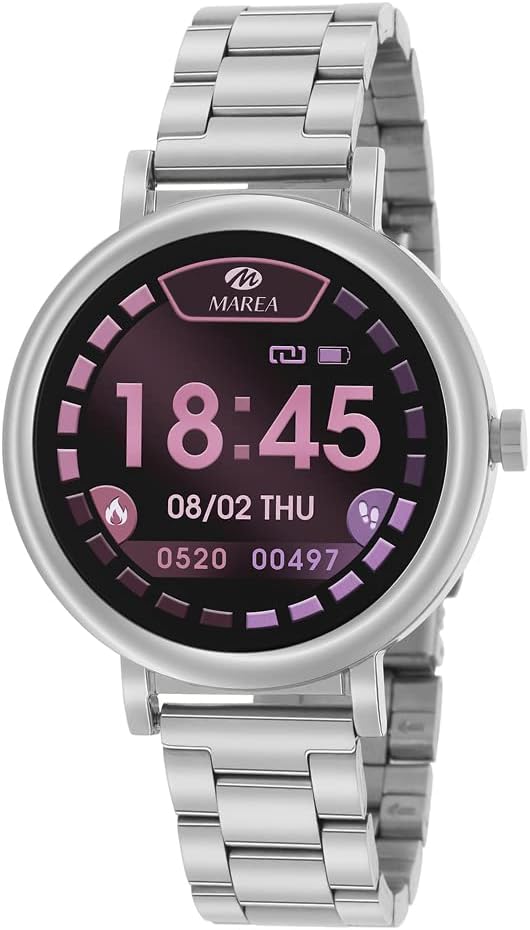
Figure 1: Marea B61002/1 Smartwatch. This image displays the smartwatch with its silver stainless steel band and a digital display. The screen shows the time as 18:45, the date as 08/02 THU, and various fitness metrics including calorie burn and step count. The watch features a round face and a single crown on the right side.
Key Features:
- Stainless steel case with a 40 mm diameter.
- Advanced health monitoring: calorie consumption, distance tracking, pedometer, heart rate, and blood pressure.
- Smart notifications: social media alerts and message reading.
- Water and sweat resistant (up to 1 meter depth), suitable for showering and training.
- Compatible with Android and iOS smartphones.
Setup
- Charging the Smartwatch:
Before initial use, fully charge your Marea B61002/1 Smartwatch. Connect the charging cable to the designated charging port on the watch and plug the other end into a USB power adapter (not included) or a computer's USB port. The battery indicator on the watch display will show charging progress. A full charge typically takes approximately 2 hours.
- Downloading the Companion App:
To unlock all features and synchronize data, download the official Marea smartwatch companion app from your smartphone's app store (Google Play Store for Android or Apple App Store for iOS). Search for "Marea Smartwatch" or refer to the QR code in the watch's packaging for direct download.
- Pairing with Your Smartphone:
- Ensure Bluetooth is enabled on your smartphone.
- Open the Marea companion app on your smartphone.
- Follow the in-app instructions to add a new device. The app will search for available smartwatches.
- Select "Marea B61002/1" from the list of found devices.
- Confirm the pairing request on both your smartphone and the smartwatch if prompted.
- Once paired, the watch will synchronize time and data with your phone.
Operating Instructions
Your Marea B61002/1 Smartwatch offers a range of functions accessible through its touch screen and physical button (if applicable).
- Basic Navigation:
Swipe left/right or up/down on the touchscreen to navigate through different screens and menus. Press the side button (crown) to return to the home screen or to wake the display.
- Time Display:
The main screen displays the current time and date, synchronized with your paired smartphone.
- Activity Tracking:
Access screens for pedometer (step count), distance covered, and calorie consumption. These metrics are automatically tracked throughout the day.
- Health Monitoring:
Navigate to the heart rate or blood pressure monitoring screens. Follow the on-screen instructions to take a measurement. Ensure the watch is snug on your wrist for accurate readings. Note: This device is not a medical device and should not be used for medical diagnosis or treatment.
- Notifications:
Once paired with your smartphone, the watch will display notifications for incoming calls, messages, and social media alerts. You can read messages directly on the watch screen.
- Special Features:
- Alarm Clock: Set alarms via the companion app to vibrate on your wrist.
- Music and Camera Remote: Control music playback and trigger your smartphone's camera remotely through the watch.
- Water Resistance:
The watch is resistant to sweat and water up to 1 meter depth. It is suitable for showering and light training. Avoid prolonged submersion or hot water exposure.
Maintenance
- Cleaning:
Wipe the watch case and strap regularly with a soft, damp cloth. For stubborn dirt, a mild soap solution can be used, followed by wiping with a clean, damp cloth and drying thoroughly. Avoid harsh chemicals or abrasive materials.
- Battery Care:
To prolong battery life, avoid fully discharging the battery frequently. Charge the watch when the battery level is low. Store the watch in a cool, dry place if not used for extended periods, and charge it periodically to prevent deep discharge.
- Storage:
When not in use, store your smartwatch in a safe place away from extreme temperatures, direct sunlight, and moisture.
Troubleshooting
| Problem | Possible Cause | Solution |
|---|---|---|
| Watch does not turn on. | Low battery. | Charge the watch for at least 30 minutes. |
| Cannot pair with smartphone. | Bluetooth is off; app not open; watch not in pairing mode; interference. | Ensure Bluetooth is on. Open the app. Restart both watch and phone. Move closer to the phone. |
| Notifications not received. | App permissions not granted; app not running in background; Bluetooth disconnected. | Check app notification permissions. Ensure app is running. Reconnect Bluetooth. |
| Inaccurate health data. | Watch not worn correctly; sensor dirty. | Ensure watch is snug on wrist. Clean the sensor on the back of the watch. |
Specifications
| Feature | Detail |
|---|---|
| Brand | Marea |
| Model Name | B61002/1 |
| Part Number | B61002/1 |
| Operating System | Android, iOS |
| Display Resolution | 240 x 240 pixels |
| Compatible Devices | Smartphone |
| Special Features | Alarm Clock, Pedometer, Time Display, Music Remote, Camera Remote |
| Display Area Size | 1.09 Inches |
| Display Type | Analog (refers to the watch's overall appearance, but the screen is digital) |
| Average Battery Life | 15 days |
| Battery Capacity | 190 Milliamp Hours |
| Battery Cell Composition | Silver Oxide |
| Wireless Connectivity | Bluetooth |
| Human Interface Input | Buttons |
| Product Dimensions | 4 x 1 x 0.5 cm; 210 g |
| Water Resistance | Up to 1 meter depth (sweat and water resistant) |
Warranty and Support
Specific warranty information for the Marea B61002/1 Smartwatch is not provided in this manual. For detailed warranty terms, conditions, and support, please refer to the official Marea website or contact your point of purchase. Keep your proof of purchase for warranty claims.
For technical support or further assistance, please visit the official Marea support page or contact their customer service department.
