
EIGIIS DWT
EIGIIS Smartwatch User Manual
Model: DWT
Introduction
Thank you for choosing the EIGIIS Smartwatch. This device is designed to enhance your daily life by providing comprehensive health tracking, smart notifications, and various sports modes. Please read this manual carefully to understand the proper use and maintenance of your smartwatch.

Image: EIGIIS Smartwatch, showcasing its sleek design and interchangeable straps.
Safety Information
Important: Wearable devices monitor human activities through electronic sensors and are at the consumer electronics level. They cannot be compared to hospital equipment and are NOT a medical device.
- Do not attempt to disassemble or modify the device.
- Keep the device away from extreme temperatures and direct sunlight.
- Avoid exposing the device to strong impacts or drops.
- Do not use corrosive cleaners to clean the device.
- If you experience skin irritation, discontinue use and consult a doctor.
- Charge the device using the provided charging cable only.
Package Contents
The following items are included in your EIGIIS Smartwatch package:
- 1 x EIGIIS Smart Watch
- 2 x Watch Bands (one pre-installed, one spare)
- 1 x Charging Cable
- 1 x User Manual (this document)
- 1 x Retail Box
Product Overview
The EIGIIS Smartwatch features a 1.28-inch HD full touch screen and a single physical button for navigation. The back of the watch houses the optical sensors for health monitoring and the charging contacts.

Image: Rear view of the EIGIIS Smartwatch, highlighting the health tracking sensors.
Setup
1. Charging the Device
Before first use, please charge the smartwatch for 2-3 hours. Connect the charging cable to the charging contacts on the back of the watch and plug the USB end into a power adapter (not included) or a computer USB port.
A full charge provides approximately 5-7 days of working time or up to 25 days of standby time.
2. Downloading and Installing the App
The EIGIIS Smartwatch uses the "GloryFit" application. You can download it from the App Store (for iOS devices) or Google Play Store (for Android devices). Alternatively, scan the QR code provided in the included user manual to quickly find the app.
3. Pairing with Your Smartphone
- Ensure Bluetooth is enabled on your smartphone.
- Open the "GloryFit" app and follow the on-screen instructions to create an account or log in.
- In the app, navigate to the device section and search for your smartwatch.
- Select your EIGIIS Smartwatch from the list of available devices to initiate pairing.
- Confirm the pairing request on both your phone and the smartwatch if prompted.
The smartwatch is compatible with Android 4.4 or above and iOS 9.0 or above, and Bluetooth 4.0 or later.
4. Customizing the Watch Face
You can personalize your smartwatch by changing the watch face. Within the "GloryFit" app, navigate to the dial settings. You can choose from various pre-designed dials or upload your favorite photo to create a custom watch face.

Image: Options for customizing the smartwatch dial with various designs and personal photos.
Operating Instructions
1. Basic Navigation
- Touch Screen: Swipe left/right or up/down to navigate through menus and functions. Tap to select an option.
- Side Button: Press the side button to return to the previous screen or the main watch face.
2. Sports Modes
The EIGIIS Smartwatch supports 24 sports modes to track your exercise data efficiently. These modes include walking, outdoor running, cycling, swimming, climbing, spinning bike, indoor running, volleyball, badminton, basketball, football, rope skipping, yoga, tennis, cricket, dancing, baseball, rugby, gymnastics, rowing, hockey, pingpong, sit-ups, and jumping jack.
Select your desired sport mode on the watch to start tracking metrics such as calorie consumption, distance, and steps. When connected to your phone's GPS, you can also track your routes in the GloryFit app.

Image: Visual representation of the 24 supported sports modes.
3. Health Tracking
The smartwatch continuously monitors your health metrics:
- Heart Rate Monitor: Provides real-time heart rate data.
- Blood Oxygen Monitor: Measures your blood oxygen levels.
- Sleep Monitor: Automatically tracks your sleep patterns, including awake, light sleep, and deep sleep stages, to help you understand and improve your sleep quality.
Access detailed health reports and historical data within the GloryFit app.
4. Smart Notifications
Once connected to your phone, the smartwatch will notify you of incoming calls and messages from various applications (e.g., Facebook, Twitter, Instagram, WhatsApp, Skype, Gmail, WeChat, Messenger) via vibrations. You can read messages directly on the watch screen and reject calls with a single tap.

Image: Smartwatch showing call and message notifications from a connected smartphone.
5. Other Functions
The EIGIIS Smartwatch offers several additional convenient features:
- Remote Camera Control: Use your watch as a remote shutter for your phone's camera.
- Music Control: Control music playback on your phone (play, pause, skip tracks).
- Weather Forecast: Get real-time weather updates directly on your wrist.
- Sedentary Reminder: Receive alerts to remind you to move after periods of inactivity.
- Stopwatch: A built-in stopwatch for timing activities.
- Find Phone: Locate your misplaced phone by making it ring from your watch.
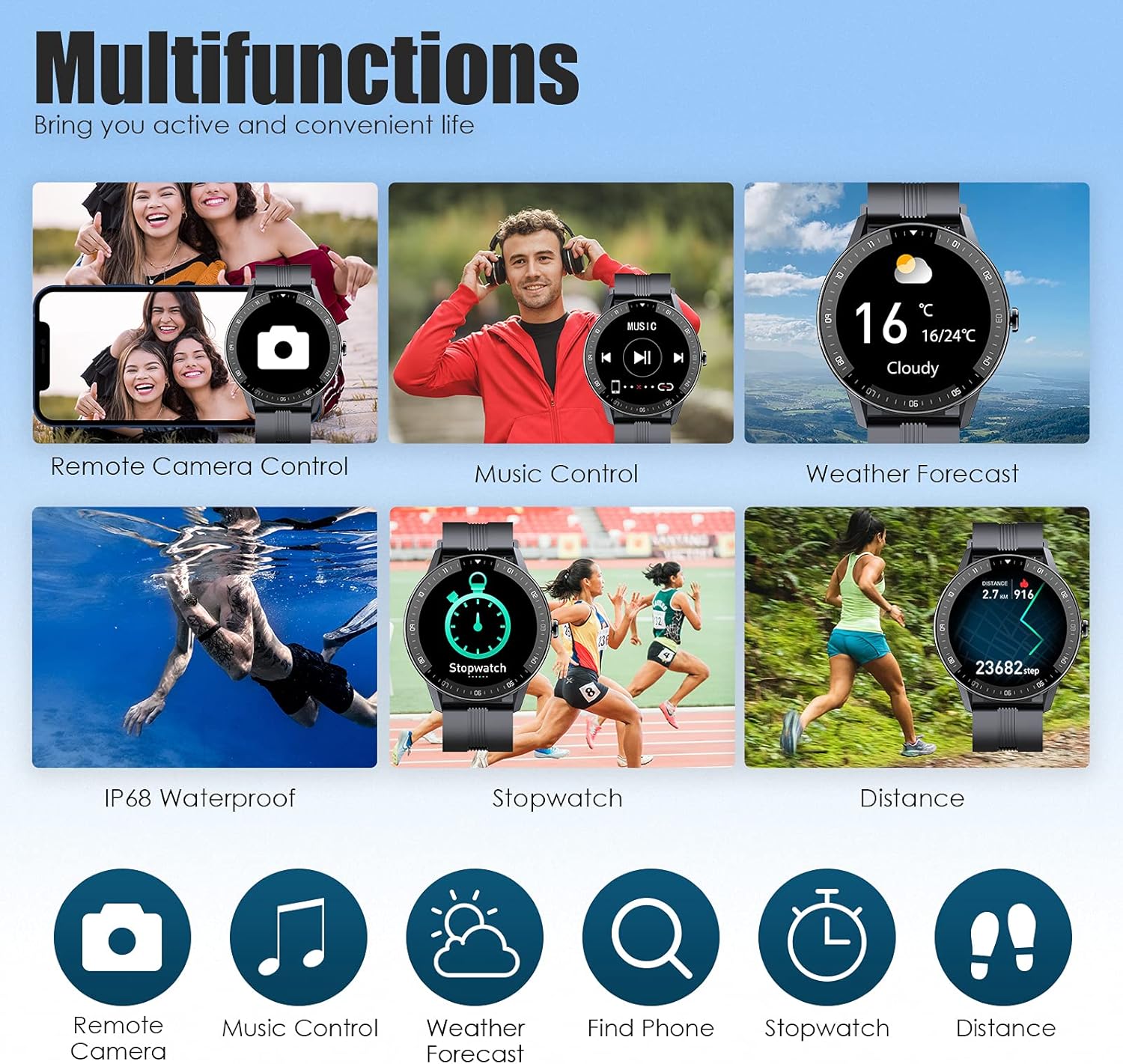
Image: Multifunctions of the EIGIIS Smartwatch, including remote camera, music control, and weather forecast.
Maintenance
- Cleaning: Wipe the watch and strap regularly with a soft, dry cloth. For stubborn dirt, use a slightly damp cloth and then dry thoroughly.
- Water Resistance: The smartwatch has an IP67 waterproof rating, meaning it is resistant to splashes, rain, and brief immersion. It is suitable for daily use and can be worn during hand washing or in light rain. Do not wear it for showering with hot water, diving, or prolonged swimming.
- Battery Care: To prolong battery life, avoid fully discharging the battery frequently. Charge the device when the battery level is low.
Troubleshooting
| Problem | Solution |
|---|---|
| Smartwatch does not turn on or charge. | Ensure the charging cable is securely connected to both the watch and a power source. Try a different USB port or power adapter. Charge for at least 30 minutes. |
| Cannot pair with smartphone. | Make sure Bluetooth is enabled on your phone. Ensure the watch is charged and within range. Restart both the watch and your phone. Forget the device in your phone's Bluetooth settings and try pairing again through the GloryFit app. |
| Notifications are not received. | Check app notification permissions on your phone. Ensure the GloryFit app is running in the background. Verify notification settings within the GloryFit app. |
| Inaccurate health data readings. | Ensure the watch is worn snugly on your wrist, not too tight or too loose. Clean the sensor on the back of the watch. Remember, this is a consumer-level device and not for medical use. |
| Screen is unresponsive. | Restart the smartwatch by pressing and holding the side button. If unresponsive, allow the battery to fully drain and then recharge. |
Specifications
| Feature | Detail |
|---|---|
| Brand | EIGIIS |
| Model Name | R021 (Model Number: DWT) |
| Screen Size | 1.28 inches |
| Screen Type | IPS, HD Full Touch Screen |
| Resolution | 240*240 pixels |
| Battery Capacity | 180mAh (Lithium-ion) |
| Working Hours | About 5-7 days |
| Standby Time | About 25-30 days |
| IP Rating | IP67 Waterproof |
| Dial Size | Approx. 1.8*1.8*0.5 inches / 46*46*12mm |
| Band Size | Approx. 10*0.9 inches / 260*22mm |
| Product Weight | Approx. 1.8oz / 50g |
| Bluetooth Version | BT 5.0 |
| Compatible System | Android 4.4 or above, iOS 9.0 or above |
| Special Features | Heart Rate Monitor, Blood Oxygen Monitor, Sleep Monitor, 24 Sports Modes, Pedometer, Calorie Tracker, Distance Tracker, Notification (Calls, SMS, Social Media), Sedentary Reminder, Music Control, Remote Camera, Weather Forecast, Find Phone, GPS (connecting to phone's GPS) |
Warranty and Support
For warranty information and technical support, please refer to the contact details provided with your purchase or visit the official EIGIIS website. If you encounter any problems with your device, do not hesitate to contact customer service for assistance.
Related documentsDWT


Ask a question about this manual
Ask about setup, troubleshooting, compatibility, parts, safety, or missing instructions. Manuals+ will review the question and use this page’s manual context to help answer it.