
LifePlus T663
LifePlus Full Automatic Washing Machine User Manual
Model: T663 | Brand: LifePlus
1. Introduction
Thank you for choosing the LifePlus Full Automatic Washing Machine. This appliance is designed to provide efficient and convenient laundry solutions for your home, apartment, or dorm. With its compact size and advanced features, it simplifies your washing tasks. Please read this manual thoroughly before operating the machine to ensure safe and optimal performance.
2. Safety Information
Your safety and the safety of others are very important. Please read all instructions before using the appliance and follow all safety precautions.
- Always ensure the washing machine is placed on a stable, level surface to prevent vibration and noise.
- Do not operate the machine if the power cord is damaged. Contact qualified service personnel for repair.
- Keep children and pets away from the machine during operation.
- Do not wash items that are soiled with flammable liquids or explosive substances.
- Unplug the machine from the power outlet before cleaning or performing any maintenance.
- Ensure proper water supply and drainage connections are made to prevent leaks.
- The machine features a child lock function. Activate it to prevent accidental operation by children.
- During fast spinning, if the lid is opened, the machine will stop and emit a warning sound to prevent injury.
3. Product Overview
Familiarize yourself with the main components and control panel of your LifePlus washing machine.

Figure 3.1: LifePlus Full Automatic Washing Machine. This image shows the compact design of the washing machine next to a laundry basket, highlighting its suitability for smaller living spaces.
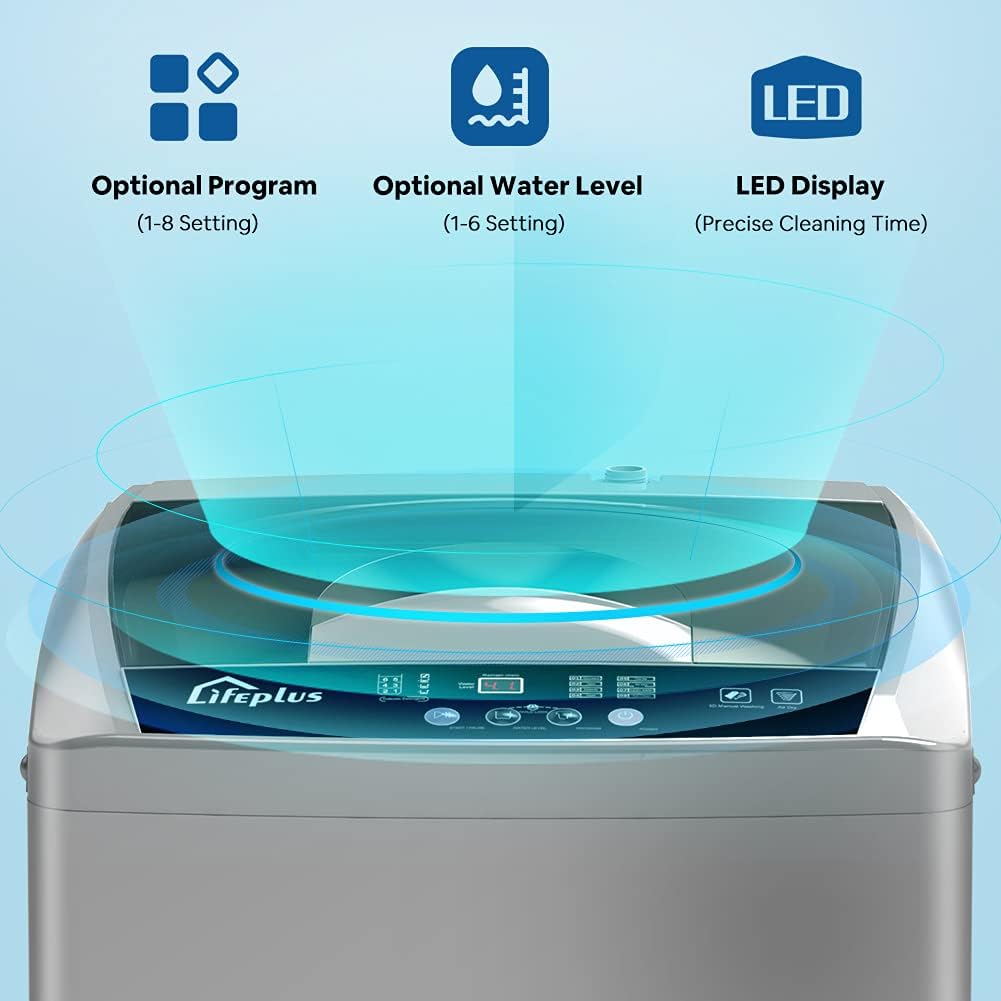
Figure 3.2: Control Panel Overview. The control panel features an LED display for precise cleaning time, along with buttons for selecting 8 optional programs and 6 optional water levels.
Control Panel Functions:
- Program Selection: Choose from 8 different washing programs tailored for various fabric types and soil levels.
- Water Level Adjustment: Select from 6 water levels to match the load size, optimizing water usage.
- LED Display: Shows remaining time and current program status.
- Start/Pause Button: Initiates or temporarily stops the washing cycle.
- Child Lock: Engages a safety feature to prevent accidental changes to settings.
4. Setup and Installation
Proper installation is crucial for the performance and longevity of your washing machine.
4.1 Unpacking
- Carefully remove all packaging materials.
- Inspect the machine for any shipping damage. If damaged, do not operate and contact customer support.
- Ensure all accessories, including the drain pump and faucet adaptor, are present.
4.2 Placement
- Place the washing machine on a firm, level surface.
- Ensure there is adequate space around the machine for ventilation and access.
- The machine's feet are adjustable; use them to level the appliance and prevent shaking during operation.

Figure 4.1: Product Dimensions. The image illustrates the compact dimensions of the washing machine: 19.7 inches (width) x 19.7 inches (depth) x 34.3 inches (height), making it suitable for various spaces.
4.3 Water Connection
- Connect the water inlet hose to a cold water faucet.
- Use the provided faucet adaptor. Note that the adaptor is suitable only for 3/4" faucets.
- If your faucet has internal threads, you may need to add two rubber gaskets to prevent water leakage. If it has external threads, no gasket is needed.
- Ensure all connections are tight to prevent leaks.
4.4 Drain Connection
- Position the drain hose into a sink or standpipe. Ensure the hose is securely fastened to prevent it from falling out during drainage.
- The drain hose should be at an appropriate height to allow for proper water flow.
4.5 Power Connection
- Plug the power cord into a grounded 110V / 60Hz electrical outlet.
- Do not use extension cords or adapters.
5. Operating Instructions
Follow these steps to operate your LifePlus washing machine.
5.1 Loading Laundry
- Sort laundry by fabric type, color, and soil level.
- Open the top lid and load clothes loosely into the tub. Do not overload the machine. The maximum capacity is 12 lbs (1.8 cu.ft).
- Add appropriate detergent to the dispenser.
- Close the lid securely.

Figure 5.1: Laundry Capacity Guide. This image provides a visual guide for the machine's capacity, indicating it can hold approximately 20 long-sleeve shirts, 25 short T-shirts, or 10 pairs of jeans.
5.2 Selecting Program and Water Level
- Turn on the machine.
- Select one of the 8 available washing programs based on your laundry needs. Programs are designed for optimal cleaning of different fabrics.
- Choose one of the 6 water levels. This allows you to adjust the water volume according to the load size, saving water and energy.

Figure 5.2: Efficient Washing Features. This graphic highlights the machine's capabilities for quick wash cycles, water saving, and power saving, contributing to an efficient laundry process.
5.3 Starting the Wash Cycle
- Press the "Start/Pause" button to begin the cycle.
- The machine will automatically fill with water, wash, rinse, and spin according to the selected program.
- The LED display will show the remaining time.
5.4 Child Lock Function
- To activate the child lock, press and hold the designated button (refer to control panel diagram in Figure 3.2) for a few seconds until the indicator light appears.
- This will lock the control panel, preventing accidental changes to settings during operation.
- To deactivate, press and hold the button again.

Figure 5.3: Safe Child Lock Feature. This image demonstrates the child lock function, which secures the control panel to prevent unintended operation by children, enhancing household safety.
6. Maintenance and Care
Regular maintenance ensures the longevity and efficiency of your washing machine.
6.1 Cleaning the Exterior
- Wipe the exterior with a soft, damp cloth.
- Do not use abrasive cleaners or solvents.
6.2 Cleaning the Tub
- The machine features an auto tub cleaning function. Refer to your control panel for instructions on activating this cycle.
- Periodically run a cleaning cycle with a washing machine cleaner or a mixture of vinegar and baking soda to remove residue and odors.

Figure 6.1: Auto Tub Cleaning Function. This image shows the interior of the washing machine tub with water and bubbles, illustrating the automatic tub cleaning feature designed to maintain hygiene and performance.
6.3 Cleaning the Lint Filter
- Locate the lint filter (usually inside the tub or near the top rim).
- Remove and clean it regularly to ensure efficient drainage and prevent lint buildup on clothes.
6.4 Winterizing (Storage)
- If storing the machine in an unheated area, drain all water from the hoses and pump to prevent freezing and damage.
- Disconnect water hoses and power cord.
7. Troubleshooting
Before contacting customer service, please refer to the following table for common issues and their solutions.
| Problem | Possible Cause | Solution |
|---|---|---|
| Machine does not start | Power cord unplugged; Lid not closed properly; No water supply. | Ensure power cord is securely plugged in; Close the lid completely; Check water supply and faucet connection. |
| Excessive vibration/noise | Machine is not level; Load is unbalanced. | Adjust the leveling feet; Redistribute laundry evenly in the tub. The machine has automatic imbalance adjustment. |
| Water leakage | Hoses not connected tightly; Drain hose improperly positioned. | Check and tighten all hose connections; Ensure drain hose is secure and at correct height. |
| Water not draining | Drain hose kinked or blocked; Lint filter clogged. | Straighten drain hose; Clean lint filter. |
| Clothes not clean | Overloading; Incorrect program/detergent; Insufficient water. | Reduce load size; Select appropriate program and detergent; Ensure correct water level. |
8. Specifications
Detailed technical specifications for the LifePlus Full Automatic Washing Machine.
| Feature | Specification |
|---|---|
| Model No. | T663 |
| Rated Voltage | 110V / 60Hz |
| Washing Rated Power | 380W |
| Spin Rated Power | 250W |
| Capacity | 1.8 cu.ft / 12 lbs |
| Product Dimensions (L x W x H) | 18.7 x 18.7 x 34.2 inches |
| Net Weight | 50 lbs |
| Gross Weight | 57 lbs |
| Washing Programs | 8 |
| Water Levels | 6 |
| Special Features | Child Lock Function, Automatic Imbalance Adjustment, Auto Tub Cleaning |
| Color | Grey |
| Material | Plastic |
9. Warranty and Support
LifePlus is committed to providing the best shopping experience.
- For any product issues or inquiries, please contact LifePlus customer support.
- Refer to your purchase documentation for specific warranty terms and conditions.
- Keep your proof of purchase for warranty claims.
Related documentsT663


Ask a question about this manual
Ask about setup, troubleshooting, compatibility, parts, safety, or missing instructions. Manuals+ will review the question and use this page’s manual context to help answer it.