
Baseus S1 Pro (NGS1P-03)
Baseus S1 Pro Active Noise Cancelling Wireless Earbuds User Manual
Model: S1 Pro (NGS1P-03)
Introduction
Thank you for choosing the Baseus S1 Pro Active Noise Cancelling Wireless Earbuds. This manual provides detailed instructions on how to set up, operate, maintain, and troubleshoot your earbuds to ensure optimal performance and longevity. Please read this manual carefully before using the product.

Image: The Baseus S1 Pro earbuds in their open charging case, showcasing their sleek blue design.
1. Setup
1.1 Packing List
Upon opening the package, please verify that all the following items are included:
- Earphones (L&R) * 1 pair
- Charging Case * 1
- Eartips * 4 pieces (various sizes)
- User Manual * 1
- Warranty Card * 1
- Charging Cable (Type-C) * 1
- Quick Guide * 1
1.2 Choosing Ear Tips
Selecting the correct ear tip size is crucial for comfort, sound quality, and effective noise cancellation. Experiment with the provided silicone ear tips to find the best fit for your ears.

Image: Diagram illustrating the ergonomic design of the earbuds and how they fit securely in the ear canal.
1.3 Wearing Earbuds Correctly
Insert the earphones into your ears and gently adjust them until they are in a comfortable and secure position. A proper fit ensures optimal audio performance and noise isolation.

Image: An illustration demonstrating the correct way to insert and position the earbud for a secure and comfortable fit.
1.4 Pairing
The Baseus S1 Pro earbuds feature one-step pairing for convenience.
- Open the lid of the charging case. The earbuds will automatically power on.
- Enable Bluetooth on your smartphone or device.
- Search for "Baseus SIMU S1 Pro" in the list of available Bluetooth devices and select it to pair.
- Once connected, you will hear an audio prompt, and the device will show "Connected".
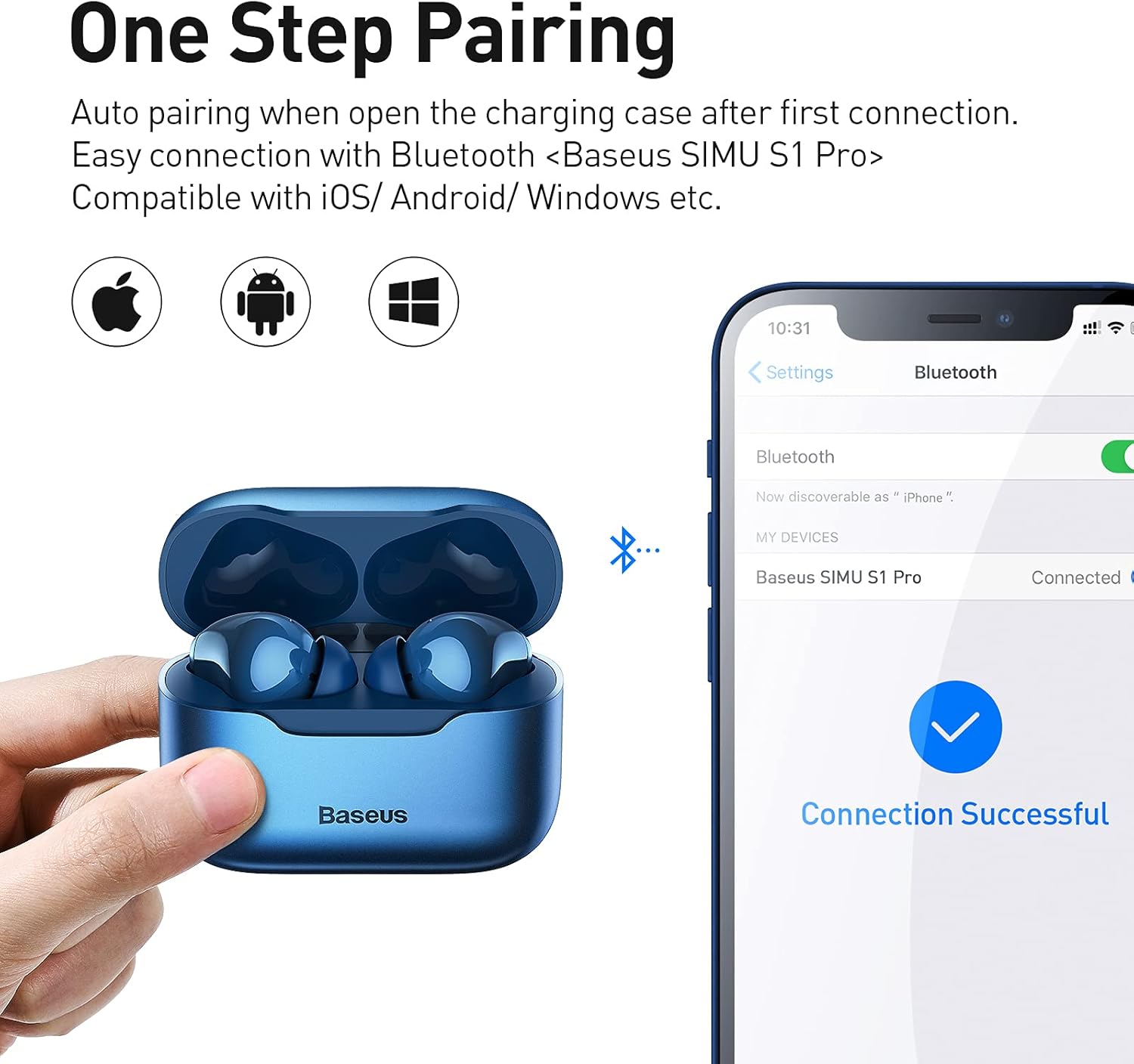
Image: A visual guide showing the earbuds in their case next to a smartphone displaying the Bluetooth pairing screen, indicating a successful connection.
2. Operating Instructions
2.1 Music Mode Controls
Control your music playback using the touch-sensitive areas on the earbuds:
- Play/Pause: Double-tap the left (L) or right (R) earbud.
- Next Song: Triple-tap the left (L) earbud for 1.5 seconds.
- Previous Song: Triple-tap the right (R) earbud for 1.5 seconds.
2.2 Call Mode Controls
Manage your calls with simple touch gestures:
- Answer/Hang Up: Double-tap the left (L) or right (R) earbud.
- Reject Incoming Call: Press and hold the left (L) or right (R) earbud for 1.5 seconds.
2.3 ANC/Ambient Sound Mode Switch
Switch between Active Noise Cancellation (ANC) and Ambient Sound Mode:
- Toggle Modes: Press and hold the left (L) or right (R) earbud for 1.2 seconds. The modes cycle through: Disable ANC > Enable Ambient Sound Mode > Enable ANC.

Image: A diagram illustrating the smart touch controls for music playback, call management, and ANC/Ambient Sound mode switching.
2.4 Official Product Videos
Baseus S1 Pro ANC Wireless Earbuds "How to Use"
Video: A comprehensive guide demonstrating how to use the Baseus S1 Pro ANC Wireless Earbuds, covering various functions and features.
Baseus Active Noise Cancelling S1 Pro Overview
Video: An overview of the Baseus S1 Pro Active Noise Cancelling Earbuds, highlighting key features like ANC, call noise cancellation, and design.
3. Maintenance
3.1 Cleaning
Regular cleaning of your earbuds and charging case is essential for optimal performance and hygiene. Use a soft, dry cloth or a cotton swab lightly dampened with alcohol to clean the earbud surfaces and charging contacts. Avoid excessive moisture.

Image: The earbuds shown with water splashes, indicating their water-resistant design for daily use and light exercise.
3.2 Charging
The Baseus S1 Pro earbuds support both Type-C cable charging and wireless charging.
- Type-C Cable Charging: Connect the provided Type-C cable to the charging port on the case and a power source.
- Wireless Charging: Place the charging case on a Qi-compatible wireless charging pad. The case features magnetic alignment for automatic charging.
A 10-minute charge can provide significant playtime, extending usage for up to 90 minutes.

Image: The charging case on a wireless charging pad, illustrating its compatibility with wireless charging and fast charging capabilities.
4. Troubleshooting
If you encounter any issues with your Baseus S1 Pro earbuds, please refer to the following common solutions:
- No Sound/Connection Issues: Ensure the earbuds are charged and properly paired with your device. Try resetting the earbuds by placing them back in the case, leaving the lid open, and pressing and holding the button on the case for 5 seconds until the indicator light flashes.
- Poor Sound Quality: Check ear tip fit and ensure earbuds are clean.
- Charging Problems: Verify the charging cable is securely connected or the wireless charging pad is functioning correctly. Clean the charging contacts on both the earbuds and the case.
- ANC Not Working: Ensure ANC mode is enabled via the touch controls. Check for proper earbud fit.
For persistent issues, please contact Baseus customer support.
5. Specifications
| Feature | Specification |
|---|---|
| Brand | Baseus |
| Model Name | S1 Pro (NGS1P-03) |
| Connectivity Technology | Wireless (Bluetooth 5.2) |
| Noise Control | Active Noise Cancellation (ANC) |
| Microphones | 4-Mics ENC Call Noise Cancelling |
| Driver Size | 10mm Dynamic Driver |
| Charging | Type-C, Wireless Charging Compatible |
| Battery Life (Single Charge) | Approx. 5 hours |
| Total Playtime (with Case) | Up to 24 hours |
| Material | Silicone, Plastic |
| Water Resistance Level | Waterproof |
| Item Weight | 5.6 ounces |
6. Warranty and Support
Baseus products come with a standard manufacturer's warranty. Please refer to the included Warranty Card for specific terms and conditions regarding your Baseus S1 Pro earbuds.
For technical support, warranty claims, or any product-related inquiries, please visit the official Baseus website or contact their customer service directly. Keep your proof of purchase for warranty validation.
Related documentsS1 Pro (NGS1P-03)


Ask a question about this manual
Ask about setup, troubleshooting, compatibility, parts, safety, or missing instructions. Manuals+ will review the question and use this page’s manual context to help answer it.