
Yottamaster 4-Bay RAID USB-B3.0
Yottamaster 4-Bay RAID HDD Enclosure User Manual
Model: 4-Bay RAID USB-B3.0 (FS4RU3)
1. Introduction
Thank you for choosing the Yottamaster 4-Bay RAID HDD Enclosure. This device is designed to provide professional-level storage and data transfer solutions for individuals and small to medium-sized businesses. It supports up to four 18TB hard drives, offering a maximum capacity of 72TB, and features multiple RAID modes for flexible data management and protection.
Key features of this enclosure include:
- Supports 7 RAID modes: RAID0, RAID1, RAID3, RAID5, RAID10, SPAN (JBOD), and Normal.
- High-speed data transfer with USB3.0 (5Gbps) via a SATA3.0 6Gbps control chip.
- Equipped with a 150W built-in power adapter for stable operation of multiple drives.
- Robust heat dissipation with high-quality aluminum alloy construction, large meteor-shaped heat dissipation holes, and an 80mm silent cooling fan.
- Automatic sleep mode after 10 minutes of inactivity for energy saving.
- Compatible with 3.5-inch and 2.5-inch SATA hard drives/SSDs.
- Supports Windows, macOS, and Linux operating systems.
2. Package Contents
Please verify that all items are present in your package:
- 1 x Yottamaster 4-Bay RAID HDD Enclosure (Aluminum Alloy)
- 1 x USB Cable (Type-A to Type-B, 100cm)
- 1 x Power Cable
- 1 x Screwdriver & Screw Set (for 2.5" and 3.5" hard drives)
- 1 x User Manual
3. Product Overview
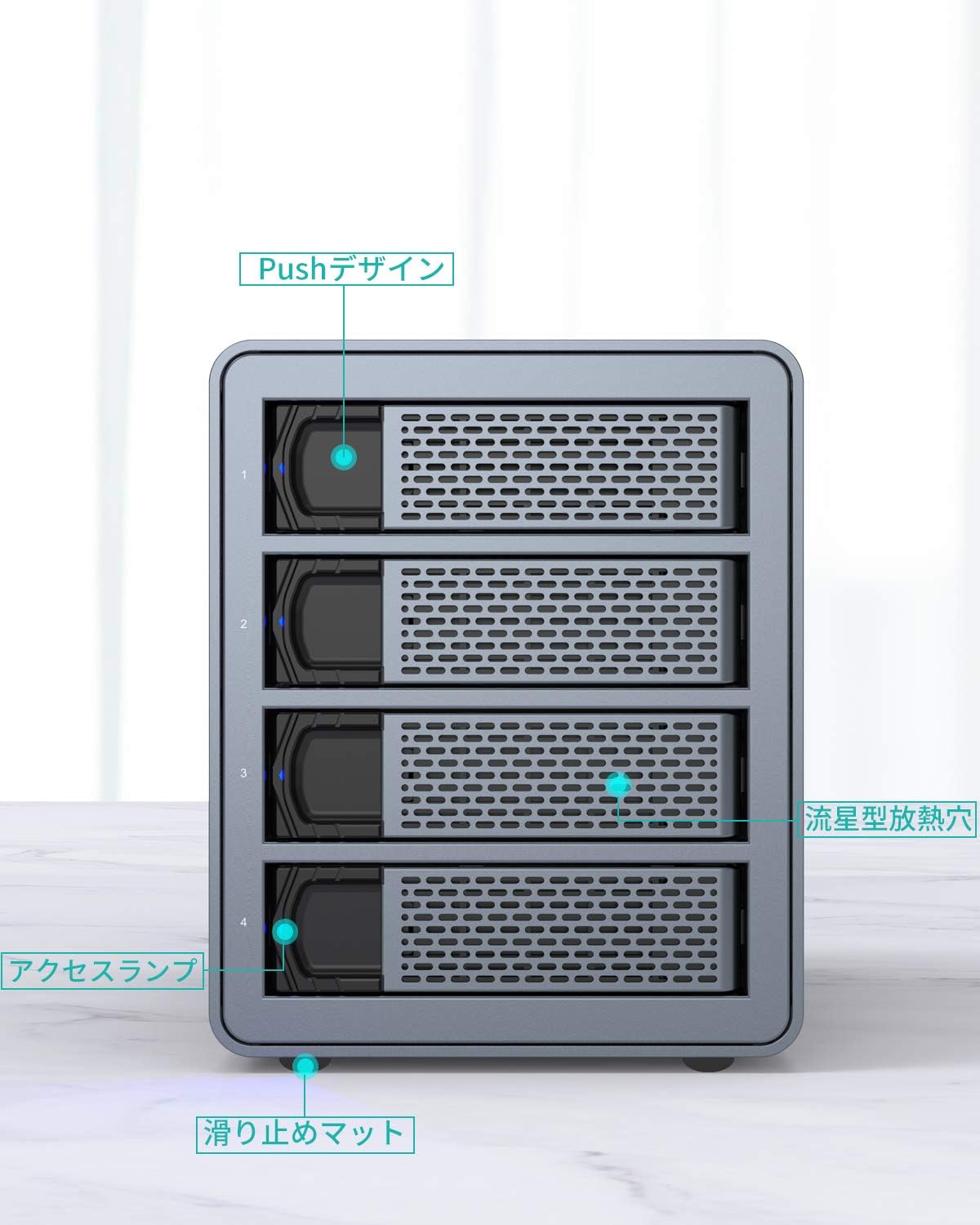
Front View

This image displays the front of the Yottamaster 4-Bay RAID HDD Enclosure. Key features visible include the four drive bays with push-design mechanisms for easy installation and removal, access lamps indicating drive activity, meteor-shaped heat dissipation holes for optimal airflow, and anti-slip mats at the base for stability.
Rear View

This image shows the rear panel of the Yottamaster 4-Bay RAID HDD Enclosure. It features an 80mm silent cooling fan for efficient heat exhaust, a main power switch, an AC power input (100-240V), a RAID DIP switch for configuring RAID modes, and a USB3.0 interface for connecting to your computer.
4. Setup
4.1 Hard Drive Installation
The enclosure supports both 3.5-inch and 2.5-inch SATA hard drives or SSDs.
- Gently pull the drive tray out from the enclosure.
- Place your 3.5-inch or 2.5-inch SATA hard drive/SSD into the tray. Secure the drive using the provided screws and screwdriver.
- Slide the loaded drive tray back into the enclosure until it clicks into place.
- Repeat for all desired hard drives.
This image illustrates the process of installing hard drives into the enclosure's removable trays. Ensure the drive is properly aligned with the SATA connector before sliding the tray in.
4.2 Connecting to Host Computer
- Connect the provided power cable to the AC power input on the rear of the enclosure and plug it into a power outlet.
- Connect the provided USB Type-A to Type-B cable to the USB3.0 interface on the rear of the enclosure and to a USB port on your computer. It is recommended to connect to a host-side USB interface for more stable voltage.
- Flip the power switch on the rear of the enclosure to the 'ON' position.
4.3 RAID Mode Configuration
The enclosure supports 7 different RAID modes. The RAID mode is configured using the DIP switches located on the rear panel. Important: When switching RAID modes, it is necessary to format the HDDs. It is highly recommended to back up all your data before changing RAID modes to prevent data loss.

This table provides an overview of the supported RAID modes:
| RAID Mode | Min. Disks | Max. Capacity | Security | Speed |
|---|---|---|---|---|
| RAID 5 | 3 | (N-1) x D | Middle | High |
| RAID 0 | 2 | N x D | Low | Very High |
| RAID 1 | 2 | 50% | High | Middle |
| RAID 3 | 3 | (N-1) x D | Middle | Middle |
| RAID 10 | 4 | 50% | High | High |
| SPAN (JBOD) | 2 | 100% | Low | Middle |
| Normal | 1 | 100% | Middle | Middle |
Note: N = Number of hard drives, D = Minimum hard drive capacity.
To configure the RAID mode:
- Ensure the enclosure is powered off and disconnected from the computer.
- Locate the RAID DIP switches on the rear panel.
- Refer to the enclosure's specific RAID configuration guide (usually printed near the DIP switches or in a separate quick start guide) to set the switches for your desired RAID mode.
- After setting the switches, power on the enclosure.
- Connect the enclosure to your computer. The system will detect the new RAID configuration.
- Initialize and format the new RAID volume through your operating system's disk management utility. Remember to back up data before formatting.
5. Operation
5.1 Data Transfer
Once the enclosure is connected and the drives are recognized by your computer, you can begin transferring data. The USB3.0 interface provides high-speed data transfer at up to 5Gbps, allowing for quick and efficient file management.

This diagram visually represents the high-speed data transfer capability and the automatic sleep function of the enclosure when connected to a laptop.
5.2 Automatic Sleep Function
The enclosure is designed with an energy-saving feature that automatically enters sleep mode after 10 minutes of inactivity. This helps conserve power and extend the lifespan of your hard drives. The sleep mode time can be adjusted, though specific instructions for adjustment are typically found in advanced settings or require firmware updates. If the device does not wake from sleep mode, please refer to the troubleshooting section or contact technical support.
6. Maintenance
6.1 Cooling System
The Yottamaster enclosure features a robust cooling system, including a high-quality aluminum alloy casing, large meteor-shaped heat dissipation holes on the front and rear, and an 80mm silent cooling fan. This design ensures efficient heat dissipation, which is crucial for maintaining optimal operating temperatures and extending the lifespan of your hard drives. Ensure that the fan vents are not obstructed to allow for proper airflow.
6.2 Safe Handling and Disconnection
To ensure the longevity and performance of your hard drives and the enclosure, always follow these guidelines:
- Before disconnecting the enclosure from your computer, always use the
Related documents4-Bay RAID USB-B3.0


Ask a question about this manual
Ask about setup, troubleshooting, compatibility, parts, safety, or missing instructions. Manuals+ will review the question and use this page’s manual context to help answer it.