
Loewe We. HEAR 2 (Model: 60702R10)
WE. by Loewe. Hear 2 Bluetooth Speaker User Manual
Model: We. HEAR 2 (60702R10)
Brand: Loewe
Important Safety Information
Please read this manual carefully before using the WE. by Loewe. Hear 2 Bluetooth Speaker. Keep this manual for future reference.
- Do not expose the speaker to extreme temperatures or direct sunlight for prolonged periods.
- Avoid dropping or subjecting the speaker to strong impacts.
- Do not disassemble, repair, or modify the speaker yourself. Refer all servicing to qualified personnel.
- Ensure the charging port cover is securely closed when the speaker is exposed to water to maintain its IPX6 water resistance rating.
- Use only the provided USB cable for charging.
- Keep out of reach of children.
Product Overview
The WE. by Loewe. Hear 2 is a portable Bluetooth speaker designed for both indoor and outdoor use. It features 60W of power, IPX6 water resistance, and a long-lasting rechargeable battery.

Figure 1: Front view of the WE. by Loewe. Hear 2 speaker in Coral Red, showcasing the main control panel on the side. The speaker features a textured fabric finish and a removable strap for portability.

Figure 2: The WE. by Loewe. Hear 2 speaker in Coral Red, shown with its detachable carrying strap attached. This view highlights the cylindrical design and the speaker grille on the end, emphasizing its portability.
Key Features:
- Powerful 60W audio output for clear and robust sound.
- IPX6 water resistance, making it suitable for outdoor environments.
- Portable and rechargeable design with a long battery life.
- Bluetooth connectivity for wireless audio streaming.
- Integrated carrying strap for easy transport.
Setup
1. Charging the Speaker
Before first use, fully charge the speaker. A full charge takes approximately 1.5 hours and provides up to 17 hours of playback time.
- Locate the charging port on the speaker. It is typically found under a protective cover to ensure water resistance.
- Open the protective cover.
- Connect the supplied USB charging cable to the speaker's charging port.
- Connect the other end of the USB cable to a compatible USB power adapter (not included) or a computer's USB port.
- The charging indicator light will illuminate during charging and turn off when fully charged.
- Once charging is complete, securely close the protective cover over the charging port.

Figure 3: Top view of the WE. by Loewe. Hear 2 speaker, illustrating the location of the USB-C charging port and the auxiliary input port, both protected by a rubber flap for water resistance.
2. Powering On/Off
- To power on, press and hold the Power button (
 ) for a few seconds until you hear an audible cue or see the indicator light illuminate.
 - To power off, press and hold the Power button again until the speaker turns off.
3. Bluetooth Pairing
The speaker will automatically enter Bluetooth pairing mode when powered on for the first time or if no device is connected.
- Ensure the speaker is powered on and in pairing mode (indicator light will typically flash).
- On your Bluetooth-enabled device (smartphone, tablet, computer), go to the Bluetooth settings.
- Search for available devices. The speaker will appear as "WE. HEAR 2" or similar.
- Select "WE. HEAR 2" from the list to connect.
- Once successfully paired, the speaker will provide an audible confirmation, and the indicator light will become solid.
- The speaker will automatically reconnect to the last paired device when in range and powered on.
Operating the Speaker
Controls Overview
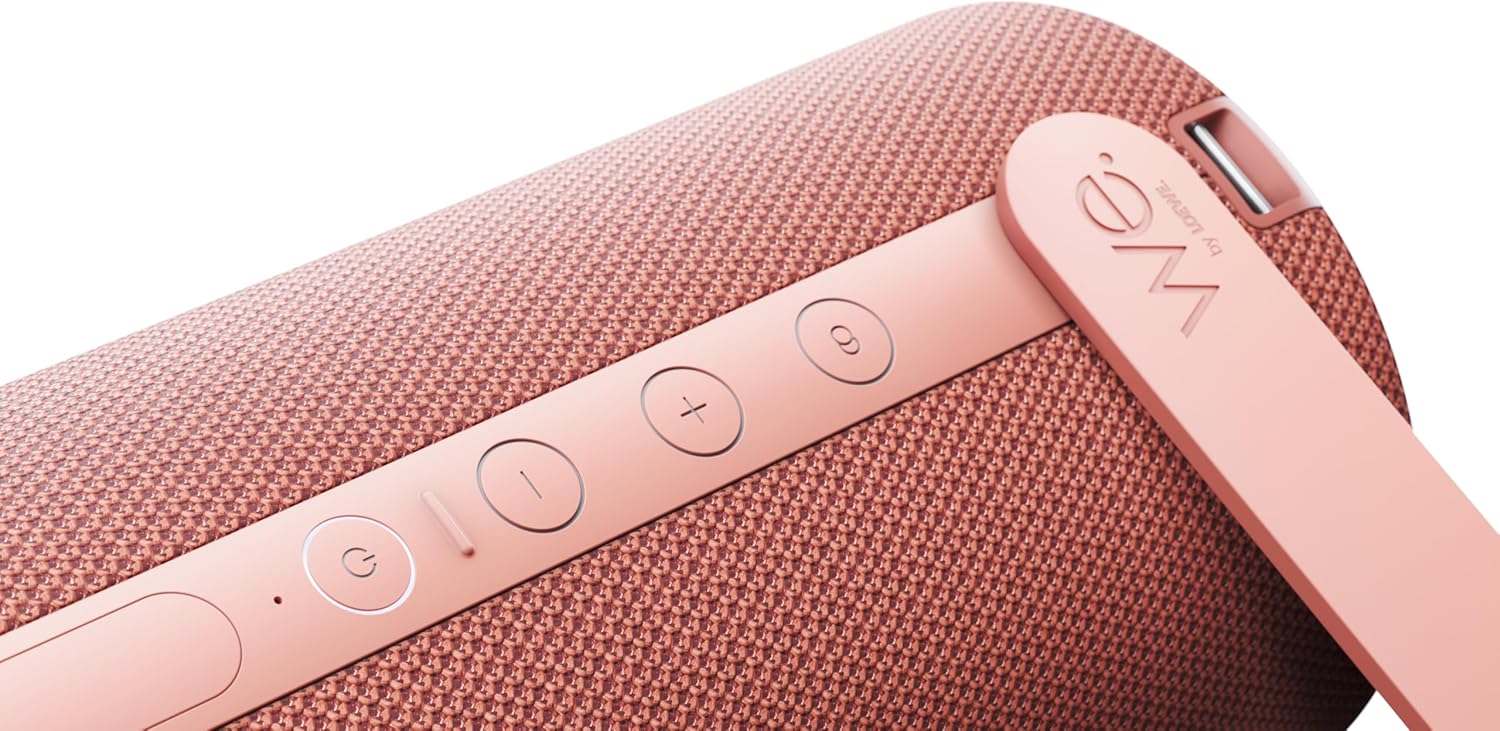
Figure 4: A detailed close-up of the control panel on the WE. by Loewe. Hear 2 speaker. From top to bottom, the buttons are: Bluetooth pairing, Volume Up (+), Volume Down (-), Play/Pause, and Power. An LED indicator is visible below the Power button.
- Power Button (): Press and hold to power on/off.
- Play/Pause Button (
 ): Press once to play or pause audio.
 - Volume Up Button (+): Press to increase volume.
- Volume Down Button (-): Press to decrease volume.
- Bluetooth Pairing Button (
 ): Press and hold to enter Bluetooth pairing mode.
Audio Playback
Once connected via Bluetooth, you can play audio from your paired device. Use the speaker's volume buttons or your device's volume controls to adjust the sound level.
Water Resistance (IPX6)
The WE. by Loewe. Hear 2 speaker is rated IPX6, meaning it is protected against powerful water jets. This makes it suitable for use near pools, at the beach, or in light rain. However, it is not designed to be submerged in water. Always ensure all port covers are securely closed before exposing the speaker to water.
Maintenance
- Cleaning: Use a soft, dry cloth to wipe the speaker. For stubborn dirt, a slightly damp cloth can be used. Do not use abrasive cleaners or solvents.
- Storage: Store the speaker in a cool, dry place away from direct sunlight and extreme temperatures when not in use for extended periods.
- Battery Care: To prolong battery life, avoid fully discharging the battery frequently. Charge the speaker regularly, even if not in constant use.
- Water Resistance: After exposure to water, ensure the speaker is thoroughly dried before opening any port covers or charging.
Troubleshooting
| Problem | Possible Cause | Solution |
|---|---|---|
| Speaker does not power on. | Battery is depleted. | Charge the speaker using the supplied USB cable. |
| Cannot pair via Bluetooth. | Speaker is not in pairing mode; device Bluetooth is off; speaker is too far from device. | Ensure speaker is in pairing mode (flashing indicator). Turn Bluetooth on your device. Move speaker closer to device (within 10 meters). |
| No sound or low volume. | Volume too low on speaker or device; device not connected. | Increase volume on both speaker and paired device. Ensure Bluetooth connection is established. |
| Sound distortion. | Volume too high; weak Bluetooth signal. | Decrease volume. Move speaker closer to the paired device. |
Specifications
| Feature | Detail |
|---|---|
| Model Name | We. HEAR 2 |
| Model Number | 60702R10 |
| Brand | Loewe |
| Color | Coral Red |
| Connectivity Technology | Bluetooth |
| Speaker Type | Bluetooth Speaker |
| Maximum Speaker Output Power | 60 Watts |
| Battery Life | Up to 17 hours |
| Charging Time | Approx. 1.5 hours |
| Water Resistance Rating | IPX6 (Protected against powerful water jets) |
| Product Dimensions (L x W x H) | 12.1 x 12.5 x 29 cm |
| Item Weight | 2 Kilograms |
| Included Components | USB cable, carrying strap |
Warranty and Support
The WE. by Loewe. Hear 2 speaker comes with a manufacturer's warranty.
- Manufacturer Warranty: 2 years.
- Availability of Spare Parts: 2 years.
For warranty claims, technical support, or service inquiries, please contact Loewe customer service or your authorized dealer. Do not attempt to repair the device yourself.
For more information, visit the official Loewe website or refer to the contact details provided with your purchase documentation.
Related documentsWe. HEAR 2 (Model: 60702R10)


Ask a question about this manual
Ask about setup, troubleshooting, compatibility, parts, safety, or missing instructions. Manuals+ will review the question and use this page’s manual context to help answer it.