
1. Introduction
The Anker 623 MagGo 2-in-1 Magnetic Wireless Charger is a compact and versatile charging station designed to power your iPhone and compatible earbuds simultaneously. Featuring a magnetic phone-charging platform and a dedicated earbud charging base, it offers convenience and efficiency for your daily charging needs.
2. What's in the Box
- Anker 623 Magnetic Wireless Charger (MagGo)
- 20W USB-C charger
- 5 ft (1.5 m) USB-C to USB-C charging cable
- Welcome guide
- 24-month stress-free warranty card
3. Setup
- Connect the provided 5 ft (1.5 m) USB-C to USB-C charging cable to the USB-C port on the back of the Anker 623 MagGo charging station.
- Connect the other end of the USB-C cable to the included 20W USB-C charger.
- Plug the 20W USB-C charger into a wall outlet. The LED indicator light at the base of the charging station will briefly illuminate, indicating it is powered on and ready for use.
4. Operating Instructions
4.1 Charging Your iPhone

To charge your iPhone, simply flip up the magnetic phone-charging platform. The platform can be adjusted up to a 60° angle for optimal viewing. Attach your compatible iPhone (iPhone 12, 13, or 14 series) to the magnetic surface. The strong magnets will snap it into place, ensuring proper alignment for efficient charging. You can position your iPhone horizontally or vertically.

The phone-charging platform allows for 360° rotation of your iPhone for flexible viewing angles. The platform can also be tilted up to 60°.
4.2 Charging Your Earbuds

To charge compatible earbuds, place their wireless charging case directly onto the base of the Anker 623 MagGo station. The base is specifically designed for earbud charging and cannot charge phones.
4.3 Simultaneous Charging
The Anker 623 MagGo station supports simultaneous wireless charging of your iPhone and compatible earbuds, providing a convenient 2-in-1 charging solution.
Official Anker video demonstrating the Anker 623 Magnetic 2-in-1 Wireless Charging Station (MagGo) in use, showcasing its magnetic attachment, adjustable viewing angles, and dual-device charging capabilities.
5. Compatibility
5.1 Compatible Phone Models
- iPhone 14 / iPhone 14 Pro / iPhone 14 Pro Max
- iPhone 13 / iPhone 13 Pro / iPhone 13 Pro Max / iPhone 13 mini
- iPhone 12 / iPhone 12 Pro / iPhone 12 Pro Max / iPhone 12 mini
Note: For optimal magnetic attachment and charging efficiency, use your iPhone without a case or with an iPhone-compatible magnetic phone case.
5.2 Compatible Earbuds
- AirPods 3 / AirPods Pro / AirPods 2 (with wireless charging case)
- Samsung Galaxy Buds+ / Galaxy Buds Pro
- Soundcore Liberty Air 2 Pro / Liberty 2 Pro
- Sony WF-1000XM4
5.3 Non-Compatible Devices/Accessories
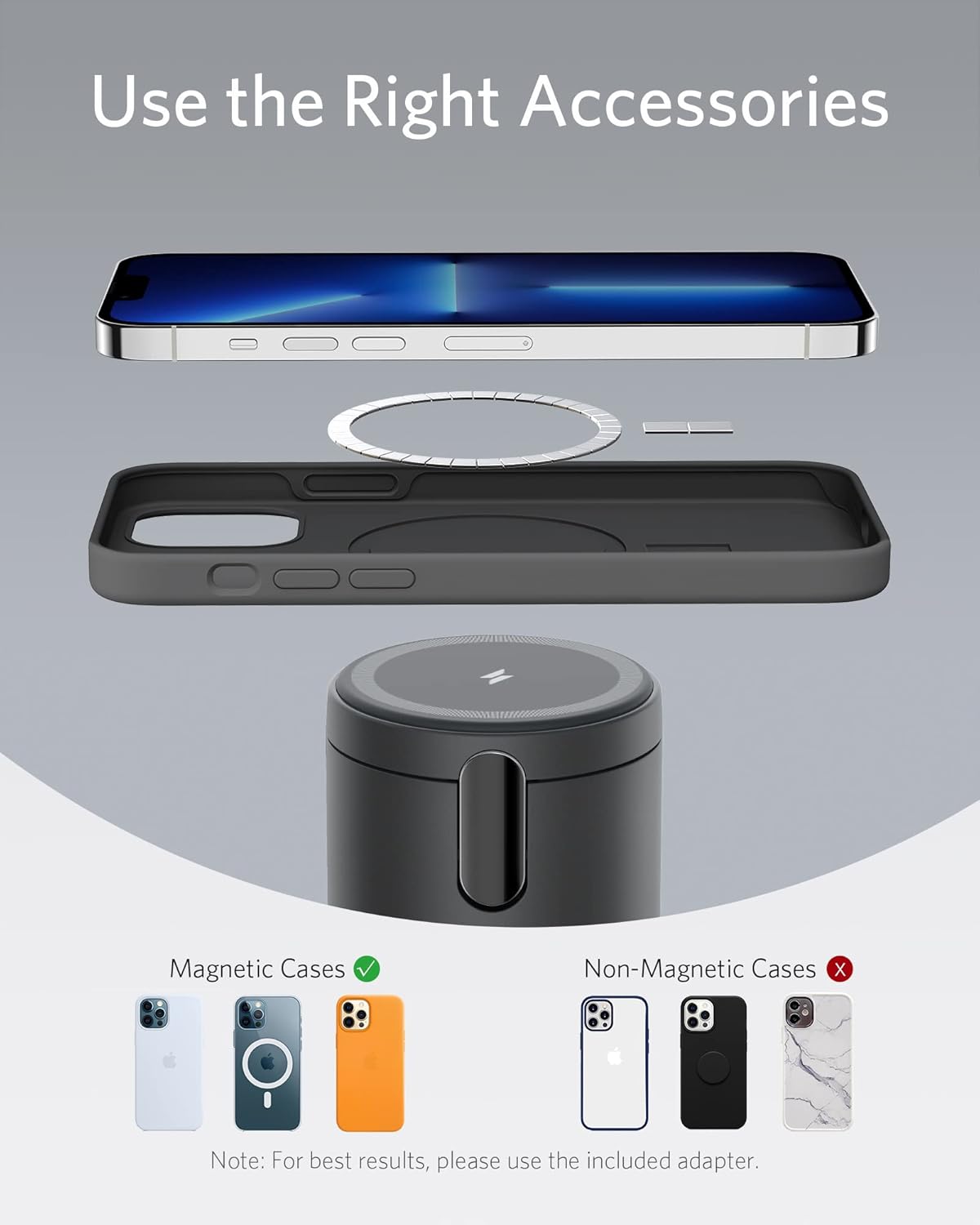
The following are not compatible with the Anker 623 MagGo:
- Non-magnetic phone cases (e.g., OtterBox defender cases).
- Magnetic and metal attachments (e.g., cards, keys, pop grips) will interfere with charging.
- iPhone 11 Pro Max or earlier models, even with a magnetic case.
- Smartwatches (e.g., Apple Watches).
6. Important Notes and Warnings
- When your iPhone is actively charging, the LED indicator lights up and will turn off after 3 seconds.
- Provides 7.5W max charging for iPhone 13 and 12 series and 5W max charging for AirPods Pro/2 (with wireless charging case).
- Charging the iPhone 13 series without a case may affect charging speed. It is recommended to charge with a magnetic phone case.
- For best results, please use the included 20W USB-C charger.
- If you keep your iPhone in a leather case while charging with the magnetic wireless charger, circular imprints from compression may form on the leather. This is normal, but if you’re concerned about this, we suggest using a non-leather case.
- The wireless charger does not have an internal battery. It needs to be plugged in to start charging.
7. Specifications
| Feature | Detail |
|---|---|
| Model Number | A2568 |
| Product Dimensions | 2.49 x 2.49 x 3.1 inches |
| Item Weight | 14.1 ounces |
| Color | Interstellar Gray |
| Connectivity Technologies | USB |
| Connector Type | USB Type C |
| Special Features | Magnetic, Wireless Charging |
| Input Voltage | 110 Volts |
| Amperage | 2 Amps |
| Total USB Ports | 1 |
8. Troubleshooting
8.1 Device Not Charging
- Ensure the charging station is properly connected to the included 20W USB-C charger and a working power outlet.
- Verify that your phone case is MagSafe-compatible or remove the case for direct magnetic attachment. Non-magnetic cases or cases with metal/magnetic attachments can interfere with charging.
- Confirm your device is an iPhone 12, 13, or 14 series model for magnetic charging.
- For earbuds, ensure they are placed correctly on the base and their case supports wireless charging.
9. Warranty and Support
Anker provides a 24-month stress-free warranty for the 623 MagGo Magnetic Wireless Charger. For any product inquiries, technical assistance, or warranty claims, please contact Anker customer service. Refer to the included welcome guide for specific contact information.


