
Humminbird 411630-1
Humminbird HELIX 7 G4N Fish Finder User Manual
Model: 411630-1
Introduction
This manual provides comprehensive instructions for the installation, operation, and maintenance of your Humminbird HELIX 7 G4N Fish Finder. The HELIX 7 CHIRP GPS G4N fish finder features Dual Spectrum CHIRP Sonar, AutoChart Live, Internal GPS and Humminbird Basemap built-in. It includes an upgraded high-definition 7" display with pre-loaded split screen view options. All HELIX 7 G4N models support Ethernet networking, Bluetooth(R), NMEA 2000(R), and are compatible with the One-Boat Network(TM).

Front view of the Humminbird HELIX 7 G4N Fish Finder, showcasing its 7-inch display and control panel.
Package Contents
Verify that all components are present in the package:
- Fish finder control head
- Power cable
- XNT 9 HW T transom-mount transducer
- Mounting hardware
- Gimbal mounting bracket

The XNT 9 HW T transom-mount transducer, a key component for sonar functionality.
Setup and Installation
Proper installation is crucial for optimal performance. Refer to the detailed diagrams for mounting the control head and transducer.
Control Head Mounting
Use the provided gimbal mounting bracket to secure the control head. Ensure it is mounted in a location that provides clear visibility and easy access to controls, away from direct sunlight if possible.

Side view of the HELIX 7 G4N mounted on its gimbal bracket, illustrating its adjustable angle.
Transducer Installation
The XNT 9 HW T transom-mount transducer should be installed on the transom of your boat. Ensure it is submerged in water and free from obstructions for accurate sonar readings. Route the transducer cable carefully to avoid damage.
Power Connection
Connect the power cable to a 12V DC power source. Ensure proper polarity. It is recommended to connect directly to the boat's battery or a dedicated fuse panel to prevent interference.

Rear view of the HELIX 7 G4N, showing the various ports for power, transducer, and networking connections.
Operating Instructions
The HELIX 7 G4N is designed for intuitive operation. Familiarize yourself with the keypad controls and menu system.
Keypad Control
The unit is operated via softkey controls. Press the POWER button to turn the unit on/off. Use the MENU button to access the main menu and navigate through options using the directional pad.
Sonar Operation (Dual Spectrum CHIRP)
The Dual Spectrum CHIRP 2D sonar provides detailed fish arches and clear views of structure. You can switch between Wide Mode for maximum coverage and Narrow Mode for focusing on specific details. Adjust sensitivity and range settings for optimal performance in different water conditions.
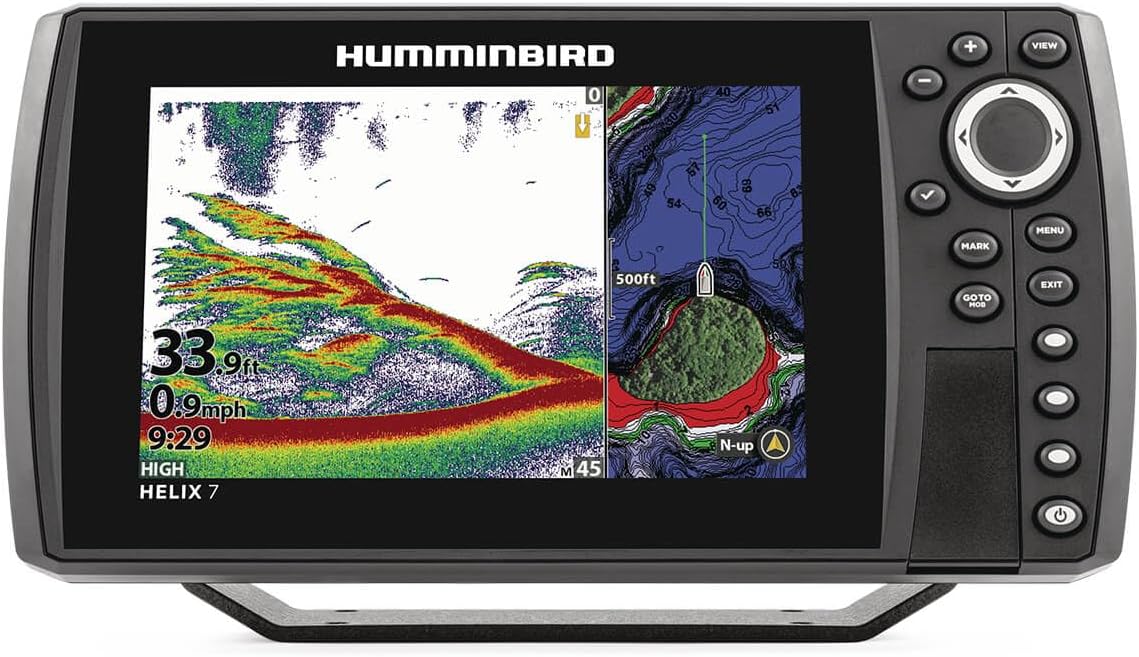
The HELIX 7 G4N display showing a split screen view with Dual Spectrum CHIRP sonar on the left and a detailed map on the right.
GPS and Basemap Navigation
The internal GPS and Humminbird Basemap provide a clear view of underwater terrain and points of interest. Navigate with confidence using pre-loaded charts of over 10,000 lakes and coastal coverage for the continental U.S. You can mark waypoints and create routes.

A detailed view of the Humminbird Basemap, illustrating contours and points of interest for navigation.
AutoChart Live
Create real-time maps of your fishing spots. AutoChart Live allows you to map depth contours, bottom hardness, and vegetation as you drive your boat. The unit comes with 8 hours of built-in recording time and is compatible with AutoChart Zero Line SD cards for extended mapping capacity.
Networking Capabilities
The HELIX 7 G4N supports Ethernet, Bluetooth, and NMEA 2000 networking. These features enable integration with other marine electronics and the One-Boat Network for enhanced control and data sharing.
- Ethernet: Connect multiple fish finders or add-on technologies like Minn Kota i-Pilot Link.
- Bluetooth: Wireless communication with compatible Talon and Raptor shallow water anchors, software updates via Humminbird FishSmart App, and smartphone notifications.
- NMEA 2000: Integrate with an NMEA 2000 network for boat performance data, weather, and water conditions.

Illustration of the One-Boat Network connectivity, showing how the HELIX 7 G4N integrates with other marine devices.
Maintenance
Regular maintenance ensures the longevity and optimal performance of your HELIX 7 G4N.
- Cleaning: Wipe the display and unit exterior with a soft, damp cloth. Avoid abrasive cleaners or solvents.
- Transducer Care: Periodically inspect the transducer for marine growth or damage. Clean gently with water and a soft brush.
- Software Updates: Check the Humminbird website or FishSmart App for available software updates to ensure you have the latest features and performance enhancements.
- Storage: When not in use for extended periods, store the unit in a dry, cool place, protected from extreme temperatures.
Troubleshooting
This section addresses common issues you might encounter.
| Problem | Possible Cause | Solution |
|---|---|---|
| Unit does not power on. | No power, incorrect wiring, blown fuse. | Check power cable connections, battery voltage, and inline fuse. |
| No sonar readings. | Transducer not submerged, damaged cable, incorrect settings. | Ensure transducer is in water, inspect cable for damage, reset sonar settings to default. |
| GPS signal lost or inaccurate. | Obstruction to sky view, unit interference. | Relocate unit if possible, ensure clear view of sky, check for other electronic interference. |
If the issue persists, contact Humminbird customer support.
Specifications
| Feature | Detail |
|---|---|
| Brand | Humminbird |
| Model Name | HELIX |
| Model Number | 411630-1 |
| Power Source | Corded Electric |
| Screen Size | 7 Inches |
| Display Type | Color TFT |
| Product Dimensions | 10.54"L x 10.54"W x 5.8"H |
| Maximum Measuring Depth | 125 Feet |
| Mounting Type | Gimbal Mount |
| UPC | 082324056208 |
| Material | Plastic |
| Model Year | 2022 |
Warranty Information
The Humminbird HELIX 7 G4N Fish Finder comes with a 1-year Manufacturer's Warranty. This warranty covers defects in materials and workmanship under normal use. For warranty claims or detailed terms and conditions, please refer to the official Humminbird website or contact their customer support.
Customer Support
For technical assistance, troubleshooting, or general inquiries, please contact Humminbird Customer Support:
- Website: Visit the official Humminbird website for FAQs, software downloads, and support resources.
- Phone: Refer to the Humminbird website for regional contact numbers.
- Online Resources: Explore the Humminbird Store on Amazon for additional product information and resources.
Related documents411630-1


Ask a question about this manual
Ask about setup, troubleshooting, compatibility, parts, safety, or missing instructions. Manuals+ will review the question and use this page’s manual context to help answer it.