
Ameriwood Home Berkeley Standing Desk
Ameriwood Home Berkeley Standing Desk Instruction Manual
Model: 7819891COM
1. Important Safety Information
Please read all instructions carefully before assembly and use. Failure to follow these instructions may result in injury or damage to the product.
- Two-Person Assembly: Always assemble the desk with two adults for proper safety and ease of handling.
- Weight Limits: Do not exceed the maximum weight capacity for the desk top (50 lbs. / 22.7 kg) and each shelf (25 lbs. / 11.3 kg). Overloading can cause structural failure and potential injury.
- Stable Placement: Ensure the desk is placed on a level, stable surface to prevent wobbling or tipping.
- Tool Use: Use only the recommended tools for assembly. Do not overtighten screws, as this may damage the material.
- Children and Pets: Keep children and pets away from the assembly area. Small parts can be a choking hazard.
- Standing Ergonomics: When using the desk in a standing position, ensure proper ergonomic posture to avoid discomfort or health issues. Take regular breaks.
2. Package Contents
Before beginning assembly, verify that all components are present and undamaged. If any parts are missing or damaged, do not proceed with assembly. Contact customer support for assistance.
Included Components:
- Desk Top Panel
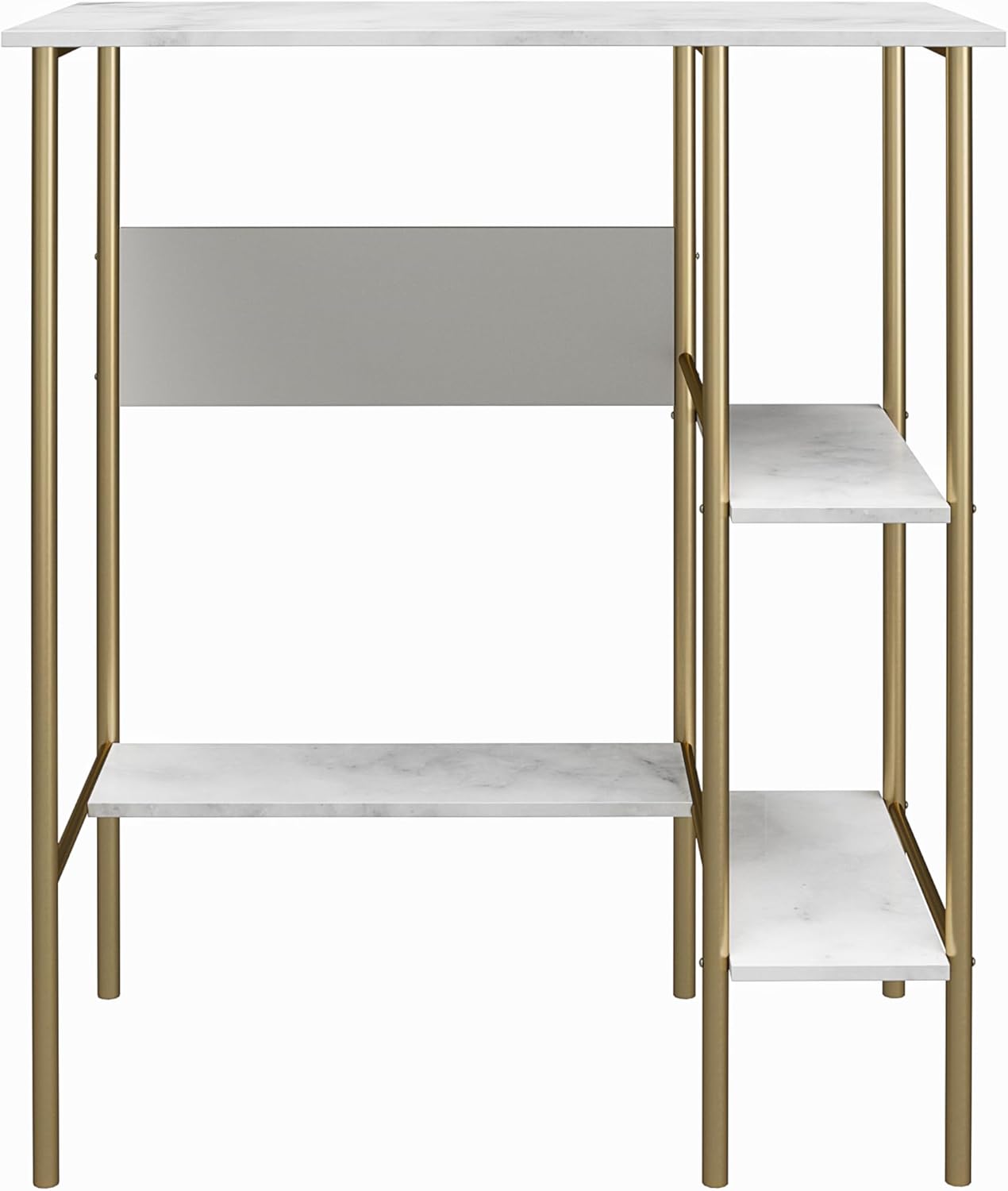
- Shelf Panels (3)
- Metal Frame Legs and Supports
- Hardware Pack (screws, connectors, etc.)
Tools Required for Assembly:
- #2 Phillips Head Screwdriver
3. Setup and Assembly Instructions
Assembly requires two adults. Clear a spacious area for assembly and lay out all components on a soft, clean surface to prevent scratches.
- Unpack Components: Carefully remove all parts from the packaging. Check against the parts list (not provided in this manual, refer to your product's included diagram) to ensure everything is present.
- Assemble Frame: Begin by connecting the metal frame components according to the provided assembly diagram. Ensure all connections are secure but do not fully tighten screws until the entire frame is assembled.
- Attach Shelves: Secure the three shelf panels to the designated areas on the metal frame using the appropriate hardware. Ensure they are level and firmly attached.
- Attach Desk Top: Place the desk top panel onto the top of the assembled frame. Secure it using the provided screws.
- Final Tightening: Once all components are in place, carefully go back and tighten all screws and fasteners. Do not overtighten.
- Position Desk: With assistance, carefully move the assembled desk to its desired location. Ensure it is on a level surface.
4. Operating Instructions
The Ameriwood Home Berkeley Standing Desk is designed for versatile use in various home office or study environments.
- Standing Position: Utilize the desk in a standing position to promote activity and reduce prolonged sitting. Ensure your monitor is at eye level and your arms are at a comfortable angle.
- Sitting Position: For intermittent breaks or extended sitting, a tall chair or stool can be used with the desk. The desk's height accommodates both standing and elevated sitting positions.
- Storage: The three built-in shelves provide convenient storage for books, office supplies, decorative items, or even a small CPU. Distribute weight evenly across the shelves, adhering to the 25 lbs. (11.3 kg) limit per shelf.
- Work Surface: The main desk surface is suitable for laptops, monitors, keyboards, and other work essentials. Do not exceed the 50 lbs. (22.7 kg) weight limit for the desk top.

5. Maintenance and Care
Proper care will extend the life and appearance of your Ameriwood Home Berkeley Standing Desk.
- Cleaning Surfaces: Wipe the faux marble surfaces with a soft, damp cloth. Avoid abrasive cleaners or harsh chemicals, as these can damage the finish.
- Cleaning Metal Frame: Clean the powder-coated gold metal frame with a soft, dry cloth. If necessary, a slightly damp cloth can be used, followed by immediate drying.
- Spills: Immediately wipe up any spills to prevent staining or damage to the faux marble finish.
- Regular Checks: Periodically check all screws and fasteners to ensure they remain tight. Retighten if necessary, but do not overtighten.
- Avoid Direct Sunlight: Prolonged exposure to direct sunlight may cause fading or discoloration over time.
- Heat Protection: Use coasters or protective pads under hot items to prevent heat damage to the desk surface.
6. Troubleshooting
If you encounter issues with your Berkeley Standing Desk, refer to the following common solutions.
- Desk is Wobbly:
- Ensure all screws and fasteners are securely tightened.
- Verify the desk is placed on a completely level surface. Adjust floor glides (if present) or use shims if the floor is uneven.
- Confirm that all frame components are correctly aligned and fully inserted during assembly.
- Parts Do Not Align During Assembly:
- Loosen all screws slightly, adjust the components to align, then retighten.
- Double-check that you are using the correct parts for each step as per the assembly diagram.
- Scratches or Dents on Surface:
- Minor scratches on faux marble may sometimes be minimized with furniture polish designed for laminate surfaces.
- Prevent future damage by using desk mats, coasters, and avoiding dragging sharp objects across the surface.
7. Specifications
| Brand | Ameriwood Home |
| Model Name | Berkeley |
| Model Number | 7819891COM |
| Dimensions (D x W x H) | 19.73"D x 35.9"W x 41.7"H (50.1 cm D x 91.2 cm W x 105.9 cm H) |
| Desk Top Weight Capacity | 50 lbs. (22.7 kg) |
| Each Shelf Weight Capacity | 25 lbs. (11.3 kg) |
| Material (Top) | Engineered Wood with Faux Marble Finish |
| Material (Base/Legs) | Powder-Coated Metal |
| Color | White Marble (Top), Gold (Frame) |
| Assembly Required | Yes (Two adults recommended) |

8. Warranty and Support
Warranty Information:
This Ameriwood Home Berkeley Standing Desk is covered by a 1-year limited warranty from the date of purchase. This warranty covers manufacturing defects in materials and workmanship under normal use. It does not cover damage resulting from improper assembly, misuse, abuse, accident, or normal wear and tear.
Customer Support:
For warranty claims, missing parts, or assembly assistance, please contact Ameriwood Home customer service. Have your model number (7819891COM) and proof of purchase ready when contacting support.
- Website: Visit the official Ameriwood Home website for support resources and contact information.
- Contact: Refer to your purchase documentation or the Ameriwood Home website for current customer service contact details (phone number, email).
Related documentsBerkeley Standing Desk


Ask a question about this manual
Ask about setup, troubleshooting, compatibility, parts, safety, or missing instructions. Manuals+ will review the question and use this page’s manual context to help answer it.