
1. Product Overview
The Levenhuk Blitz 114s PLUS is a short-focus Newtonian reflector telescope designed for observing deep-sky objects and astrophotography. Its 114mm aperture and 500mm focal length provide a high-resolution, detailed view of celestial bodies. The compact design facilitates portability for observing sessions away from light pollution.
This telescope features a spherical primary mirror and anti-reflective coated glass optics, ensuring clear images with minimal distortion. It is equipped with an equatorial mount (EQ3) for manual tracking of celestial objects and an adjustable aluminum tripod.

Image 1.1: The Levenhuk Blitz 114s PLUS Telescope fully assembled on its equatorial mount and adjustable aluminum tripod.
Included Components:
- Telescope optical tube
- K 10mm eyepiece (50x magnification)
- K 25mm eyepiece (20x magnification)
- 2x Barlow lens
- Lunar filter
- Finder scope 6x30
- Equatorial mount EQ3
- Slow-motion control knobs
- Counterweight bar
- Counterweight
- Tube rings
- Aluminum tripod with accessory tray
- User manual (this document)

Image 1.2: Key accessories for the telescope, including the 2x Barlow lens, K10mm eyepiece, K25mm eyepiece, and the finder scope base.
2. Setup and Assembly
Assembly of the Levenhuk Blitz 114s PLUS telescope involves several steps. It is recommended to perform the initial assembly indoors to familiarize yourself with the components.
2.1. Tripod and Mount Assembly
- Unpack Components: Carefully remove all parts from the packaging and identify them using the included components list.
- Set Up Tripod: Extend the legs of the aluminum tripod to a stable position. Adjust the height as needed using the leg clamps.
- Attach Accessory Tray: Secure the accessory tray to the center brace of the tripod. This tray provides stability and a convenient place for eyepieces.
- Mount Equatorial Head: Place the EQ3 equatorial mount head onto the tripod. Secure it firmly with the locking screw located underneath the tripod head.
- Attach Counterweight Bar and Counterweight: Thread the counterweight bar into the mount. Slide the counterweight onto the bar and secure it with its locking screw. The counterweight balances the telescope tube.

Image 2.1: The accessory tray mounted on the tripod's central support, providing storage for eyepieces and other small items.
2.2. Optical Tube Assembly
- Attach Tube Rings: Secure the tube rings to the equatorial mount. Ensure they are oriented correctly to hold the optical tube.
- Mount Optical Tube: Carefully place the telescope optical tube into the tube rings. Close the rings and tighten the locking screws to hold the tube securely but without excessive force.
- Install Focuser and Eyepieces: Insert the desired eyepiece (e.g., K25mm for initial setup) into the focuser. If using the Barlow lens, insert it first, then the eyepiece into the Barlow. Tighten the small thumbscrews to hold them in place.
- Attach Finder Scope: Slide the finder scope into its bracket on the optical tube. Secure it with the small thumbscrews.
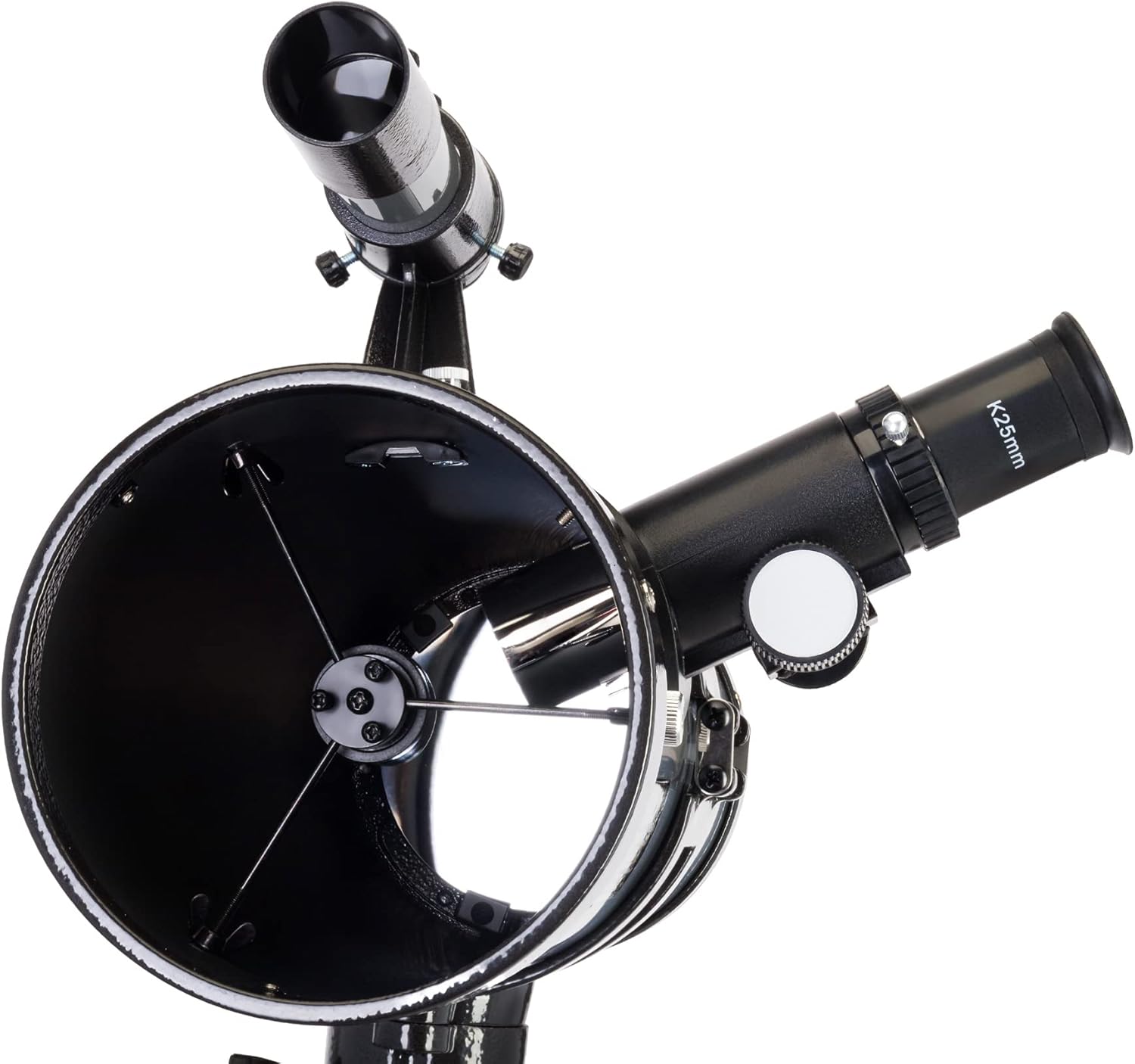
Image 2.2: A K25mm eyepiece properly inserted into the telescope's focuser, ready for observation.
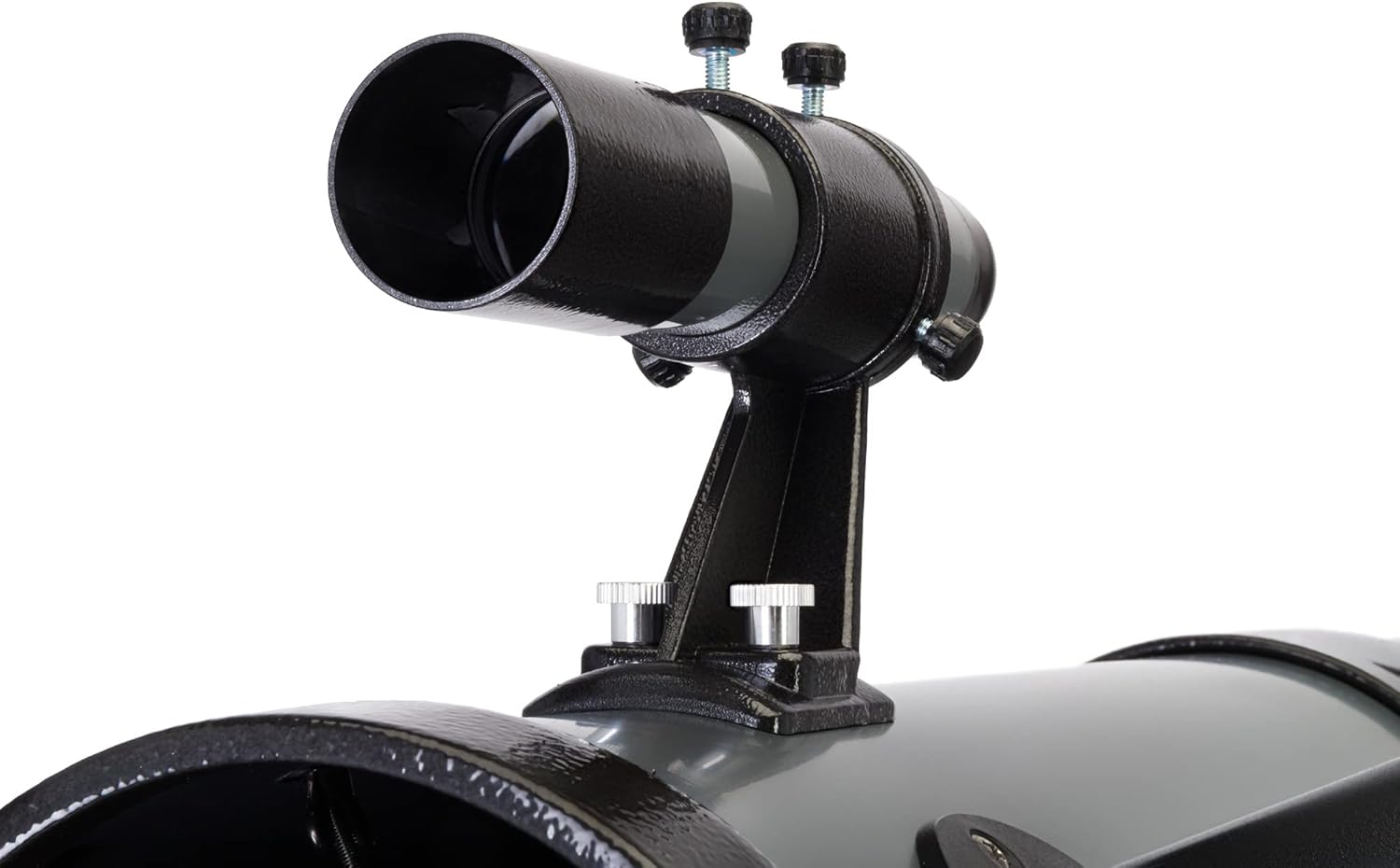
Image 2.3: The 6x30 finder scope mounted on the main telescope tube, used for locating celestial objects.
2.3. Balancing the Telescope
Proper balancing is crucial for smooth tracking and preventing strain on the mount. Adjust the counterweight position on the bar and the optical tube position within the tube rings until the telescope remains stationary when the mount clutches are disengaged.
3. Operating Instructions
Once assembled, the telescope is ready for use. Follow these steps for optimal viewing.
3.1. Aligning the Finder Scope
The finder scope must be aligned with the main telescope for easy object location.
- Daytime Alignment: Point the main telescope at a distant, stationary object (e.g., a distant tree or building) during daylight hours.
- Center Object: Look through the main telescope with a low-power eyepiece (e.g., K25mm) and center the object in the field of view.
- Adjust Finder Scope: Look through the finder scope. Use its adjustment screws to move the crosshairs until they are centered on the same object.
- Verify Alignment: Switch between the main telescope and the finder scope to ensure both are pointing at the exact same spot.
3.2. Observing Celestial Objects
- Choose an Eyepiece: Start with the lowest power eyepiece (K25mm) for a wider field of view, making it easier to locate objects.
- Locate Object: Use the finder scope to point the telescope at your desired celestial object.
- Center and Focus: Look through the main telescope's eyepiece. Use the slow-motion control knobs on the equatorial mount to precisely center the object. Rotate the focuser knobs until the image is sharp.
- Increase Magnification (Optional): Once the object is centered and focused with the low-power eyepiece, you can switch to a higher-power eyepiece (K10mm) or use the 2x Barlow lens for greater magnification. Re-focus as needed.
- Tracking: As celestial objects move across the sky due to Earth's rotation, use the slow-motion control knobs on the equatorial mount to keep the object centered in your field of view.
- Lunar Filter: For observing the Moon, attach the lunar filter to the bottom of your eyepiece to reduce glare and enhance contrast.

Image 3.1: Detail of the rack and pinion focuser, used to achieve a sharp image by adjusting the eyepiece position.
4. Maintenance and Care
Proper maintenance ensures the longevity and performance of your telescope.
- Dust Protection: Always keep dust caps on the optical tube and eyepieces when not in use.
- Cleaning Optics:
- Use a soft brush or compressed air to remove loose dust from lenses and mirrors.
- For smudges or fingerprints, use a specialized optical cleaning solution and a microfiber cloth designed for optics. Apply solution to the cloth, not directly to the lens.
- Avoid touching optical surfaces with bare hands.
- Storage: Store the telescope in a dry, dust-free environment. If storing for extended periods, consider disassembling and returning components to their original packaging or a dedicated storage case.
- Mechanical Parts: Periodically check all screws and fasteners for tightness. Do not over-tighten.
- Avoid Extreme Temperatures: Do not expose the telescope to rapid temperature changes or extreme heat/cold, as this can affect optical components.
5. Troubleshooting
Here are solutions to common issues you might encounter:
| Problem | Possible Cause | Solution |
|---|---|---|
| Image is blurry or out of focus. | Incorrect focuser adjustment. | Adjust the focuser knobs slowly until the image is sharp. Ensure the eyepiece is fully inserted. |
| Cannot find objects. | Finder scope is not aligned. | Align the finder scope with the main telescope during daylight hours (refer to Section 3.1). |
| Image is dim or dark. | Too high magnification for conditions; light pollution; dirty optics. | Use a lower power eyepiece. Move to a darker viewing location. Clean optics if necessary (refer to Section 4). |
| Stars appear as streaks. | Telescope not tracking celestial motion; mount not properly aligned or balanced. | Use slow-motion controls to track objects. Ensure the equatorial mount is roughly aligned to the celestial pole and balanced. |
| Vibrations during observation. | Unstable tripod; loose connections. | Ensure tripod legs are fully extended and stable on a firm surface. Check all screws and clamps for tightness. |
6. Specifications
Detailed technical specifications for the Levenhuk Blitz 114s PLUS Telescope.
| Feature | Specification |
|---|---|
| Optics Material | Optical glass |
| Optics Coating | Anti-reflective |
| Lens (mirror) Shape | Spherical |
| Optical Design | Newtonian reflector |
| Aperture | 114mm |
| Focal Length | 500mm |
| Aperture Ratio | f/4.4 |
| Highest Practical Power | 228x |
| Resolution Threshold | 1.0 arcseconds |
| Limiting Stellar Magnitude | 12.38 |
| Eyepiece Barrel Diameter | 1.25 inches |
| Focuser | Rack & pinion |
| Finder Scope | 6x30 |
| Mount Type | Equatorial EQ3 |
| Telescope Control | Manual |
| Optical Tube Material | Metal |
| Tripod Height (adjustable) | 610–1040 mm |
| Product Dimensions (L x W x H) | 80 x 39 x 27.5 cm |
| Item Weight | 12.18 Kilograms |
| User Level | Beginners, experienced users |
| Assembly Difficulty | Complicated |
7. Warranty and Support
The Levenhuk Blitz 114s PLUS Telescope comes with a lifetime warranty, ensuring long-term support for your product. For any technical assistance, troubleshooting beyond this manual, or warranty claims, please contact Levenhuk customer support directly. Refer to the official Levenhuk website or the packaging for contact details.
Always retain your proof of purchase for warranty purposes.


