
Introduction
Thank you for choosing the LEKATO 5.8GHz Wireless XLR Microphone System, model MW-1. This system provides a stable and reliable wireless connection for your dynamic and condenser microphones, offering high-quality audio transmission with minimal latency. Designed for ease of use, it's compatible with a wide range of audio equipment including mixers, sound cards, PA systems, and DSLR cameras. Please read this manual carefully to ensure proper setup, operation, and maintenance of your device.
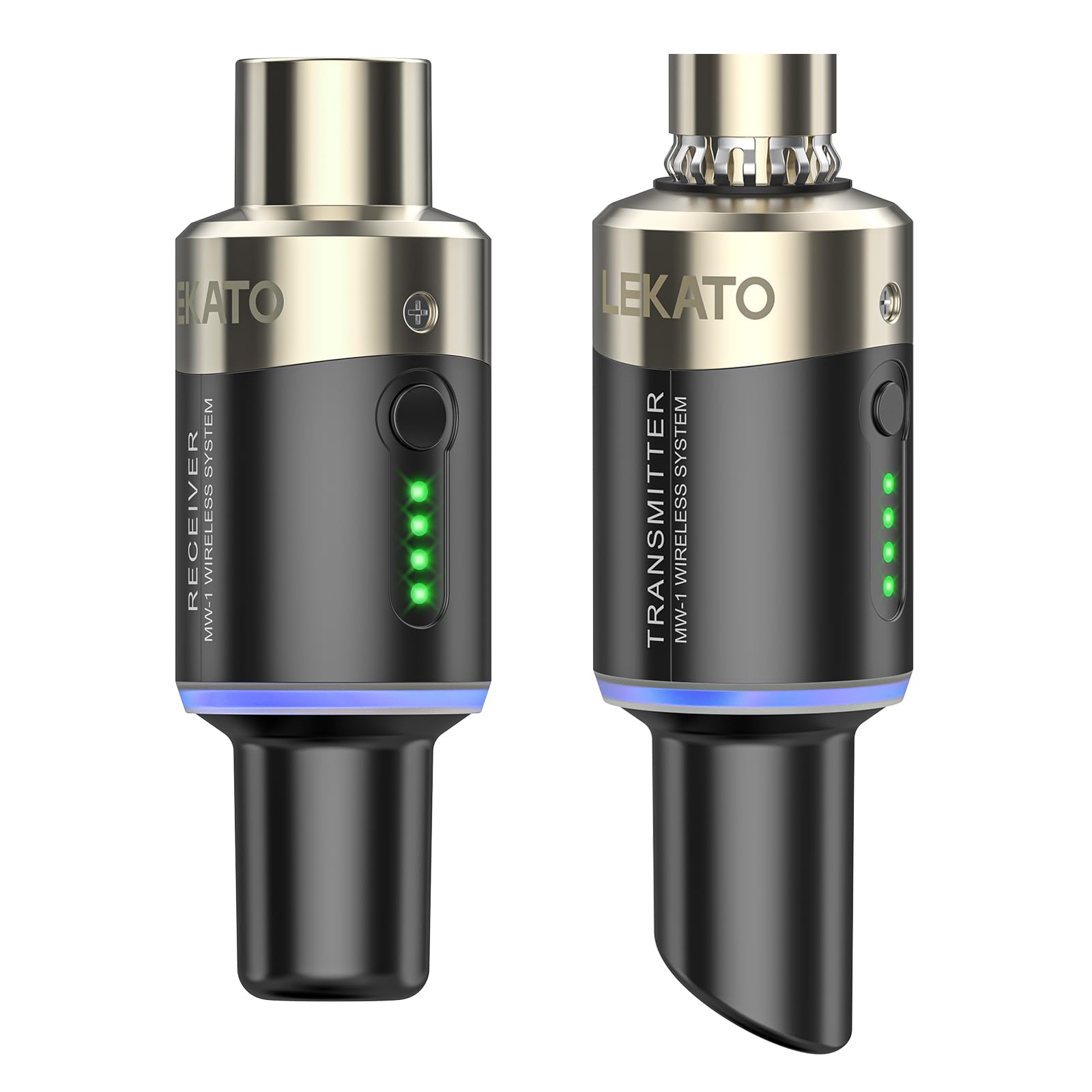
Image: The LEKATO 5.8GHz Wireless XLR Microphone System, showing the transmitter and receiver units.
What's in the Box
Upon opening your LEKATO MW-1 package, you should find the following components:
- 1 x XLR Microphone Transmitter
- 1 x XLR Microphone Receiver
- 1 x Dual-port USB Charging Cable
- 1 x User Manual
Key Features
- Interference-Free Wireless System: Utilizes the 5.8GHz ISM frequency band for stable, interference-free transmission.
- High-Quality Audio Transmission: Features 24-bit audio resolution with a 48KHz sampling rate, ensuring clear and reliable sound.
- Ultra-Low Latency: Experience virtually no delay with latency less than 5ms.
- Extended Range: Enjoy a wireless range of up to 30 meters (100 feet).
- Built-in Rechargeable Battery: Both transmitter and receiver have integrated batteries, offering 3.5 to 5 hours of playtime on a single charge.
- Dual-Port USB Charging: Conveniently charge both units simultaneously with the included dual-port USB cable.
- Battery Level Indicator: Easily monitor battery status with integrated power indicators.
- Multi-Channel Operation: Supports 4 switchable channels, allowing up to 4 sets to be used simultaneously in the same location.
- Universal XLR Compatibility: Works with dynamic microphones and battery-powered condenser microphones (up to 24V), audio mixers, PA systems, and DSLR cameras.

Image: Close-up of the LEKATO wireless transmitter and receiver, emphasizing the 5.8GHz ISM frequency band for stable, interference-free transmission.

Image: A singer using the LEKATO wireless microphone system, with overlaid text highlighting features like <0.02% signal distortion, 100ft/30m transmission range, <5ms latency, and 24-bit/48kHz sampling rate.
Setup
1. Charging the Units
Before initial use, fully charge both the transmitter and receiver. Connect the dual-port USB charging cable to both units and plug the other end into a standard USB power adapter (not included). The status indicator will be red while charging. Once fully charged, the red status indicator will turn off.

Image: Illustration of the LEKATO wireless transmitter and receiver charging simultaneously via a dual USB-C cable, with battery level indicators.
2. Pairing the Transmitter and Receiver
The transmitter and receiver are typically pre-paired from the factory. If re-pairing is needed or if you are using multiple sets, follow these steps:
- Turn on both the transmitter and receiver by pressing and holding their respective power buttons.
- Long press the signal key on both the transmitter and receiver simultaneously. The indicator lights will flash, indicating they are searching for a connection.
- Once successfully paired, the indicator lights will turn solid green, and the units will be ready for use.

Image: Diagram illustrating universal XLR compatibility of the LEKATO wireless system with mixers, sound cards, recorders, PA systems, dynamic mics, and condenser mics.
Operating Instructions
1. Connecting to Microphones
Plug the XLR transmitter directly into the XLR output of your dynamic microphone. For condenser microphones, ensure they are battery-powered and require 24V or less. High-power 48V mics may cause noise.

Image: Two images showing the LEKATO wireless system connected to a condenser microphone and a dynamic microphone during a performance.
2. Connecting to Audio Devices
Plug the XLR receiver into the XLR input of your desired audio device, such as an audio mixer, sound card, PA system, or DSLR camera. Ensure a secure connection.

Image: Collage of images showing the LEKATO wireless system connected to a mixer, a device for voice effects, a sound card, and a camera, demonstrating broad compatibility.
3. Channel Selection
The system supports 4 switchable channels. If you experience interference or are using multiple sets, you can switch channels by briefly pressing the signal key on both the transmitter and receiver until they synchronize to a new channel. This allows up to 4 sets to operate simultaneously without interference.

Image: Four microphones equipped with LEKATO wireless systems connected to an audio mixer, demonstrating support for up to four simultaneous sets.
4. Usage Tips
- Ensure a clear line of sight between the transmitter and receiver for optimal performance and range.
- Monitor the battery indicator lights to ensure sufficient power for your performance.
- Avoid placing the units near other 5.8GHz devices to minimize potential interference.

Image: A man singing into a microphone equipped with the LEKATO wireless system during a performance.
Maintenance
- Cleaning: Use a soft, dry cloth to clean the units. Do not use liquid cleaners or solvents.
- Storage: Store the system in a cool, dry place away from direct sunlight and extreme temperatures.
- Battery Care: To prolong battery life, avoid fully discharging the units frequently. Charge them regularly, even if not in use for extended periods.
- Handling: Handle the units with care to prevent damage from drops or impacts.
Troubleshooting
| Problem | Possible Cause | Solution |
|---|---|---|
| No sound or intermittent signal | Low battery; Units not paired; Out of range; Interference; Incorrect connection | Charge units; Re-pair units; Move closer to receiver; Change channel; Check XLR connections |
| Noise or static in audio | Interference from other 5.8GHz devices; High-power 48V condenser mic; Weak signal | Change channel; Move away from other wireless devices; Ensure condenser mic is 24V or less; Move closer to receiver |
| Units not charging | Faulty USB cable or power adapter; Loose connection | Check cable and adapter; Ensure secure connection; Try a different USB port/adapter |
| Short battery life | Battery degradation; Frequent deep discharge | Ensure full charge before use; Avoid frequent deep discharges; Consider battery replacement if significantly degraded (contact support) |
Specifications
| Feature | Specification |
|---|---|
| Brand | LEKATO |
| Model Name | MW-1 |
| Connectivity Technology | RF (5.8 GHz ISM Band) |
| Connector Type | XLR |
| Compatible Devices | Dynamic Microphones, Condenser Microphones (≤24V), Audio Mixers, Sound Cards, PA Systems, DSLR Cameras |
| Polar Pattern | Unidirectional |
| Power Source | Battery Powered (1 Lithium-polymer included per unit) |
| Number of Channels | 4 |
| Frequency Response | 20Hz - 20KHz |
| Sampling Rate | 24-bit / 48KHz |
| Transmission Range | Up to 30 meters (100 feet) |
| Latency | < 5 ms |
| Signal Distortion | < 0.02% |
| Signal-to-Noise Ratio (SNR) | > 105 dB |
| Working Time | 3.5 - 5 hours |
| Material | Metal |
| Dimensions (L x W x H) | 16.5 x 11.8 x 3.5 cm |
Warranty & Support
LEKATO products are designed for reliability and performance. For warranty information, technical support, or any inquiries regarding your LEKATO 5.8GHz Wireless XLR Microphone System, please refer to the official LEKATO brand store or contact customer service through your purchase platform. Keep your proof of purchase for warranty claims.
Visit the official LEKATO store for more information: LEKATO Brand Store