1. Introduction and System Overview
The Wolf Guard MR1 GSM Smart Security System (Model W4Q-KIT3) is a comprehensive security solution designed to protect your home or business. This system features a WiFi + 4G dual network connection for enhanced reliability, ensuring alerts are delivered even if one network fails. The main control panel includes a 2.4-inch TFT LCD screen for easy operation and supports control via the free Android/iOS Smartlife and Tuya applications. It is compatible with Amazon Alexa and Google Assistant for smart home integration.
The system supports up to 10 remote controls, 16 RFID tags, and 100 wireless defense zones, allowing for extensive customization and coverage. It also includes a built-in backup battery to maintain operation during power outages and an anti-dismantle function for added security.
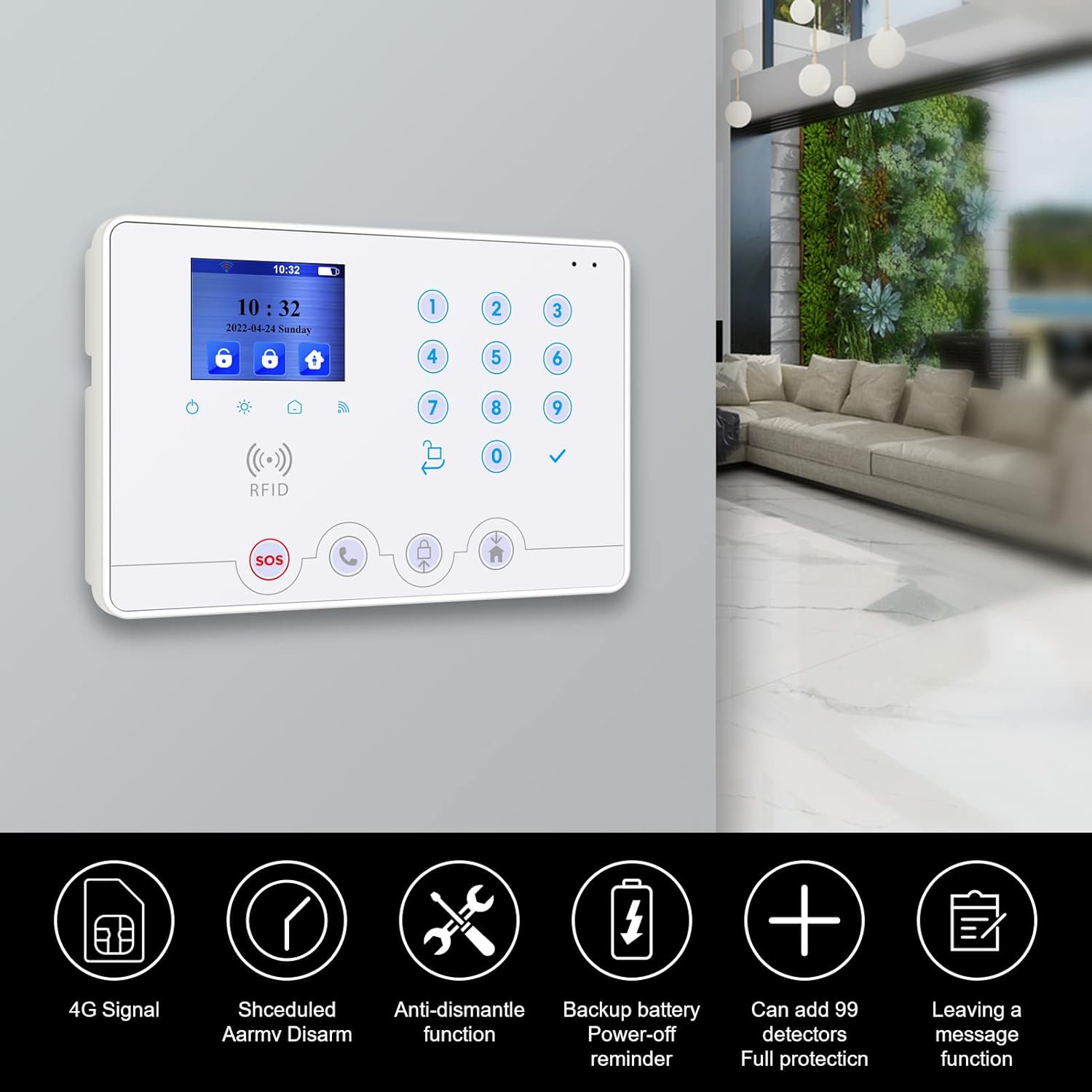
Image: The main control panel of the Wolf Guard MR1 GSM Smart Security System, highlighting key features such as 4G signal, scheduled arm/disarm, anti-dismantle function, backup battery, support for 99 detectors, and message leaving.
2. Product Components
The Wolf Guard MR1 GSM Smart Security System kit includes the following components:
- 1 x WiFi + 4G Control Unit (Main Panel)
- 2 x Infrared Motion Detectors (PIR)
- 2 x Door/Window Magnetic Sensors
- 1 x Wireless Remote Control
- 1 x Wireless WiFi 1080p Camera
- 1 x Mini Wired Indoor Siren (110 dB)
- 2 x RFID Cards
- 1 x Alarm Warning Sticker
- 2 x Power Adapters (1 for host, 1 for camera)
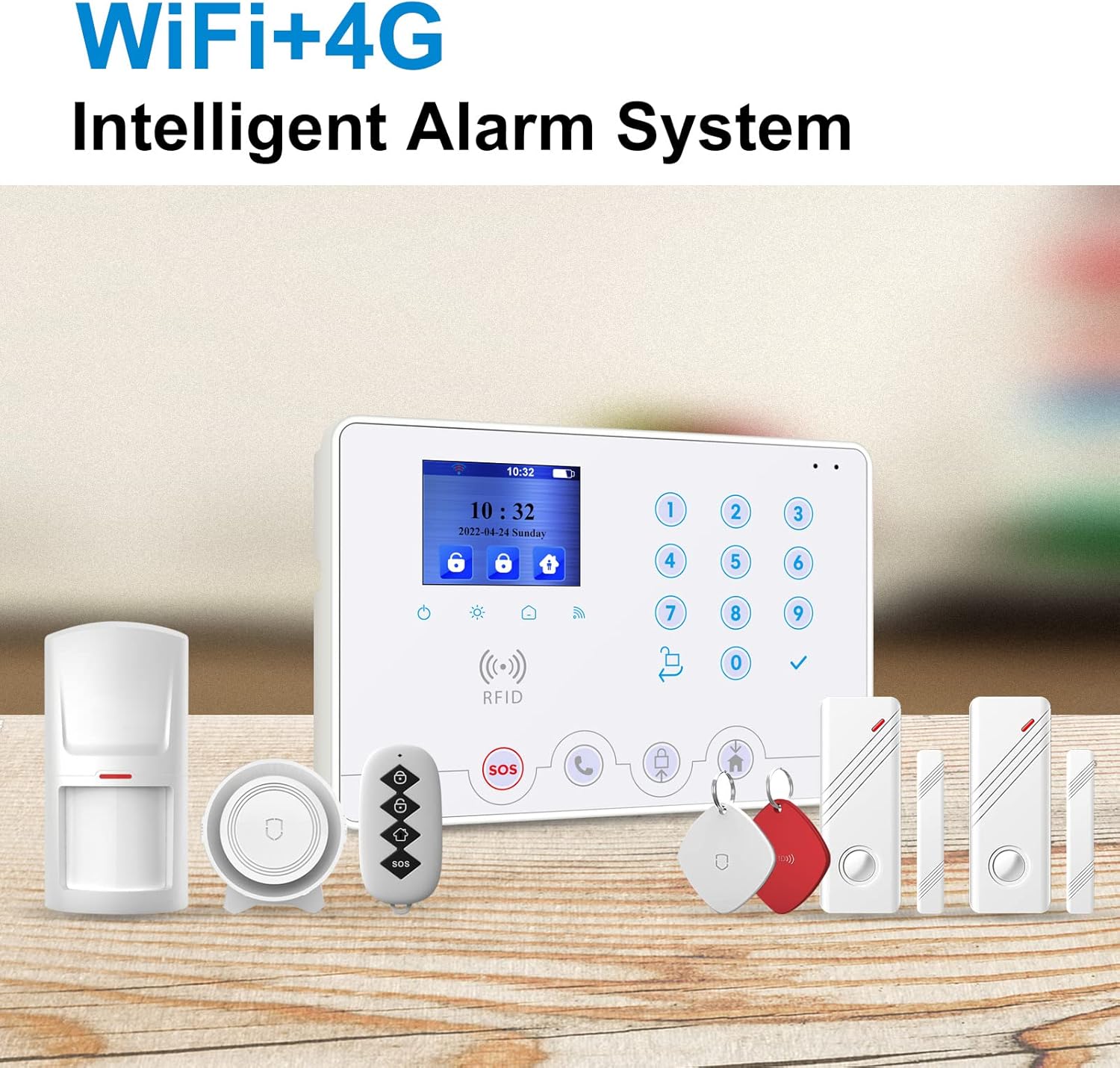
Image: A complete set of Wolf Guard MR1 GSM Smart Security System components, including the main panel, PIR motion sensor, door/window contact sensor, remote control, RFID key fobs, and a siren.
3. Setup Instructions
The Wolf Guard MR1 system is designed for easy installation. Most sensors in this kit are pre-configured with the host panel, simplifying the initial setup process.
3.1. Powering On the Main Panel
- Connect the provided power adapter to the main control unit and plug it into a power outlet.
- The LCD screen will illuminate, indicating the system is powering on.
3.2. Network Connection (WiFi & 4G)
The system supports both WiFi and 4G network connections for dual reliability.
- WiFi Setup: Access the system settings on the LCD panel or via the mobile application to connect to your home WiFi network. Follow the on-screen prompts to enter your network credentials.
- 4G Setup: Insert a compatible 4G SIM card into the designated slot on the main panel. The system will automatically detect and connect to the cellular network. Ensure the SIM card has an active plan for calls and SMS.
3.3. Mobile Application Installation
Download the free "Smartlife" or "Tuya" application from the Android Play Store or Apple App Store. Register an account and follow the in-app instructions to add your Wolf Guard MR1 system. This application allows for complete remote management of your security system.

Image: Diagram showing the Wolf Guard MR1 main panel, a 360-degree camera, and a smartphone displaying the "Smartlife" app, indicating that the camera and alarm host use the same application for control.
3.4. Sensor Placement
- PIR Motion Detectors: Install in areas where intruders are likely to pass, such as hallways or living rooms. Ensure they have a clear line of sight and are not obstructed by furniture.
- Door/Window Magnetic Sensors: Attach to doors and windows. Ensure the two parts of the sensor are aligned and close to each other when the door/window is closed.
4. Operating Instructions
The Wolf Guard MR1 system offers multiple ways to arm, disarm, and manage your security settings.
4.1. Arming and Disarming the System
- Via Mobile App: Use the "Smartlife" or "Tuya" app to fully arm (Away mode), partially arm (Home mode), or disarm the system from anywhere.
- Via Remote Control: Press the arm button on the wireless remote control to arm the system. Press the disarm button to disarm.
- Via RFID Card: Tap an authorized RFID card on the RFID reader area of the main panel to quickly disarm the system.
- Via Main Panel: Use the keypad on the main panel to enter your security code and arm or disarm the system.
4.2. Zone Management
The system supports various defense zone types to suit different security needs:
- Access Zone: Typically for entry/exit points with a delay.
- Indoor Zone: For internal areas, often bypassed in Home mode.
- Perimeter Zone: For external doors and windows, active in Home mode.
- 24-Hour Zone: Always active, such as for smoke detectors or emergency buttons.
- Doorbell Zone: Triggers a doorbell sound when activated.
4.3. Timed Arm/Disarm
You can schedule specific times for the system to arm or disarm automatically. This feature is useful for daily routines.
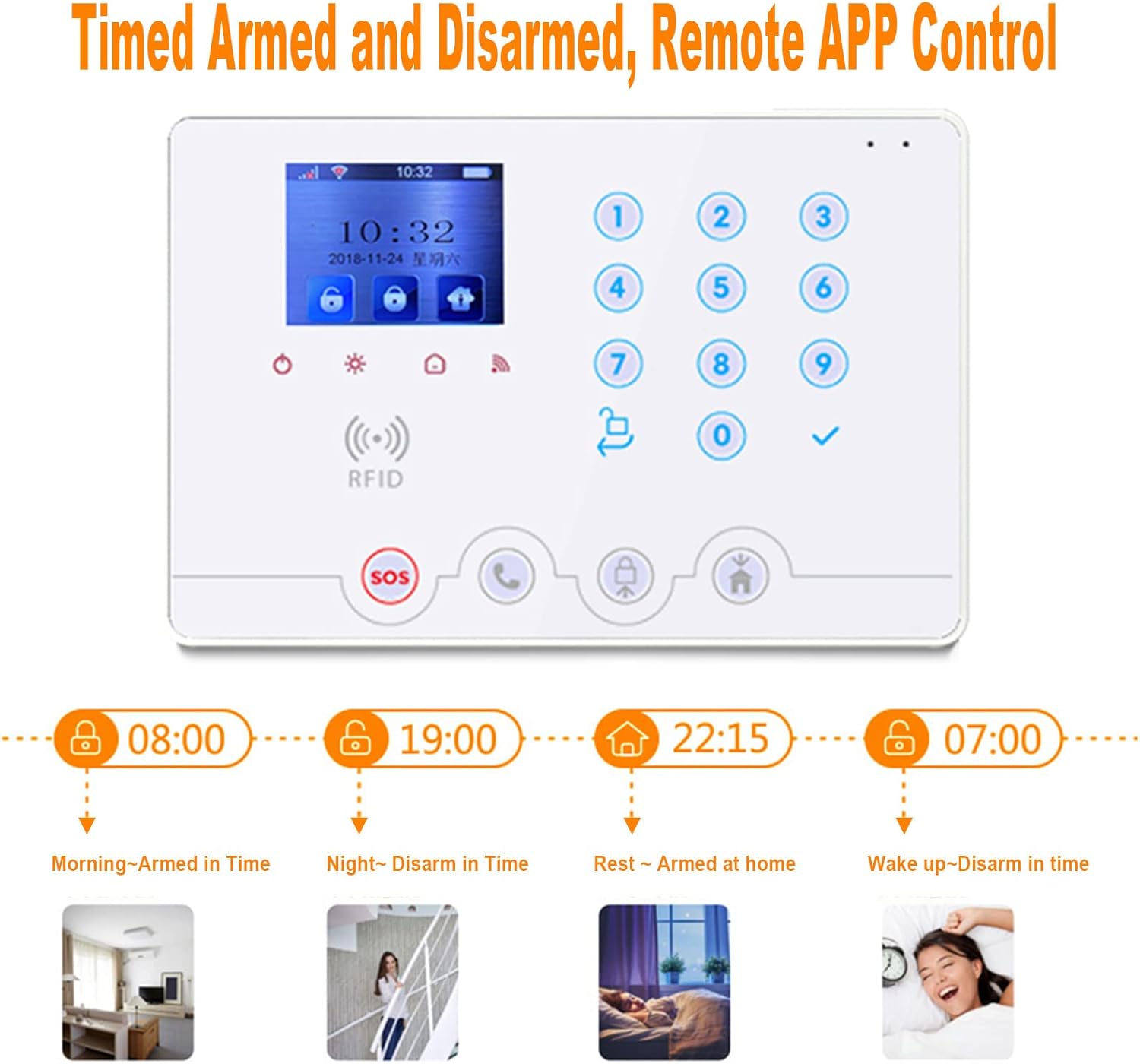
Image: The main control panel illustrating timed arming and disarming schedules for different parts of the day, such as morning arm, night disarm, rest arm at home, and wake up disarm.
4.4. Emergency (SOS) Function
Press the SOS button on the main panel or remote control to trigger an immediate alarm and send emergency notifications to pre-programmed contacts.

Image: A smartphone displaying the alarm system application interface, showing options to arm, disarm, and view alarm history, with a visual of a person in a balaclava near a door, indicating a security event.
4.5. Camera Operation
The included 1080p WiFi camera can be integrated with the Smartlife/Tuya app. It features motion detection and 2-way audio, allowing you to monitor your premises and communicate remotely.

Image: The 1080p WiFi camera demonstrating its motion detection capabilities and 2-way audio feature, with a baby and a cat in the foreground.
5. Maintenance
Regular maintenance ensures the optimal performance of your Wolf Guard security system.
5.1. Battery Backup
The main control unit has a built-in backup battery. In the event of a power outage, the system will automatically switch to battery power and continue to operate for several hours. You will receive an SMS notification about the power failure and its restoration.
5.2. Anti-Dismantle Function
The main panel and siren are equipped with an anti-dismantle function. If an attempt is made to tamper with or remove these devices, an alarm will be triggered.
5.3. Sensor Checks
Periodically check the batteries in your wireless sensors (PIR, door/window contacts) and replace them as needed to ensure continuous protection.
6. Troubleshooting
This section addresses common issues you might encounter with your Wolf Guard security system.
6.1. No Power / System Offline
- Check Power Adapter: Ensure the main panel's power adapter is securely plugged into both the unit and a working power outlet.
- Backup Battery: If there's a power outage, the system will run on its backup battery. You should receive an SMS notification. If the battery is depleted, the system will power off.
6.2. No Notifications / App Issues
- Network Connection: Verify that the main panel is connected to WiFi and/or has a working 4G SIM card with signal. Check your home internet connection.
- App Permissions: Ensure the Smartlife/Tuya app has necessary permissions (e.g., notifications) on your smartphone.
- App Login: Confirm you are logged into the correct account in the app.
6.3. Sensor Not Triggering Alarm
- Battery Check: Replace batteries in the sensor if they are low.
- Sensor Placement: Ensure door/window sensors are properly aligned and within range. PIR sensors should have a clear field of view.
- Zone Settings: Verify the sensor's defense zone is correctly configured and active in the current arming mode.
6.4. Unclosed Door/Window Reminders
The system can provide reminders if a door or window is left open when attempting to arm. Close all monitored entry points before arming the system.

Image: The main panel displaying a reminder for unclosed doors, and an illustration of the anti-dismantling alarm function, which triggers if the device is tampered with.
7. Specifications
| Feature | Specification |
|---|---|
| Brand | Wolf Guard |
| Model Number | W4Q-KIT3 |
| Manufacturer | CTD |
| Connectivity Technology | Wireless (WiFi, 4G) |
| Power Source | Battery Powered (with AC adapter) |
| Voltage | 5 Volts |
| Item Weight | 1 Kilogram |
| Product Dimensions (L x W x H) | 20 x 13.6 x 3.1 cm |
| Video Recording Resolution (Camera) | 1080p |
| Wireless Standard | IEEE 802.11 b/g/n, 433.92 MHz |
| Display | 2.4" TFT LCD |
| Defense Zones | Up to 100 wireless, 2 wired |
| Remote Controls Supported | 10 |
| RFID Tags Supported | 16 |
8. Warranty and Support
Specific warranty information for the Wolf Guard MR1 GSM Smart Security System is not provided in the product details. For warranty claims, technical support, or further assistance, please refer to the documentation included with your purchase or contact Wolf Guard customer service directly.
You may also visit the Wolf Guard Brand Store for additional product information and support resources.


