
1. Product Overview
The Shadowhawk 500,000 Lumen LED Tactical Flashlight (Model S1476) is a high-performance, durable lighting tool designed for various outdoor activities, emergencies, and daily use. Featuring an upgraded XHP70.2 LED chip, this flashlight delivers exceptional brightness and a long-range beam. Its robust aluminum construction ensures durability, while the IP67 waterproof rating provides reliable performance in challenging weather conditions. The flashlight is equipped with a rechargeable battery, USB charging capabilities, and multiple lighting modes for versatile use.

Image: The Shadowhawk S1476 flashlight alongside its protective carrying case, showcasing the included accessories.
2. Package Contents
Please verify that all items are present in your package:
- 1x Shadowhawk Rechargeable Flashlight
- 1x USB Charging Cable
- 1x Rechargeable Battery (pre-installed or separate)
- 1x AAA Battery Holder (for 3x AAA batteries, AAA batteries included)
- 1x Flashlight Holster
- 1x Gift Box
- 1x User Manual
Image: A detailed view of the Shadowhawk flashlight and all included accessories neatly arranged in its case.
3. Setup
3.1 Battery Installation
The Shadowhawk S1476 flashlight uses a rechargeable battery. Ensure the battery is inserted correctly for proper function.
- Unscrew the rear cover of the flashlight by turning it counter-clockwise.
- Identify the positive (+) and negative (-) poles of the battery. The positive pole is typically the raised end, and the negative pole is the flat end.
- Insert the battery into the flashlight body with the positive (+) end facing towards the flashlight head (LED end) and the negative (-) end facing towards the tail cap. Important: Do not remove the red packaging from the rechargeable battery.
- Carefully screw the rear cover back on clockwise until it is securely tightened.

Image: Visual guide demonstrating the correct battery installation process, showing the positive and negative terminals.
3.2 Initial Charging
Before first use, it is recommended to fully charge the flashlight's battery. Refer to the 'Charging and Battery' section for detailed instructions.
4. Operating Instructions
4.1 Power On/Off
To turn the flashlight on or off, press the power button located on the side of the flashlight body. The blue LED indicators next to the button will illuminate when the flashlight is on, showing the battery level.
4.2 Changing Lighting Modes
The Shadowhawk S1476 features 5 lighting modes:
- High Light: Maximum brightness for powerful illumination.
- Medium Light: Balanced brightness for general use.
- Low Light: Reduced brightness for extended battery life or close-range tasks.
- Strobe: Flashing light for signaling or disorientation.
- SOS: Morse code signal for emergency situations.
To cycle through the modes, short press the power button repeatedly. To turn off the flashlight from any mode, long press the power button for 3 seconds.

Image: Illustration of the flashlight's five lighting modes (High, Medium, Low, Strobe, SOS) and its zoomable function.
4.3 Adjustable Focus (Zoom Function)
The flashlight features an adjustable focus mechanism, allowing you to switch between a wide floodlight and a concentrated spotlight beam.
- To adjust the focus, gently pull the head of the flashlight outwards to zoom in (spotlight) or push it inwards to zoom out (floodlight).
- The spotlight is ideal for long-distance observation, while the floodlight provides wide-area illumination.
5. Charging and Battery
5.1 USB Rechargeable
The Shadowhawk S1476 flashlight is equipped with a built-in USB charging port, allowing for convenient recharging using various power sources.
- Connect the included USB charging cable to the flashlight's charging port.
- Plug the other end of the USB cable into a power source such as a power bank, wall adapter, computer USB port, or car charger.
- The LED indicators on the flashlight will show the charging progress.

Image: Various USB charging methods for the flashlight, including power bank, wall adapter, and car charger.
5.2 Battery Level Indicator
The blue LED indicators next to the power button display the current battery level:
- 4 LEDs: 75-100% charge
- 3 LEDs: 50-75% charge
- 2 LEDs: 25-50% charge
- 1 LED: Below 25% charge (recharge soon)

Image: Close-up of the flashlight's LED battery indicators showing different charge levels (25%, 50%, 75%, 100%).
5.3 Power Bank Function
The flashlight can also function as a power bank to charge other small electronic devices, such as smartphones. Simply connect your device to the flashlight's USB output port using your device's charging cable.
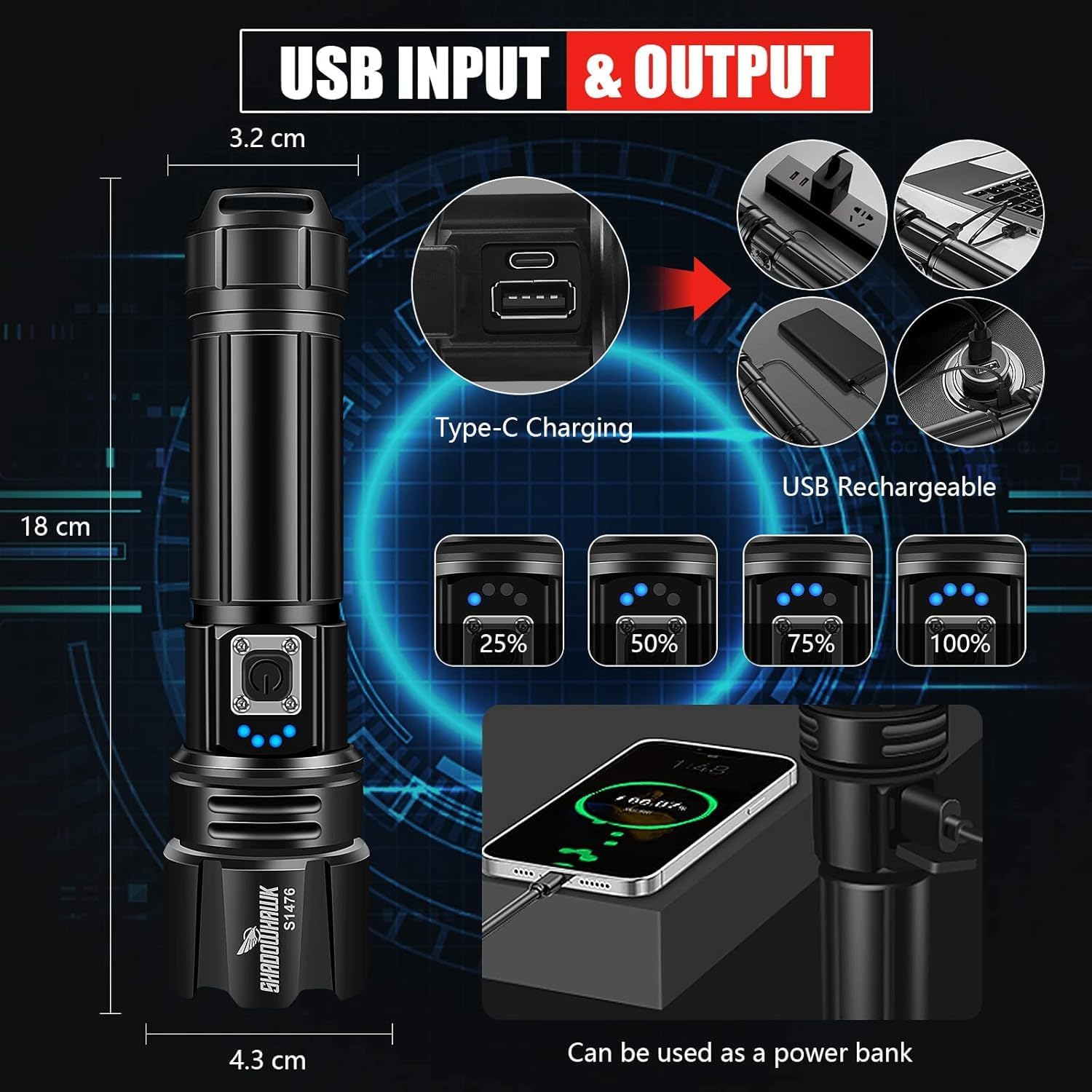
Image: The flashlight's USB input and output ports, demonstrating its capability to charge a smartphone.
6. Maintenance
6.1 Cleaning
To maintain optimal performance and appearance, clean your flashlight regularly:
- Wipe the exterior with a soft, damp cloth.
- Do not use abrasive cleaners or solvents, as they may damage the finish.
- Keep the lens clean for clear light output. Use a lens cleaning cloth if necessary.
6.2 Storage
When storing the flashlight for extended periods:
- Ensure the battery is fully charged before storage.
- Store in a cool, dry place away from direct sunlight and extreme temperatures.
- For very long storage, consider removing the battery to prevent potential leakage.
6.3 Water Resistance (IP67)
The Shadowhawk S1476 is rated IP67 waterproof, meaning it is protected from dust and can withstand temporary immersion in water up to 1 meter for 30 minutes. It is suitable for use in rain or snow.
Note: While IP67 rated, this flashlight is not designed for diving or prolonged submersion in water. Ensure the rear cover is tightly sealed before exposure to water.

Image: The flashlight shown in a wet environment, highlighting its IP67 waterproof rating and resistance to compression.
7. Troubleshooting
If you encounter any issues with your Shadowhawk flashlight, please refer to the following common problems and solutions:
| Problem | Possible Cause | Solution |
|---|---|---|
| Flashlight does not turn on. | Battery is dead or low. Battery inserted incorrectly. Loose connections. | Charge the battery. Ensure battery is inserted with correct polarity (+/-). Tighten all parts of the flashlight. |
| Light is dim or flickers. | Low battery. Dirty lens. | Recharge the battery. Clean the flashlight lens. |
| Cannot change lighting modes. | Button malfunction. | Ensure you are short-pressing the button. If issue persists, contact customer service. |
| Flashlight gets warm during use. | Normal operation for high-lumen flashlights. | This is normal, especially on High mode, as the aluminum body dissipates heat. If it becomes excessively hot, turn it off and let it cool. |
If the problem persists after trying these solutions, please contact our customer service for further assistance.
8. Specifications
| Feature | Specification |
|---|---|
| Brand | Shadowhawk |
| Model Number | S1476 |
| Dimensions (L x W x H) | 4.2 x 4.4 x 18 cm (1.65 x 1.73 x 7.09 inches) |
| Weight | 430 grams (0.95 lbs) |
| Luminous Flux | 500,000 lumens (advertised) / 20,000 lumens (white brightness) |
| Light Source Type | LED (XHP70.2) |
| Lighting Modes | High, Medium, Low, Strobe, SOS (5 modes) |
| Water Protection Rating | IP67 |
| Material | Aluminum |
| Power Source | Battery Powered (Rechargeable) |
| Battery Type | Rechargeable battery included (also supports 3x AAA with adapter) |
| Voltage | 4.2 Volts |
| Average Lifespan | 50,000 Hours |
| Special Features | Adjustable focus, USB rechargeable, Power bank function |
9. Warranty and Support
Shadowhawk is committed to providing high-quality products and excellent customer service. We have carefully inspected all items before shipment to ensure proper functionality.
If you have any questions or experience any issues with your Shadowhawk flashlight, please do not hesitate to contact our customer service team. We aim to provide the best solution within 24 hours.
For support, please refer to the contact information provided with your purchase or visit the official Shadowhawk website.


