
Jebao MCP-70
Jebao MCP Smart Cross Flow Pump User Manual
Model: MCP-70
Brand: Jebao
1. Introduction
Thank you for choosing the Jebao MCP Smart Cross Flow Pump. This advanced pump is designed to create optimal water flow in saltwater aquariums, mimicking natural ocean currents to promote a healthy environment for your aquatic life. Featuring innovative crossflow technology, a magnetic base for easy installation, and an intuitive LCD display controller, the MCP-70 offers precise control and reliable performance.

Figure 1.1: Jebao MCP-70 Smart Cross Flow Pump and its retail packaging.
2. Safety Information
Please read all safety instructions carefully before operating the pump. Failure to follow these instructions may result in electric shock, fire, or serious injury.
- Ensure the pump is fully submerged in water before powering on. Dry operation can damage the unit.
- Always disconnect power before performing any maintenance, installation, or cleaning.
- This product is designed for indoor use only in saltwater aquariums. Do not use it for any other purpose.
- Keep the power cord and controller away from water.
- Do not operate the pump if the power cord or plug is damaged.
- Keep out of reach of children.
- The pump must run into water. Maximum water temperature: 35°C.
3. Package Contents
Verify that all items listed below are included in your package:
- Jebao MCP Smart Cross Flow Pump (MCP-70)
- LCD Display Controller
- Magnetic Base Mount
- Power Adapter (100V-240V 50/60Hz DC 24V 20W, 3-prong US plug)
- User Manual (this document)
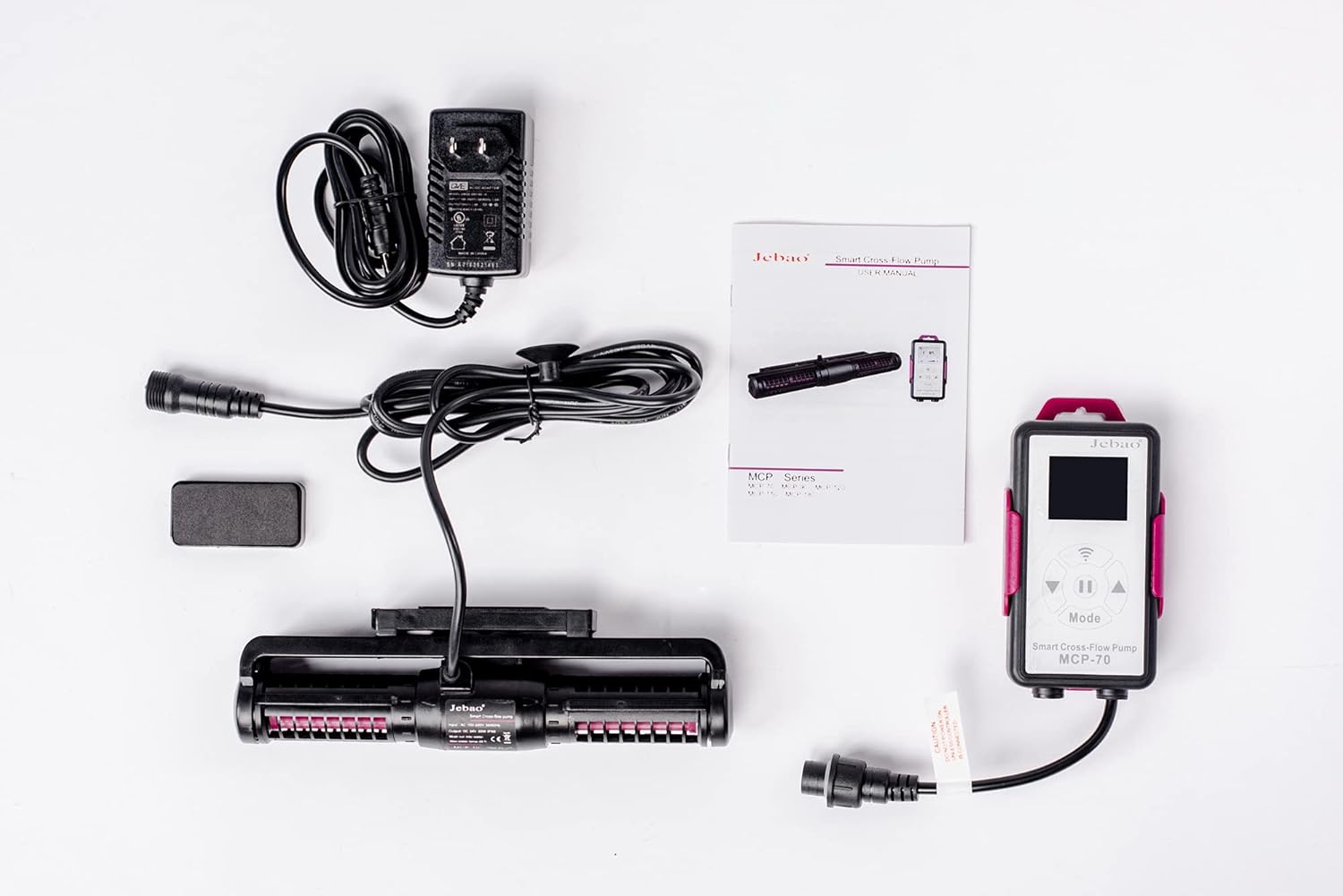
Figure 3.1: All components included in the Jebao MCP-70 package.
4. Setup
4.1. Installation
- Positioning the Pump: Select a location in your aquarium where the pump can create optimal flow without disturbing corals or fish directly. The crossflow design ensures wide water movement.
- Attaching the Magnetic Base: The pump comes with a magnetic base. Place the pump unit inside the tank at the desired location. Align the external magnet on the outside of the glass with the internal magnet attached to the pump. The strong magnetic force will secure the pump in place.
- Connecting the Controller: Connect the pump's cable to the designated port on the LCD display controller.
- Power Connection: Connect the power adapter to the controller, then plug the adapter into a standard 3-prong US electrical outlet (100V-240V, 50/60Hz).

Figure 4.1: The Jebao MCP-70 pump with its magnetic base for secure aquarium attachment.
4.2. Wi-Fi Setup (Optional)
The MCP-70 supports Wi-Fi connectivity for control via a mobile app (iOS/Android). For optimal connection, ensure your Wi-Fi network is operating on a 2.4GHz frequency. Some users may need to temporarily disable 5GHz on their router during initial setup.
- Download the official Jebao app from your device's app store.
- Follow the in-app instructions to add your device. This typically involves putting the pump into Wi-Fi search mode and connecting it to your home network via the app.
- Ensure the app is updated to the latest version for stable performance.
5. Operating Modes
The LCD display controller allows you to select various operating modes to suit your aquarium's needs. The pump utilizes sine wave technology for quiet and stable performance.
- W1: Classic Wave Mode: Adjust the up/down buttons to modify wave patterns. This mode can synchronize multiple pumps.
- W2: Sine Wave Mode: In this mode, one or more pumps can operate simultaneously. The flow rate changes smoothly between 30-100%, resembling a sine curve.
- Else: Random Wave Mode: One or more pumps can operate simultaneously. The pump power changes randomly over time without a set regulation, creating unpredictable flow.
- H: Constant Wave Mode: One or more pumps can operate simultaneously, providing a steady, consistent flow.
- C: Shift to Flow Mode: Requires two pumps to operate. Pumps alternate between working and stopping (P1 works, P2 stops; then P2 works, P1 stops), creating a shifting flow pattern.
- Feed Mode: Short press the stop button on the controller. The pump will cease operation for 10 minutes, allowing fish to feed undisturbed.
6. Maintenance
Regular maintenance ensures the longevity and optimal performance of your Jebao MCP pump.
- Cleaning: Periodically remove the pump from the tank and disassemble it according to the diagrams in the manual (if provided by manufacturer). Clean impellers and internal components to remove algae and debris buildup. Use a soft brush and aquarium-safe cleaning solution if necessary.
- Shaft Lubrication: It is recommended to lubricate the pump shaft during cleaning to ensure smooth operation and prevent wear. Use a silicone-based lubricant safe for aquarium use.
- Cable Inspection: Regularly inspect the power cable and connections for any signs of wear, damage, or corrosion.
7. Troubleshooting
If you encounter issues with your Jebao MCP pump, refer to the following common problems and solutions:
| Problem | Possible Cause | Solution |
|---|---|---|
| Pump not turning on | No power, damaged cable/adapter, dry operation protection activated. | Check power connection. Ensure pump is fully submerged. Inspect cable for damage. |
| Weak or inconsistent flow | Impeller clogged with debris, worn impeller, incorrect mode setting. | Clean the impeller. Check selected operating mode. |
| Unusual noise/vibration | Debris in impeller, worn shaft/bearings, improper installation. | Clean the impeller. Lubricate the shaft. Re-seat the pump on the magnetic base. |
| Wi-Fi connection issues | Router on 5GHz, app not updated, incorrect setup steps. | Ensure router is on 2.4GHz or temporarily disable 5GHz. Update the app. Re-attempt Wi-Fi setup. |
7.1. Official Product Videos
No official seller-provided product videos are available for embedding at this time.
8. Specifications
| Feature | Detail |
|---|---|
| Model | MCP-70 |
| Brand | Jebao |
| Dimensions (L x W x H) | 8.5" x 2.0" x 1.2" (21.6cm x 5.1cm x 3.0cm) |
| Power Source | AC Powered |
| Input Voltage | 100V-240V, 50/60Hz |
| Output Voltage | DC 24V |
| Wattage | 20W |
| Assumed Flow Rate | 925 to 1850 GPH (Gallons Per Hour) |
| Material | Stainless Steel, Polypropylene, or PVC (as per manufacturer) |
| Control | LCD Display Controller, Wi-Fi (iOS + Android App) |
| Features | Crossflow technology, Sine wave technology, Dry/locked rotor protection, Automatic power-off upon no water. |
9. Warranty & Support
For warranty information and technical support, please refer to the official Jebao website or contact their customer service directly. Keep your purchase receipt as proof of purchase for any warranty claims.
Jebao Official Website: www.jebao.com (Please note: This is a placeholder URL. Refer to your product packaging for the correct official website or contact information.)
Related documentsMCP-70


Ask a question about this manual
Ask about setup, troubleshooting, compatibility, parts, safety, or missing instructions. Manuals+ will review the question and use this page’s manual context to help answer it.