
1. Product Overview
The Lyridz Smart Night Light 2S is a plug-in LED nightlight designed for convenience and energy efficiency. It features a motion sensor, adjustable brightness, and multiple operating modes to suit various indoor environments.
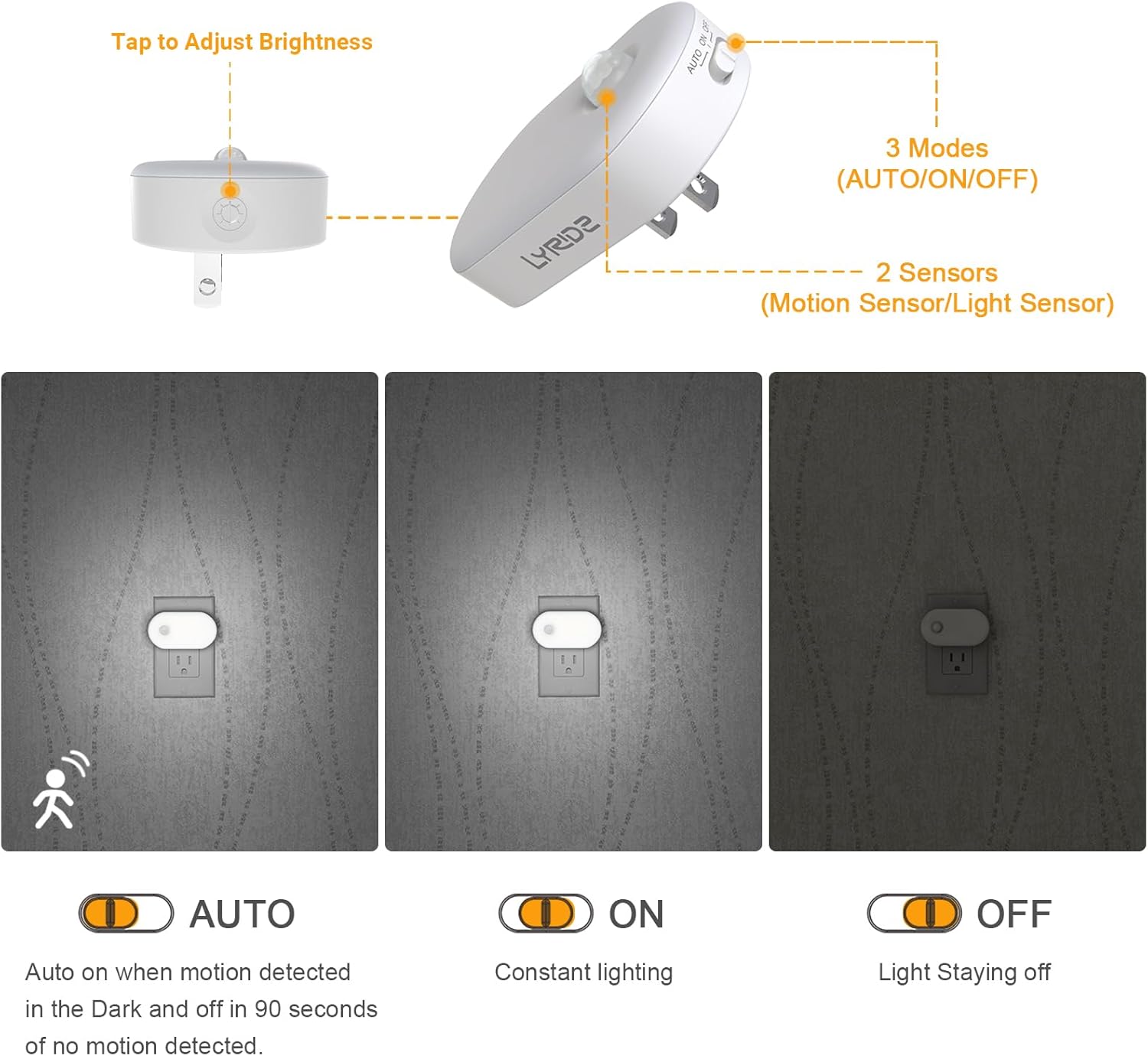
Image: Overview of the Lyridz Smart Night Light 2S, highlighting its three operational modes (AUTO, ON, OFF) and dual sensor system (motion and light sensor).
2. Setup
2.1 Plugging In
Insert the night light into any standard electrical outlet. Ensure it is securely plugged in. The compact design allows the second outlet to remain free for other devices.

Image: The night light plugged into the top socket of a wall outlet, demonstrating that the bottom socket remains accessible.
2.2 Mode Selection
Locate the switch on the side of the night light to select one of the three operating modes:
- AUTO Mode: The light will automatically turn on when motion is detected in dark conditions and turn off approximately 90 seconds after the last movement.
- ON Mode: The light will remain continuously on, regardless of motion or ambient light.
- OFF Mode: The light will remain off.
2.3 Brightness Adjustment
The night light offers adjustable brightness from 1 lumen (min) to 120 lumens (max).
- Stepless Dimming: Touch and hold the control panel to smoothly adjust the brightness.
- 5-Level Brightness: Tap the control panel to cycle through 5 preset brightness levels.
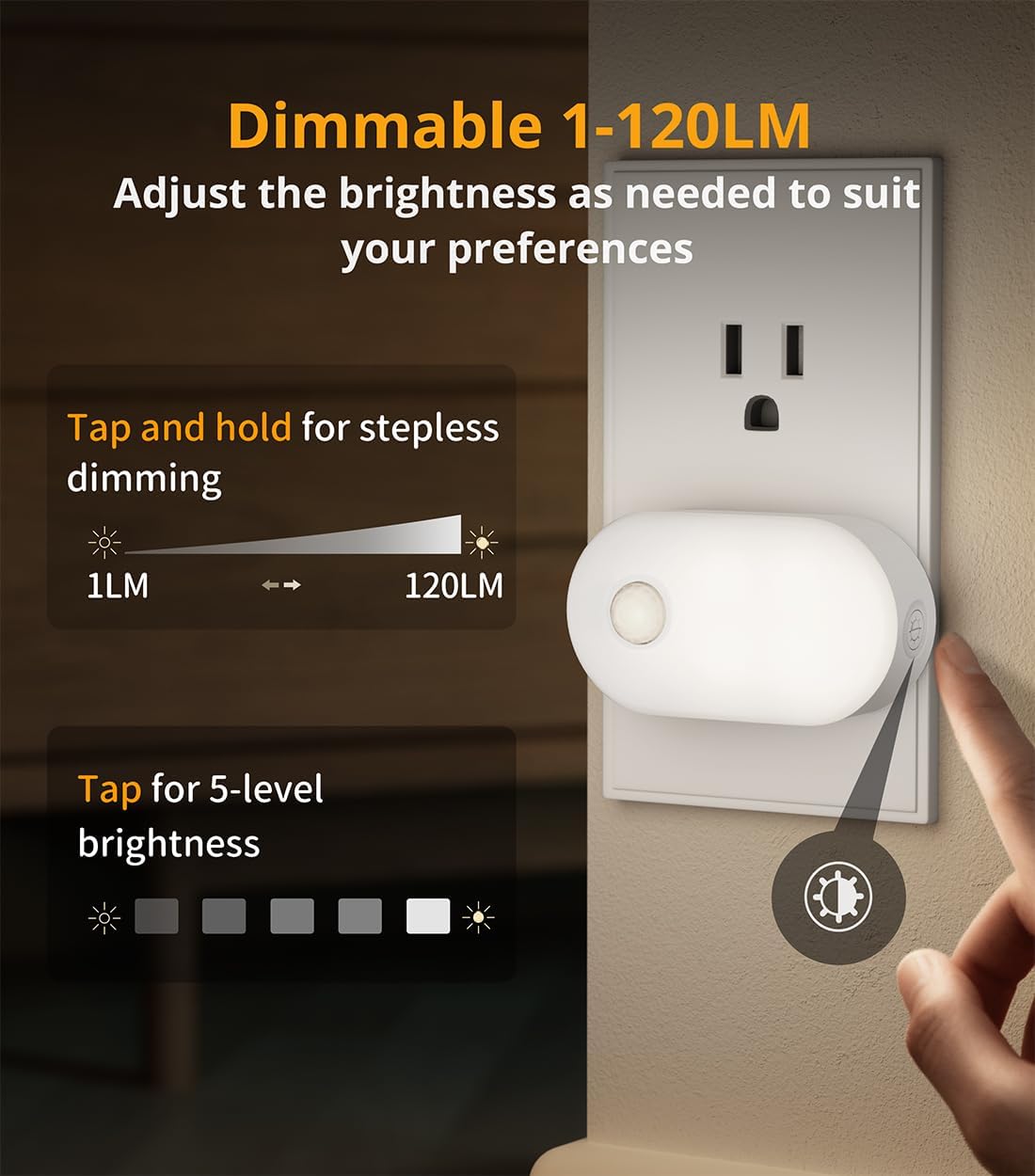
Image: Instructions for adjusting the night light's brightness, illustrating both stepless dimming by touch-and-hold and 5-level adjustment by tapping.
3. Operating Instructions
3.1 Motion Sensor Functionality
In AUTO mode, the integrated motion sensor detects movement within a 10-13ft range and a 120-degree detection angle. The light will activate automatically in dark conditions and turn off 90 seconds after no further motion is detected, conserving energy.
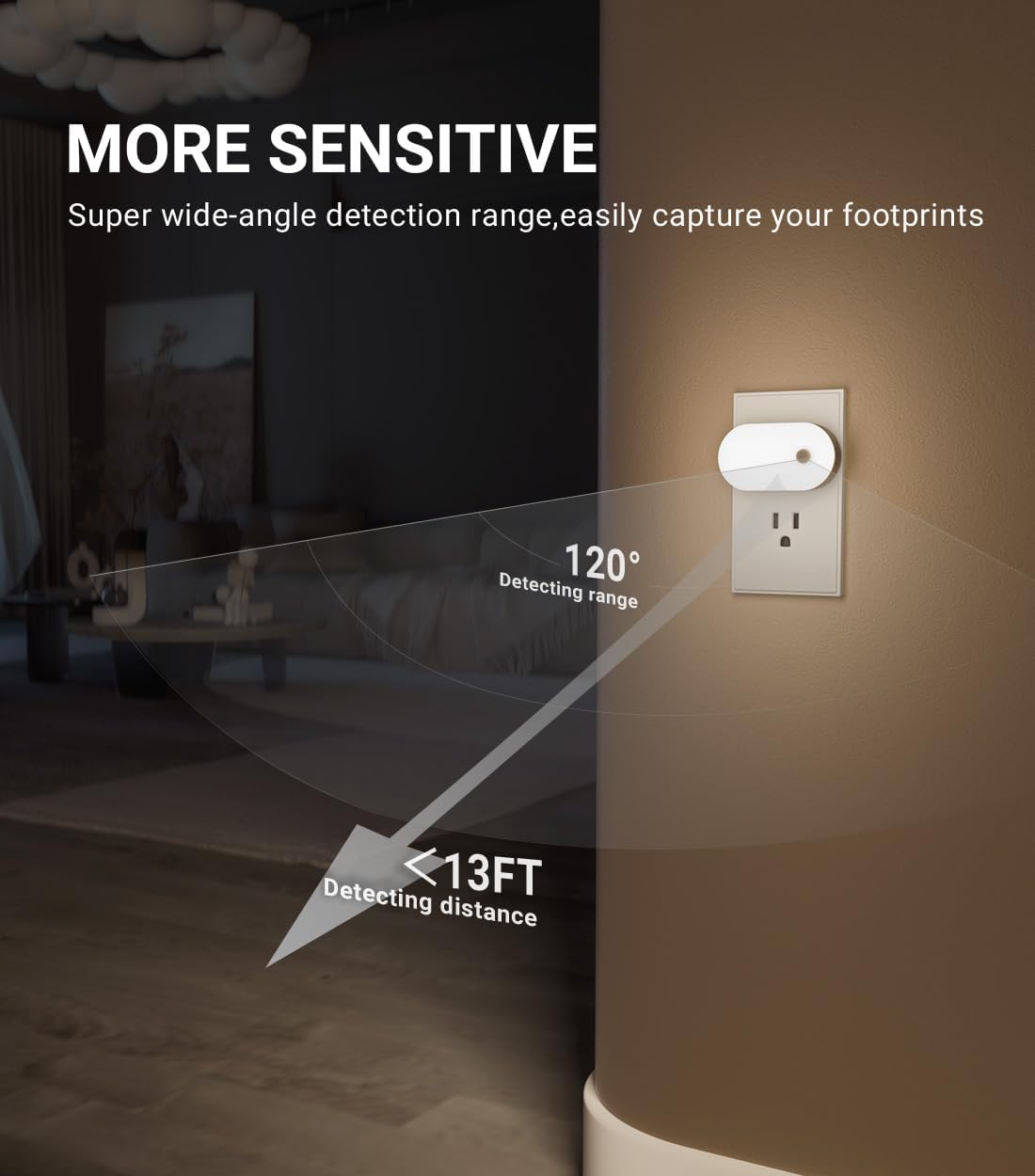
Image: Visual representation of the night light's wide-angle motion detection range and distance capabilities.

Image: The night light installed in a hallway, demonstrating its sensitive motion sensor detecting movement within 13 feet to provide illumination.
3.2 Brightness Memory Function
The night light includes a brightness memory function. If the power supply is not interrupted (i.e., the light remains plugged in), it will recall the last adjusted brightness setting when reactivated, eliminating the need for manual adjustment each time.
4. Maintenance
To ensure optimal performance and longevity of your Lyridz Smart Night Light 2S, follow these simple maintenance guidelines:
- Cleaning: Disconnect the night light from the power outlet before cleaning. Use a soft, dry cloth to wipe the surface. Avoid using abrasive cleaners, solvents, or harsh chemicals, as these can damage the finish or internal components.
- Storage: If storing the night light for an extended period, unplug it and keep it in a cool, dry place away from direct sunlight and extreme temperatures.
- Inspection: Periodically check the night light for any signs of damage, such as cracks in the casing or loose prongs. If any damage is found, discontinue use and contact customer support.
5. Troubleshooting
If you encounter issues with your Lyridz Smart Night Light 2S, refer to the following common problems and solutions:
5.1 Light Does Not Turn On
- Check Power: Ensure the night light is securely plugged into a working electrical outlet.
- Mode Setting: Verify the switch is not set to 'OFF'. If in 'AUTO' mode, ensure ambient light conditions are dark enough for activation.
- Ambient Light: If the surrounding area is too bright, the light sensor may prevent activation in 'AUTO' mode. Try turning off other lights.
Video: This video provides guidance on what to do if the Lyridz night light does not illuminate.
5.2 Motion Sensor Not Sensitive or Not Working
- PIR Position: Ensure the night light is oriented correctly. The PIR sensor should face the area where motion is expected. Avoid inverted installation.
- Obstructions: Clear any objects that might be blocking the sensor's field of view.
- Installation Location: Avoid placing the night light near heat sources (e.g., radiators, air vents) or in direct line of air currents, as these can interfere with sensor performance.
- Movement Direction: The sensor is most effective when motion crosses its detection field horizontally. Walking directly towards the sensor may not trigger it as reliably.
Video: This video addresses common reasons why the motion sensor might not be sensitive and offers solutions.
Video: This video provides troubleshooting steps if the motion sensor of the night light is not functioning.
5.3 Light is Too Dim
- Adjust Brightness: Use the brightness adjustment feature (touch and hold or tap) to increase the light output.
- Ambient Light: Ensure the room is sufficiently dark for the night light to operate at its intended brightness in 'AUTO' mode.
Video: This video explains how to address situations where the night light's illumination appears too dim.
5.4 Light Remains On After Sensing
- Continuous Motion: If there is continuous motion within the detection range, the light will remain on. It will turn off 90 seconds after the last detected movement.
- Heat Sources: Ensure there are no other heat sources or air outlets nearby that could continuously trigger the sensor.
Video: This video offers solutions if the night light remains on continuously after sensing motion.
6. Specifications
| Feature | Specification |
|---|---|
| Model Name | Smart Night Light 2S |
| Part Number | A5117 |
| Product Dimensions | 3"D x 0.84"W x 1.6"H |
| Item Weight | 7.8 ounces (220 Grams) |
| Light Source Type | LED |
| Light Color | Cool White (6400 Kelvin) |
| Brightness | 1-120 Lumens (Adjustable) |
| Power Source | Plug-in (110 Volts AC) |
| Special Features | Dimmable, Energy Efficient, Memory Function, Motion Sensor, Plug In |
| Material | Acrylonitrile Butadiene Styrene, Polycarbonate |
| Indoor/Outdoor Usage | Indoor |
| Number of Items | 6 (Pack) |
7. Warranty and Support
Lyridz provides a 12-month limited warranty for this product. Additionally, lifetime technical support is available to assist with any product-related inquiries or issues.
For customer service and technical support, please contact:
- Email: support@lyridz.com

Image: Product packaging displaying warranty details and customer support contact information.


