
Introduction
This manual provides essential information for the safe and effective use of your ALITOVE DC 5V 3A Power Adapter. Please read these instructions carefully before use and retain them for future reference.
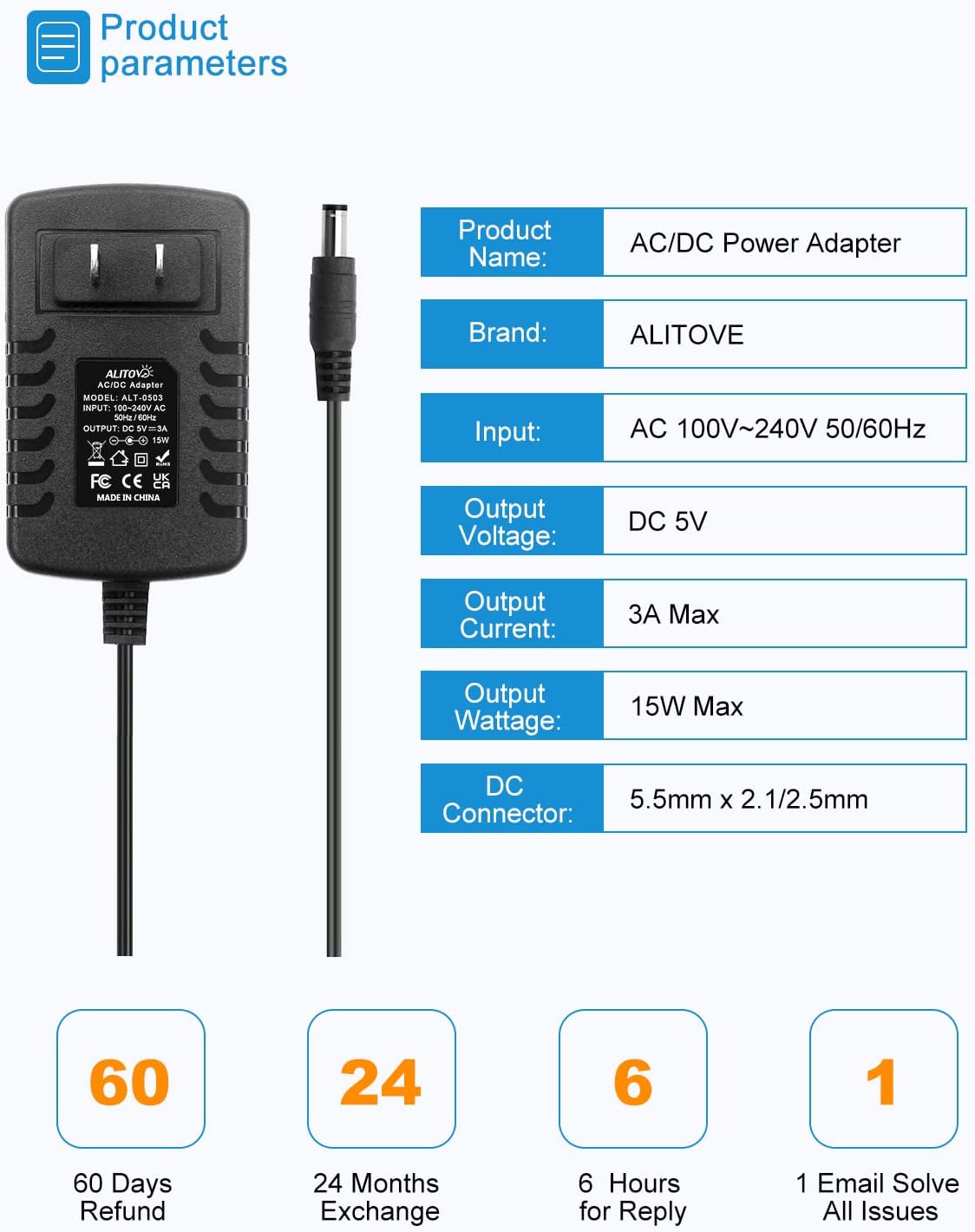
Image: ALITOVE DC 5V 3A Power Adapter, showing the main unit and DC output cable.
Product Specifications

Image: Detailed product parameters including input, output voltage, current, wattage, and DC connector size.
| Feature | Description |
|---|---|
| Product Name | AC/DC Power Adapter |
| Brand | ALITOVE |
| Model Number | ALT-0503 |
| Input | AC 100V-240V, 50/60Hz |
| Output Voltage | DC 5V |
| Output Current | 3A Max |
| Output Wattage | 15W Max |
| DC Connector | 5.5mm x 2.5mm (compatible with 5.5mm x 2.1mm) |
| Cable Length | Approximately 4.92 ft (1.5 meters) |
| Safety Features | Overload cut-off, Over Voltage cut-off, Thermal cut-off, Short circuit protection |
| Certifications | CCC, CE |
What's in the Box
- ALITOVE DC 5V 3A Power Adapter
- Female DC Barrel Connector (for custom wiring)
Setup Instructions
1. Connecting the Power Adapter
- Ensure the device you intend to power requires a 5V DC input and draws no more than 3A (15W).
- Connect the DC output plug of the power adapter to the DC input port of your device. The connector size is 5.5mm x 2.5mm, compatible with 5.5mm x 2.1mm ports.
- Plug the AC input prongs of the power adapter into a standard AC 100-240V wall outlet.
2. Understanding DC Connector Polarity
The DC connector features an internal positive (+) and an outer negative (-) polarity. Always ensure your device's polarity matches this configuration to prevent damage.

Image: Universal DC Output Tip diagram, illustrating the 5.5mm x 2.1/2.5mm dimensions and polarity.
3. Using the Female DC Barrel Connector
The included female DC barrel connector allows for custom wiring without soldering. This is useful for connecting to devices with non-standard input terminals.
- Unscrew the terminals on the female DC barrel connector.
- Insert the positive wire of your device into the '+' terminal and the negative wire into the '-' terminal.
- Tighten the screws to secure the wires.
- Connect the male DC plug from the power adapter into this female connector.

Image: Detailed view of the power adapter's construction, including the female terminal connector for easy wire connection.
Operating Instructions
1. Powering Your Devices
Once properly connected, the power adapter will supply stable 5V DC power to your compatible electronic devices. It is designed to work with devices drawing up to 3A, such as LED pixel lights, Wi-Fi cameras, USB hubs, wireless routers, and Bluetooth speakers.

Image: Universal Compatibility diagram, showing examples of devices compatible with the 5V power adapter.
2. Load Recommendations
To ensure optimal performance and longevity of the power adapter and your devices, it is recommended that the maximum continuous use load does not exceed 80% of the adapter's full capacity. For this 5V 3A (15W) power supply, it is best to power devices that require 12W or less.

Image: Usage recommendation diagram, showing the power adapter connected to a device and advising on maximum load.
Maintenance
- Cleaning: Disconnect the power adapter from the wall outlet and any connected devices before cleaning. Use a dry, soft cloth to wipe the surface. Do not use liquid cleaners or sprays.
- Storage: Store the power adapter in a cool, dry place away from direct sunlight and moisture when not in use.
- Inspection: Periodically inspect the power cord and adapter casing for any signs of damage, such as cuts, fraying, or cracks. If damage is found, discontinue use immediately.
Troubleshooting
- No Power Output:
- Ensure the power adapter is securely plugged into a working wall outlet.
- Verify that the DC output plug is firmly connected to your device's input port.
- Check if your device is functioning correctly with another known-good power source.
- Device Not Functioning Correctly / Intermittent Power:
- Confirm that your device's voltage and current requirements match the adapter's specifications (5V DC, max 3A).
- Ensure the load on the adapter does not exceed 15W (or 12W for continuous use). Overloading can trigger safety protections.
- Check for correct DC polarity if using the female barrel connector.
- Adapter Feels Warm:
- It is normal for the adapter to feel slightly warm during operation. However, if it becomes excessively hot, disconnect it immediately and check for overloading or short circuits in the connected device.
Safety Information
The ALITOVE DC 5V 3A Power Adapter incorporates multiple safety features to protect both the adapter and your connected devices:
- Automatic Overload Cut-off: Prevents damage from excessive current draw.
- Over Voltage Cut-off: Protects against input voltage spikes.
- Automatic Thermal Cut-off: Shuts down if internal temperature becomes too high.
- Short Circuit Protection: Safeguards against damage from short circuits in the connected device.
- Anti-EMI Interference: Reduces electromagnetic interference.
- Surge Protection: Offers defense against power surges.

Image: Icons illustrating the multiple safety protections integrated into the power adapter.
Despite these protections, always adhere to the recommended load limits and ensure proper connections to avoid potential hazards.
Warranty
This ALITOVE power adapter comes with a 2-Year Manufacturer Warranty. Please retain your proof of purchase for warranty claims. The warranty covers defects in materials and workmanship under normal use. It does not cover damage caused by misuse, accident, unauthorized modification, or improper installation.
Support
For technical assistance, troubleshooting, or warranty inquiries, please contact ALITOVE customer support through the retailer where the product was purchased or visit the official ALITOVE website for contact information.