
1. Introduction
This manual provides important information regarding the installation, operation, and maintenance of your Ecoey Smoke Detector Carbon Monoxide Detector Combo (Model: FJ183-A). This device is designed to detect both smoke and carbon monoxide, providing early warning of potential hazards in your home. Please read this manual thoroughly before installation and keep it for future reference.
2. Important Safety Information
- This device is intended for residential use only.
- Do not paint the detector. Paint can clog the sensing chambers and prevent the alarm from functioning properly.
- The battery in this unit is a sealed 10-year lithium battery and is not replaceable. Do not attempt to replace the battery.
- Regularly test the alarm as described in the 'Operating Instructions' section.
- Never ignore any alarm. Investigate the cause immediately.
- Carbon monoxide alarms are not substitutes for smoke alarms.
- This device does not detect natural gas, propane, butane, or other combustible fuels.
3. Product Overview
The Ecoey Smoke Detector Carbon Monoxide Detector Combo is a 2-in-1 device featuring both photoelectric smoke sensing and electrochemical CO sensing technologies. It is designed for easy installation and reliable performance.
3.1 Components and Indicators

Image: Front view of the Ecoey Smoke and CO Detector, highlighting the central 'TEST SILENCE' button and the surrounding LED indicator rings. The model number FJ183-A and a warning about the non-replaceable 10-year battery are visible on the outer edge.
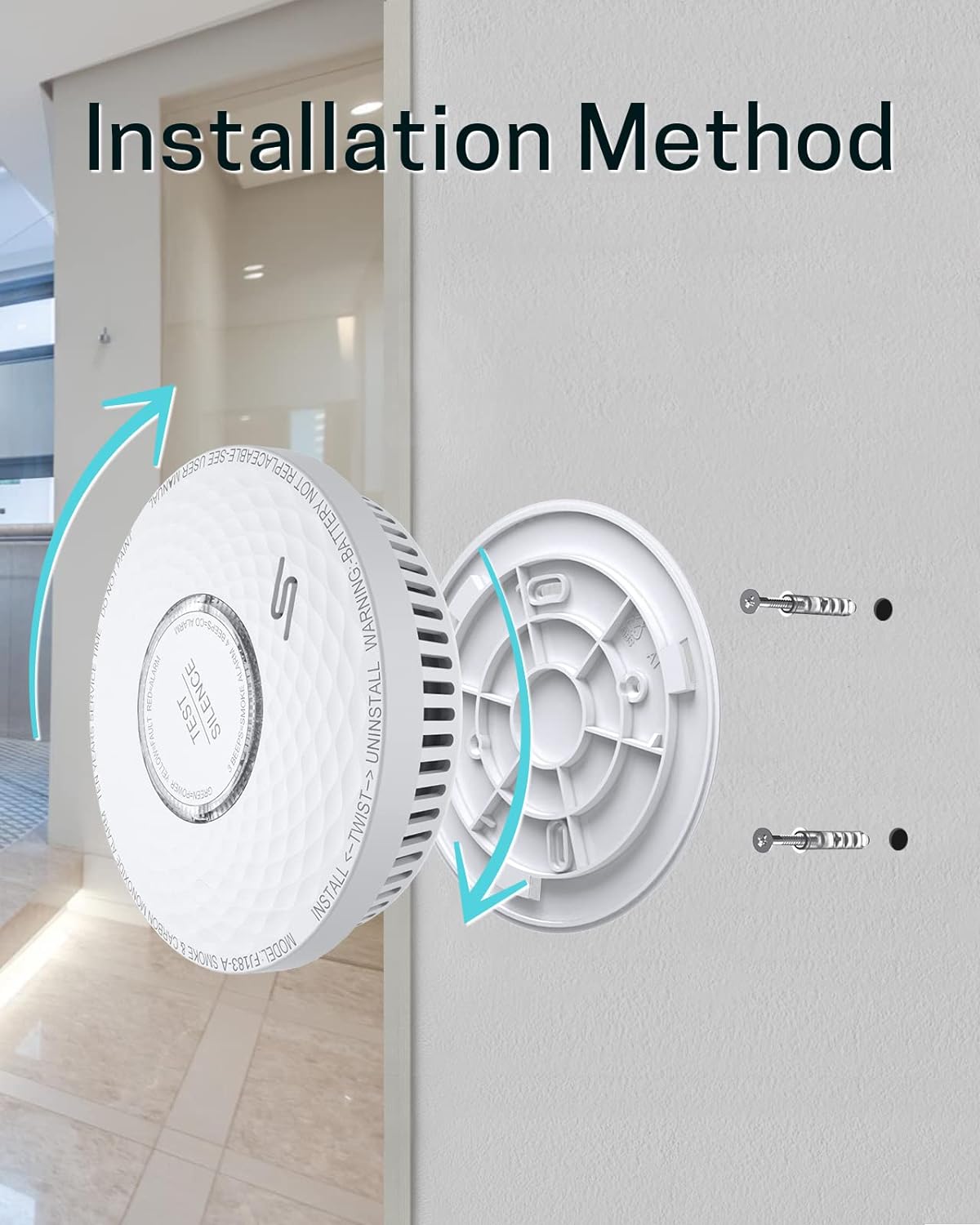
Image: An exploded diagram illustrating the internal components of the Ecoey detector. Key parts shown include the Test/Silence button, Buzzer, CO Sensor, Intelligent Chipset, 10 Years Lithium Battery, High Quality LED, Photoelectric Sensor, and Fire-Retardant PC Plastic Material. This image demonstrates the advanced technology and robust construction of the device.
- Test/Silence Button: Used to test the alarm's functionality and to silence false alarms.
- LED Indicator: Provides visual status of the alarm.
- Buzzer: Emits audible alarm signals.
- Photoelectric Smoke Sensor: Detects smoke particles.
- Electrochemical CO Sensor: Detects carbon monoxide gas.
3.2 LED Indicator Status
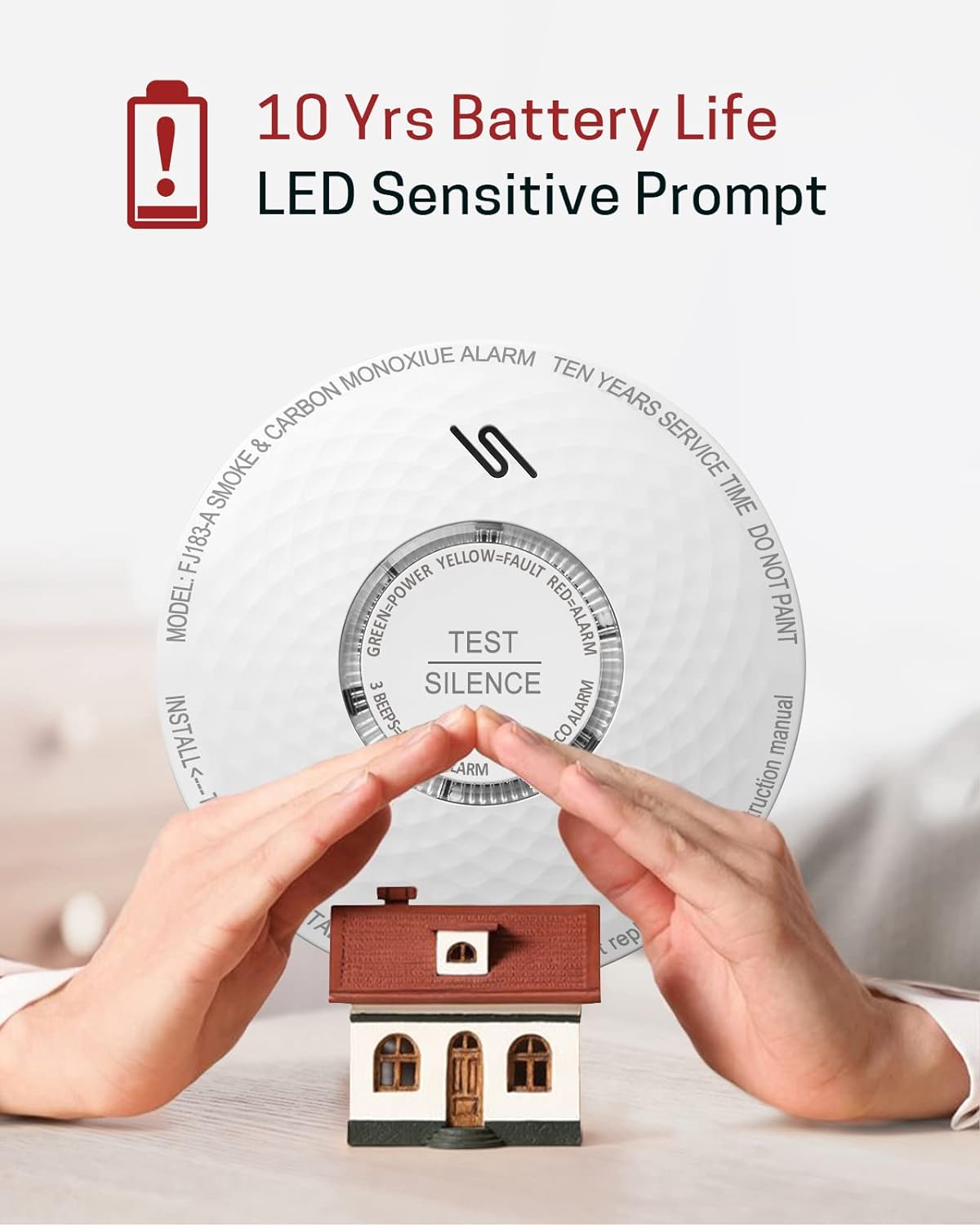
Image: A visual representation of the three main LED indicator states: Green for Power (normal operation), Yellow for Fault (indicating a malfunction or low battery), and Red for Alarm (indicating smoke or CO detection). This helps users quickly identify the device's status.
- Green LED: Indicates normal operation (Power Indicator).
- Yellow LED: Indicates a fault or low battery (Fault Indicator).
- Red LED: Indicates an alarm condition (Smoke or CO detection) (Alarm Indicator).
4. Setup and Installation
4.1 Choosing a Location
Proper placement of your smoke and CO detector is crucial for effective protection. Consider the following guidelines:

Image: A multi-story house diagram illustrating recommended placement for Smoke & Fire Alarms, Carbon Monoxide Alarms, and Fire Extinguishers. It shows alarms in bedrooms, hallways, living areas, and near the garage, emphasizing comprehensive coverage for home safety.
- Install at least one smoke/CO alarm on every level of your home, including basements.
- For best protection, install a smoke/CO alarm in every sleeping area and in the hallway outside of each separate sleeping area.
- For carbon monoxide detection, place alarms near sleeping areas and on every level of the home.
- Avoid placing alarms in kitchens, bathrooms, or garages where cooking fumes, steam, or vehicle exhaust could cause false alarms.
- Mount on a ceiling or wall, at least 15 cm (6 inches) from any wall/ceiling intersection.
4.2 Mounting Instructions
The Ecoey alarm is designed for easy installation and comes with screws and a bracket.

Image: A visual guide demonstrating the installation method. It shows the mounting bracket being screwed into a wall or ceiling, and then the detector being twisted onto the bracket for secure attachment. Arrows indicate the twist-to-install and twist-to-uninstall directions.
- Choose a suitable mounting location (wall or ceiling) according to the guidelines above.
- Use the mounting bracket as a template to mark the positions for drilling holes.
- Drill two holes and insert the provided wall plugs (if necessary).
- Attach the mounting bracket to the wall/ceiling using the provided screws.
- Align the detector with the mounting bracket and twist it clockwise until it clicks securely into place.
- After installation, perform a test as described in the 'Operating Instructions' section.
5. Operating Instructions
5.1 Initial Power-Up
Upon initial installation and attachment to the mounting bracket, the alarm will automatically activate. The green LED will flash periodically, indicating normal operation.
5.2 Test/Silence Function
It is recommended to test your alarm weekly to ensure proper functioning.
- To Test: Press and hold the 'TEST/SILENCE' button for a few seconds. The alarm will sound a series of beeps (3 beeps for smoke, 4 beeps for CO) and the red LED will flash. Release the button to stop the test.
- To Silence: In the event of a non-emergency alarm (e.g., cooking fumes), press the 'TEST/SILENCE' button. The alarm will enter a silence mode for approximately 10 minutes. The red LED will continue to flash during the silence period. If the smoke or CO concentration is still high after 10 minutes, the alarm will reactivate.
5.3 Alarm Indications
- Smoke Alarm: 3 loud beeps followed by a pause, repeated. Red LED flashes rapidly.
- Carbon Monoxide Alarm: 4 loud beeps followed by a pause, repeated. Red LED flashes rapidly.
- Low Battery Warning: The yellow LED will flash and the unit will chirp approximately once every 60 seconds. This indicates the end of the battery's life and the unit needs to be replaced.
- Fault Warning: The yellow LED will flash and the unit will chirp irregularly. This indicates a malfunction and the unit needs to be replaced.
5.4 Carbon Monoxide Alarm Sensitivity Setting
The CO alarm sensitivity is set according to industry standards to provide timely warning.
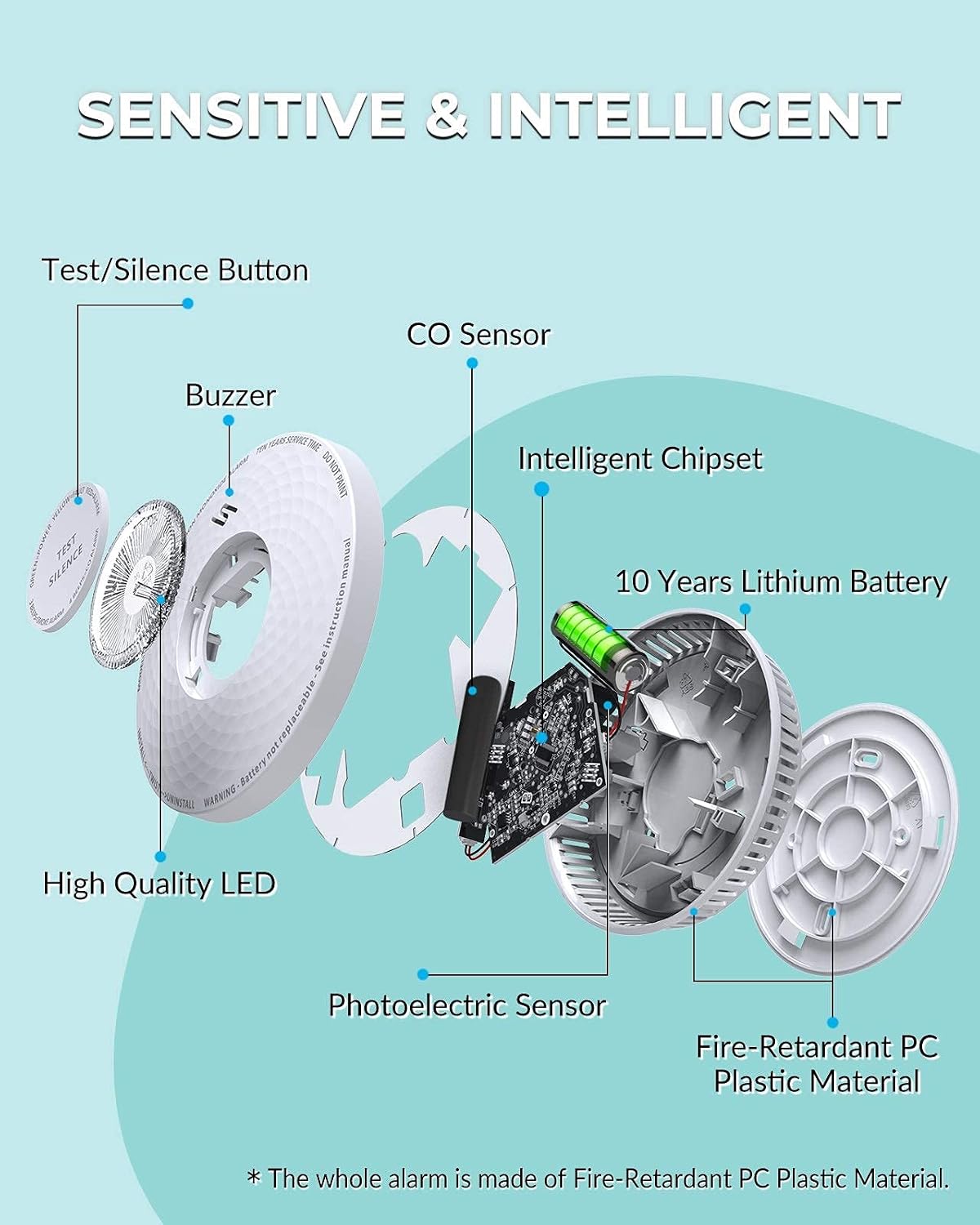
Image: A table detailing the Carbon Monoxide (CO) Alarm Sensitivity Settings. It lists different CO concentration levels in PPM (parts per million) and the corresponding timeframes within which the alarm will sound: 30PPM without alarm before 120 minutes, 50PPM alarms between 60 and 90 minutes, 100PPM alarms between 10 and 40 minutes, and 300PPM alarm in less than 3 minutes.
| CO Concentration (PPM) | Alarm Time |
|---|---|
| 30 PPM | No alarm before 120 minutes |
| 50 PPM | Alarms between 60 and 90 minutes |
| 100 PPM | Alarms between 10 and 40 minutes |
| 300 PPM | Alarm in less than 3 minutes |
6. Maintenance
6.1 Regular Testing
Test the alarm weekly by pressing the 'TEST/SILENCE' button. If the alarm does not sound during the test, refer to the 'Troubleshooting' section.
6.2 Cleaning Your Alarm
Clean your alarm at least once a month to remove dust and debris. Use a soft brush or a vacuum cleaner with a soft brush attachment to clean the exterior of the alarm and the openings around the sensor chamber. Do not use water, cleaners, or solvents as they may damage the unit.
6.3 Battery Information
This alarm is equipped with a sealed 10-year lithium battery. The battery is designed to last for the entire lifespan of the alarm under normal operating conditions. The battery is not replaceable. When the low battery warning sounds (yellow LED flashes and chirps every 60 seconds), the entire unit must be replaced.
7. Troubleshooting
| Problem | Possible Cause | Solution |
|---|---|---|
| Alarm does not sound during test. | Unit is not powered on, battery is depleted, or unit is faulty. | Ensure unit is properly installed. If low battery warning is active, replace the unit. If no warning and still no sound, replace the unit. |
| Alarm sounds frequently without apparent smoke/CO. | False alarm due to cooking fumes, steam, dust, or insects. | Press the 'SILENCE' button. Clean the alarm. Relocate the alarm if false alarms persist due to environmental factors. |
| Yellow LED flashes and unit chirps every 60 seconds. | Low battery warning. | The 10-year battery is nearing its end of life. Replace the entire alarm unit immediately. |
| Yellow LED flashes and unit chirps irregularly. | Fault warning. | The unit has a malfunction. Replace the entire alarm unit immediately. |
8. Specifications
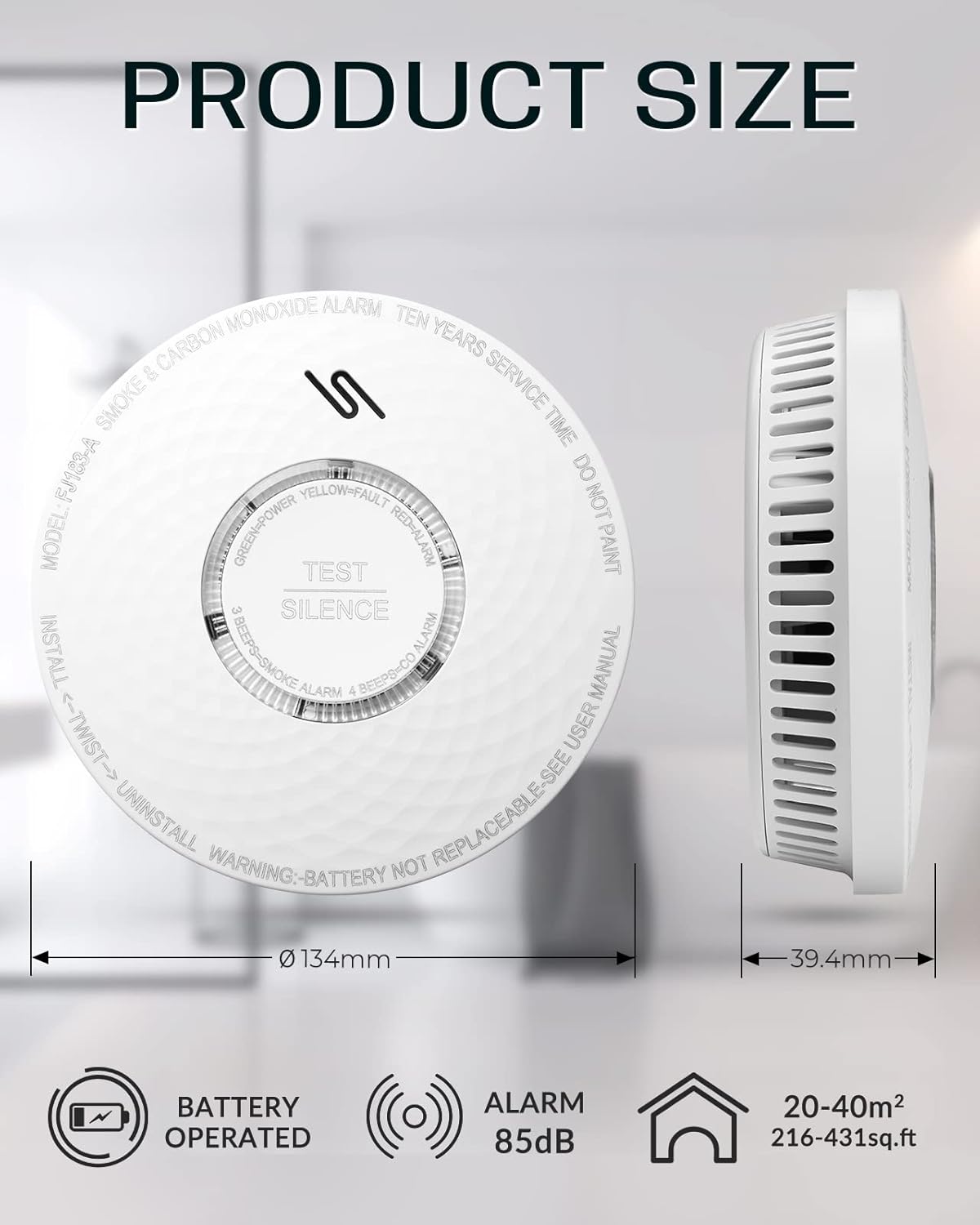
Image: A graphic displaying the product dimensions and key specifications. It shows the detector's diameter as 134mm and height as 39.4mm. Icons indicate it is Battery Operated, has an Alarm of 85dB, and covers an area of 20-40m² (216-431 sq.ft).
- Model: FJ183-A
- Power Source: Built-in 3V Lithium Battery (10-year life, non-replaceable)
- Sensor Type: Photoelectric (Smoke), Electrochemical (CO)
- Alarm Loudness: >85 dB at 3 meters
- Product Dimensions: 5.28"D x 5.28"W x 1.57"H (approx. Ø134mm x 39.4mm)
- Operating Temperature: 0°C to 40°C (32°F to 104°F)
- Operating Humidity: 10% to 95% RH (non-condensing)
- Color: White
- UPC: 766258726382
9. Warranty and Support
Ecoey products are designed for reliability and performance. For specific warranty details and customer support, please refer to the warranty card included with your product or visit the official Ecoey website. If you experience any issues with your device, please contact Ecoey customer service for assistance.
Contact Information: Please refer to the packaging or the official Ecoey website for the most up-to-date contact information.
