
Introduction
This manual provides essential information for the proper use, maintenance, and care of your ARES 42067 120 Tooth Ratchet Set. This set includes 1/4-inch, 3/8-inch, and 1/2-inch drive ratchets, designed for durability and efficient operation in various mechanical tasks. Please read these instructions thoroughly before using the tools to ensure safe and effective performance.

Image: The ARES 42067 120 Tooth Ratchet Set, featuring 1/4-inch, 3/8-inch, and 1/2-inch drive ratchets neatly organized in a red and black foam storage tray.
Product Features
- 120 Tooth Ratcheting Mechanism: Provides a fine 3-degree swing arc, ideal for working in tight and confined spaces.
- Durable Construction: Made from heat-treated chrome vanadium steel for superior strength and longevity.
- Reversible Drive: Easily change the drive direction with a thumb switch located on the back of the ratchet head.
- Ergonomic Handle: Contour forged handle designed for comfort and enhanced leverage during use.
- Professional Gear Structure: Features a gear-to-gear pawl design for increased durability and reliable performance.
- ANSI and ASME Standards: Meets and exceeds ANSI and ASME torque performance standards.

Image: The three ratchets from the ARES 120 Tooth Ratchet Set, highlighting that the set includes 3 ratchets and 1 reusable EVA foam storage tray, and meets ANSI performance standards.
Setup
- Unpacking: Carefully remove the ratchet set from its packaging. Inspect each ratchet for any signs of damage.
- Storage: The included EVA foam organizer is designed to keep your ratchets organized and protected in a toolbox drawer. Place the foam tray in a suitable drawer for easy access.
- Familiarization: Before first use, familiarize yourself with each ratchet's size (1/4-inch, 3/8-inch, 1/2-inch drive) and the location of the direction switch.

Image: The ARES 120 Tooth Ratchet Set, stored in its foam tray within a red toolbox drawer, alongside a socket organizer.
Operating Instructions
- Select the Correct Ratchet: Choose the appropriate drive size (1/4-inch, 3/8-inch, or 1/2-inch) for your socket or fastener.
- Attach Socket: Firmly press the desired socket onto the square drive of the ratchet. Ensure it is securely seated.
- Set Direction: Use the thumb switch on the back of the ratchet head to select the desired direction for tightening or loosening. Push the switch to one side for clockwise rotation (tightening) and to the other for counter-clockwise rotation (loosening).
- Apply Torque: Place the socket onto the fastener. Apply steady, controlled force to the ratchet handle. The 120-tooth mechanism allows for small, precise movements, requiring only a 3-degree swing arc.
- Working in Tight Spaces: The fine-tooth design and ergonomic handle are particularly beneficial in confined areas, allowing for effective operation where larger ratchets may not fit.

Image: A close-up view of an ARES ratchet head, showing the thumb switch for easy direction change and the ergonomic contour forged handle.
Video: This video demonstrates the features and use of the ARES 120 Tooth Ratchet Set, including its 3-degree swing arc, ergonomic handle, and the smooth action of the thumb switch for changing direction. It also shows the ratchets being used in an engine bay and stored in their foam organizer.
Maintenance
- Cleaning: After each use, wipe down the ratchets with a clean cloth to remove dirt, grease, and debris. For stubborn grime, a mild degreaser can be used, followed by a thorough drying.
- Lubrication: Periodically apply a small amount of light machine oil to the ratcheting mechanism to ensure smooth operation and prevent corrosion. Avoid over-lubricating.
- Storage: Always store the ratchets in their foam organizer or a clean, dry environment to protect them from moisture and damage.
- Inspection: Regularly inspect the ratchets for any signs of wear, damage, or loose components. Do not use damaged tools.
Troubleshooting
If you encounter issues with your ARES 120 Tooth Ratchet Set, consider the following:
- Ratcheting Mechanism Sticking: This may be due to accumulated dirt or lack of lubrication. Clean the mechanism thoroughly and apply a small amount of light machine oil.
- Difficulty Changing Direction: Ensure the thumb switch is free of debris and operates smoothly. Clean and lubricate if necessary.
- Socket Not Holding Securely: Check if the square drive or the socket is worn or damaged. Replace damaged components. Ensure the socket is fully seated.
For persistent issues or concerns, refer to the Warranty and Support section for contact information.
Specifications
| Feature | Detail |
|---|---|
| Model Number | 42067 |
| Drive Sizes Included | 1/4-inch, 3/8-inch, 1/2-inch |
| Tooth Count | 120 Teeth |
| Swing Arc | 3 Degrees |
| Material | Heat-treated Chrome Vanadium Steel |
| Finish | Polished |
| 1/4-inch Ratchet Length | 5 inches |
| 3/8-inch Ratchet Length | 8 inches |
| 1/2-inch Ratchet Length | 9.75 inches |
| Compliance | Meets and exceeds ANSI and ASME torque performance standards |
| Item Weight | 2.4 pounds (for the set) |
| UPC | 840129904083 |
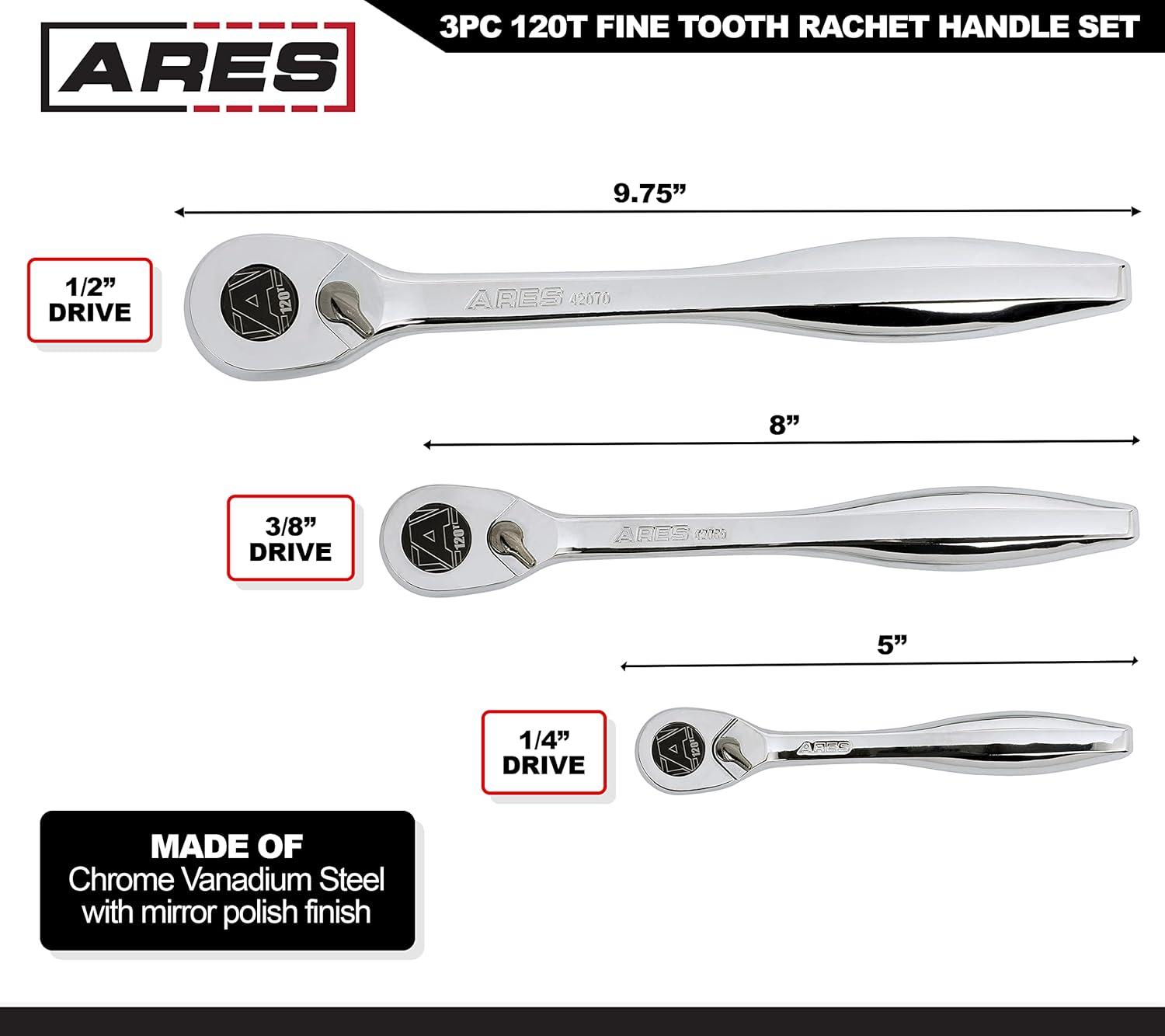
Image: An illustration showing the lengths of the 1/4-inch (5 inches), 3/8-inch (8 inches), and 1/2-inch (9.75 inches) drive ratchets from the ARES 120 Tooth Ratchet Set.
Warranty and Support
The ARES 42067 120 Tooth Ratchet Set is backed by a Performance Assurance Limited Lifetime Warranty. This warranty covers defects in material and workmanship under normal use.
If you experience any issues with your ARES 120 Tooth Ratchet Set, please contact ARES customer service for assistance with troubleshooting, parts, replacement, or refund. Contact information can typically be found on the manufacturer's website or through your point of purchase.

Image: The ARES Performance Assurance Limited Lifetime Warranty logo, indicating the product's warranty coverage.