
FNNEMGE LS407S
FNNEMGE Portable Tire Inflator User Manual
Model: LS407S
1. Introduction
Thank you for choosing the FNNEMGE Portable Tire Inflator. This device is designed for efficient and convenient inflation of various items, including car tires, motorcycle tires, bicycle tires, balls, and other inflatables. Featuring a powerful motor, dual power supply options, automatic shut-off, and an integrated LED light, it provides a reliable solution for your inflation needs. Please read this manual thoroughly before use to ensure proper operation and to maximize the lifespan of your product.
2. Safety Information
- Always ensure the inflator is placed on a stable surface during operation.
- Do not leave the inflator unattended while in use.
- Keep out of reach of children.
- Avoid prolonged continuous operation to prevent overheating. Allow the device to cool down if it becomes hot.
- Do not expose the inflator to rain or wet conditions.
- Use only the provided accessories and power adapters.
- Ensure the correct pressure unit (PSI, BAR, KPA, KG/CM²) is selected for your specific inflation task.
- Do not overinflate. Always refer to the recommended pressure for the item being inflated.
3. Package Contents
Please check the package to ensure all items are present:
- 1 x FNNEMGE Digital Air Compressor
- 1 x Air Hose
- 3 x Nozzle Adapters (for various inflatables)
- 1 x 3.5 Meters Car Adapter Cable (DC 12V)
- 1 x USB Charge Cable (Type-C)
- 1 x User Manual

4. Product Overview
Familiarize yourself with the components of your tire inflator:
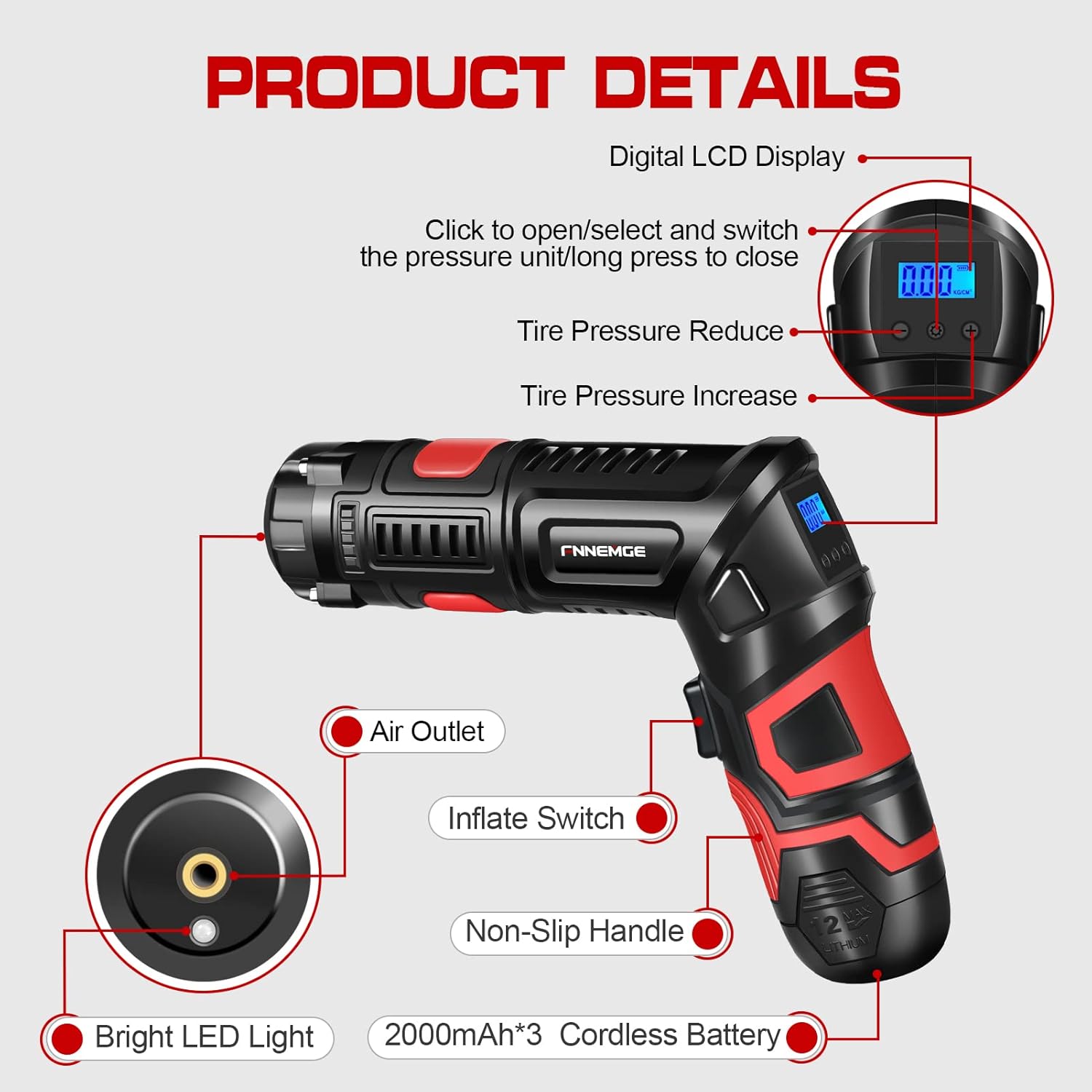
- Digital LCD Display: Shows current pressure, preset pressure, and selected unit.
- Pressure Adjustment Buttons (+/-): Used to increase or decrease the target pressure.
- Mode Button (M): Cycles through pressure units (PSI, BAR, KPA, KG/CM²).
- Inflate Switch: Activates/deactivates the inflation process.
- Air Outlet: Connection point for the air hose.
- Bright LED Light: Provides illumination for night use or low-light conditions.
- Non-Slip Handle: Ergonomically designed for comfortable grip.
- Cordless Battery: Removable 6000mAh lithium battery for portable use.
- Twistable Handle: The handle can be twisted 90 degrees for easier handling and storage.

5. Setup
5.1 Charging the Battery
The inflator is equipped with a built-in 6000mAh rechargeable lithium battery. Before first use, fully charge the battery.
- Connect the provided USB Charge Cable to the Type-C charging interface on the inflator.
- Plug the other end into a suitable USB power adapter (not included) or a computer USB port.
- The battery indicator on the display will show charging status. A steady red light indicates charging, and a steady green light indicates a full charge.
- Alternatively, the removable battery can be charged separately using its dedicated charging base (if included).

5.2 Connecting the Air Hose
Screw the air hose securely onto the air outlet of the inflator. Ensure a tight connection to prevent air leakage.
6. Operating Instructions
6.1 Powering On/Off
Press the power button to turn on the inflator. The LCD display will light up. Long press the power button to turn it off.
6.2 Selecting Pressure Unit
With the inflator powered on, press the "M" (Mode) button to cycle through the available pressure units: PSI, BAR, KPA, and KG/CM².

6.3 Setting Target Pressure
Use the "+" and "-" buttons to set your desired target pressure. The display will show the preset value. The inflator will automatically stop once this pressure is reached.

6.4 Inflation Process
- Connect the air hose to the valve stem of the item you wish to inflate. Ensure a secure connection. For different items, use the appropriate nozzle adapter.
- Press the Inflate Switch to begin inflation. The display will show the real-time pressure.
- The inflator will automatically shut off once the preset pressure is reached.
- Disconnect the air hose from the valve stem.

6.5 Using the LED Light
The inflator features a bright LED light with three modes: lighting, SOS, and strobe. Press the light button to cycle through these modes. This is useful for nighttime operations or emergencies.

6.6 Power Bank Function
The 6000mAh battery can also serve as a power bank. Connect your smartphone or other USB-powered devices to the Type-C port for emergency charging.
6.7 Applications
This versatile inflator is suitable for:
- Car/SUV/RV Tires
- Motorcycle Tires
- Bicycle Tires
- Sports Equipment (e.g., basketballs, footballs)
- Inflatable Toys (e.g., swimming rings)

7. Maintenance
- Cleaning: Wipe the exterior of the inflator with a soft, damp cloth. Do not use harsh chemicals or abrasive cleaners.
- Storage: Store the inflator in a cool, dry place away from direct sunlight and extreme temperatures. Ensure the battery is partially charged (around 50%) if storing for extended periods to preserve battery life.
- Hose and Adapters: Keep the air hose and nozzle adapters clean and free from debris.
8. Troubleshooting
| Problem | Possible Cause | Solution |
|---|---|---|
| Inflator does not turn on. | Battery is depleted. | Charge the battery fully. |
| Inflator stops prematurely or does not inflate. | Preset pressure reached; Hose not securely connected; Battery low; Overheating. | Check preset pressure; Re-secure hose connection; Recharge battery; Allow device to cool down. |
| "ERR" message on display. | Internal error or malfunction. | Turn off the inflator, wait a few minutes, then turn it back on. If the error persists, contact customer support. |
| Inaccurate pressure reading. | Incorrect pressure unit selected; Loose hose connection. | Ensure correct unit is selected (PSI, BAR, KPA, KG/CM²); Check hose connection. |
9. Specifications
| Feature | Detail |
|---|---|
| Brand | FNNEMGE |
| Model Name | FG901 (LS407S) |
| Voltage | 12 Volts |
| Power Source | Battery Powered (6000mAh Lithium Battery) & DC 12V Car Adapter |
| Maximum Pressure | 150 PSI |
| Airflow | Up to 35 L/min |
| Maximum Power | 120 Watts |
| Noise Level | 75 dB |
| Special Features | Automatic Shut-Off, LED Light (Lighting/SOS/Strobe), Portable, Power Bank Function |
| Item Weight | 0.6 Kilograms (1.32 pounds) |
| Product Dimensions | 6.87"L x 4.33"W x 2.3"H |
| Material | Acrylonitrile Butadiene Styrene |
| Color | Red |
10. Warranty and Support
This FNNEMGE product comes with a 1-year warranty from the date of purchase. This warranty covers manufacturing defects and workmanship under normal use. It does not cover damage caused by misuse, accident, unauthorized modification, or neglect.
For warranty claims, technical support, or any questions regarding your product, please contact FNNEMGE customer service through the retailer where you purchased the product or refer to the contact information provided on the product packaging or official FNNEMGE website.
Ask a question about this manual
Ask about setup, troubleshooting, compatibility, parts, safety, or missing instructions. Manuals+ will review the question and use this page’s manual context to help answer it.